Kimi K3.1 Pro: open-weight coding model priced and timed for students
Moonshot released Kimi K3.1 Pro on October 23, 2026, with open weights promised by November 4. It costs $2 per million input tokens, scores 65.7% on Terminal-Bench 4.0, and is worth trying free on kimi.ai before you pay.

Kimi K3.1 Pro is called an open-weight model, but the weights are not out yet, and a model this size will not run on a student laptop. Moonshot released it on October 23, 2026, according to TechnWZ's launch report. What a student can use today is the API, which is cheaper than Kimi K3, and the free app.
Kimi K3.1 Pro is an open-weight coding model with a 1M-token context, priced at $2 per million input tokens and $10 per million output tokens. Moonshot says it scores 65.7% on Terminal-Bench 4.0, ahead of GPT-6 Astra and just behind Claude Opus 5.5. No independent coding benchmark exists yet, so treat that score as a claim. Open weights are promised by November 4, 2026. Until then you can use it free on kimi.ai or pay per token through the API.
What Moonshot released on October 23
K3.1 Pro is a post-trained update to Kimi K3, a mixture-of-experts model that Moonshot calls its most capable open-weight model so far. "Post-trained" means Moonshot took K3 and trained it further instead of building a new model from zero.
According to CellCog's breakdown, the model has 2.8 trillion parameters in total, with 104 billion active at any moment. It also reads images as well as text. Its context window is the 1 million tokens listed above.
Two terms need a plain definition. Open-weight means the trained model files are published, so anyone can download and run them. Mixture-of-experts means the model is split into many smaller "expert" parts, and only a few of them work on each word. That design is why only a small share of the model runs at once. It also makes each answer cheaper to produce.
You can use it today in these places, per the vendor blog:
- Kimi.ai and the Kimi apps
- Kimi Work
- Kimi Code, by switching with the
/modelcommand - The Kimi API, as
kimi-k3.1-proorkimi-k3.1-pro-highspeed
Terminal-Bench 4.0 tests work, not trivia
Terminal-Bench 4.0 runs a coding agent inside a real terminal under resource limits, so it looks closer to a junior developer's daily tasks than a question-and-answer quiz, though that is my reading and not a claim from Moonshot. A coding agent is a model that runs commands, reads the output and picks its next step by itself. "Resource limits" means it gets a fixed amount of memory and time, as a real server would give it.
This matters for a fresher. Much of a first job looks like this test: install something, run it, read the error, fix it. A model that does well here should help with that loop more than one that only answers textbook questions.
Here are the scores Moonshot published. No outside group has repeated these runs yet. A 0.7-point gap between Claude Opus 5.5 and Kimi K3.1 Pro is too small to pick a winner from one self-reported test.
| Model | Terminal-Bench 4.0 (self-reported) |
|---|---|
| Claude Opus 5.5 | 66.4% |
| Kimi K3.1 Pro | 65.7% |
| GPT-6 Astra | 58.2% |
| Source: Moonshot's K3.1 Pro blog | |
Moonshot also reports 61.2% on Kimi Code Bench 3.0 Long-horizon, up from K3's 55.95%. "Long-horizon" means a task that needs many steps over a long session, like changing code across many files. Moonshot built this benchmark itself, so treat it as a progress report on its own models.
CellCog reports that the one independent check so far comes from Artificial Analysis. It named K3.1 Pro the top openly-available model for agentic cyber defense, at 64%. That test covers security work, not general coding, so it does not confirm the coding scores directly.
Highspeed is for chat, Pro is for long solves
The Highspeed variant answers 2-3 times faster in chat, so use it for quick chat questions. Use the standard Pro for long tasks, because it costs half as much per token. On a long agent task, the model works through many steps without you watching, so waiting a little longer costs you nothing there.
Pros of Highspeed
- Faster replies, which suits quick back-and-forth chat
- Good for "why does this error happen?" questions while you code
Cons of Highspeed
- Costs twice as much per token as standard Pro
- The extra speed buys little on long, unattended tasks
Moonshot also tested how often the model makes things up. In its hallucination stress test, the rate fell from 23.4% on K3 to 8.3%. A stress test is built to trap the model with hard, tricky prompts. It does not tell you how often the model is wrong in normal use, so still check every answer before you trust it.
The real cost: free, pay per token, or wait
A student has three routes today: use it free on kimi.ai, pay per token through the API, or wait until about November 4 and run the open weights yourself. The free app is fine for trying it out. The API is what you need if your project calls the model from code.
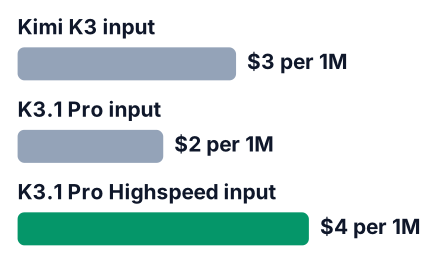
The bigger change is against Moonshot's own older model. CellCog lists K3 at $3 in and $15 out per million tokens, so K3.1 Pro is a third cheaper on both sides. Highspeed sits at $4 in and $20 out. A cache hit costs $0.20 per million input tokens. A cache hit happens when you resend input the API has already seen, like the same codebase, so that input costs a tenth of the normal price.
| Model | Input price per 1M tokens |
|---|---|
| Kimi K3.1 Pro | $2.00 |
| Kimi K3 | $3.00 |
| K3.1 Pro Highspeed | $4.00 |
| Source: CellCog price breakdown | |
Say you send a whole codebase of two hundred thousand tokens once. That is a fifth of a million tokens, so at the $2 input rate reading it costs about forty cents. Say the answer runs 5,000 tokens: 5,000 × $10 / 1,000,000 = $0.05 at the output rate, so one run costs about $0.45. If you send the same code again and it hits the cache, the input part drops to about four cents.
No source gives a rupee price yet, so check your card's conversion before you top up. If cost is still the main worry, compare it with the cheaper models in our DeepSeek V4.1 Flash breakdown and our Reflection Beam post.
The open weights will be slightly toned down on cyber
Moonshot removed cyber-related data from the open weights, so the model you can download will score lower on hard cyber tasks than the unfiltered one. It did this at two stages: mid-training and reinforcement learning, which is the stage where a model learns from rewards.
For everyday coding, like building a web app or fixing a test, this likely changes little. If your project is in security, expect the downloaded model to be weaker there than the API version.
API now or open weights on November 4?
Use the API or the free app now if you want to test today, and wait for the weights only if you need to run it on your own hardware. Pick by what your project needs:
- Need to test this week: use kimi.ai for free, or the API for your own scripts.
- Need privacy or offline use: wait for the weights, and plan for rented server GPUs.
- Need the lowest bill and own no big GPU server: stay on the API.
Be honest about hardware. A model of that size needs a rack of server GPUs, not a student laptop or even a gaming PC. The weights are also only a promise until Moonshot publishes them, as TechnWZ's report makes clear. Check the vendor blog on the day before you plan around them. If you would rather have an agent that runs in the cloud for you, see how students build apps with Codex cloud.
Test it on your own codebase this week
Run the same task on K3.1 Pro, DeepSeek V4.1 Flash and Claude Opus 5.5, because only your own code shows which one is worth paying for. Benchmarks test someone else's tasks. Your project has its own messy folders and odd bugs.
Pick a codebase you know
Use a large real project, like your final-year project or an open-source repo you have read before.
Choose one real task
Fix a bug you already understand, or add a missing test. You need to know what a good answer looks like.
Run it on each model
Give each one the same prompt and the same files. Do not help one more than the others.
Compare output and cost
Check whether the fix works and what each run cost. Note how long each one took.
Keep notes and check the numbers
Write down what you saw. Then open Moonshot's blog, TechnWZ's report and CellCog's price page to check every number above.


