Reflection Beam 1.0: a cheap open coding model students can use
Reflection Beam 1.0, a 501B open-weight coding model, scores 81.6% on SWE-Bench Verified, and a small coding request costs less than one rupee. Here is how students can use it today through OpenRouter, without a GPU.

On October 16, 2026, a US lab called Reflection released Beam 1.0 — its first open-weight model, with 501 billion parameters — and it is priced so low that a full coding task costs less than a cup of chai. Here is how you can use it today, even if your laptop is a basic college machine.
Reflection Beam 1.0 is a 501B open-weight coding model you can rent cheaply through OpenRouter or Hugging Face — no GPU needed, at $1 per million input tokens and $3 per million output tokens, scoring 81.6% on SWE-Bench Verified.
What Reflection Beam 1.0 actually is
Beam is the first open-weight model from Reflection, a new US lab that previously only shipped closed models. It is built specifically for coding and agentic tasks — meaning it can work through multi-step problems, browse files, and fix bugs on its own. That focus shows in its design: it is a sparse Mixture-of-Experts model with 501B total parameters but only 23.4B active per token. Think of it as a team of specialists where only the relevant experts wake up for each task, which keeps costs down.
Beam is text-only, has a 1-million-token context window (enough to read entire codebases), and is released under the Apache 2.0 license, which means you can use, modify, and even sell what you build with it. Reflection trained it with heavy reinforcement learning — over 100 million rollouts on 10,500 NVIDIA GB300 GPUs over four weeks — so it has seen a lot of coding problems and learned from them.
The release date matters because it signals a shift: a frontier-quality lab choosing open weights. Reflection's own announcement points out this is their first open-weight model, and the decision to open it under Apache 2.0 is deliberate — they want developers to own, customize, and scale it.
Beam's benchmark scores, with sources you can check
Beam's top coding score is 81.6% on SWE-Bench Verified, and it also shines at math and reasoning. SWE-Bench Verified is the standard test for whether a model can fix real GitHub issues, so a high score here means it can actually solve coding problems, not just generate snippets.
Here are the verified scores from the model card:
| Benchmark | Score (source) |
|---|---|
| SWE-Bench Verified | 81.6% |
| SWE Bench Pro v2-Hard | 76.5% |
| SWE Bench Pro v1 | 66.1% |
| Terminal Bench v2.1 | 80.1% |
| AIME 2026 (math) | 97.7% |
| GPQA Diamond (science) | 90.6% |
| LiveCodeBench | 88.3% |
On the Artificial Analysis leaderboard, Beam scores an Intelligence Index of 30 with a cost of $0.57 per benchmark task on a 1.05M context. For reference, Claude Opus 5.5 tops the index at 58, and the highest open-weight model is MiMo-V2.6-Pro at 46. So Beam is not the smartest model on the market, but it is far from weak — and its price per task is unusually low.
These numbers come from the Hugging Face model card and the Artificial Analysis leaderboard. You can open both pages and verify them yourself.
What Beam costs: rupees per coding task
A small coding request on Beam costs less than one rupee. OpenRouter lists Beam at $1 per million input tokens and $3 per million output tokens. A simple bug-fix request sends a few thousand tokens and gets back about a thousand, so the bill is less than one cent.
Long, multi-step tasks cost more, because the model reads and writes much more text. Artificial Analysis measures Beam at $0.57 per task on its own benchmark tasks, which are far bigger than one bug fix. For a student, that changes what "experimenting with AI" means: you can try many small requests without worrying about the bill.
Pros of Beam
- Open weights — you can fine-tune and own your version
- Cheap: $0.57 per task on Artificial Analysis's benchmark tasks
- Token-efficient with five reasoning-effort levels
Cons vs paid frontier tools
- Lower Intelligence Index (30 vs Claude Opus 5.5's 58)
- Text-only — no image or audio support
- Newer model, smaller ecosystem of community tools
Paid frontier models like Claude Opus 5.5 score higher on reasoning benchmarks, but they cost more per task. For learning and building, the price difference matters more than a few extra points on a benchmark.
Why you cannot run Beam on your laptop
The models are too big for a normal laptop: BF16 needs about 1 TB, NVFP4 about 280 GB. That is not a matter of tweaking settings. A typical student laptop has 8–16 GB of RAM and no GPU. Even the smallest quantization still needs roughly 20 times that.
Beam ships in three numerics: BF16 (full precision, about 1 TB), FP8 (half precision), and NVFP4 (4-bit, about 280 GB). Serving it realistically means renting multiple Blackwell or H200 GPUs — the kind of hardware that costs hundreds of dollars per hour on cloud providers. That is simply out of reach for a personal machine.
This honesty matters. If you have a basic laptop, you cannot run Beam locally, and no amount of "optimization" changes that. But you do not need to. The API route gives you the same model without the hardware. Your laptop just needs an internet connection and a terminal.
The Hugging Face blog post is explicit about this: the model is designed for server-side deployment, not local use. So treat Beam like a cloud service, not a download.
How to try Beam today, without a GPU
Use OpenRouter or Hugging Face Inference Providers (Baseten, Fireworks, Together) — no credit-card shock. Here is the fastest path, which takes about five minutes:
Create an account on OpenRouter
Go to openrouter.ai and sign up with your email or GitHub account.
Get an API key
Click your profile icon, then "Keys", then "Create Key". Copy it and store it somewhere safe.
Pick Reflection Beam
Search for "Beam 1.0 501B" in the model list and copy its model string.
Start coding
Write a simple script that calls the API with your key and a coding prompt. See the example below.
import requests
response = requests.post(
    "https://openrouter.ai/api/v1/chat/completions",
    headers={
        "Authorization": "Bearer YOUR_API_KEY",
        "Content-Type": "application/json",
    },
    json={
        "model": "reflection/beam-1.0-501b-a23b",
        "messages": [
            {"role": "user", "content": "Fix the bug in this Python function: def add(a,b): return a-b"}
        ]
    }
)
print(response.json()["choices"][0]["message"]["content"])
Alternatively, you can use Hugging Face Inference Providers, which route through Baseten, Fireworks, or Together. The Hugging Face blog post walks through the setup step by step, and the free tier lets you test a few prompts before you pay anything.
Who should pick Beam over paid tools
Beam suits students doing coding and agentic work on a budget; paid frontier tools may still lead on raw reasoning. If your goal is to learn by building — writing small projects, fixing bugs, automating repetitive tasks — Beam's price makes it the practical choice. You can make dozens of calls for the cost of one premium subscription.
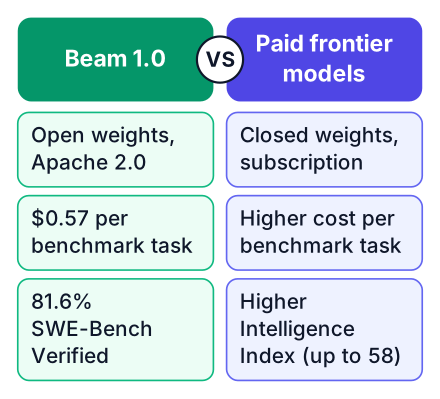
Beam's strengths are open weights, low cost, and token efficiency. The five reasoning-effort levels let you control how much computation each task gets, so you can use the cheap mode for simple questions and the expensive mode only when you are stuck. That is a feature paid tools do not always give you.
For top-tier benchmarks — the hardest math problems, the most complex multi-step reasoning — Claude Opus 5.5 and other paid models still score higher. The Artificial Analysis leaderboard shows this clearly. But for a student learning to code, the gap on abstract benchmarks rarely shows up in day-to-day work. The verdict: for learning and building, Beam is hard to beat; for pushing the highest scores, consider paid.
What Apache 2.0 means for your projects
Apache 2.0 lets you use, modify, and even sell your work with Beam, with no fees. That is the most permissive open-source license for practical purposes. You can take Beam, fine-tune it on your own code, and deploy it commercially without paying Reflection a rupee or sharing your changes.
This matters for a student who wants to learn and build. You can study how Beam works, experiment with fine-tuning on public datasets, and even make a portfolio project that uses it. If you later build something people want to pay for, the license does not stop you. You can also use related tools in the ecosystem — the license covers weights, code, and usage.
The contrast with closed models is sharp. Those tools are rented, not owned. The moment the vendor changes pricing or discontinues a model, your workflow breaks. With Beam, you can download the weights (if you have the storage) or keep using the API, and your right to use it never expires.
Copy the API key from OpenRouter, write a simple script to call Beam, and try fixing a bug in one of your own projects. Compare its answer with what you would write yourself — that is how you learn what it is good at.


