How to Demo Your Project in a Fresher Interview
Interviewers doubt fresher project claims for good reason. A live screen-share demo proves your work better than rehearsal. This post gives you a complete script: five files to open in order, what to point at, and the exact words to say.

The moment an interviewer asks "tell me about your project," they are not really asking what your app does. They are checking one thing: did you actually build it? Most freshers answer with a generic feature list. This post gives you a screen-share demo script instead — the exact files to open, the lines to point at, and the words to say. The interviewer sees your reasoning and walks out believing the project is yours.
Open your project on your own laptop, share your screen, and walk through five specific files in order. Point at the database schema line, the auth middleware, and the one bug you fixed in its own commit. Say what each line does, why you chose it, and what you ruled out. That is a live demo that proves your work.
Why interviewers doubt fresher project claims
Indian recruiters have learned to be sceptical of fresher claims. They have heard too many rehearsed answers that fall apart under a single follow-up question. Your demo must make your work verifiable without them taking your word for it. A claim a recruiter can check without trusting you is worth ten feature lists.
The doubt is not personal. It is rational. Fresher resumes all look similar, and project sections all claim the same skills. The screen-share demo is how you separate yourself from that crowd.
The four signals reviewers scan for
Reviewers look for a real problem, your judgment, validation that the result holds, and clear communication — the screen-share demo hits all four at once. These four signals come from what reviewers actually scan for in a demo.
A real problem means you built something someone actually needs, not a tutorial copy. Judgment means you can explain why you chose one approach and what you ruled out. Validation means proof the result holds, not just a screenshot that ran once. Communication means a clear write-up a non-technical manager could follow.
Verbal explanation
- Fast to deliver
- Easy to rehearse
- No technical risk
Live screen-share demo
- Shows real reasoning
- Proves the code is yours
- Lets the interviewer verify claims
Most reviewers will not dig into raw code on their own. The on-screen walkthrough is your chance to show depth they would never find otherwise. Without the demo, they never see the judgment behind it.
What makes a demo credible: verifiability, not polish
A credible demo lets the interviewer check a specific line themselves later, so everything you show must be real, named, and committed. Polish matters less than proof. A smooth demo of a shallow project loses to a slightly rough demo of real work.
| Sounds generic | Is verifiable |
|---|---|
| "I built a blog app with authentication." | "This foreign key in schema.sql links posts to users. You can check line 12." |
| "I handled errors well." | "This commit fixes the null post bug. The hash is 4f2a91c." |
| "I used JWT for security." | "This middleware verifies the token before the route runs. Without it, anyone could delete any post." |
Every claim you make should point to a file, a line, or a commit the interviewer could open later. That is what makes the project yours in their mind. The verifiability principle is the whole game.
The full script: a two-table blog app, screen by screen
Here is a complete rehearsal-ready demo for a simple blog app, with the exact five files to open in order, what to point at, and the words to say. The app has two tables: users and posts. That is enough to show relational thinking without overcomplicating the demo.
Schema first
Open schema.sql and point at the foreign key linking posts to users. This proves you understand relational data.
Auth middleware
Open the middleware and explain why the token check sits there. Show what happens without it.
The bug fix commit
Open git log and point at the dedicated fix commit. Tell the story of the error, the failed attempt, and the fix.
The API route
Open the route that queries both tables. Show the join and the data shape it returns.
The frontend render
Open the component that draws the result. Trace the data from browser to database and back.
Each step takes about two minutes. The whole demo runs under ten minutes, which fits an interview slot. Practise it until the words feel natural.
File 1: the schema — show the two tables, not the UI
Open schema.sql first and point at the foreign key that links posts to users, because that line proves you understand relational data. Most freshers open the homepage first. You open the database instead, and that already sets you apart.
CREATE TABLE users (
  id SERIAL PRIMARY KEY,
  email TEXT UNIQUE NOT NULL,
  password_hash TEXT NOT NULL
);
CREATE TABLE posts (
  id SERIAL PRIMARY KEY,
  user_id INTEGER NOT NULL REFERENCES users(id),
  title TEXT NOT NULL,
  body TEXT NOT NULL,
  created_at TIMESTAMPTZ DEFAULT now()
);
Point at the REFERENCES users(id) line. Say: "This foreign key means every post belongs to a real user. I chose a foreign key instead of just storing the user's name as text, because if a user changes their name, the posts update automatically. I ruled out a NoSQL document store because posts and users are clearly related and I needed the constraint."
The verifiable line: the foreign key constraint on line 7 of schema.sql. The interviewer can open the file later and confirm it exists.
File 2: auth middleware — prove you know why, not just what
Open the auth middleware and point at the token check, then explain why you put it there and what would happen without it. Razorpay's interview breakdown shows Indian product companies test engineering depth at the fresher level, not just recall. The "why" is the depth.
function requireAuth(req, res, next) {
  const token = req.headers.authorization?.split(" ")[1];
  if (!token) return res.status(401).json({ error: "No token" });
  try {
    const payload = jwt.verify(token, process.env.JWT_SECRET);
    req.userId = payload.userId;
    next();
  } catch {
    return res.status(401).json({ error: "Invalid token" });
  }
}
Say: "This middleware runs before the post routes. It checks the JWT and attaches the user ID to the request. I put it here, not in each route, so every protected route gets the check for free. Without it, anyone could send a DELETE request and remove any post. I ruled out storing the token in a database session because JWT keeps the server stateless, which makes scaling easier."
The verifiable line: the middleware function name requireAuth and where it is imported. The interviewer can search the codebase and find it.
File 3: the bug you fixed — your most honest proof
Open the commit that fixes one bug and explain the error, the failed attempt, and the fix, because interviewers trust what you struggled with more than what went smoothly. The Razorpay breakdown also notes that speaking your reasoning process out loud as you code is critical; interviewers who cannot follow your thought process assume you are less capable than you are, even if your final code is correct.
$ git log --oneline
4f2a91c fix: handle null post in render function
8b3d7e2 feat: add delete post route
1a9c5f0 feat: add auth middleware
Point at the commit hash 4f2a91c. Say: "This commit fixes a real bug. When a post was deleted, the frontend tried to render a null object and crashed. My first attempt was to check for null in the render function, but that hid the problem. The real fix was in the API route: it returned a 404 with a clear message instead of an empty object. I committed the fix separately so the history shows what happened."
Say the reasoning out loud. The interviewer is listening for how you think, not just what you built. The verifiable line: the commit hash 4f2a91c in git log.
File 4 and 5: the API route and the render — close the loop
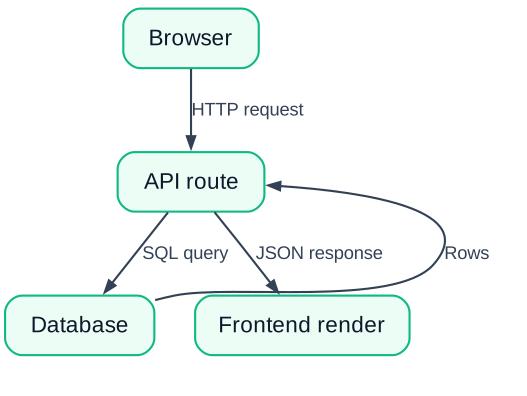
Open the API route that queries both tables and the frontend component that draws the result, then show the data travelling end to end. This is where the demo becomes a story instead of a list of files.
app.get("/api/posts", requireAuth, async (req, res) => {
  const posts = await db.query(
    `SELECT posts.*, users.email
     FROM posts JOIN users ON posts.user_id = users.id
     ORDER BY posts.created_at DESC`
  );
  res.json(posts.rows);
});
Say: "This route joins both tables. It returns each post with the author's email, so the frontend does not need a second request. I ruled out two separate queries because that would double the database round-trip for no benefit."
Then open the frontend render component. Say: "The browser calls this route, the server queries Postgres, and the response comes back as JSON. This component maps over that array and draws each post. The data flows in one direction, and the error handling lives in the route, not scattered through the UI."
The verifiable line: the JOIN clause in the route and the .map() call in the render component. The interviewer can trace the same path later.
Common mistakes that sink live demos
Practise the script, close unrelated tabs, and test the demo on a clean machine so the screen never freezes or shows an error you cannot explain. Three mistakes kill more demos than weak projects.
First, an unpractised script. If you hesitate on every file, the interviewer doubts you know the code. Rehearse until the file names and line numbers come without thinking. Second, a messy screen. Close WhatsApp, YouTube, and the tutorial tab you still have open. A cluttered screen says you are not serious. Third, an untested environment. The demo must run on a clean machine, not just your main setup where the database is already running. Test it after a fresh restart.
If something does break during the demo, do not panic. Say: "That is the error I fixed in commit 4f2a91c. Let me show you what happens and why." Turning a crash into a teaching moment is more impressive than a perfect run.
Take this script, open your own project, and rehearse it out loud once a day for three days in front of a friend. By the interview, the words will be yours, and the interviewer will see a fresher who did the work.