SQL Interview Questions for 5 Years Experience
Interviewers for 5+ years of experience score depth, not syntax: window functions, index design, reading EXPLAIN and thinking in sets. The 30 questions below are grouped into six topics, each showing how to structure an answer that proves your experience.

At five years of experience, no interviewer asks you to write a plain SELECT with one JOIN. They hand you a slow query on a large table and watch what you do next.
Say you get one such question: "This report takes forty seconds. Why?" Most candidates guess. A few ask for the execution plan first. The interview is really about the difference between those two groups.
A strong walkthrough goes like this: ask for the plan, find the biggest scan or sort, compare row estimates with actual counts, check the filter for functions on columns, then change one index and read the plan again. The sections below cover each step.
In my experience, interviewers for 5+ years of experience score depth, not syntax: window functions, index design, reading EXPLAIN and thinking in sets. That is my own view, not a measured benchmark. I also see a split by market: Indian service-company rounds lean on definitions and query drills, while US product-company rounds lean on window functions and a live slow-query discussion. The 30 questions below are grouped into six topics. Each topic shows what the interviewer is scoring and how to structure an answer that proves your experience. Each section ends with a note on what the interviewer is checking, and the DbVisualizer interview guide covers the tuning side.
The four-part answer that shows experience
A senior answer states the result, gives a concrete case, names the cost or trade-off, and says how you would check it.
A junior answer stops after the first part. It is correct, but it gives the interviewer nothing to score beyond syntax.
Answer
Give the direct result in one or two sentences. No warm-up.
Case
Attach it to a table you can describe: orders, payments, rides. Name the columns.
Trade-off
Say what your choice costs. Slower writes, more storage, a sort step, a NULL trap.
Check
Say how you would prove it worked: run EXPLAIN, compare the plan, test with tied or NULL rows.
Every section below reuses these four steps, so you only learn the shape once. For each question, I point out which step the interviewer leans on.
Interviewers often push hardest on the fourth step, because it shows you test your own work. Expect a follow-up like "How would you know your fix worked?" Without an answer to that, the first three parts lose most of their weight.
ROW_NUMBER, RANK and DENSE_RANK handle ties differently
The three ranking functions differ only in how they treat tied values: ROW_NUMBER gives unique numbers, RANK leaves gaps, DENSE_RANK does not, as DataLemur's window function guide lays out.
- ROW_NUMBER()
- Gives every row in a partition a unique sequential number. Two tied rows still get different numbers, and which one comes first is arbitrary unless your ORDER BY breaks the tie.
- RANK()
- Gives tied rows the same number, then skips. Two rows tied for first both get 1, and the next row gets 3.
- DENSE_RANK()
- Gives tied rows the same number and does not skip. Two rows tied for first both get 1, and the next row gets 2.
Six questions fall in this group:
- How do ROW_NUMBER and RANK differ, and where does DENSE_RANK fit? Use the definitions above, then add a case: a sales leaderboard where two people tie. The trade-off is that ROW_NUMBER silently picks a winner.
- Find the top two products by spend in each category. This is the "Highest Grossing Items" question DataLemur lists from Amazon. Ask whether ties should both appear before you pick a function.
- How is PARTITION BY different from GROUP BY? GROUP BY collapses rows into one per group. PARTITION BY keeps every row and adds a calculated column next to it.
- What does ORDER BY inside OVER() do? It decides the ranking order inside each partition. With aggregate functions like SUM, it also turns the result into a running total.
- Find the second-highest salary in each department. DENSE_RANK is the safe pick here. With RANK, a tie for first means no row gets rank 2.
- When would you choose ROW_NUMBER on purpose? Removing duplicates. You want exactly one row per key, so you keep rows where ROW_NUMBER equals 1.
WITH ranked AS (
  SELECT category,
         product,
         SUM(spend) AS total_spend,
         RANK() OVER (
           PARTITION BY category
           ORDER BY SUM(spend) DESC
         ) AS rnk
  FROM product_spend
  GROUP BY category, product
)
SELECT category, product, total_spend
FROM ranked
WHERE rnk <= 2;
What the interviewer scores in this group is set-thinking plus one habit. Do you ask "what happens on a tie?" before typing? A candidate who asks that question shows they have probably met this bug in real work.
LAG and LEAD compare a row with its neighbour
LAG and LEAD let one row read the previous or next row's value, which replaces most self-joins in time-based questions, per DataLemur's window function questions.
- Show each order next to the customer's previous order amount. LAG(amount) partitioned by customer and ordered by date. Mention that the first order per customer returns NULL.
- Find the delay between a user's first and second ride. DataLemur lists this as a practice question. Rank the rides, then compare the first and second dates.
- Find repeated payments within ten minutes. DataLemur lists this as a practice question. PARTITION BY merchant_id, credit_card_id, amount ORDER BY transaction_timestamp, then LAG the timestamp and keep rows where the gap is 10 minutes or less.
- Build a running total of revenue by day. Use SUM() OVER with an explicit frame: ROWS BETWEEN UNBOUNDED PRECEDING AND CURRENT ROW. The default frame groups tied dates together, which surprises people.
- What share of customers bought AirPods right after buying an iPhone? DataLemur lists this as a practice question. Use LEAD(product) OVER (PARTITION BY customer_id ORDER BY purchase_date) AS next_product, then count rows where product is 'iPhone' and next_product is 'AirPods', divided by the customers who bought an iPhone.
SELECT user_id,
       ride_date,
       ride_date - LAG(ride_date) OVER (
         PARTITION BY user_id
         ORDER BY ride_date
       ) AS days_since_last_ride
FROM rides;
-- The first ride per user has no previous row,
-- so days_since_last_ride is NULL there.
The scoring point is the choice of tool. A self-join on "the row before this one" needs a messy join condition and is harder to read. A window function says the same thing in one line. Explain that, and also handle the NULL on the first row out loud.
Index design: clustered, non-clustered and covering
An index lets the engine jump to matching rows instead of scanning the whole table, but every index slows writes and uses storage, as DbVisualizer's performance tuning guide explains.
- What is the difference between a clustered and a non-clustered index? A clustered index stores the rows themselves in index order. A non-clustered index is a separate structure that points to the row.
- How many of each can a table have? One clustered index, usually on the primary key, and many non-clustered ones, per DbVisualizer. The reason is physical: rows can only be stored in one order.
- What is a covering index? One that holds every column a query needs, so the database never has to visit the table. Give a case: an index on (customer_id, order_date, amount) for a customer history report.
- Does column order in a composite index matter? Yes. An index on (customer_id, order_date) helps a filter on customer_id alone, but not a filter on order_date alone.
- Should you index a status column with only a few values? Usually not. The engine will scan the table anyway, because most rows match.
- What does an index cost on INSERT and UPDATE? Every write must also update each index on that table. A write-heavy log table with several indexes pays that cost on every row.
- How do you find indexes nobody uses? Check the database's usage statistics, such as
pg_stat_user_indexesin PostgreSQL. Then drop unused ones after confirming no rare monthly job needs them.
Pros
- Reads on the indexed columns skip the full table scan.
- A covering index can answer a query without touching the table.
- A matching index can remove a sort step from a query.
Cons
- Every write, from INSERT through to DELETE, gets slower.
- Each index takes extra storage.
- Unused indexes cost writes and give nothing back.
Interviewers score whether you name the write-side cost without being asked. Candidates who say "just add an index" and stop sound like they have never dealt with a slow insert job.
Reading EXPLAIN: a window query, seek versus scan
A worked example takes one window-function query on a large orders table and shows the plan before and after adding an index on customer_id, following the seek-versus-scan idea in DbVisualizer's tuning guide.
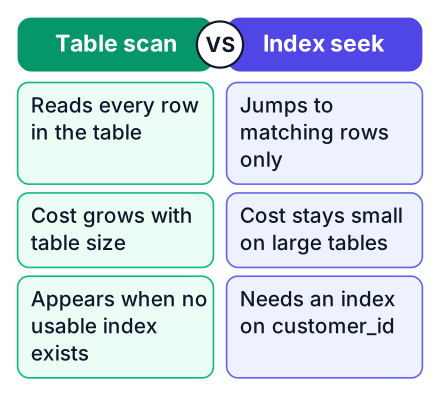
Here is the query. It ranks one customer's orders by amount:
EXPLAIN
SELECT order_id,
       amount,
       ROW_NUMBER() OVER (
         PARTITION BY customer_id
         ORDER BY amount DESC
       ) AS rn
FROM orders
WHERE customer_id = 42;
With no index on customer_id, a PostgreSQL plan has this shape (cost numbers removed):
WindowAgg
  -> Sort
       Sort Key: amount DESC
       -> Seq Scan on orders
            Filter: (customer_id = 42)
Read it from the bottom up. The engine reads every row in the table and throws away the ones that do not match. That is a table scan, which takes longer as the table grows, as DbVisualizer describes. These plans are simplified examples, and real output depends on your data. Then it sorts the survivors, because the window needs rows in amount order.
Now add an index that starts with customer_id and stores amount second:
CREATE INDEX idx_orders_customer_amount
  ON orders (customer_id, amount DESC);
WindowAgg
-> Index Scan using idx_orders_customer_amount on orders
Index Cond: (customer_id = 42)Two lines disappeared. The engine jumps straight to this customer's rows, and the Sort step is gone, because the index already returns them in amount order. PostgreSQL calls this an Index Scan; SQL Server calls the same move an Index Seek.
| Plan step | What it means | When you see it |
|---|---|---|
| Seq Scan / Table Scan | Reads every row, then filters | No useful index, or most rows match anyway |
| Index Scan / Index Seek | Jumps to matching rows through the index | A selective filter on the index's first column |
| Sort | Orders rows in memory or on disk | Nothing upstream already returns the needed order |
The questions this example answers:
- How do you get an execution plan? EXPLAIN shows the planned steps. In PostgreSQL, EXPLAIN ANALYZE also runs the query and shows real row counts, so use it with care on queries that change data.
- What do you look for first? Scans on big tables, Sort steps, and row estimates far from the actual counts.
- Why does a window query sort? The window needs rows grouped by the PARTITION BY columns and ordered by the ORDER BY columns.
- How can an index remove that sort? When its columns match the PARTITION BY and ORDER BY columns, in that order, rows come out already sorted.
- When would the planner ignore your new index? When the filter matches most of the table. A scan is cheaper then, and the planner is right.
Here the interviewer scores reading, not running. Anyone can type EXPLAIN. Pointing at the Sort line and saying why it vanished is what earns the marks.
Sargable predicates and query rewrites
Sargable means the engine can use an index to search for the filter. A predicate is sargable when the column is left bare, so WHERE DATE(order_date) = '2026-10-01' defeats an index but a date range does not, as DbVisualizer explains.
-- Before: the function hides order_date from the index
SELECT order_id, amount
FROM orders
WHERE DATE(order_date) = '2026-10-01';
-- After: a range on the bare column can use the index
SELECT order_id, amount
FROM orders
WHERE order_date >= '2026-10-01'
AND order_date < '2026-10-02';- What makes a filter sargable? The engine can search the index with it. That needs the column on its own, compared to a value.
- Why does a function on a column in WHERE hurt? The engine must compute the function for every row before comparing. The stored index order no longer helps.
- Why avoid SELECT * in a hot query? It asks for columns the index does not hold, which forces a trip to the table and breaks a covering index.
- Why is LIKE '%term' slow? A leading wildcard means the start of the value is unknown, so the index order cannot narrow the search. LIKE 'term%' can still use it.
Walk the interviewer through a rewrite in order: read the plan, find the scan, look for a function or wildcard on the filtered column, rewrite, then read the plan again. They score whether you fix the query before you reach for a new index, since every index carries the write cost from the earlier section.
Set-thinking beyond JOIN: NOT IN versus EXISTS, plus HAVING and CTEs
The last three questions test whether you can solve a problem on whole sets of rows instead of looping row by row.
- Why can NOT IN return no rows at all? If the subquery returns even one NULL, every comparison becomes "unknown," and nothing passes. NOT EXISTS does not have this trap, so prefer it when the column allows NULLs.
- What is the difference between WHERE and HAVING? WHERE filters rows before grouping. HAVING filters groups after aggregation, so "customers with more than five orders" belongs in HAVING.
- When do you use a CTE instead of a subquery? When the logic has named steps a reader should follow, like "rank, then filter." Mention that PostgreSQL before version 12 always materialised a CTE, while newer versions can inline it, so you check the plan.
Set-thinking means you describe the result you want and let the engine pick the path. The NULL question is a common slip. Take ids 1, 2 and 3 in one table and a subquery returning 2 and NULL. NOT EXISTS ignores the NULL and returns ids 1 and 3. NOT IN compares every id to NULL, gets "unknown", and returns nothing.
SELECT id FROM t WHERE id NOT IN (SELECT ref_id FROM s);
-- returns no rows
SELECT id FROM t WHERE NOT EXISTS (SELECT 1 FROM s WHERE s.ref_id = t.id);
-- returns ids 1 and 3
For practice, take one topic per day across six days, and write each answer in the four-part shape. On the seventh day, answer a random mix out loud without notes.
Pick one slow query from your own work, run EXPLAIN on it, and practise explaining the plan out loud using the four-part answer. Then add one index and explain the change.


