How to Build AI Agents: Free Tutorial With Python and Google ADK
Build a working AI agent for free using Python, Google's open-source ADK, and OpenRouter's free models. No credit card needed. You'll create a tool-using agent with memory in under 10 minutes, plus a hackathon-ready project idea.

This week, a student in my class asked: "Can I build a real AI agent without paying for an API key?" The answer is yes. In this tutorial, you will build a tool-using agent with a memory loop that runs on free models only, with no credit card. The same code is a hackathon project you can demo tomorrow.
You can build a working AI agent for free using Python, Google's open-source ADK, and OpenRouter's :free models. You need Python 3.11+, pip, and a free OpenRouter account. No paid API, no credit card. The agent calls tools, remembers the conversation, and can fix its own mistakes.
What an AI agent actually is
An AI agent is a program that lets a language model use tools and remember context to complete a task. When you call the ChatGPT website, you get a plain LM call: you type, it answers. An agent is a layer on top that gives the model hands.
Say you ask a plain model: "What's the weather in Kolkata?" It either guesses or says it cannot browse. An agent, however, receives the same question, decides it needs a tool called get_weather, calls that function, gets the real data, and then answers you. That loop decides and acts. Google's Agent Development Kit (ADK) is a code-first Python framework that handles this exact pattern for you, letting you plug in any model, not just Google's own Gemini.
Tools matter because models are trapped inside their training data. Memory matters because a model forgets everything between your messages. Without a loop that feeds prior replies back in, the agent cannot hold a conversation longer than one turn.
Set up free tools: OpenRouter and Google ADK
Run three terminal commands to install ADK and create a free OpenRouter account, no credit card needed. OpenRouter is a gateway that serves many models through one API. Its free models work with a $0 balance, and the openrouter/free router picks a model for you, which is the easiest option.
First, install the toolkit. You'll also need python-dotenv to load your API key from the .env file. Open your terminal and run:
pip install google-adk python-dotenvNext, create your free OpenRouter account. Go to openrouter.ai, sign up with email or Google, and open the Keys page. Click "Create Key", paste it into a file named .env in your project folder. You will not be asked for a payment method. .env files store your secret key so you do not paste it into your code.
There is one limit to know. The default free tier allows 50 requests per day, which is plenty for learning and for a hackathon demo. If you ever need more, buying $10 of credits raises the limit to 1,000 requests daily, as detailed in a community guide to OpenRouter's free models.
# create project folder and environment file
mkdir my-agent
cd my-agent
echo "OPENROUTER_API_KEY=your_key_here" > .env
You are now ready to write code.
Build a minimal agent with one custom tool
Write a Python file that defines an Agent with instructions and a function the model can call. The code below is a complete, runnable agent using the official ADK classes, per Google's documentation.
Create a file named agent.py in your project folder and paste this:
import os
from dotenv import load_dotenv
from google.adk.agents import Agent
from google.adk.runners import Runner
from google.adk.models.open_router import OpenRouterModel
load_dotenv()
def add_numbers(a: float, b: float) -> float:
    """Add two numbers and return the result."""
    return a + b
model = OpenRouterModel(
    model_name="openrouter/free",
    api_key=os.getenv("OPENROUTER_API_KEY")
)
agent = Agent(
    model=model,
    name="calculator_agent",
    instructions="You are a helpful assistant. Use the add_numbers tool when the user asks for a sum.",
    tools=[add_numbers]
)
runner = Runner(agent=agent)
if __name__ == "__main__":
    result = runner.run("What is 15 plus 27?")
    print(result.contents[-1].text)
Let me break down what happens here. The add_numbers function is a plain Python function. The Agent class takes your model, instructions, and that function as a tool. When you ask for a sum, the model sees the tool's description, decides to call it, and waits for the result.
Create the file
Save the code above as agent.py in your project folder.
Define a tool
Write a normal Python function with a docstring describing what it does.
Create the agent
Pass the model, a system instruction, and your tools list to the Agent class.
Run it
Call runner.run() with a user message and print the reply.
This is function calling, the core of tool-using agents. The model does not run your code. It asks your code to run, then reads the output.
Add a memory loop so the agent remembers
Use ADK's session object to store conversation history so the agent can refer back to earlier turns. Without this, every question starts from zero. A session is a container that holds the list of messages for a single conversation.
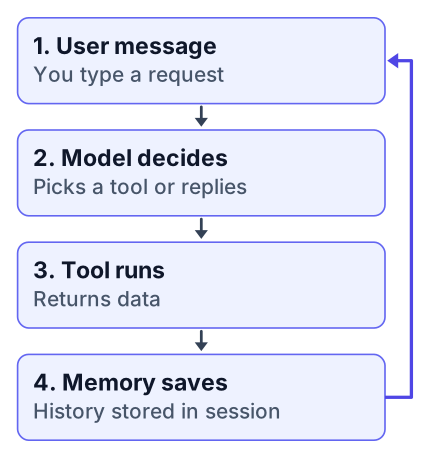
A plain LLM call treats each message as a stranger. A session gives the agent a notebook. Every turn, your code appends the user message, the tool's output, and the model's reply into that notebook, then feeds the whole thing back to the model on the next request.
The earlier example had a bug. The variable result holds only the final text. For multi-turn memory, you need to pass a session object, like this:
import os
from dotenv import load_dotenv
from google.adk.agents import Agent
from google.adk.runners import Runner
from google.adk.models.open_router import OpenRouterModel
from google.adk.sessions import InMemorySession
load_dotenv()
def add_numbers(a: float, b: float) -> float:
    """Add two numbers and return the result."""
    return a + b
model = OpenRouterModel(
    model_name="openrouter/free",
    api_key=os.getenv("OPENROUTER_API_KEY")
)
agent = Agent(
    model=model,
    name="calculator_agent",
    instructions="You are a helpful assistant. Use the add_numbers tool when the user asks for a sum.",
    tools=[add_numbers]
)
runner = Runner(agent=agent)
# For testing only - InMemorySession is not for production use
session = InMemorySession(agent=agent)
result = runner.run("My name is Ananya.", session=session)
result = runner.run("What is my name?", session=session)
print(result.contents[-1].text)  # It remembers "Ananya"
Now try a longer exchange. Ask it to remember a fact, change the subject, then return to that fact. The agent will connect them because the full history is in the session.
Memory loop
User message → Agent → Tool call → Tool result → Memory (session) → back to Agent → Final reply
This loop is the entire difference between a chatbot and an agent. A chatbot answers once. An agent works, checks its work, and works again.
Run your agent from the terminal
Launch your agent with the single command adk run agent.py and talk to it interactively. This is the official way to test ADK agents, and it gives you a chat prompt in your terminal. It works with the minimal agent code too; you don't need a session to use this command.
adk run agent.py
# you should see something like:
# user > What is 15 plus 27?
# assistant > Using the tool...
# assistant > The sum is 42.
# For the minimal agent (without session) the output will be similar, just without the session-based memory.
You will see the tool get called. The terminal prints a line about a tool invocation before the final answer. If it answers without that line, function calling did not trigger.
Two common problems appear here. First, the model might ignore your tools. Fix it by making the instruction explicit, like "You must use a tool before answering" or by renaming the function to match what the user asks. Second, an API key error usually means the .env file is in the wrong folder or the key was pasted with extra spaces.
If the model still refuses, check that your account balance is actually zero and that you did not pick a paid model by mistake. The openrouter/free router only serves models in the free bucket.
Why this shape matters for real projects
The tool-calling and feedback-loop pattern is the same one used in production agents, and it is exactly what a specialized course teaches. The Boot.dev course "Build an AI Agent in Python" walks through the same structure: use free models, write functions the agent calls, then add a feedback loop where the agent fixes a real bug in its own code. You can check out the course at boot.dev/courses/build-ai-agent-python.
That course runs 12 hours across 20 lessons and 8 chapters. You just built the core of it in under 10 minutes. The difference is depth: the course adds error handling, debugging when the loop fails, and a project where the agent iterates until it works, not just the happy path.
Here is an honest comparison of free versus paid models for this work:
Pros of free models
- Zero cost, no card, instant access.
- Enough for learning, demos, and hackathons.
- OpenRouter swaps models without code changes.
Cons of free models
- Lower rate limits, around 50 requests a day.
- Slower response times during peak usage.
- Less reliable for large, complex agent loops.
For a hackathon, free is the right call. For a production app serving real users, you would add a paid tier. The code stays identical; only the model name in one line changes.
Hackathon-ready project idea and next steps
Build a study-buddy agent that stores a plan, computes days to an exam, and quizzes you — a demo judges can touch.
Build a "personal study buddy" agent that tracks your study plan and reminds you, a problem statement you can demo at any hackathon. This takes the loop you just built and points it at a real human need.
Here is the problem statement: many students juggle multiple subjects and forget what they planned. Your agent fixes that. It stores a study plan in its memory, answers questions about it, and uses a tool to calculate how many days remain until an exam.
FAQ
Do I need a Google account? No, you only need an OpenRouter account, which you can create with email or Google.
Can I run this on Windows? Yes, the commands work in Windows Terminal, Command Prompt, or PowerShell, as long as Python 3.11+ is installed.
What if the free model is too slow? You can switch to a paid model by changing the model name in one line, or try a different free model on OpenRouter.
Features to add:
- A
store_plantool that saves the user's schedule to the session. - A
days_untiltool that computes time left for a target date. - A
review_plantool that prints the user's stored plan on demand. - A "quiz me" tool that asks a question and checks the answer.
Each tool is a plain Python function, exactly like the add_numbers one. You already know how to write them. In an hour, you will have a demo that judges can touch, asking it questions about their own fake schedules.
The memory loop makes this demo shine. A naive chatbot forgets the plan instantly. Your agent remembers and references it. That is the difference between a toy and a product.
For more context on what a career in this space actually requires, see what skills an AI engineer needs as a fresher. And if you want to see how fast this field moves, check out the latest local model release we covered, which you can run on your own laptop with no cloud at all.
Open your terminal, run adk run agent.py, and ask your agent to use the tool you built. Then pick one extra tool to add this week. The hackathon project above gives you a ready problem statement to build on.