Meta Muse Wonder for students: costs, free trial, and what it can do
Meta released Muse Wonder, its first frontier reasoning model, on October 12, 2026. Here is what it can do for your projects, what it costs, and how to try it free in under five minutes.

You can test Meta's new frontier model in five minutes for a few cents. Here is how, and what it will cost as your use grows. On October 12, 2026, Meta shipped Muse Wonder, its first frontier reasoning model, with a 1M-token context window and API pricing at $4 per 1M input and $20 per 1M output tokens. If you are a student in India, the real question is not what a frontier model does, but what it does that your free Gemini or ChatGPT tools cannot, and whether you even need to pay.
Meta's new model, Muse Wonder, is its first frontier reasoning model, built for long-running agents, coding, and computer use, with a 1M-token context window. It costs $4 per 1M input and $20 per 1M output tokens via the Meta Model API. There is no free tier, but a test through the Meta Model API quickstart costs a few cents; the richer Muse Wonder Full requires a paid Muse Code plan.
What is Muse Wonder?
Meta's first frontier reasoning model, Muse Wonder, launched on October 12, 2026 from the Superintelligence Lab, is built specifically for agents. A frontier model is the top tier of what a company can build, the kind that competes for the best scores on coding and reasoning benchmarks.
Until now, Meta's free Llama models were good for learning, but not for heavy agent work. This is Meta's first real competitor to the top models from Google and OpenAI. Meta's announcement calls Muse Wonder a major step for its Superintelligence Lab. The 1M-token context window means the model can hold a very large amount of text in memory at once, like an entire codebase or a long book.
For you as a student, the important part is that you now have a third pole to choose from. Gemini 4 Argon and GPT-6 Astra are the other two. Each has a different personality, different pricing, and different strengths. Learning to compare them is a skill in itself.
What can Muse Wonder do for your projects?
Muse Wonder handles frontier coding, long-running agents that delegate and recover from errors, and advanced computer use of browsers and desktop apps.
Frontier coding means it writes and fixes code at the level of the best models available. Long-running agents are where it gets interesting: the model can run a task that takes hours, spin up sub-agents for subtasks, and recover when something goes wrong. Computer use means it can click through a browser or an app like a person would.
Meta's model page also lists Active Memory and Active Focus. Active Memory lets the model remember context across sessions, and Active Focus helps it stay on task in long runs. These matter for a student building a real project.
Say you downloaded 50 lecture PDFs from your college portal and want one combined notes file. The free ChatGPT tool makes you paste each one separately and it forgets the start after a few. With Muse Wonder you point it at the folder once, give it the instructions, and let it run. It can hold all the files in memory and produce a single notes document. The 1M context window means it can hold all the files it processes, not just the one in front of it.
You can also automate a browser task, like filling a form or scraping a page, and hold a very long conversation without the model forgetting the start. The free tiers of other tools usually cut off around 200K tokens. Muse Wonder gives you five times that.
Muse Wonder Full and what it costs
Muse Wonder Full is a richer version available only to Muse Code subscribers at $50 or $200 per month, and it is not served through the API. That is a separate product from the pay-per-use API model.
Here is the pricing difference in one table:
| Plan | What you get | Price |
|---|---|---|
| Meta Model API | Muse Wonder, $4 per 1M input tokens, $20 per 1M output, $0.20 cached input | Pay per use |
| Muse Code Power | Muse Wonder Full | $50 per month |
| Muse Code Maximum | Muse Wonder Full, higher limits | $200 per month |
Meta's announcement and the model page both confirm that Wonder Full is only for Muse Code subscribers. The API serves the standard Muse Wonder model, not the Full version. There is no rupee figure in any source, so I will not give you one. Work with the dollar amounts and convert at today's rate if you need to.
The honest read: if you are a student on a budget, the API pay-as-you-go route is your entry point. Wonder Full at $50 or $200 a month is a serious commitment, one you should only make after you have built something with pay-per-use API calls first.
Is Muse Wonder Full free?
No. Meta's Muse Wonder page lists access to Wonder Full as "Muse Code subscription only", on the Power Usage or Maximum Usage plan. Meta shows no free plan, no free trial and no per-token price for it. The two cheaper Muse Code plans also leave it out.
Muse Code has four plans. Meta's page shows the two top prices, and Kingy AI's pricing test gives the two lower ones from Meta's public Muse Code page. All prices are in US dollars.
| Muse Code plan | Usage | Muse Wonder | Muse Wonder Full | Price per month |
|---|---|---|---|---|
| Everyday Usage | 10 to 50 prompts every 5 hours | Yes | No | $5 |
| High Usage | 5x Everyday | Yes | No | $15 |
| Power Usage | 20x Everyday | Yes | Yes | $50 |
| Maximum Usage | 80x Everyday | Yes | Yes | $200 |
Usage limits per plan: MyClaw's plan comparison, checked against Meta's page.
A higher reasoning setting on plain Wonder does not turn it into Full, because Full is a separate model.
Is the free Muse app a way to use Muse Wonder?
Not yet. The Muse app is Meta's personal agent for mobile, Mac and WhatsApp. Meta's FAQ for the app says Muse "is available for free with a usage limit". But Meta's launch post says Muse Wonder will power Muse only "soon", and paying subscribers get it first.
- In India, you join a waitlist. If you register from India today, Muse puts you on a waitlist instead of opening the app.
- Outside India, you can start free. When you reach the free limit, you can upgrade to a paid plan or wait for the limit to refresh.
What about apps that offer free Muse Wonder chats?
Some apps and websites that Meta does not run offer a few free Muse Wonder chats. For example, 1min.AI lets you try it without signing up, and then charges credits. A Muse chatbot app in the Microsoft Store gives new users a small number of free chats.
These can be a quick way to test the model. But they are middlemen, so follow three rules:
- Check who runs it. A name with "Muse" in it does not mean it comes from Meta.
- Keep private data out. Do not paste passwords, college ID details or code you must keep secret.
- Read the price before you pay. Credits and plans on these sites often cost more per message than Meta's own API.
How much better is Wonder Full than plain Wonder?
The gap is real but small. Artificial Analysis, an independent testing lab, gives Wonder Full 56 and plain Wonder 52 on its Intelligence Index, both at maximum reasoning effort. Wonder Full gains most on coding in the terminal and on agent tasks. For learning and for most student projects, plain Wonder is enough.
Three rules to check before you pay
- You must be 18 or older. MyClaw's summary of Meta's terms says Muse Code subscribers must be 18+, and plan benefits can change by region.
- Contributor mode is on by default. It gives you extra usage, and in return Meta can train its models on your content. Turn it off for private college code and for any client work.
- There is no refund when you cancel, unless a law in your country requires one.
If you only want to try a Muse model, start with the $5 Everyday plan or the pay-per-use API. Move up to Power only when Wonder fails your long coding tasks again and again.
How can you try it for a few cents?
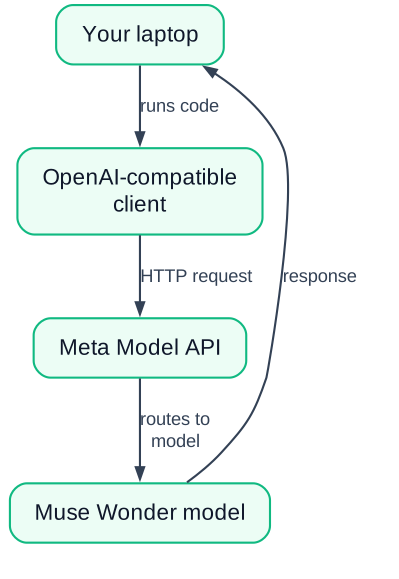
Use the Meta Model API quickstart with any OpenAI-compatible client to send your first Muse Wonder request, paid per token.
Get an API key
Sign up at the Meta Model API and create a key. This takes about a minute.
Pick a client
Use any OpenAI SDK-compatible client, like the Python OpenAI library, pointed at Meta's endpoint.
Send a first request
Ask Muse Wonder something simple, like explaining a concept or fixing a bug. Confirm you get a response.
Build a small agent
Give the model a task with a tool call, like reading a file and summarising it. This is where the 1M context shows its value.
The quickstart guide walks you through the first request. There is no free tier, but a short test costs only a few US cents. And if you want a bigger goal, Meta is running a Global AI Developer Hackathon with $1M in prizes. That is a real target for a student project.
How does Muse Wonder compare to other frontier models?
Independent benchmarks are still early; the 1M context is the differentiator, not the benchmark numbers. Meta's own testing says Muse Wonder compares to Fable 5.1 (Anthropic's latest model) and GPT-6 Astra, but those numbers are not yet independently verified.
MemoryBench is a benchmark that tests how well a model remembers information across a long conversation. TechCrunch's report mentions these tests, but without published scores there is little to act on. The 1M-token context window is the concrete advantage you can verify yourself.
The honest framing is simple: the 1M-token context window is the feature that changes what you can build, not a benchmark score. Independent benchmarks are still early, so treat any claim as direction, not settled fact. What matters is which model you can actually build with.
You already read about Gemini 4 Argon in my earlier post. Now you have a third option. If you are learning to code, the model you choose matters less than the habit of building projects. Using AI to learn without cheating is a skill, and building a full-stack app is a concrete way to practice it.
Pick one frontier model, learn its quirks, and build something real. You can switch later. The switching cost is lower than the cost of never building at all.
What to do now
Try Muse Wonder through the pay-per-use Meta Model API, build one small agent that does one thing well, and only consider the paid tiers when you need the richer Full version.
The concrete action is simple. Run the quickstart today. Create your API key and send your first request before you read another article about it. Then build a tiny agent that reads a local file and summarises it. That is the fastest way to feel what a 1M context window changes, and it costs only a few cents.
After that, ask yourself three questions:
- What does Muse Wonder do that your free tools cannot?
- What is the actual cost for your use case?
- Is pay-per-use enough for now?
Answer those honestly, and you will know whether to stay on pay-per-use or move up to a plan.


