Pass Take-Home Coding Assignments as a Fresher: A Plan-First Guide
Most freshers fail take-home assignments not on code quality but on planning. Learn the plan-first method: clarify requirements, choose a familiar stack, sketch the design, and write tests before building.
Most freshers fail take-home assignments not on code quality but on planning. Here's the plan-first method that works. With 72 hours to build a note-taking app, don't open the editor and panic. The assignment is the one round you fully control. You just need a plan before you write a single line of code.
Pass the take-home assignment by planning before you code: clarify the requirements, decide your stack, map the design, write the tests first, then build. Reviewers rarely run your code, so a clean structure and a README that explains how to run it matter more than extra features. Make it work, then make it pretty, then make it fast.
Understand the requirements before you write code
A take-home assignment is one of the fresher interview rounds: a coding task you finish in your own time and submit for review. Companies use it to see how you work, not just what you build. Common failure modes are time overrun, ignoring requirements, and poor communication. The plan-first method starts here: companies give vague requirements on purpose; your first job is to ask clarifying questions. The practical round is a test of how you handle ambiguity, not just how you code. A candidate who asks smart questions looks like someone the team can work with.
When you receive the assignment, read it twice. Highlight every noun and verb: "build a note-taking app", "users can create and delete notes", "data persists". Then write down what is missing. Does the app need login? What fields does a note have? How should data be stored? For example, if the prompt says "users can create and delete notes", you should ask: can users edit notes? Can two users share a note? What happens to notes when a user is deleted?
Send your clarifying questions to the recruiter or hiring manager. Keep them short and grouped. Ask about the data model, authentication, and scope. Wait for answers before you start building. This one email shows you think like an engineer, not like someone racing to submit.
Decide your stack and list your technical choices
Pick the stack you know best and write down every technical decision before you start. This is the second step of the plan-first method from freeCodeCamp's guide. A familiar stack lets you focus on solving the problem, not fighting a framework you just learned.
Resist the urge to use a trendy new tool in the submission. Reviewers want to see that you can ship reliably. A boring stack that works beats an exciting one that crashes. If the company mentioned a specific technology in the job post, use that one.
Write your decisions down. For a note-taking app, your list might look like this:
- Backend: Node.js with Express, because I know it best
- Database: SQLite, because it needs zero setup for the reviewer
- Frontend: plain HTML/CSS/JS, because no build step means it runs instantly
- Testing: Jest, because it is simple to configure
- Project structure: Express Generator, so the layout is standard
Decisions like these double as documentation. When the reviewer opens your repo, they know what you chose and why. That is the difference between a coder and an engineer.
Sketch the design before the first commit
Draw a rough diagram of your app's flow and data model before you open your editor. Paper works; a whiteboard tool is fine. The goal is a picture of how the pieces connect, not a perfect architecture diagram.
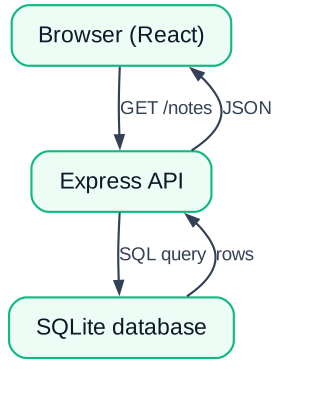
For the note-taking app, the flow is simple. The browser sends a request to the server. The server reads or writes a note in the database, then sends a response. The browser renders the result. Draw that as boxes and arrows. Then sketch the data model: a note has an id, a title, a body, and a timestamp.
This sketch catches design problems early. Maybe you realize notes need a category field. Or that deleting a note should be a separate server route. Finding these issues on paper takes minutes; finding them in code takes hours.
Write the test plan before the code
List 5–10 tests you will write, including the happy path and edge cases, before you implement anything. This is the fourth step in the plan-first method. Tests force you to define what "working" means before you build it.
Your test list for the note app could look like this:
- Happy path: creating a note returns it with a new id
- Happy path: reading all notes returns the list
- Happy path: deleting a note removes it
- Edge case: creating a note with an empty title returns a validation error
- Edge case: reading a non-existent note returns a 404
- Complex logic: two notes created in a row get different ids
A test is just a function that checks an expectation. Here is a happy-path test for creating a note. This test calls a function you will export from your routes file. It uses Jest's global test and expect.
test('creating a note returns it with an id', async () => {
  const note = await createNote('My first note', 'Body text');
  expect(note.id).toBeDefined();
  expect(note.title).toBe('My first note');
});
Working through this list before coding shows professionalism. It proves you think about failure cases, not just the happy path. Reviewers notice this instantly. Even if you write only a handful of tests, the intent matters.
Set up your project with a generator
Use a scaffold generator like Express Generator or Create React App so your project structure is instantly recognizable. Generators produce a standard layout that every reviewer has seen before. There is no reason to hand-build a project structure when a generator gives you a professional one for free.
Proper project tooling helps too. A package manager like NPM or Yarn, a configured test runner, and an environment file for secrets all signal that you know how to work on a real team. A reviewer who does not have to fix your setup will spend more time reading your code.
| Generator | Project type | Why use it |
|---|---|---|
| Express Generator | Node.js REST API | Standard structure, minimal setup |
| Create React App | React frontend | Build config included, works out of the box |
| Django Admin | Python full stack | Built-in database and auth scaffolding |
| Spring Initializr | Java backend | Maven/Gradle setup, industry standard |
Generators also save time. The minutes you would spend creating folders and config files go into the actual solution. When time is short, as it always is, this matters.
Build to spec, one task at a time
Organize the work into small tasks and implement them in order, testing as you go. Do not try to build the whole app in one sitting. Break it into steps that each produce something working. The guide recommends doing one thing really well over doing five things poorly.
Here is a worked example for the note-taking app, from empty folder to submission:
Init the repo and scaffold
Create the project, run the generator, and make an initial commit with the empty structure.
Run the generated app
Start the server, confirm the hello-world page loads, then delete the sample route.
Write the happy-path test
Add the create-note test to the test file and watch it fail. Red is fine; it proves the test works.
Run the test
Implement the create route until the test passes. Commit. That is one complete task done.
Build to spec
Repeat the test-then-code loop for each requirement: list notes, read one, update, delete.
Write the README
Document what the app does, how to install dependencies, how to run it, and how to run the tests.
Each step ends with something that works. If you run out of time halfway, you still have a functioning app to submit. That beats a half-finished giant feature every time.
Make the submission easy to review
A reviewer who cannot run your app in two minutes will reject it, no matter how clever the code is. Reviewers often skim many submissions in a day. A clear README and a standard project structure make their job easier, and they will remember you for it.
Use logging instead of System.out or console.log for meaningful messages. A proper logging library shows you work like a professional. Do not print stack traces; let the error handler deal with them. The README must explain how to run the app step by step, and what the reviewer should see when they do.
Pros of bonus work
- GitHub Actions CI shows your code passes checks
- A deployed demo on Render or Vercel is instantly clickable
- Both signal you understand modern delivery
Cons of bonus work
- Time spent on extras is time not spent on core features
- A broken CI pipeline looks worse than none
- Deployment is only a plus when the core app is solid
These extras are bonus points, never a substitute for the basics. If your core app works, has tests, and runs from a two-step README, you have already passed the bar. Adding CI and a demo pushes you to the top of the pile. For example, a two-step README looks like this: Step 1: npm install. Step 2: npm start. That's it. If your README needs a third step, simplify your setup.
If you are competing for your first role, a polished take-home submission is one you control completely. Combine it with a strong GitHub profile and see how to ace your take-home challenge for more tips.
If you have an assignment deadline, spend the first 30 minutes planning: write down the requirements, your stack, a rough design, and your test list. Then open your editor. If you don't have one yet, practice on a free prompt from a site like Frontend Mentor, the plan-first habit transfers. That one habit will put you ahead of most applicants.