How to Put a Project on GitHub With a Good README
A repo becomes a portfolio piece when a stranger can clone it and run it in five minutes. That takes four files: your code, a README.md with install and run steps, a .gitignore that keeps junk out, and a LICENSE.

Say you push your first web app to GitHub tonight and send the link to a recruiter. They clone it, type npm start, and see a wall of red errors. Many would close the tab and move on to the next link.
Your code might be fine. The repo just never told a stranger how to run it.
A repo becomes a portfolio piece when a stranger can clone it and run it in five minutes. That takes four files: your code, a README.md with install and run steps, a .gitignore that keeps junk out, and a LICENSE. Then you prove it with a one-minute stranger test on a clean folder. The example here is a Node.js walkthrough. If you use Python, the .gitignore lines are venv/ and __pycache__/, the install step is pip install -r requirements.txt and the run command is python app.py. Other languages need the same four files, with their own .gitignore lines and run command.
Why a runnable repo matters for your portfolio
GitHub's docs describe the README as often the first item a visitor sees, so a project that runs from its README is a cheap way to look credible.
Know the four files a stranger needs
Your repo needs at least these four kinds of files at the top level: the app code, README.md, .gitignore and LICENSE. A fifth, optional file, .env.example, comes later in the guide. Make a README notes that the README lives in the top-level folder and that README.md is the traditional name.
| File | What it is for | If it is missing |
|---|---|---|
App code (src/, package.json, package-lock.json) | The program and the list of packages it needs | Nothing installs, or it installs different versions than yours |
README.md | Tells a stranger how to install and run the app | The visitor has to guess how to run it, then leaves |
.gitignore | Keeps generated folders and secrets out of the repo | Your API keys and a huge node_modules folder go public |
LICENSE | States what others may do with your code | Nobody has clear permission to reuse it |
Here is the folder tree for a small Express app called quick-notes. It is the example for the rest of this post:
quick-notes/
├── src/
│   └── server.js
├── docs/
│   └── screenshot.png
├── .env.example
├── .gitignore
├── LICENSE
├── package.json
├── package-lock.json
└── README.md
GitHub can also read a README from a .github or docs folder. For a first project, keep it in the root, where every visitor looks.
Write a .gitignore before your first commit
Create .gitignore first, because files that were already committed stay in your history even after you add them to the ignore list. Make a file named .gitignore in the project root and paste this:
node_modules/
.env
dist/
build/
.DS_Store
*.log
Each line has one job:
node_modules/holds packages thatnpm installrebuilds frompackage.json, so it never belongs in the repo..envholds your private settings, such as API keys and passwords.dist/andbuild/are output folders your build tool creates again on every build..DS_Storeis a hidden file macOS drops into folders.*.logskips any log file, which only matters on your machine.
Strangers still need to know which settings your app expects. Commit a .env.example file with the names and empty values:
# The port the server listens on (any free port)
PORT=
# Any long random string you type yourself
SESSION_SECRET=
Write the README sections a stranger will follow
A runnable README answers what the project is, what you need installed, how to start it, and what the reader should see when it works. freeCodeCamp's README guide asks for install and run steps written one at a time, with every dependency listed. A beginner cannot guess a step you left out, so write every step.
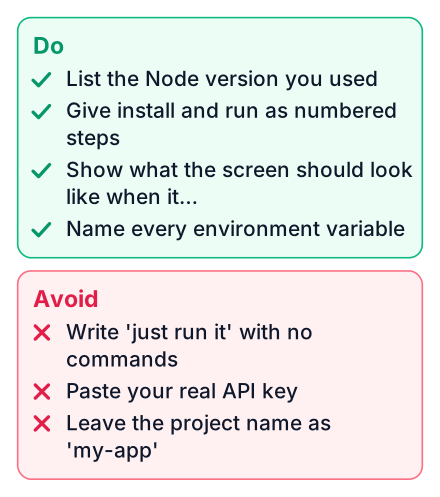
Here is a complete README for quick-notes. Copy it and change the details:
# Quick Notes
A small Express app that saves short notes and lists them in the browser.

## Prerequisites
- Node.js, the current LTS release (check with `node -v`)
- npm, which comes with Node.js (check with `npm -v`)
- Git
## Install
- Clone the repo: `git clone https://github.com/your-username/quick-notes.git`
- Move into the folder: `cd quick-notes`
- Install the dependencies: `npm install`
- Create your settings file: `cp .env.example .env`
(Windows Command Prompt: `copy .env.example .env`)
## Environment variables
| Name | What it is | Where to get it |
|------|------------|-----------------|
| PORT | The port the server listens on | Pick any free port |
| SESSION_SECRET | Signs session cookies | Type any long random string |
## Run
`npm start`
## Expected output
With PORT=3000 in your .env file, the terminal prints `Server listening on port 3000`.
Open `http://localhost:3000` in your browser. The app reads PORT from .env.
You should see an empty notes list and an "Add note" box.
## License
MIT. See [LICENSE](LICENSE).The "Expected output" section is the one beginners skip, and it matters most. Without it, a stranger cannot tell a working app from a broken one.
GitHub handles some of the work for you. The GitHub Docs page on READMEs explains that GitHub builds a table of contents from your headings automatically. It recommends relative links like docs/screenshot.png so they keep working in clones. Longer documentation belongs in a wiki, and README content beyond 500 KiB gets cut off.
Put in a first README
- One line on what the app does
- Prerequisites with the command to check each
- Install and run commands, one per line
- What the reader should see when it works
Leave out
- Your learning journey and thank-you notes
- A long feature list for features nobody can see yet
- Badges you do not understand
- Steps that only work on your laptop
Add a license so others know what they may do
Without a license file, other people have no clear permission to use your code, and a short MIT license fixes that. MIT is a common, simple choice for small learning projects. It lets anyone reuse the code as long as they keep your copyright notice.
A portfolio project still benefits from one. It shows you understand how open source works, and it lets a classmate fork your app without asking.
Adding one takes a few clicks. When you create the repo on GitHub, pick "MIT License" from the license dropdown. For an existing repo, click Add file, name it LICENSE, and GitHub offers a template picker. Make a README links to a guide that compares licenses in plain words. This is not legal advice: read the text of the license you pick before you commit it.
Push the project with these terminal commands
Five commands take a local folder to a public repo: git init, git add, git commit, git remote add and git push. A few checks in between catch the usual mistakes:
Start tracking the folder and look at what Git sees:
git init
git status
The list should show
src/,README.md,.gitignoreandLICENSE, plus the package files. Ifnode_modules/or.envappears, fix your .gitignore before going on.Stage and commit everything:
git add .
git commit -m "First commit: app, README, gitignore, license"
On github.com, create a new empty repository. Leave every "Initialize" box unticked, since your files already exist.
Connect your folder to it and name your branch:
git remote add origin https://github.com/your-username/quick-notes.git
git branch -M main
Push:
git push -u origin mainIf Git asks you to sign in, note that your GitHub password no longer works over HTTPS. Use the browser sign-in window that Git opens, or paste a personal access token when it asks for a password.
Common mistakes at this stage:
- Committing
node_modulesbecause the .gitignore came later. - Committing
.envwith real keys inside. - Pushing before the README exists, so the first visitors see a bare file list.
- Leaving out
package-lock.json, which lets a stranger install different package versions than you tested.
Run the five-step stranger test
The stranger test is cloning your repo into a brand-new folder and following only your README, and any step you have to guess is a bug in the README. Start a timer and aim to finish in five minutes.
Clone into an empty folder
Pick a different directory from your working copy, so no old
.envornode_moduleshelps you by accident.Read only the README
Do not open the code. Act like you have never seen this project.
Run the install steps
Type each command exactly as written, including the step that creates
.env.Run the start command
Use the command from the Run section, not the one you remember.
Compare with the expected output
Check that the terminal and the browser match what the README promises.
When a step fails, edit the README rather than relying on your memory. The stranger will not have your memory. Then run the whole test again from a fresh folder.
A friend on another computer is the best tester, because their machine has different versions installed. If nobody is free, a fresh folder still catches most gaps. If your app has a separate frontend and API, see how to connect a React frontend to an API and give each part its own run steps.
Fix the five README failures that break most first projects
Most failed stranger tests come from the same few README gaps: a missing prerequisite, a missing environment file, a wrong command, a hidden port number or no expected output. Match the error to its fix:
| Symptom a stranger sees | Missing README line | Fix |
|---|---|---|
command not found | Prerequisites | List Node.js and npm with the command that checks each one. |
Cannot find module | The install step | Add npm install as its own line before the start command. |
| App crashes asking for a key | Environment setup | Add the step that copies .env.example and a table of every variable. |
| Blank page | Expected output | Write the exact address to open and what the page should show. |
port already in use | The port setting | Name the variable that sets the port and say how to change it. |
Open your most recent project today, add a .gitignore and a README with install and run steps, push it, then run the stranger test in a fresh folder. Fix every step that fails, then read the hosting post to put the same project online.