How to Connect React to a Backend API (CORS, Fetch, MongoDB)
React doesn't talk to your API; the browser does. Build an Express server, fetch data in React, fix the CORS error with one line of middleware, and keep data in a free MongoDB Atlas M0 cluster.

Say you build a small Express server on port 3000 and a React app on port 5173. You write fetch('http://localhost:3000/api/books'), and the console shows a red CORS error. The code looks right, so you blame React. The problem is somewhere else. Two programs both call themselves localhost, and the browser is the one stopping the request.
React does not talk to your API; the browser does. Your component only tells the browser to run fetch(). Your Express server must then allow that request with a CORS header. Use the full address of your API, like http://localhost:3000, and expect three beginner errors: CORS, "Failed to fetch", and a JSON parse error.
The browser makes the request, not React
Drawing the page is all React does. The fetch() call is a browser feature that sends an HTTP request to a server, the same way typing a URL into the address bar does.
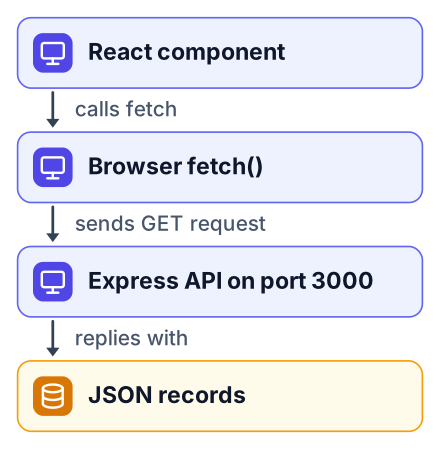
Here is the full trip one request takes:
React component
Your code runs
fetch('http://localhost:3000/api/books')insideuseEffect.Browser
The browser builds an HTTP GET request and sends it to port 3000.
Express server
Your route reads the request and replies with JSON plus some headers.
Browser again
The browser checks the headers. If they allow your page, it hands the body back to React.
React re-renders
You store the data in state, and the list appears on screen.
An origin is the protocol, the host and the port together. http://localhost:5173 is where Vite serves your React app. http://localhost:3000 is where Node runs Express. Same machine, same word "localhost", but the browser treats them as two different websites.
That one detail explains most of the confusion. If you are still choosing between frameworks for the frontend half, my Next.js vs React comparison covers that decision first.
Write an Express API that returns JSON
A GET route that calls res.json() with an array is all the backend you need to start.
Open a new terminal in an empty folder and run these commands:
mkdir books-api
cd books-api
npm init -y
npm install express
Create a file called server.js and paste this in:
const express = require('express');
const app = express();
const books = [
  { id: 1, title: 'Eloquent JavaScript', author: 'Marijn Haverbeke' },
  { id: 2, title: 'The Pragmatic Programmer', author: 'Andrew Hunt' },
  { id: 3, title: 'Clean Code', author: 'Robert C. Martin' }
];
app.get('/api/books', (req, res) => {
  res.json(books);
});
app.listen(3000, () => {
  console.log('API running on http://localhost:3000');
});
Start it with node server.js. The terminal prints one line and then waits:
$ node server.js
API running on http://localhost:3000
Now open http://localhost:3000/api/books in a browser tab. You should see the raw array:
[{"id":1,"title":"Eloquent JavaScript","author":"Marijn Haverbeke"},{"id":2,"title":"The Pragmatic Programmer","author":"Andrew Hunt"},{"id":3,"title":"Clean Code","author":"Robert C. Martin"}]If this page loads, your backend works. Every later problem is about the connection between the two programs.
Fetch the data inside a React component
Call fetch inside useEffect with an empty dependency list, and keep three pieces of state: the data, a loading flag and an error message.
The empty list [] means "run this once, after the first render". Without it, every state update would trigger another request. In your Vite project, create src/BookList.jsx:
import { useEffect, useState } from 'react';
const API_URL = 'http://localhost:3000/api/books';
export default function BookList() {
  const [books, setBooks] = useState([]);
  const [loading, setLoading] = useState(true);
  const [error, setError] = useState(null);
  useEffect(() => {
    fetch(API_URL)
      .then((response) => {
        if (!response.ok) {
          throw new Error(`Server replied with status ${response.status}`);
        }
        return response.json();
      })
      .then((data) => setBooks(data))
      .catch((err) => setError(err.message))
      .finally(() => setLoading(false));
  }, []);
  if (loading) return <p>Loading books...</p>;
  if (error) return <p>Error: {error}</p>;
  return (
    <ul>
      {books.map((book) => (
        <li key={book.id}>{book.title} by {book.author}</li>
      ))}
    </ul>
  );
}
Import it in App.jsx and render <BookList />. When everything works, the page shows a plain list:
- Eloquent JavaScript by Marijn Haverbeke
- The Pragmatic Programmer by Andrew Hunt
- Clean Code by Robert C. Martin
Note that response.json() returns a promise, which is why it needs its own .then(). MDN's Using the Fetch API guide is the reference to keep open while you write this. On a first run, though, you will probably see the error state instead of the list. The page shows Error: Failed to fetch. Open the console to see the real CORS message, because a CORS block looks like "Failed to fetch" to your catch handler.
Fix the CORS error with one line of middleware
The browser blocks the response because your server did not send an Access-Control-Allow-Origin header, and the cors package adds it.
In the console, the message looks like this:
Access to fetch at 'http://localhost:3000/api/books' from origin
'http://localhost:5173' has been blocked by CORS policy: No
'Access-Control-Allow-Origin' header is present on the requested resource.
Stop the server with Ctrl+C, then install the package:
npm install corsAdd the require and one line of middleware near the top of server.js, before your routes:
const cors = require('cors');
app.use(cors({ origin: 'http://localhost:5173' }));
Restart with node server.js and reload the React page. The list appears. After you deploy, change origin to the address of your deployed React site, and if Vite moves to port 5174, change it to match. Do not use origin: '*' for an API that needs login cookies. With credentials (cookies), the browser requires a specific origin, not *, so a wildcard makes it refuse to send them.
Here is the surprising part. For a simple GET like this one, the request reaches Express and your route runs. Express sends the JSON back. The browser receives it, sees no permission header, and refuses to show it to your JavaScript. You can prove this: add console.log('GET /api/books hit') inside the route. The terminal prints GET /api/books hit on every reload, even while the browser console still shows the CORS error.
Changing React code cannot fix this. The permission has to come from the server that owns the data. That is the whole purpose of the rule: a random website should not read your bank's API just because your browser is logged in.
Fix 'Failed to fetch' and JSON parse errors
"Failed to fetch" means nothing answered (server off, wrong port, or typo in the URL) or the browser blocked the reply because of CORS. "Unexpected end of JSON input" means a reply came but its body was empty or not JSON.
| Error message | Real cause | One-line fix |
|---|---|---|
has been blocked by CORS policy | Server sent no permission header for your origin | Add app.use(cors({ origin: 'http://localhost:5173' })) |
TypeError: Failed to fetch | Nothing answered, or the browser blocked the reply (check the console for a CORS message) | Start the server, match the port and path exactly, and add CORS if the console mentions it |
Unexpected end of JSON input or Unexpected token '<' | The body was empty, or it was HTML | Make the route call res.json() and fetch the full API URL |
The Unexpected token '<' version has a common cause. You write fetch('/api/books') with no host. The browser sends it to port 5173, where Vite answers with your index.html. That file starts with <!doctype html>, and .json() cannot read it because of the first <. An Express 404 page causes the same crash, because it is also HTML.
When the table does not settle it, the Network tab in DevTools shows what really happened:
Open DevTools
Press F12, then click the Network tab and reload the page.
Find the request
Click the row named
books. Check the full URL it went to.Read the status
A status of 200 means it worked. A 404 means wrong path. No status at all means nothing answered.
Open the Response tab
If you see HTML here instead of JSON, you hit the wrong server or the wrong route.
Test your frontend first with JSONPlaceholder
JSONPlaceholder is a free fake API that needs no signup or API key, so you can build the React side before your own server works.
Change one line in BookList.jsx:
const API_URL = 'https://jsonplaceholder.typicode.com/posts';Its posts have title and body instead of author, so swap {book.author} for {book.body} while you test. If the list fills with fake posts, your component is correct.
This gives you a clean way to split the bug in half. Works with JSONPlaceholder but fails with yours? The fault is in Express: the route, the port, or the CORS setup. Fails with both? Look at your React code.
Keep data after a restart with MongoDB Atlas M0
MongoDB Atlas has a free M0 tier with no credit card, so your Express API can store records in a real database instead of an array in memory.
The books array lives in the Node process. Stop the server and any book you added is gone. A database keeps it on disk somewhere else.
To set one up, sign up on Atlas and create a cluster on the free M0 option. Then add a database user with a password. Under Network Access, allow your current IP address. If you skip this, mongoose.connect hangs and then fails with "Could not connect to any servers in your MongoDB Atlas cluster. One common reason is that you're trying to access the database from an IP that isn't whitelisted." Add your IP to the allow list and restart the server. Finally, click Connect and copy the connection string that starts with mongodb+srv://.
Pros
- A free tier with no end date listed on the MongoDB pricing page
- No credit card needed to sign up
- 512 MB of storage per the pricing page, plenty for a learning project
Cons
- Shared RAM and shared vCPU, so speed varies
- Not meant for real production traffic
- Fills up fast if you store images inside documents
Install two packages, then put the connection string in a file called .env:
npm install mongoose dotenvMONGODB_URI=mongodb+srv://youruser:yourpassword@cluster0.example.mongodb.net/booksAdd .env to your .gitignore before your next commit. The string holds your password, and a public GitHub repo exposes it to anyone. Then replace the array in server.js:
require('dotenv').config();
const mongoose = require('mongoose');
mongoose.connect(process.env.MONGODB_URI)
  .then(() => console.log('Connected to MongoDB'))
  .catch((err) => console.error('MongoDB error:', err.message));
const Book = mongoose.model('Book', new mongoose.Schema({
  title: String,
  author: String
}));
app.get('/api/books', async (req, res) => {
  const books = await Book.find();
  res.json(books);
});
One change on the React side: MongoDB names the id field _id. Update the list item to key={book._id}, or React will warn about missing keys.
Common mistakes when you connect React to an API
Most failures come from four habits: hardcoding the wrong port, skipping the response.ok check, committing the database password, and forgetting to restart the server after changes.
- Trusting the port blindly. If port 5173 is busy, Vite quietly picks the next free one. Your CORS origin then no longer matches. Read the address Vite prints in the terminal.
- Deleting the
response.okcheck. A 404 or 500 does not makefetchfail on its own. Without the check, your code tries to read an error page as data. - Pushing the password anyway. If
.envalready reached GitHub, deleting the file is not enough. Change the database user's password in Atlas. - Forgetting to restart the server. Plain
node server.jsdoes not reload on save. Runnode --watch server.jsso each edit restarts the server for you.
Today, build the Express route and the React component from this post, and check it works with JSONPlaceholder first. Then add one new field to your API's JSON, like a year, show it on the page, and move your array into a free MongoDB Atlas M0 cluster. Once that runs, the 10-week front-end skills plan shows what to learn next, and this guide to building apps with Codex Cloud helps you ship the next project faster.