GPT-6.1 Terra Price: $1 Per Million Tokens, Half of Sol
OpenAI's GPT-6.1 Terra costs $1 per million input tokens through the API, half the price of GPT-6.1 Sol. Here's what the launch means for students and which plans you need to try it today.

As of 26 October 2026, OpenAI's GPT-6.1 Terra costs $1 per million input tokens. The same day, GPT-6.1 Sol was listed at twice that. A model that clicks through a screen and fixes code in a terminal used to cost more than a student could test with. I opened the launch pages today to see what changed.
GPT-6.1 Terra is OpenAI's new mid-tier model, priced at $1 per million input tokens and $5 per million output tokens through the API. That is half the price of GPT-6.1 Sol. You can use it today inside ChatGPT Work and Codex on paid plans, and in GitHub Copilot, but not on the Free tier.
GPT-6.1 Terra is the mid-tier model in the GPT-6 series
OpenAI announced Terra on 26 October 2026 as the model that sits below GPT-6.1 Sol and GPT-6 Astra and replaces GPT-5.6 Terra, according to Data Studios' launch summary.
In the API, the model ID is gpt-6.1-terra. Its context window is 1,050,000 tokens, and a single reply can run to 128,000 tokens. Its knowledge cutoff is June 1, 2026.
The context window is how much text the model can read in one request. In plain words, that is roughly a large codebase in one go. The long output limit means it can write a big patch or a full file without stopping halfway.
The cutoff matters for students using new libraries. If a framework changed its API after that date, paste the current docs into your prompt. Terra will not know them on its own.
OpenAI also published a safety addendum for Terra on its Deployment Safety Hub. I come back to it in the limits section.
GPT-6.1 Terra price: $1 input and $5 output per million tokens
Terra costs half as much as GPT-6.1 Sol, and cached input drops to $0.05 per million tokens.
A token is a small piece of text, often part of a word, and the API bills you by the count. Input tokens are what you send. Output tokens are what the model writes back.
| Model | Input (per 1M tokens) | Output (per 1M tokens) | Cached input (per 1M tokens) | Source |
|---|---|---|---|---|
| GPT-6.1 Terra | $1 | $5 | $0.05 | Data Studios |
| GPT-6.1 Sol | $2 | $10 | Not listed in the launch pages | iThinkDiff |
| GPT-5.6 Terra | Replaced by GPT-6.1 Terra; price not listed in the launch pages | Data Studios | ||
Cached input is where a student saves the most. When you send the same long beginning again, such as fixed instructions or the same source file, the repeated part is billed at the cached rate.
None of the launch pages gives a rupee price. The list prices are in dollars, so an Indian student paying by card should check the bank's conversion rate and any foreign-transaction fee before topping up.
Output is the expensive side, at five times the input rate. A test run where you send a few files and get a short fix back uses a few thousand tokens, a tiny share of one million. Long replies are what eat a budget, so ask for a diff instead of a rewritten file.
Where a student can use Terra today
Terra is in ChatGPT Work and Codex for Plus, Pro, Business, Enterprise and Edu users (Data Studios), and in GitHub Copilot Pro, Pro+, Max, Business and Enterprise (GitHub Changelog).
Free and Go users do not get it, and Terra does not appear in regular Chat, as The Next Web reports. If you only use the normal ChatGPT chat window, you will not find it there.
On Copilot, the changelog says the rollout is gradual and billing follows provider list pricing. It may not show up in your account on day one.
Check your plan
Look at your ChatGPT or Copilot subscription page. You need one of the paid tiers above, or an Edu account from your college.
Open Codex or ChatGPT Work
Terra lives in these two surfaces, not in the regular chat window.
Pick Terra
Choose GPT-6.1 Terra from the model menu before you start a task.
Or enable it in Copilot
In your Copilot settings, turn the model on, then select it in your editor's model picker.
This works the same for a student in Pune on Plus as for one in Ohio on a university Edu plan. If you have not set up Codex yet, my walkthrough on building apps with Codex cloud covers the first run.
Computer use is where Terra improves most
OpenAI measured Terra matching GPT-6 Astra on Agents' Last Exam at one-tenth the price per token, and scoring 15 points higher than GPT-5.6 Terra at about a third of the cost, as iThinkDiff and The Next Web report.
Computer use means the model looks at a screen, then clicks and types like a person would. That is how an agent fills a form or moves through a website for you.
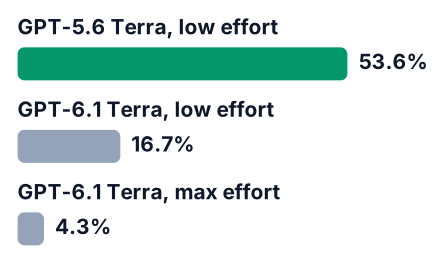
The bigger change for daily use is fewer mistakes. On prompts built to make the model slip, the error rate fell sharply, according to 9to5Mac:
| Model and setting | Error rate on error-inducing prompts | Source |
|---|---|---|
| GPT-5.6 Terra, low effort | 53.6% | 9to5Mac |
| GPT-6.1 Terra, low effort | 16.7% | 9to5Mac |
| GPT-6.1 Terra, max effort | 4.3% | iThinkDiff |
These are OpenAI's own measurements. None of the pages I opened shows an outside lab repeating the tests, so treat them as a starting claim to check on your own tasks.
Terra's coding score is solid, but Sol and Astra still lead
On Terminal-Bench 4.0, Terra solves 50.3% of tasks at max effort, up from 21.5% for GPT-5.6 Terra, yet OpenAI itself points to Sol or Astra for the hardest coding.
Terminal-Bench gives a model jobs to do inside a command-line terminal. Think installing packages, running tests and fixing what breaks.
On the Artificial Analysis leaderboard, Terra has an Intelligence Index of 41 at medium reasoning. That rises to 48 at max reasoning and drops to 33 with reasoning off.
The same page lists a cost of $0.10 per benchmark task at medium, $0.05 at low and $0.40 at max. That is per benchmark task, not what one of your requests will cost. Your own requests may be much smaller or much larger.
Sol and recent Claude models sit on that leaderboard too. Open it and sort by the index to see where Terra lands against them. For heavy legacy work, my post on GPT-6 Sol and COBOL migration shows why the top model can still be worth it.
What Terra changes for a student's portfolio project
A computer-use or terminal coding agent used to be a project only funded teams could run, and Terra's price makes it realistic for one student, since The Next Web describes it as a model for everyday computer work.
Say you apply for internships and type the same details into a handful of job portals every week. Or say your college project has a test suite where a few tests keep failing. Each one is small, repeatable and easy to check, which makes it a good first agent.
Keep the scope tight so the token count stays low:
- Pick one task with a clear finish line, like "all tests pass".
- Put your fixed instructions at the start of every request, so the cached input rate applies.
- Ask for a diff, not the whole file.
- Cap the agent at a few retries before it stops and asks you.
Here is a minimal API call to start from:
import OpenAI from "openai";
const client = new OpenAI();
const response = await client.responses.create({
  model: "gpt-6.1-terra",
  instructions: "You fix failing tests. Reply with a unified diff only.",
  input: "Test output:\n" + testOutput + "\n\nFile:\n" + sourceFile,
});
console.log(response.output_text);
Once it works, decide how the agent picks its next action. My guide to the OpenAI Decisions API covers that step.
Limits to know before you rely on Terra
Terra is not the strongest model, is missing from regular Chat and the Free tier, and OpenAI rates it Critical for cybersecurity risk, so it runs with the full safeguards stack, per the GPT-6.1 Terra safety addendum.
The same addendum rates Terra High for biological and chemical risk under OpenAI's Preparedness Framework. It uses the same safeguards as Sol and Astra. A security assignment that asks about attacks may get refused, even when your purpose is study.
Pros
- Half the per-token price of Sol
- A context window large enough for a whole project
- Strong agent and computer-use scores for its price
Cons
- Not the pick for the hardest coding work
- Free, Go and regular Chat users are excluded
- The headline results are OpenAI's own benchmarks
- Strict safeguards can block security-related tasks
Do not buy a bigger plan for Terra yet. If you already have Plus, Edu or Copilot Pro, test it there first and upgrade only when a real project needs more.
Open Codex or Copilot today, pick GPT-6.1 Terra, and give it one small terminal task, such as fixing a failing test in a project you already have. Check the token usage afterwards, then decide whether a bigger agent project fits your plan.


