OpenAI Decisions API: Fast, Cheap Classifications in 2026
OpenAI's Decisions API is now generally available as of October 22, 2026. It returns typed answers like probabilities, choices, and scores instead of written text, at a fraction of the cost.

Say you are building a support-ticket tool for a class project. Your first plan is to send every ticket to a big chat model and wait for it to write an answer. Most tickets only need a label, not a paragraph. OpenAI's Decisions API, now generally available as of October 22, 2026, is built for that smaller job.
The Decisions API is a new OpenAI endpoint that returns a typed answer instead of written text. It gives you a probability, a choice with confidence, or a score. It runs on gpt-6-luna, is about 10x faster than the Responses API, and costs $0.10 per 1M input tokens with no output charge. Use it first to classify and route inputs, and to gate requests.
Decisions API went generally available on October 22
This endpoint moved out of public beta on October 22, 2026, after a limited preview at DevDay and a public beta on October 6.
The official guide now opens with a plain line: "The Decisions API is now generally available. Review what's new since the public beta." You can read it on the OpenAI developer docs. This is a status change for a tool that already existed, not a first-ever launch.
Here is the timeline, kept short. A limited group saw it at DevDay 2026 (September 29 to 30), then anyone could try the beta. The model behind it, gpt-6-luna, shipped alongside GPT-6 Sol on September 22. If you followed the GPT-6 news through its COBOL migration results, Luna is the smaller sibling from that same release.
Each question type returns its own kind of typed answer
Each question type returns a different shape: predicate gives a 0 to 1 probability, choice picks one value from a fixed set, and score rates input against ordered levels.
Here is what comes back from each, with one plain question you could ask:
- Predicate: a probability that a condition is true. Example: "Is this photo of a damaged product?"
- Choice: the chosen value, a probabilities array for every option, and a confidence field (use the label for routing, not the confidence for thresholds). Example: "Which team handles this complaint: billing, shipping or returns?"
- Score: the probability-weighted average of the level indices. Example: "How severe is this ticket, from low to critical?"
The score answer needs one extra thought. Say your levels are numbered 0 for low, 1 for medium, 2 for high and 3 for critical. If the model gives probabilities of 0.1, 0.2, 0.6 and 0.1, the score is 1.7, which sits close to high but leans toward medium. That tells you the model is split between those two levels, which is more useful than a single forced label. To turn it into an action, pick a cut-off such as 1.5 and send anything above it to a person.
Your evidence can be text, an image, or JSON sent through an input_json content part, according to the OpenAI docs. Only messages with the user role accept data. Put the ticket or photo there, and keep your instructions in the question itself.
Input-only pricing makes each decision cost almost nothing
You pay $0.10 per 1M input tokens and nothing for cache reads, cache writes or output, so a short classification costs a tiny fraction of a cent. As a worked example, 1,000 tickets at about 300 input tokens each is 300,000 tokens, which comes to $0.03 at $0.10 per 1M. To see the saving, take the input and output prices of the chat model you use today and run the same sum, remembering that the chat call also bills for every word it writes back.
| What gets billed | Decisions API (gpt-6-luna) | A text-generating call |
|---|---|---|
| Input tokens | Yes, $0.10 per 1M (source) | Yes, check the model's pricing page |
| Output tokens | No charge (source) | Yes, and long answers cost more |
| Cache reads and writes | No charge (source) | Depends on the model |
| What you get back | A probability, label or score | Written text you must parse |
The output column is the real difference. With a chat call, you cannot know the bill until the model stops writing. With a decision call, the cost depends only on what you send.
Speed matters for the same reason. The speed gap the docs describe counts because a gate runs on every single request. A slow gate makes the whole app feel slow, even when most requests never reach the big model. Note that the 10x figure is OpenAI's own comparison against the Responses API, and the sources give no latency numbers or test conditions, so time a few requests yourself. The $0.10 price comes from OpenAI's community announcement, so confirm it against your own billing page before you budget.
Decide first, generate only when needed
The pattern most tutorials skip is to run a cheap decision call to classify, route or gate an input, and call a large model only when something must be written.
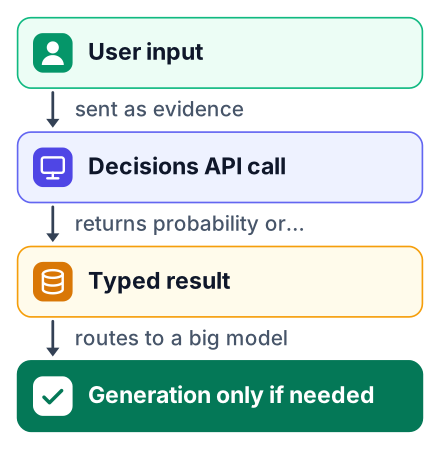
The OpenAI docs give three examples that fit together as one routing flow:
- Gate: a predicate checks whether an uploaded image shows a damaged product. If the probability is low, you skip the refund path.
- Route: a choice question sends the customer complaint to the right team.
- Classify: a support ticket arrives as JSON, and the API labels it before anyone reads it.
- Generate: only now, for the tickets that need a reply, do you call a text model to draft one.
Here is how the gate works with a ticket as JSON evidence. Ask a predicate question such as "Is this ticket about a refund?", read the returned probability, and compare it to a cut-off you chose from labelled examples. Use a choice question only to route, branching on its winning label and not on its confidence. The exact request and a real response, with every field shown, are in the Decisions guide, so copy them from there.
The Decisions guide shows a complete request and a sample response for each question type, with every field name written out, so copy from there rather than from a sketch. For a gate, start from its predicate example and send the ticket through an input_json content part. Read the probability from the response and compare it with a cut-off you picked from labelled examples: if it is above the cut-off, take the refund path, and if not, skip it. For routing, copy the choice example and read only the chosen value to pick a team, not the confidence beside it. Keep the two calls separate, so the gate decides whether a ticket matters and the route decides who sees it. Because the guide's examples are maintained by OpenAI alongside the API, they are a safer starting point than any code written here, and you can run them in the Playground first to see the real response before you add any code of your own.
If you have already followed my step-by-step Python agent guide, this call slots in before the agent loop. Let the decision pick the tool, and let the agent do the writing.
Try it in the Playground with no code
You can test a decision question in OpenAI's Playground today, before you write any integration code.
Open the Playground
Sign in to your OpenAI platform account and open the Playground.
Pick gpt-6-luna
Look for the Decisions option and select gpt-6-luna as the model. If you cannot find it in your account, use the request examples in the Decisions guide instead.
Write one question
Start with a choice question whose options mean clearly different things.
Paste a sample input
Use a real ticket, message or image from your own project, not a made-up one.
Read the result
Look at the probability and the confidence field, and note where they surprise you.
When the question behaves the way you want, the Decisions guide has ready-made request examples in six languages, including Python and JavaScript, plus curl. Pick the language your project already uses.
What GA added since the October 6 beta
General availability added prompt caching, JSON input, hosted image URLs and up to 400 questions per request, up from 200.
The full list of changes in the OpenAI docs:
- Prompt caching
- Images inside question instructions, so you can show a reference photo
- JSON input through
input_json - HTTP and HTTPS image URLs as well as base64
- Conversation history
- Usage reporting at the organization level
- Native GPT-Live integration
- Private Link
For a student project, JSON input and hosted image URLs are the two you will use first. They save you from base64-encoding photos and from flattening form data into text.
The rest mostly serves companies. Zero Data Retention and HIPAA support are available for eligible customers, with data residency in the US and in the EEA or Switzerland. If your future employer runs on a cloud platform, my post on OpenAI models on Google Cloud covers that side.
Limits to know before you trust the numbers
The choice question can over-concentrate probability, only gpt-6-luna is supported, and images cannot use file_id.
Pros
- Fast enough to sit in front of every request
- Input-only billing, so costs are easy to predict
- Typed output you can use directly in an
ifstatement
Cons
- One community loaded-coin test reported that choice returned about 98% instead of about 70% across 1000 trials
- Only gpt-6-luna works for now
- Images must be base64 or a public URL, not a file_id
That coin test is one reported result, not a settled fact, so repeat it on your own data. A coin that lands heads 70% of the time was given to the model, and choice reported about 98% heads. Until you have checked otherwise, do not use confidence values from choice as thresholds, because a gate that trusts an inflated number will let the wrong items through. If you need a probability to gate on, ask a predicate question instead. Use choice when you only need the winning label.
The guide's authoring advice, summarised by Unite.AI, is practical. Keep separate concerns in separate questions. Define score levels so neighbours differ clearly. Then set your threshold against real labeled examples, deciding which hurts more: a false positive or a false negative.
Should a student build with it?
Yes for classification and routing projects, and for gating checks, but no for anything where the user needs written text back.
Good fits work the same way in a college in Pune or a university in Ohio. A campus helpdesk router can send hostel and fee queries to the right office, and keep exam queries for a separate desk. A content-moderation gate can block a post before it goes live. A ticket triage tool can sort a student club's inbox by urgency. Unite.AI's coverage points to the same kind of classification work.
Poor fits are chatbots, summarisers and essay feedback tools. They need sentences, and a probability cannot write one. Pair those with a text model and keep the decision call in front.
Look at your current project. Which feature sends a full chat call just to get a yes, a no, or a label back? Test that one first, and use this rule: run 10 labelled examples, count the wrong answers, and only add code if at least 9 of 10 are right.


