Top JavaScript Interview Questions for 5 Years Experience
At five years of experience, JavaScript interviews test judgment, not recall. Video calls for a park bench is just a Twitter joke, and the only person who can make the call is you.

Say you have written JavaScript for five years. You can build a feature end to end without asking anyone for help. Then an interviewer asks, "What is a closure?" You give the clean textbook definition, and a rejection email follows two days later. Picture the feedback saying only that your answer sounded like a junior one, with no other detail. Same question, different grading.
At five years of experience, JavaScript interviews test judgment, not recall. You still get closures, the event loop and Promises. But the interviewer now wants to hear the bug each one causes in production, and how you would fix it. A definition alone passes a junior round and fails a senior one.
This list comes from the questions in GreatFrontend's JavaScript interview questions for 5 years experience, checked against MDN where the topic is the runtime itself. For each one, you get the answer that gets you hired.
Closures: from definition to stale-state bugs
A senior answer to "what is a closure?" links it to a real bug, such as a stale value captured inside a React hook. This is the version of the question that experienced candidates are usually asked. A closure is a function that keeps access to the variables around it, even after the outer function has finished running.
The surface answer stops there: "a function that remembers its scope." The deeper answer explains what that memory costs you. In React, every render creates new functions. Each one closes over the values from that render, and keeps them.
Here is the bug interviewers love to show you:
function Counter() {
  const [count, setCount] = useState(0);
  useEffect(() => {
    const id = setInterval(() => {
      setCount(count + 1); // count is stuck at its first value
    }, 1000);
    return () => clearInterval(id);
  }, []);
  return <p>{count}</p>;
}
The effect runs once, because the dependency list is empty. Its callback closed over the first count, so the counter goes up by one and then stops. The fix is to stop reading the captured value:
setCount(c => c + 1); // React passes the latest value inName the bug ("stale closure"), explain why it happens, then give two fixes. The updater function is one, and it is the one to prefer here, because the interval keeps running without restarting. Adding count to the dependency list is the other, with the trade-off that the interval restarts on every change.
Event loop: how tasks and microtasks give exact output
Microtasks such as Promise callbacks always run before the next task such as setTimeout, because each job runs to completion first, as MDN's page on the JavaScript execution model describes. JavaScript runs your code on a single thread. One job runs and finishes. Only then does the next one start.
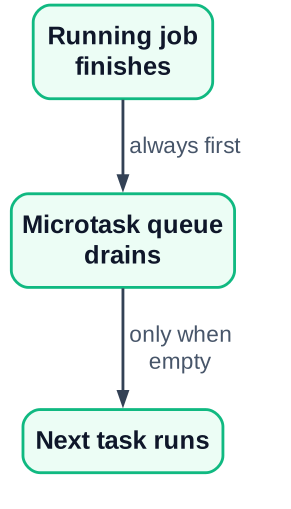
Interviewers test this with a "predict the output" snippet. Try this one before you read the answer:
console.log('sync start');
setTimeout(() => console.log('timeout'), 0);
Promise.resolve().then(() => {
  console.log('promise');
  queueMicrotask(() => console.log('nested microtask'));
});
queueMicrotask(() => console.log('queued microtask'));
console.log('sync end');
// Console output, line by line:
// sync start
// sync end
// promise
// queued microtask
// nested microtask
// timeout
Walk through it out loud, the way you would in the room. The two console.log calls are plain synchronous code, so they print first. The .then callback and the first queueMicrotask go into the microtask queue, in that order. The setTimeout callback goes into the task queue.
When the main script finishes, the engine empties the whole microtask queue. That includes the nested microtask, which was added while the queue was draining. Only after that queue is empty does the engine pick up the timeout. MDN calls this rule "run to completion": no job is ever stopped halfway so another can run.
The senior addition is the consequence. A long chain of microtasks can delay rendering and timers, because the browser cannot paint until the queue is empty. InterviewBit calls these timer callbacks macrotasks.
Promises and async code: what to run in parallel
Promise.all only helps when the inputs are independent. With a dependency chain, you await the first step, then run the rest together. The junior answer is "Promise.all is faster." The senior answer asks which calls depend on which.
// The orders and reviews both need the user, so fetch the user first.
const user = await getUser(id);
// These two don't depend on each other, so run them together.
const [orders, reviews] = await Promise.all([
  getOrders(user.accountId),
  getReviews(user.accountId),
]);
Then talk about failure. Promise.all rejects as soon as one input rejects, and you lose the results that did succeed. If a page can still show orders when reviews fail, Promise.allSettled is the better pick. Saying this unprompted is a strong signal.
The follow-up is often about requests you no longer need. Picture a search box: the user types fast, and an older, slower response arrives after a newer one. AbortController cancels the pending fetch when you call controller.abort():
let controller;
async function search(query) {
  controller?.abort();              // cancel the previous request
  controller = new AbortController();
  try {
    const res = await fetch(`/api/search?q=${query}`, {
      signal: controller.signal,
    });
    render(await res.json());
  } catch (err) {
    if (err.name !== 'AbortError') throw err;
  }
}
Two uses are worth naming. One is a user pressing "cancel." The other is making sure only the latest request can update the screen.
What 'this' refers to
The value of this depends on how a function is called, not where it is written. Arrow functions keep the this of the code around them. Most candidates can recite that rule. Fewer can spot where it breaks a real feature.
const timer = {
  seconds: 0,
  tick() {
    this.seconds++;
  },
  start() {
    setTimeout(this.tick, 1000); // bug: tick loses its object
  },
};
Passing this.tick hands over the function alone, without the object. When the timer later calls it, nothing is to the left of the dot, so this is not timer. In strict mode it is undefined, and the line throws.
Give both fixes and say when you would use each:
setTimeout(() => this.tick(), 1000);   // arrow keeps the outer this
setTimeout(this.tick.bind(this), 1000); // bind fixes this for good
The same bug shows up with event handlers and class methods passed as props. Mentioning those places tells the interviewer you have met it in real code.
Junior vs senior grading: the same question, side by side
The same three questions get different marks depending on whether you stop at the definition or go on to the trade-off, a pattern both GreatFrontend and its DEV Community version describe. Use this table as a self-check before any round.
| Question | Surface answer | Deeper answer |
|---|---|---|
| What is a closure? | A function that remembers its scope | Names the stale-closure bug in hooks and gives two fixes with their costs |
| How do Promises run in parallel? | Use Promise.all, it is faster | Orders calls by dependency, chooses all or allSettled, cancels stale requests |
| What does 'this' refer to? | The object that owns the method | Explains call-site binding and how a callback drops it |
Read across each row. The right column always contains a bug and a choice. If your answer has neither, the interviewer has nothing to grade above junior level.
For the event loop, MDN gives you the precise terms ("job," "task queue," "run to completion"). Using them correctly is part of the deeper answer.
Memory leaks in a long-running app
Take heap snapshots in Chrome DevTools and look for Detached HTMLDivElement counts and a JS heap that only rises. A typical scenario, an illustrative example rather than a measured case, is a React app left open all day whose memory climbs toward about 1 GB. A "detached" element is one removed from the page that JavaScript still holds a reference to, so the browser cannot free it.
Describe your process as steps. Interviewers want a method, not a guess:
Take a baseline snapshot
Open the Memory tab, load the page, and record a heap snapshot.
Repeat the suspect action
Open and close the same modal or route several times.
Take a second snapshot and compare
Filter for "Detached" and check whether the count keeps climbing.
Follow the retainers
Click a detached node and read which closure or listener still points to it.
Fix the cleanup
Remove the reference in the effect's cleanup function, then measure again.
The usual causes are familiar once you have seen them:
- A listener added to
windowordocumentinside a closure and never removed - A
setIntervalthat is never cleared - A
ResizeObserverorIntersectionObserverthat is never disconnected
Notice the link back to the first question. Each of these leaks is a closure holding on to something after the component is gone.
Animation timing: requestAnimationFrame over setInterval
setInterval(updateUI, 16) misses frames and is throttled in background tabs. requestAnimationFrame pauses when the tab is hidden. The 16 in that call is an attempt to match a screen's refresh rate by hand, and it does not hold.
Here is the contrast to give in the interview:
- setInterval: fires on its own clock. It drifts out of step with the screen, fires while the tab is hidden, and slows down badly on a busy device.
- requestAnimationFrame: the browser calls your function right before it paints. It matches the display and stops when nobody can see the page, which saves battery.
A strong closing line: "I would also check whether CSS transitions can do this, so JavaScript does not run every frame at all."
Modules: CommonJS vs ES modules
CommonJS uses require and module.exports, while ES modules use import and export, and a senior answer explains when a real project has to mix the two systems.
| CommonJS | ES modules |
|---|---|
require() and module.exports |
import and export |
| Loaded while the code runs | Read before the code runs, so tools can drop unused exports |
| The old Node.js default | The browser standard, and Node.js with "type": "module" |
Mixing happens in real projects. An older internal package may only ship CommonJS while your new service uses ES modules. Explain how you would load it, and why the test runner or bundler might need extra config. That is a judgment answer.
If your role leans toward the server, the Node.js interview questions for 5 years experience post goes deeper on the backend side.
How to prepare for advanced JavaScript interview questions
Practise saying the bug and the fix aloud for each topic, because experienced interviews reward explanation over memorised definitions. Say it the way you would in a live round, because an interviewer can only grade the reasoning they hear while you write the code.
Use this routine for each question:
Write the code
Type the snippet yourself from memory, without copying it.
Predict the output
Write down what you expect before you run it.
Explain the bug
Say what breaks in a real app and why.
State the trade-off
Give two fixes and the cost of each.
When you run out of material, InterviewBit's JavaScript interview questions has a long list for extra practice. Pair it with something you built: a small project from these JavaScript project ideas gives you real bugs to talk about.
Pick one question from this list today, such as the closure one. Write the code, predict its output, then say the bug and the fix out loud in under two minutes. Do one topic a day for a week.


