Node.js Interview Questions for 5 Years Experience
Senior Node.js interviews test how the runtime behaves, not just syntax. Expect deep questions on event loop phases, thread pools, memory leaks, and scaling. Here are the questions, model answers, and the code traps that separate a 2-year from a 5-year candidate.

A five-year Node.js interview rarely asks you to write code. Instead, the interviewer pastes a tiny snippet and asks what it prints. Here is a common one:
setTimeout(() => console.log('timeout'), 0);
setImmediate(() => console.log('immediate'));
Two lines, two logs. In my view, many candidates pick an order quickly and sound sure. That confidence is the trap. At top level the order can change from run to run; inside an I/O callback, immediate always wins.
Senior Node.js interviews test how the runtime behaves, not how you write syntax. Expect questions on the event loop phases, the libuv thread pool, memory leaks and garbage collection, and scaling with clusters or worker threads. Below are the questions, short model answers, and the code traps that separate a 2-year from a 5-year candidate.
The questions this post lets you practise:
- Explain the event loop and name its phases (event loop section).
- What does
setTimeout(0)vssetImmediateprint, and when is it guaranteed? (setTimeout vs setImmediate section). - nextTick vs setImmediate vs promises: what runs first, and what can starve I/O? (nextTick section).
- What happens when you start more crypto calls than the thread pool has threads? (thread pool section).
- How would you debug a service whose memory grows over days? (memory leaks section).
- Cluster, worker threads or child processes: which one, and how do you scale past one machine? (scaling section).
- Which performance traps would you look for in a slow API, and how would you measure them? (performance traps section).
Event loop phases decide what runs first
The event loop runs in a fixed order of phases (timers, pending callbacks, idle/prepare, poll, check, close callbacks), and interviewers ask you to name them and say where your callback lands, as the official Node.js event loop guide lays out.
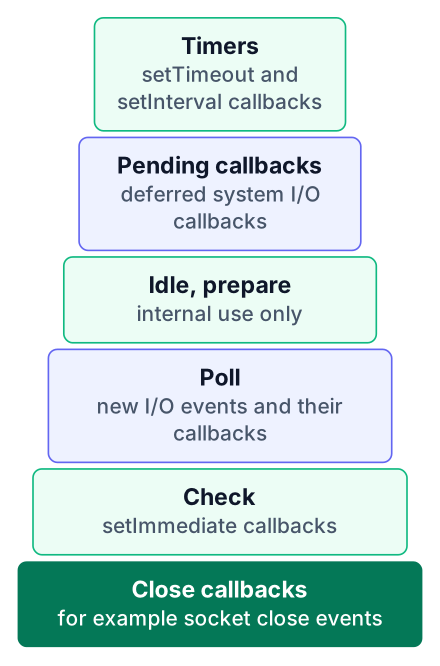
Here is a model answer to "Explain the event loop" that fits in under a minute. Node runs your JavaScript on one thread. When an async operation finishes, its callback waits in the queue for one phase. The loop visits each phase in turn, runs that queue, then moves to the next.
Timers
Runs callbacks from
setTimeoutandsetIntervalwhose time has passed.Pending callbacks
Runs some system-level callbacks that were deferred from the last loop, such as certain TCP errors.
Idle, prepare
Used only inside Node itself. You never schedule work here.
Poll
Waits for new I/O events and runs their callbacks, like a finished file read.
Check
Runs
setImmediatecallbacks.Close callbacks
Runs cleanup handlers, such as
socket.on('close').
The poll phase deserves one extra sentence in your answer. Poll decides how long the loop should block while waiting for I/O. That is why poll controls when timers run: a timer can be due, but its callback only fires once poll finishes and the loop wraps around. Between each callback, Node empties the nextTick and promise queues, which the next sections cover.
Interviewers like this question because every follow-up builds on it.
setTimeout vs setImmediate inside an I/O callback
Outside an I/O cycle the order of setTimeout(0) and setImmediate is not guaranteed, but inside an fs.readFile callback setImmediate always runs first, according to the Node.js event loop documentation.
Save this as file.js:
const fs = require('node:fs');
fs.readFile(__filename, () => {
  setTimeout(() => {
    console.log('timeout');
  }, 0);
  setImmediate(() => {
    console.log('immediate');
  });
});
Run it with node file.js. The output is the same every time:
immediate
timeout
Walk the interviewer through the phases to explain it. The readFile callback runs in the poll phase. When poll finishes, the next phase is check, so the immediate callback goes first. The timer has to wait for the loop to come back around to the timers phase.
The two-line snippet from the top of this post has no such anchor. At the top level, the order depends on how fast the process starts up and whether the timer is already due when the loop begins. You might see either order on the same laptop.
A strong answer says both halves: "not deterministic at the top level, always immediate first inside I/O." A weak answer picks one order and defends it.
process.nextTick can starve your I/O
process.nextTick runs right after the current operation, before the loop moves on, so calling it recursively blocks the poll phase and I/O never gets a turn, as the Node.js guide on timers and nextTick warns.
Model answer for "nextTick vs setImmediate vs promises": nextTick callbacks run first, the moment the current JavaScript finishes. Resolved promise callbacks (microtasks) run right after the nextTick queue empties. Both happen before the loop advances to its next phase. setImmediate waits for the check phase.
The code trap looks harmless:
const http = require('node:http');
function spin() {
  process.nextTick(spin);
}
http.createServer((req, res) => {
  res.end('ok');
}).listen(3000);
spin();
The server starts, but every request hangs. Each spin call queues another one before the loop can reach poll, where incoming connections would be handled. Swap process.nextTick for setImmediate and the server answers, because the loop gets to finish a full lap between calls.
| process.nextTick | setImmediate | |
|---|---|---|
| When it fires | On the current phase, right after the running code | On the next loop iteration, in the check phase |
| Can it starve I/O? | Yes, if called recursively | No, I/O runs between calls |
| Good for | Emitting an event after a constructor returns, cleaning up before anything else runs | Breaking up long work so requests still get served |
The names are confusing, and the docs admit it: "nextTick" is more immediate than "setImmediate." A 5-year candidate mentions the starvation risk without being asked. In my view, a 2-year candidate often knows nextTick is "faster" and stops there.
The libuv thread pool runs four crypto calls at once
Node's main thread is single, but libuv runs file, DNS and crypto work on a pool of threads, which is why four concurrent crypto.pbkdf2 calls finish together instead of one after another, a test shown on InterviewBit's Node.js question list.
Save this as pool.js:
const crypto = require('node:crypto');
const start = Date.now();
for (let i = 1; i <= 4; i++) {
  crypto.pbkdf2('secret', 'salt', 100000, 512, 'sha512', () => {
    console.log(`call ${i}: ${Date.now() - start} ms`);
  });
}
Run it with node pool.js. The InterviewBit example reports 1213, 1225, 1212 and 1222 ms, but treat those numbers as an example only. All four land together, near 1.2 seconds in that run. The default pool has 4 threads, so the demo starts four calls. A fifth call would wait for a free thread and finish in a second batch. Your numbers will differ by machine, and the line order can change.
Look at what the timings prove. If the hashing ran on the event loop thread, the calls would stack up, and the last one would take several times longer than the first. They land together because each hash runs on its own pool thread while the main thread stays free.
The follow-up question is almost always: "What happens if you start more calls than the pool has threads?" The extra calls wait in a queue. They start only when a thread frees up, so they finish in a second batch, later. You can change the pool size with the UV_THREADPOOL_SIZE environment variable, set before the process starts.
Add one detail to stand out. Network sockets do not use this pool. The operating system handles them asynchronously, which is why one Node process can hold many open connections at once.
Memory leaks and V8 garbage collection
V8 collects new objects with a fast Scavenge phase and older objects with Mark-Sweep or Mark-Compact, and leaks come from references you forgot to release, per the roadmap.sh Node.js questions.
The model answer on generations goes like this. Most objects die young, like the temporary values inside one request. Scavenge cleans that young space often and cheaply. Objects that survive a few rounds move to old space, where the slower mark-and-sweep pass runs less often.
Garbage collection in V8 frees only what nothing points to. A leak is an object your code still points to but no longer needs. Common causes:
- Global caches with no limit. A
Mapthat stores every user ID it has seen keeps growing for as long as the process lives. - Event listeners that are never removed. Adding
emitter.on()inside a request handler adds one more listener per request. - Closures holding large objects. A small callback that refers to a big buffer keeps the whole buffer alive.
- Timers left running. A
setIntervalwithout a matchingclearIntervalkeeps its closure, and everything inside it, reachable.
The key question here is: "How would you debug a service whose memory grows over days?" A senior answer has an order to it:
- Confirm the trend with metrics, such as
process.memoryUsage().heapUsedover time, so you know it is a leak and not normal growth. - Reproduce it locally or in staging with similar traffic.
- Start the process with
node --inspectand open Chrome DevTools fromchrome://inspect. - Take a heap snapshot, send traffic, take another, and compare them.
- Find the object type that keeps growing and read its retainer chain to see what holds it.
- Fix the reference, then rerun the same test to prove memory stays flat.
Scaling with cluster, worker threads and child processes
Use cluster to run one worker per CPU core for network load, and worker threads for CPU-heavy tasks because they share memory while forked child processes do not, as both the Node.js cluster docs and roadmap.sh describe.
| cluster | worker_threads | child_process | |
|---|---|---|---|
| Memory | Separate per worker process | Shared (via SharedArrayBuffer), same process | Separate per process |
| Best for | Serving more HTTP traffic on one machine | CPU-heavy work like image resizing or hashing | Running another program or script |
| Cost | A full Node process per worker | Lighter, but you manage thread safety | A full process, plus messages copied between them |
With cluster, a primary process forks workers that share the same server port. The docs say connections are spread round-robin by default. They also explain why: when the operating system hands sockets to workers directly, over 70% of connections can land in just 2 of 8 processes, according to the cluster documentation. This means one core can be overloaded while others sit idle, so Node uses round-robin on Linux and macOS.
A system design follow-up usually zooms out: "How would you scale this past one machine?" Put a load balancer in front of several servers. Keep each Node worker stateless, with sessions and caches stored in a shared store like Redis. Then any worker can serve any request, and you can add machines without code changes.
In containers, many teams skip cluster and run one Node process per container, letting the orchestrator add copies. Saying you know both options, and when each fits, is the senior signal.
Performance traps that separate 2-year from 5-year candidates
Senior answers name the trap, such as blocking the loop with sync code or a heavy JSON parse, and then say how they would measure and fix it, which is the pattern behind many questions on roadmap.sh's Node.js list.
fs.readFileSyncin a request handler. Every request waits while the file loads. Fix: usefs.promises.readFile, or read the file once at startup.- Unbounded
Promise.all. Firing thousands of database calls at once overloads the database and your memory. Fix: process in small batches or use a concurrency limit. - CPU work on the main thread. A big
JSON.parseor a sorting job freezes every other request. Fix: move it to a worker thread, or stream the data. - Missing backpressure on streams. Writing faster than the destination can accept fills memory. Fix: use
stream.pipeline(), or respect thefalsereturned bywrite(). - No timeout on outbound calls. One slow API makes your requests pile up. Fix: set a timeout with
AbortSignal.timeout()and fail fast.
For measuring, name a tool. node --prof or the DevTools CPU profile shows where time goes. The perf_hooks module can track event loop delay, which tells you when the loop is blocked.
A 4-step way to structure any senior answer, with a worked example
Interviewers at 5 years listen for trade-offs and measurement, so state what you would pick, what it costs, and how you would check it, a pattern you can practise with the extra questions on InterviewBit.
A simple structure keeps you on track:
- Claim: what you would do.
- Reason: why it fits this case.
- Trade-off: what it costs or where it breaks.
- Verify: how you would measure that it worked.
Say you are asked to scale an API that slows under load. A 2-year answer is "add more servers." A 5-year answer sounds different: "First I'd check event loop delay to see if we're CPU-bound or waiting on I/O. If it's CPU, I'd move the heavy part to worker threads. That adds complexity, so I'd load-test before and after to prove it helped."
A senior round rarely stops at the runtime. Expect a database half too, and the SQL interview questions for 5 years experience post covers that side with window functions. This post is about how Node behaves; that one is about querying the data behind it.
If the role is full-stack, be ready to explain how your API talks to the browser; the guide on how to connect a React frontend to an API covers that path.
Run both demos on your own machine today. Save the fs.readFile ordering example and the four-call pbkdf2 example, run each with node, and explain the output out loud in your own words. Then pick one performance trap from the list above and fix it in a small project of yours.