How to Add a Free Database to Your Web App in 2026
Use MongoDB Atlas M0 if your API is Node/Express, or Supabase or Neon if you want SQL. Each free tier takes something away, so pick the one whose limit your demo will never hit, then copy the connection code.

As of August 2026, FreeTier.co's comparison of 15 free database tiers lists Render's free Postgres as a plan that expires after 30 days. Pick that plan for your first web app and your users, posts and test data could be gone on day 31. The word "free" means very different things on different pricing pages. You need to know which kind you are signing up for.
Use MongoDB Atlas M0 if your API is Node/Express, or Supabase or Neon if you want SQL. Each free tier takes something away: storage, speed, project count or uptime. Pick the one whose limit your demo will never hit, then copy the connection code below.
Pick the free tier whose limit you can live with
Every free database trades one thing away, so choose by the limit you will never reach in a first project. FreeTier.co's 2026 roundup shows four kinds of limit:
- A project count. You get a small number of databases, and the next one costs money.
- A storage cap. Your data has to fit under a fixed size.
- A speed limit. Requests slow down when your app sends too many at once.
- An idle pause. The database switches off when nobody uses it for a while.
A first web app rarely has much data or traffic. The limit that hurts beginners is usually the pause, because a portfolio project sits untouched for weeks between interviews.
Free database tiers compared in 2026
The tiers that stay free without a credit card are MongoDB Atlas, Supabase, Neon, DynamoDB, CockroachDB and Cloudflare D1, while Render's free Postgres is only a 30-day trial, according to FreeTier.co's August 2026 check. The table below combines that check with MongoDB's own pricing page. All prices are in dollars, and every row here costs $0.
| Database | Free storage | What it takes away | Source |
|---|---|---|---|
| MongoDB Atlas (M0) | 512 MB | Throttled above 100 operations per second; shared RAM and CPU | MongoDB pricing |
| Supabase | 500 MB per project | 2 projects only; pauses after 1 week idle | FreeTier.co |
| Neon | 0.5 GB per project | Compute budget of 100 CU-hours per project per month; compute suspends when idle, so the first request after a quiet spell is slower, but your data is kept | FreeTier.co |
| DynamoDB | 25 GB | Needs an AWS account | FreeTier.co |
| CockroachDB | 10 GiB | Postgres-compatible, with some differences to learn | FreeTier.co |
| Cloudflare D1 | 5 GB | 5 million rows read per day | FreeTier.co |
| Render Postgres | Trial only | Expires; not a lasting free tier | FreeTier.co |
| Xata | None hosted | No perpetually free hosted plan | FreeTier.co |
A "CU-hour" is one hour of one compute unit running your queries. For a demo that only runs when someone opens it, that budget goes a long way. Free tiers change sizes every year. Only the MongoDB row comes from the vendor's own page, and the other rows come from one roundup, so confirm each number on the vendor's pricing page before you commit.
Which one should I pick?
- Node/Express API and you like documents: MongoDB Atlas setup.
- SQL, with users linked to orders: Neon or Supabase setup.
- A demo that sits idle for weeks: Neon, in the same Neon and Supabase section.
Create a free MongoDB Atlas cluster
Atlas's M0 cluster gives you 512 MB of shared RAM and CPU at no cost, which is plenty for a first API, according to MongoDB's pricing page. Setup takes a few minutes in the browser.
Sign up
Create an account on the Atlas website. A Google or GitHub login works.
Choose the free cluster
On the "Deploy" screen, pick the card labelled "M0 Free", the same free tier described on MongoDB's pricing page. Do not pick a paid tier by accident.
Pick a region
Choose the region closest to where your backend runs.
Create a database user
Set a username and password. This is separate from your Atlas login.
Allow your IP address
Under Network Access, add your current IP. Add your hosting provider's IP too when you deploy.
Copy the connection string
Click Connect, choose "Drivers", and copy the string that starts with
mongodb+srv://.
For an app serving users in India, the Mumbai region (ap-south-1, listed among the cloud regions on MongoDB's pricing page) cuts the distance each request travels. In the US, match the region to your host. A backend in Virginia talks faster to a database in Virginia than to one in Oregon.
Students get extra room. The same pricing page says the GitHub Student Developer Pack adds $50 in Atlas credits plus free MongoDB certifications.
Connect Express to Atlas with Mongoose
Mongoose connects with one mongoose.connect call that reads your connection string from an environment variable, as shown in MongoDB's official Mongoose tutorial. Mongoose is a library that adds schemas (rules for what each document looks like) on top of MongoDB.
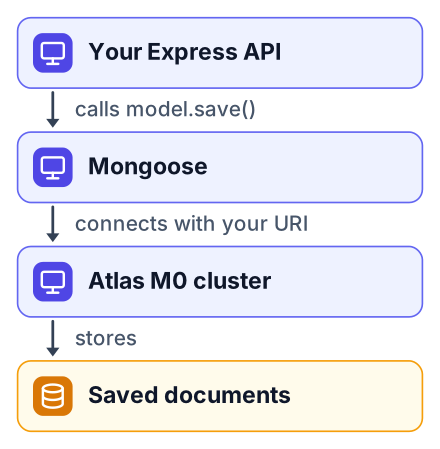
Install it with the dotenv package, which loads secrets from a file:
npm install mongoose dotenvCreate a file named .env in your project root and paste your string, with your real password in place of the placeholder:
MONGODB_URI=mongodb+srv://appUser:yourPassword@yourcluster.mongodb.net/myappAdd .env to your .gitignore before your next commit. Then write the connection code:
import 'dotenv/config';
import mongoose from 'mongoose';
await mongoose.connect(process.env.MONGODB_URI);
const blogSchema = new mongoose.Schema({
  title: String,
  author: String,
  body: String,
  createdAt: { type: Date, default: Date.now },
});
const Blog = mongoose.model('Blog', blogSchema);
await Blog.create({ title: 'Hello Atlas', author: 'You', body: 'My first saved document' });
const found = await Blog.findOne({ title: 'Hello Atlas' });
console.log(found);
Here is what each part does:
import 'dotenv/config'reads.envintoprocess.env.mongoose.connectopens the link to your cluster. Theawaitmakes the code wait until it is ready.new mongoose.Schemalists the fields every blog post has and their types.mongoose.modelturns that schema into a model you can save and search with.Blog.createsaves one document.Blog.findOnefetches it back.
Top-level await needs "type": "module" in your package.json. Inside Express, move the model into its own file, such as models/Blog.js, export it, and call Blog.find() from a route like this:
import express from 'express';
import Blog from './models/Blog.js';
const app = express();
app.get('/blogs', async (req, res) => {
  res.json(await Blog.find());
});
app.listen(3000);
If your React app needs to show this data, the next piece is connecting a React frontend to your API.
Choose Supabase or Neon when your data is relational
When your data has tables that link to each other, such as users and their orders, a SQL database fits better than MongoDB. Both Supabase and Neon run Postgres, and FreeTier.co shows how their free limits differ.
Supabase
- Good: adds login, file storage and a table editor in the browser
- Good: useful when you want a backend without writing one
- Limit: 2 free projects, and a project pauses after a week idle (FreeTier.co)
Neon
- Good: plain Postgres, nothing extra to learn
- Good: up to 100 projects, so each app idea can have its own database
- Limit: a monthly compute budget per project rather than a one-week pause (FreeTier.co)
For a demo that sits unused for weeks, Neon is the safer pick, because FreeTier.co lists a monthly compute budget for it rather than a one-week pause. Check Neon's own pricing page before you rely on that, since free-tier rules change. Atlas M0 clusters can also pause after a long idle stretch (see the free-tier rules on MongoDB's pricing page), so open your demo link yourself before you share it. If the cluster has paused, click Resume in the Atlas dashboard and wait a few minutes for it to start.
Either one connects the same way from Node. Here is the Neon setup, and Supabase follows the same pattern:
Create a project
Sign up on Neon's website, then create a new project from the dashboard.
Copy the connection string
Click Connect on the project dashboard and copy the string that starts with
postgresql://. In Supabase, copy the Postgres connection string from the project's Connect panel.Paste it into .env
Add the string to your
.envfile asDATABASE_URL.Install the driver
Run
npm install pg dotenv, then query:
The code below connects and asks the database for the time:
import 'dotenv/config';
import pg from 'pg';
const pool = new pg.Pool({
  connectionString: process.env.DATABASE_URL,
  ssl: { rejectUnauthorized: true }, // verify the server's certificate
});
const result = await pool.query('SELECT NOW()');
console.log(result.rows);
If that prints something like [ { now: 2026-10-26T09:14:03.512Z } ], your app can reach the database. The ssl option is there because both providers require an encrypted connection, and the setting above keeps certificate checking switched on.
To see relational data work, run this SQL in the Neon SQL editor (or in Supabase's table editor). It creates a users table and an orders table linked to it, adds one row to each, and reads them back together:
CREATE TABLE users (id SERIAL PRIMARY KEY, email TEXT NOT NULL);
CREATE TABLE orders (id SERIAL PRIMARY KEY, user_id INT REFERENCES users(id), item TEXT);
INSERT INTO users (email) VALUES ('you@example.com');
INSERT INTO orders (user_id, item) VALUES (1, 'Notebook');
SELECT users.email, orders.item FROM orders JOIN users ON users.id = orders.user_id;
The last query returns one row with the email and the item, which is the link between the two tables.
Keep the database free after the demo
A free tier stays free only if your app respects its limit, so watch the one cap your chosen database enforces. On Atlas, that is the operations-per-second ceiling from MongoDB's pricing page.
Do:
- Add an index on any field you search by often, like
emailorslug. An index is a sorted lookup list the database keeps, like the index at the back of a book. One indexed lookup costs less work than a full scan. - Cache reads that repeat. A cache is a saved copy of an answer you reuse instead of asking the database again. A home page list that changes once a day does not need a fresh query on every visit.
- Choose Neon over Supabase for a demo a recruiter may open without warning, since a Supabase project pauses after 1 week idle and stays asleep until someone restores it.
- Write the database name and any setup steps in your project's README. This README guide shows the layout.
Don't:
- Sign up for a plan with an end date, even if the dashboard calls it free.
- Push your connection string to GitHub. Bots scan public repos for exactly this.
- Run a loop that sends one query per item when a single query can fetch them all.
When the app goes live, set the same variable in your host's settings page. The steps for that are in deploying your first web app for free.
Common mistakes with free databases
Most first-time failures come from a blocked IP address, a wrong password character, or a database that paused while nobody used it. Each has a quick fix.
- IP not allowed in Atlas. The connection times out. Add your IP, and your host's, under Network Access.
- Special characters in the password. Symbols like
@or#break the connection string. Wrap the password inencodeURIComponent, or use a password with only letters and digits. - Committing
.env. Your secret is now public. Change the database password at once, then add.envto.gitignore. - Choosing Render's trial Postgres. It deletes itself, as FreeTier.co notes. Move to Neon before the trial ends.
- Forgetting a paused Supabase project. Your API returns errors with no clear message. Restore the project from the Supabase dashboard.
Create your free Atlas M0 cluster today (or a Neon project if you prefer SQL), paste the Mongoose connection code into your Express app, and save one test document before you deploy.