Does Claude Have Voice Mode? Yes — Here's What Changed in 2026
Yes, Claude has voice mode in 2026, on every plan including Free. Since July 23, 2026, paid plans can use Opus or Sonnet for voice instead of the small Haiku model. We explain the plans, limits, languages, and how it compares to ChatGPT voice.

Say you are on a forty-minute bus ride in Kolkata, or a campus shuttle in Ohio. You have a database exam tomorrow, and your notes are in your bag. You want someone to quiz you out loud on joins and normal forms. Until July 2026, asking Claude to do that meant talking to its smallest model, Haiku, as TechCrunch reported. Can it do better today, and does it beat ChatGPT for this?
Yes, Claude has voice mode in 2026, on every plan including Free. It is a beta feature on iOS and Android, and on desktop and web. Haiku is the small, fast model, Sonnet sits in the middle, and Opus is the strongest. Since July 23, 2026, paid plans can pick Opus, Sonnet or Haiku for voice, while Free stays on Haiku (Claude Help Center).
Claude voice mode in 2026: what changed in July
On July 23, 2026, Anthropic ended Haiku-only voice and let paid plans choose a stronger model, TechCrunch reported.
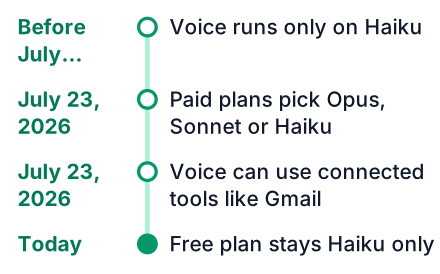
The update did more than swap the model. You can change models in the middle of a voice chat. You can also move from typing to talking in the same conversation, and Claude keeps the context. Per the help doc, voice starts on whichever model you last used in text chat.
That default matters for studying. If you were typing with Opus about B-trees an hour ago, your voice quiz starts on Opus too. One model is left out: voice mode does not work with Claude Fable at all, so pick Opus, Sonnet or Haiku instead.
| When | Voice model on paid plans | Voice model on Free |
|---|---|---|
| Before July 23, 2026 | Haiku only | Haiku only |
| From July 23, 2026 (TechCrunch) | Your choice of Opus, Sonnet or Haiku | Haiku only |
Voice mode by plan: Free, Pro, Max, Team and Enterprise
Every plan gets voice, but only the paid plans get a choice of model and more than one connected tool, per the Claude pricing page.
| Plan | Voice models | Connected tools | Monthly cost in USD (claude.com/pricing) |
|---|---|---|---|
| Free | Haiku | One | $0 |
| Pro | Opus, Sonnet, Haiku | More than one | $20 billed monthly, or $17 a month billed yearly |
| Max | Opus, Sonnet, Haiku | More than one | From $100, with 5x or 20x Pro's usage |
| Team | Opus, Sonnet, Haiku | More than one | $20 per seat billed yearly or $25 billed monthly; premium seat $100 |
| Enterprise | Opus, Sonnet, Haiku | More than one | $20 per seat plus usage, minimum 20 seats |
None of these prices includes a voice add-on. If the two Max tiers confuse you, read Claude Max 5x vs 20x, explained with pizza.
Claude voice mode limits in 2026
Voice has no quota of its own, so a long spoken study session uses up the same allowance as typed chat, according to the Claude Help Center.
Your model choice decides how fast that allowance drains. Opus is the strongest model, and as a general expectation a stronger model uses your limit faster than Haiku does, though the Help Center gives no figure for voice. A sensible split: Haiku for quick flashcard quizzing, Sonnet for explaining a topic, Opus for a hard proof or a system design question.
On Pro, a few long Opus voice sessions can hit the limit before the day is over. My guide on stretching Claude Pro usage limits shows how to plan around that. Remember too that the whole feature is still labelled beta, so menus and behaviour can change without warning.
Pros
- Paid plans can think with Opus, the strongest Claude model.
- Context carries over when you switch from typing to talking.
- It can act on your connected apps, after asking you.
- It works hands-free on your phone, where it is built to work best.
Cons
- You cannot cut in while Claude is mid-answer.
- Long spoken sessions eat into your text allowance.
- It is still a beta feature.
- Languages other than English must be chosen by hand in Settings.
Languages: Hindi and 9 others, and how to switch
Claude voice speaks about 10 languages in 11 locale options, and you must choose a non-English one by hand, per the help doc.
- English
- French
- German
- Hindi
- Indonesian
- Italian
- Japanese
- Korean
- Brazilian Portuguese
- Spanish, in two locales: Latin America and Spain
Every language other than English is still in beta, CNET notes. For a student in India, Hindi is the useful one. You can ask Claude to explain recursion in Hindi, then ask the follow-up in English. In the US, Spanish speakers get the same benefit.
Here is the catch. Setting your phone or the Claude app to Hindi does not change the voice language. You switch it here:
Open Settings
Tap your profile in the Claude app, then Settings.
Go to Capabilities
This is where Claude's optional features live.
Open Voice
Find the voice section under Capabilities.
Pick a Spoken language
Choose Hindi, or any other locale, from the list.
Connected tools in voice: Gmail, Calendar, Docs and Slack
Claude voice can act on your connected apps, and it asks your permission before it does, TechCrunch reports.
Anthropic names four tools: Gmail, Google Calendar, Google Docs and Slack. TechCrunch's demo also used Canva and Notion. Free accounts can connect one tool, and paid plans can connect more (Claude Help Center).
These requests work for a student in Pune or in Austin:
- "What classes do I have tomorrow?" Claude reads your Google Calendar and answers aloud.
- "Add a two-hour revision block for operating systems on Saturday morning." Claude asks first, then creates the event.
- "Summarize my DBMS notes doc." Claude opens the Google Doc and reads you the main points.
- "Did my professor email about the lab deadline?" Claude searches Gmail for it.
On Free, connect the one tool you open most while studying. For most students, that is Google Calendar or Google Docs.
Claude voice vs ChatGPT voice: turn-based vs full-duplex
Claude waits for you to finish before it answers, while ChatGPT's GPT-Live listens and speaks at the same time and lets you cut in, as TechCrunch describes.
| Feature (TechCrunch) | Claude voice | ChatGPT voice (GPT-Live) |
|---|---|---|
| Turn style | Turn-based: listens, pauses to think, then replies | Full-duplex: listens and speaks at once |
| Interruption | You wait for Claude to finish | You can cut in mid-sentence |
| Tools | Can act on Gmail, Calendar, Docs, Slack and others, with permission | Still cannot use different tools to get work done |
| Model choice | Paid plans pick from Opus, Sonnet or Haiku | Varies by plan; check OpenAI's current voice page for limits |
Hands-free studying: which voice mode wins
I have not run a side-by-side test, so this is reasoning from how each one works. In theory, Claude should suit you when you want to think a hard problem through aloud with a strong model, and ChatGPT should suit you when you want quick back-and-forth you can interrupt.
DigitalApplied frames Opus in voice as a thinking partner for hard problems. That is where turn-taking helps you. Imagine you are stuck on why a query needs a GROUP BY. You explain your reasoning in full, Claude thinks, then it should point to the gap. I have not tested this scenario.
Anthropic's own list of good uses fits a student's day: learning while you commute or exercise, daily planning, interview practice and capturing ideas (Claude Help Center). Mock interviews suit Claude well. In a real interview you also answer fully before the other person speaks.
Pick by what you are doing and what you can spend:
- Explaining a concept or a mock interview: Claude, on Sonnet or Opus if you pay.
- Planning your week by voice: Claude, because it can write to your calendar.
- Fast formula or vocabulary drills: ChatGPT, because you can cut in when you already know the answer.
- No budget yet: try both free tiers and compare on one real topic.
- Daily voice for long hours: look at Max, since voice shares your usage pool.
Is Claude voice mode worth paying for?
If you only want to talk to Claude hands-free, Free is enough to try it, and Pro at $20 a month is the plan to pay for once you need Opus or Sonnet (Claude pricing). Paying for a year brings Pro down to $17 a month on the same page.
Open the Claude app, go to Settings, then Capabilities, then Voice, and run a ten-minute spoken quiz on one topic from tomorrow's exam. Then try the same drill in ChatGPT voice and keep the one you finish more questions with.