Claude Pro Usage Limits: 7 Ways to Make $20 Last Longer
Claude Pro gives you a usage budget, not a fixed message count. Learn how the 5-hour session window and weekly limit work, and how to stretch your $20 subscription much further.

Here is an example, not a measured case: say you open Claude on a Sunday night with a project due Monday. You type one long prompt, attach three PDFs, and get a "limit reached" message after only a few replies. You did not send many messages at all. Something else was using up your budget: the long prompt and the three PDFs turned into far more tokens than a few short questions would, and you can see this if you know where to look.
Claude Pro does not give you a fixed number of messages; it gives you a usage budget that refills on a rolling 5-hour session window, plus a weekly limit that resets at a fixed time for your account. Pro costs $20 per month, according to Anthropic's Pro plan page. Three attached PDFs and one long prompt can use much more budget than a handful of short questions, though I have not measured the exact gap. You make the budget last longer by watching the meters in Settings, lowering effort, putting reused files in Projects and batching requests.
Know what Claude Pro usage limits really count
A long prompt with files costs far more than a short question, because Pro usage is measured as a budget of work, not a count of messages.
The unit behind the budget is the token, a small piece of a word. Your prompt, your files and Claude's reply all turn into tokens. A one-line question about a Python error is cheap. A forty-page PDF plus "summarise this and write my report" is expensive.
You may see the figure of about 45 messages per session. That is only an estimate for short, light Pro chats, and the same source says long prompts, attached files and model choice all use more. Long conversations also grow in cost, because Claude reads the earlier turns again with every new reply.
If you are still deciding whether to pay, my post on the Claude Pro price in India covers the money side. This post is about getting the most from the plan once you have it.
Read the 5-hour session window and the weekly limit
The session limit refills on a rolling 5-hour window. The weekly limit resets at a fixed time assigned to your account, as Anthropic's Pro plan page explains. This means a quiet Tuesday does not help a heavy Sunday.
"Rolling" means the window follows your own activity, not the calendar. Say you send your first message at 9:00; that session window ends at 14:00. The weekly limit works differently. It sits on top of every session and refills only at your account's set time, whatever you did during the week.
| Session limit | Weekly limit | |
|---|---|---|
| What it measures | Usage inside one rolling window | Total usage across the whole week |
| When it resets | Every 5 hours, on a rolling basis (source) | At a fixed time set for your account |
| What happens when you hit it | Wait for the window to refill, or use credits | Wait for the weekly reset, or use credits |
Hitting a limit does not have to stop your work. Anthropic lets usage credits carry you past the included limits, but those cost extra money. Treat them as an emergency option before a deadline, not a weekly habit.
Open Settings > Usage and check your meters
Settings > Usage shows progress bars for your current session and your weekly limit, plus the reset time, so you can plan your work before you are blocked.
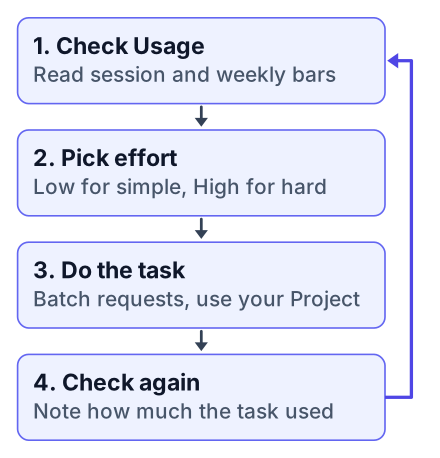
Most students never open this page until they are blocked. Checking it takes less than a minute. Here is a routine you can run every Monday and before any big task:
Open the usage page
Go to Settings, then Usage, on the web or in the desktop app.
Read both bars
Note how full the session bar is and how full the weekly bar is. The weekly bar is the one that can make you miss a deadline.
Write down the reset time
Put your weekly reset time in your phone calendar as a repeating event.
Sort today's tasks
Run the heavy jobs now if the weekly bar is low. Push the light ones, or do them by hand, if it is high.
Now plan the week against that one budget. Say you have a lab report due Thursday and a coding assignment due Saturday. Do the heavy reading for the lab report early, while the weekly bar is near empty. Keep a slice of the week for the coding work, because debugging sessions grow fast.
If the weekly bar is already past half by Wednesday, change your plan that day. Waiting until Friday night leaves you no room to change anything.
Lower the effort level for simple tasks
Low and Medium effort use fewer tokens, so save High effort for the hard debugging or design question and use Low for renaming, formatting and quick explanations.
Effort controls how much thinking Claude does before it answers. The effort control is not offered on every model, and where it sits can differ by model and app version, so look near the model picker first and, if you do not see it, check the usage limit best practices page to see which models offer it. More thinking means more tokens. Most student tasks do not need the deepest level, and Gmelius gives the same advice for making a plan last.
- Low: renaming variables, fixing indentation, "what does this error mean", turning notes into bullet points.
- Medium: explaining a new concept with an example, reviewing a short function, drafting an email to a professor.
- High: a bug you have chased for an hour, choosing a database design, planning a project's structure.
The Low, Medium and High lists above are my own rule of thumb, not official guidance. Switch from Low to High as soon as a Low answer comes back wrong or shallow once, instead of paying for several follow-ups. Pair this with the meters. When the weekly bar is high, drop everything you can to Low. When it has just reset, that is the time to spend High effort on your hardest problem.
Pros
- Saves budget on routine work.
- Leaves more weekly budget for harder tasks later.
Cons
- Reasoning may be shorter on hard problems.
- A wrong Low answer can cost more in follow-up messages than one High answer.
Put reused files in a Project
Projects cache content you reuse, so lecture notes or an assignment brief that you upload once count less than the same files pasted into every new chat.
Caching means Claude keeps a ready copy of those files instead of processing them from scratch each time. The saving should grow with every chat you open inside the Project, though I have not measured by how much.
A simple setup that works for a B.Tech student in Pune or a CS student in Ohio: make one Project per course. Put the syllabus, the assignment brief and your own notes inside it. Every question about that course starts from the Project, not from a blank chat.
Compare that with the usual habit. You open a new chat, attach the same assignment PDF, ask one question, and repeat that ten times across the week. Each upload is paid for again.
This is not only a Pro feature. Free users got Projects and Artifacts in February 2026, so you can build the habit before you pay.
Batch similar requests into one message
One message that asks for three related things costs less than three separate messages that each re-read the same context. I have not tested this against the Usage bar, so treat the size of the saving as unmeasured.
Here is a typical set of separate prompts about one function:
Message one:   Explain what this function does.
Message two:   Now add comments to it.
Message three: Now write two test cases for it.
And here is the same work as one prompt:
For the function below, do three things:
a) explain in plain words what it does,
b) return it with short comments added,
c) write two test cases, one for normal input and one for empty input.
The batched version sends the function once and gets everything back in one reply. It also forces you to think about what you want before you type.
Do not batch when one step depends on the answer to the step before. If you need Claude to find the bug before you decide how to fix it, ask about the bug first. Read the answer, then ask the follow-up.
Remember that Claude Code shares the same pool
Chat, Claude Code, and the desktop and mobile apps all draw from one pool, so a long coding session can leave you with little chat capacity.
AIUsageBar describes the same thing: heavy Claude Code use reduces what you have left for chat. Claude Code reads files, runs commands and loops on errors, and each loop costs tokens. Features that let it work on its own, like those in my Claude auto mode setup guide, make this faster still.
In May 2026, Anthropic doubled Claude Code's 5-hour limits for Pro and removed peak-hour reductions, according to one third-party report. That means Anthropic stopped lowering your limit at busy times of day. Check your Usage page to see what applies to you now. The weekly limit still applies, and it is still shared.
Compare Claude Pro limits, free tier limits and API rate limits
The free tier has a smaller allowance than Pro, and one third-party guide estimates roughly 30 to 100 messages a day, so check the Claude Help Center for the current Free limits. The API uses separate rate limits and billing that a Pro plan does not cover.
These are three different systems. People search "claude pro limits", "claude free tier limits" and "claude api rate limits" as if they were one thing, and that causes confusion.
| Free | Pro | API | |
|---|---|---|---|
| Price or billing | No charge (source) | Flat monthly fee (source) | Pay for what you use (source) |
| What the limit measures | A small daily allowance of messages | Session window plus weekly limit | Rate limits per request and per minute |
| Claude Code access | No | Yes, from the shared pool | Separate, billed per use (source) |
API rate limits matter only if you build an app that calls Claude from your own code. Paying for Pro does not give you API access, and API spending does not refill your Pro meters. For the details of each tier, read AIUsageBar's breakdown and TrueFoundry's guide to Claude Code limits.
Open Settings > Usage right now, write down your weekly reset time, then plan your next assignment so the hardest task runs at High effort inside a Project right after the reset.


