How an AI Coding Agent Actually Works (and Why I Use Claude Code)
What an agent harness is, how agentic coding differs from autocomplete, and why I reach for Claude Code over Cursor, Copilot, Aider, and Codex CLI.
For a whole afternoon, my plain code-completion tool kept handing me a fix that looked correct and wasn’t. A date function was off by one day. The autocomplete confidently rewrote the same broken line four times, each version looking clean, none of them passing. I was the one running the tests by hand, copying the red output back, and asking again.
Then I handed the same bug to an agent that could run the tests itself. It changed the line, ran the test suite, read the failure, changed it again, and stopped only when the suite went green. Three loops. No babysitting from me.
That gap is the whole point of this post. The model guessing the next line of code is one thing. A program wrapped around that model, one that can run your tests and react to what they say, is a different thing. That wrapper is called an agent harness, and the harness I reach for is Claude Code. Let me show you why, in plain terms, and let me be honest about where the other tools genuinely win.
Prefer to listen? Here is the full post as audio (about 12 minutes), narrated with AI.
What is an agent harness, actually?
An agent harness is the program built around the AI model that lets it read your files, run commands, and keep looping until the job is done.
- Think of the model as an engine. An engine on a workshop floor is powerful, but it cannot take you anywhere on its own.
- The car built around the engine, the wheels, the steering, the brakes, the dashboard, is what turns that power into something you can drive.
- The harness is the car. The model is the engine inside it.
- On its own, the model only produces text.
- It cannot open
app.py, it cannot runnpm test, and it cannot see whether the thing it just wrote actually works. - The harness gives it hands.
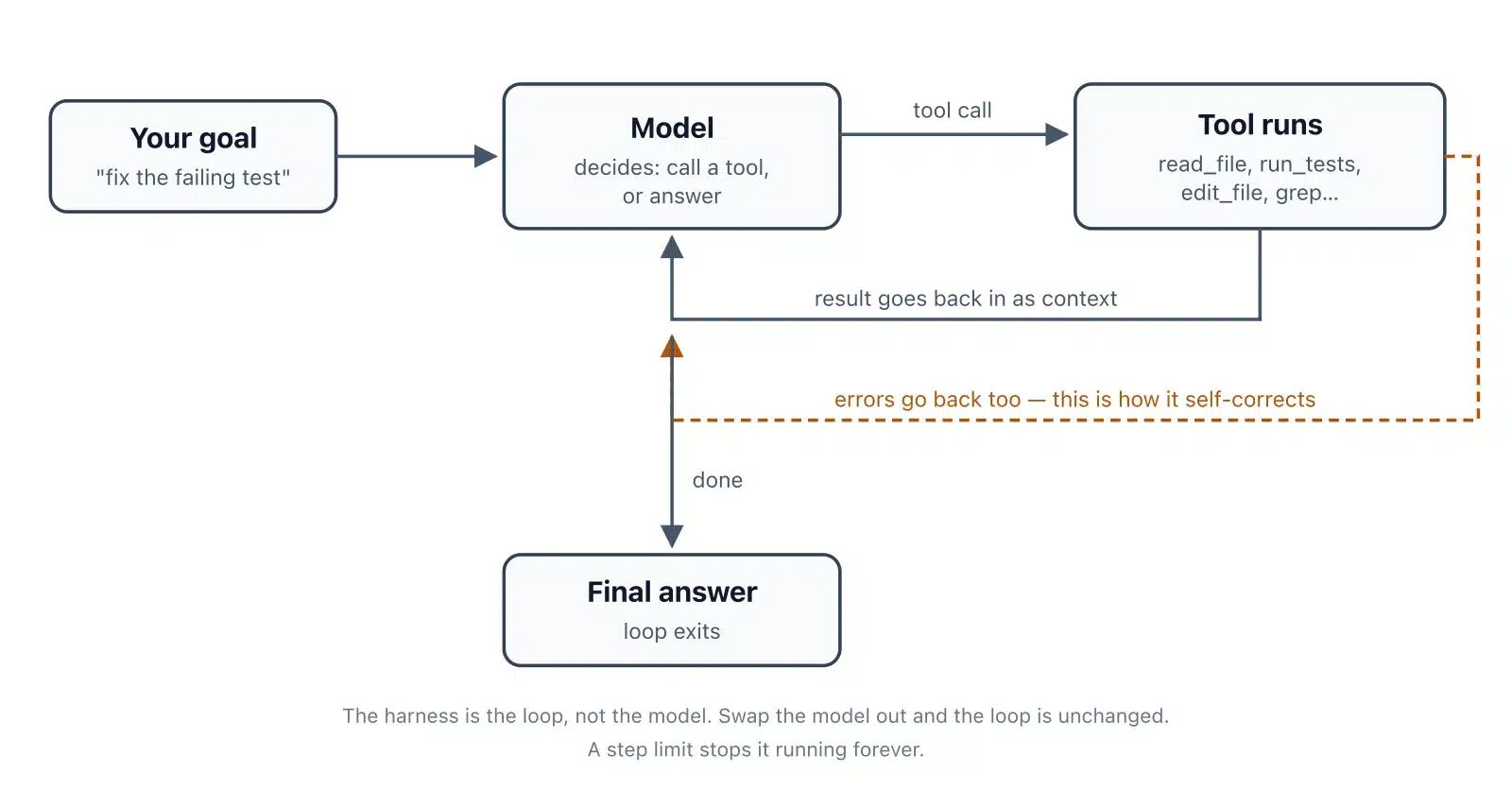
It lets the model say “read this file” and then feeds the file back. It lets the model say “run this command” and then feeds the output back. Cursor, GitHub Copilot, Aider, Codex CLI, and Claude Code are all harnesses. They wrap similar models in very different cars.
Here is the same idea as a picture. Follow the arrows: the model never touches your files directly. It asks the harness, the harness does the work, and the result comes back as new context.
What is the difference between generating tokens and agentic coding?
Plain autocomplete predicts the next word and stops. An agent runs a tool, looks at the result, and tries again. That second loop is the entire difference.
A token is a chunk of text, roughly a word or part of a word. When a model “generates tokens,” it is doing fancy autocomplete: you type, it predicts what comes next, it prints that, and it is finished. It never checks its answer. It cannot, because it has no hands. This is what powered the off-by-one bug I started with. The completion looked right because right-looking code is exactly what autocomplete is trained to produce.
Agentic coding adds a loop on top. The agent picks a tool, runs it, reads what came back, and decides the next move. Read a file. Run a test. Search the code. Build the project. Each result changes what it does next. Here is the shape of it, side by side:
| Plain autocomplete | Agentic coding |
|---|---|
| You type, it predicts the next line | You describe a goal |
| It prints a guess and stops | It runs a tool and reads the result |
| You check whether it works | It checks whether it works |
| You feed errors back by hand | It feeds its own errors back and retries |
The official Claude Code docs put the agent version in one line: it “reads your codebase, edits files, runs commands, and integrates with your development tools.” Notice every verb in that sentence is an action, not a prediction.
Why do people call it “vibe coding”?
Vibe coding means you describe what you want, accept the changes the agent makes, and barely read the actual code. It is fine for throwaway work and risky when you are still learning.
The term comes from Andrej Karpathy, a well-known AI researcher who helped start OpenAI.
In a February 2025 post he wrote about “a new kind of coding I call ‘vibe coding’, where you fully give in to the vibes, embrace exponentials, and forget that the code even exists.” He described his own loop as: “I just see stuff, say stuff, run stuff, and copy paste stuff, and it mostly works.” He was honest about the limits in the same post, calling it fine for “throwaway weekend projects” and admitting that sometimes he just asks for random changes until a bug goes away.
That honesty matters, because the workflow has a sharp edge for beginners.
Is vibe coding bad for beginners?
Mostly, yes, if it replaces learning. When you accept code you do not understand, you ship a working app and learn almost nothing. One of my students built a login page this way in an evening and felt great, until a small bug appeared and they could not even find the file where the problem lived.
The app worked right up until it didn’t, and then there was nothing in their head to fall back on. For a weekend toy, vibe coding is fine. For the months when you are building the knowledge you will use for years, it quietly robs you. I will come back to how to use these tools without that happening.
Why are tool calls what make the agent useful?
Because a tool call lets the agent check its own work instead of guessing. Guessing produces plausible code. Checking produces working code.
A “tool call” is the agent asking the harness to do something real: read a file, run a test, search the code with grep, build the project. The result of that action comes back as new information, and the agent uses it to decide the next step. Stack those steps and you get a feedback loop. A guess becomes a fix.
Take my off-by-one date bug. Here is roughly what the agent did, step by step:
- Read the file that held the date function.
- Edited the line it thought was wrong.
- Ran the test suite and read the failure.
- Saw the date was still one day off, looked at a timezone setting it had missed.
- Edited again, re-ran the tests, and stopped when they passed.
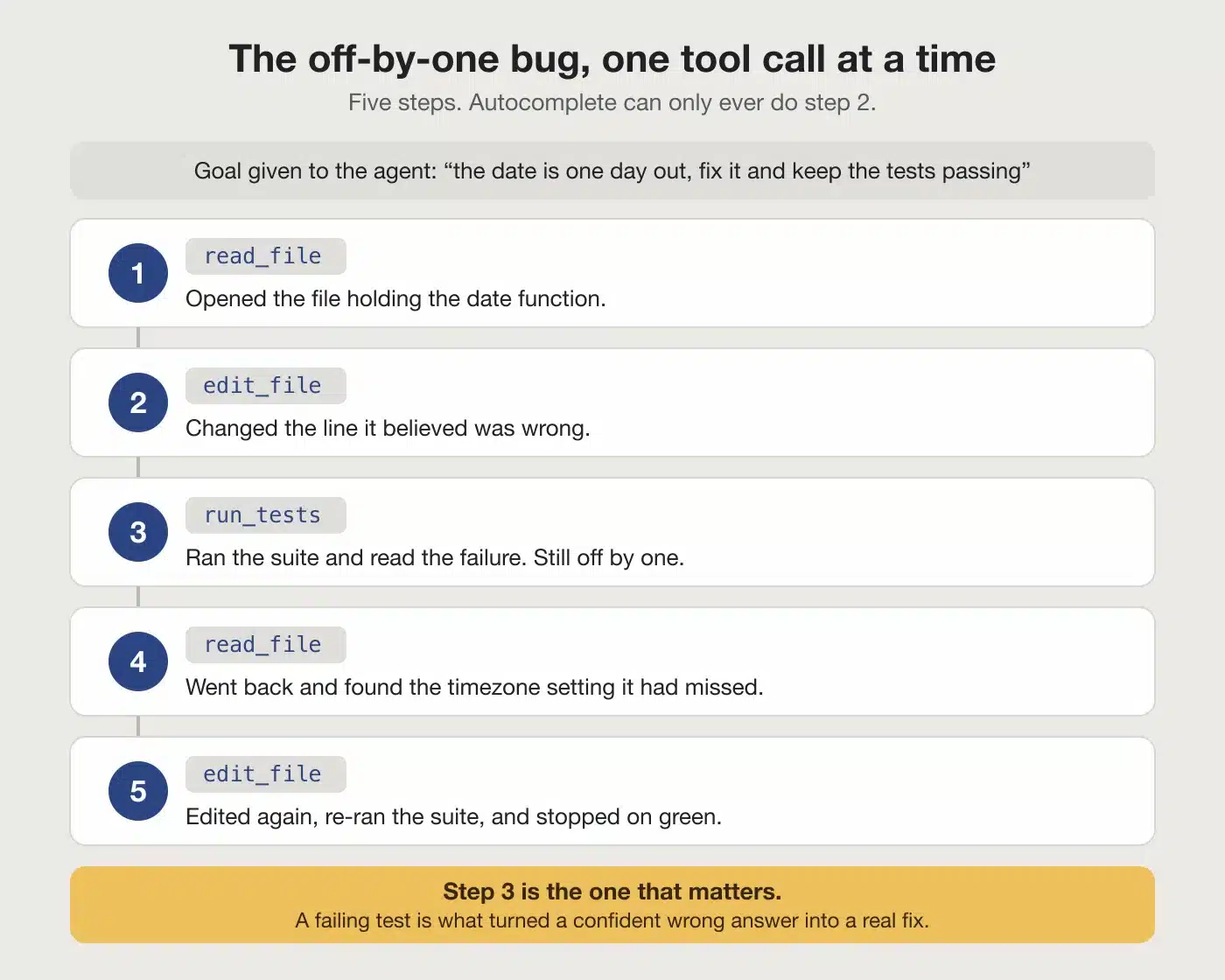
Plain autocomplete can only ever do step two. It writes a plausible line and trusts it. The agent does steps one through five, and the test result at step three is what turned a confident wrong answer into a real fix. The tool calls are not a side feature. They are the reason the second tool worked and the first one didn’t.
This is also why the quality of your tests matters more once you start using an agent. The agent is only as good as the signals it gets back. If your tests are thin, the agent has nothing solid to check against, and it slides back toward guessing.
Good tests, a working build command, and a linter used to be hygiene. Now they are also the feedback the agent reads to correct itself. I have watched the same model do careful work in a well-tested project and sloppy work in a messy one, and the difference was the quality of the results it could read.
That loop is smaller than it sounds. Below is a working version you can copy into a file and run today. It needs no API key and no account, because fake_model stands in for the real model. That is on purpose. The part people find confusing is the loop, not the model, so this lets you watch the loop by itself.
"""An agent harness, in one runnable file.
No API key needed. `fake_model` stands in for the real model, so you
can run this and watch the loop, which is the confusing part.
"""
import json, pathlib
# 1. The tools: ordinary functions the model is allowed to call.
def read_file(path: str) -> str:
    return pathlib.Path(path).read_text()[:200]
def count_lines(path: str) -> str:
    return str(len(pathlib.Path(path).read_text().splitlines()))
TOOLS = {"read_file": read_file, "count_lines": count_lines}
# 2. A stand-in for the model. The real one returns the same shape:
#    either a request to call a tool, or a final answer.
def fake_model(messages):
    seen = [m for m in messages if m["role"] == "tool"]
    if not seen:
        return {"tool": "count_lines", "args": {"path": "sample.txt"}}
    if len(seen) == 1:
        return {"tool": "read_file", "args": {"path": "sample.txt"}}
    lines, head = seen[0]["content"], seen[1]["content"]
    return {"answer": f"{lines} lines, starts: {head[:20]!r}"}
# 3. The loop. This is the entire harness.
def run(goal, max_steps=10):
    messages = [{"role": "user", "content": goal}]
    for step in range(max_steps):
        reply = fake_model(messages)
        # The model is done.
        if "answer" in reply:
            return reply["answer"]
        # The model wants a tool.
        name, args = reply["tool"], reply["args"]
        print(f"  step {step}: calling {name}({args})")
        try:
            result = TOOLS[name](**args)
        except Exception as e:
            # Errors go BACK to the model instead of crashing.
            result = f"error: {e}"
        messages.append(
            {"role": "assistant",
             "content": json.dumps(reply)}
        )
        messages.append({"role": "tool", "content": result})
    return "gave up: hit the step limit"
if __name__ == "__main__":
    pathlib.Path("sample.txt").write_text("alphanbetangamman")
    print(run("How many lines is sample.txt, and how does it start?"))
Save it as agent_loop.py, then run python3 agent_loop.py. You will see this:
  step 0: calling count_lines({'path': 'sample.txt'})
  step 1: calling read_file({'path': 'sample.txt'})
3 lines, starts: 'alphanbetangamman'
Two tool calls, then an answer. Now look at the except branch. When a tool fails, the error is sent back to the model as an observation instead of stopping the program. That is why an agent can recover from a wrong guess. Remove those two lines and the agent will break easily, failing on the first error. If the tool fails and the program just crashes, the agent cannot recover. That is the whole point of sending the error back.
How does Claude Code compare to the other agent harnesses?
They are all good, and they win at different things. I reach for Claude Code, but I would not call the others wrong choices. Here is an honest grid before I make my case. The first column is the order I would try them in, and the section near the end of this post explains each ranking in full.
| Try first | Tool | Type | Interface | Best for |
|---|---|---|---|---|
| 1 | Claude Code | Full agent | Terminal, IDE, web | Steerable agent work in the terminal |
| 2 | Kimi Code | Full agent | Terminal, IDE | Strong coding on a small budget |
| 3 | Qwen Code | Full agent | Terminal | Open-weight models, big context |
| 4 | Open Code | Full agent | Terminal, IDE | Any model, no lock-in, runs offline |
| 5 | Cursor | Autocomplete + agent | IDE (VS Code fork) | Best inline-edit feel in an editor |
| 6 | Codex CLI | Full agent | Terminal | Safe sandboxed runs, CI/CD |
| 7 | Aider | Full agent | Terminal | Open-source, git-native workflow |
| 8 | GitHub Copilot | Autocomplete + agent | IDE (VS Code, JetBrains) | Everywhere, free to start |
| 9 | Pi Coder | Full agent | Terminal | Minimal, hackable, build-your-own |
| 10 | Kilo Code | Autocomplete + agent | IDE, terminal | Editor + CLI, 500+ models |
| — | Gemini CLI | Full agent | Terminal | Retired in June 2026, listed for reference |
- Now the fair credit, because each rival earns it.
- Cursor has the best inline-edit feel of anything I have used; typing in its editor and watching it complete across files is genuinely smooth, and students get a free year with a school email.
- Copilot is everywhere and has a real free tier, so it is often the first agent a beginner ever touches.
- Aider is open source, model-agnostic, and git-native: every change is a commit you can undo, which is a lovely way to stay in control.
- Codex CLI runs every command inside a sandbox, so a risky command cannot wreck your machine, and Gemini CLI gives away a generous daily free tier with a huge context window.
Gemini CLI is the exception. Google announced in May 2026 that it was being retired and replaced by Antigravity CLI, and it stopped serving most users around mid-June 2026. It is in the table for reference, not as a recommendation.
- A newer wave of open-source agents is worth knowing too, so I added them to the table.
- Kimi Code and Qwen Code each ship with their own strong model: Moonshot’s Kimi K2.5 and Alibaba’s Qwen3-Coder. The public SWE-bench leaderboard, a test of whether an agent can fix a real GitHub issue, shows how they compare with Claude today.
Treat those numbers as rough, because they are self-reported and shift with every release. The other three, Open Code, Pi Coder, and Kilo Code, bring no model of their own, so their performance is simply the performance of whatever model you connect.
On price, this group leans cheap. Kimi Code and Qwen Code give you the tool for free and charge only for their model, which runs well below the big US models. Kimi Code starts near $19 a month, or a few cents per million tokens if you pay as you go. Qwen Code is free to install, but its free daily tier closed in April 2026, so you now bring your own key or a paid plan.
Open Code, Pi Coder, and Kilo Code go further and add no markup at all. You point them at any model, including a free local one, and pay only what that model costs. Kilo Code even gives new users $20 of credit to start, and Open Code offers a low $10-a-month plan for open-weight models if you would rather not manage keys.
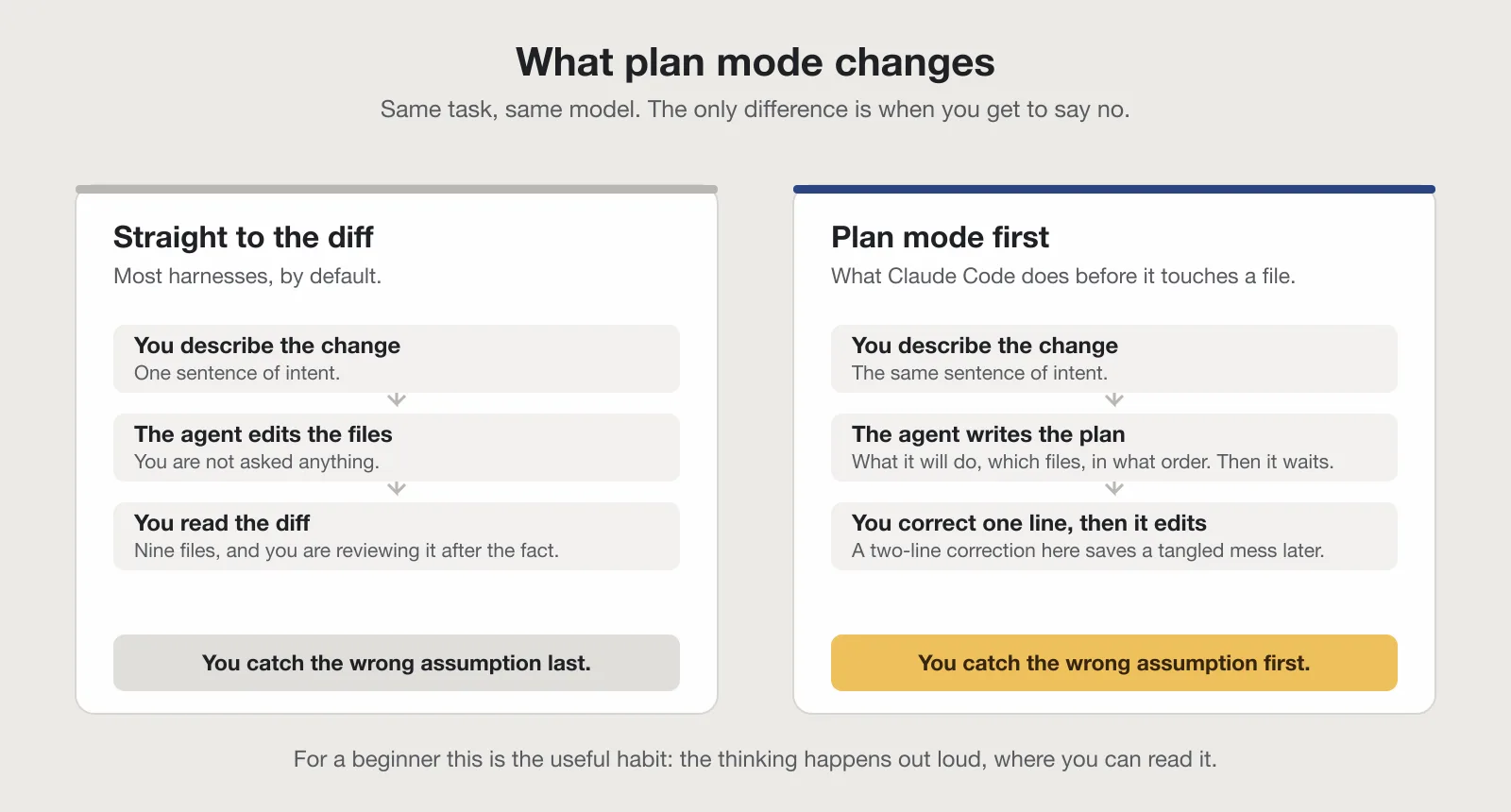
So why Claude Code for me? Four reasons. It lives in the terminal, which fits the way I already work with files and git. It has a plan mode that writes out its approach before touching a single file, so I can read the plan and correct it early.
It can spin up subagents for focused side jobs, like reviewing a change, without cluttering the main session. And it is steerable: hooks and a CLAUDE.md rules file let me set guardrails the agent actually follows, plus the model quality on hard bugs has been the most reliable for me. That last point is taste, and yours may differ. These same strengths are true of the other top agents in the table, so the choice really comes down to which interface and workflow you prefer.
- Plan mode is the feature I would miss most.
- When I ask for a change, the agent first writes out what it intends to do, which files it will touch, and in what order, and then it waits.
- I read that plan like a junior engineer’s proposal.
Half the time I catch a wrong assumption before any code is written, and a two-line correction at that stage saves me a tangled mess later. For a beginner this is the single most useful habit a harness can teach, because it forces the thinking to happen out loud where you can see it and learn from it.
A guess that looks right is not the same as code that runs. The tool calls are what close that gap.
Should a beginner use an agent harness?
Yes, but use it to learn, not to skip learning. The tool should make you a stronger developer, not a faster button-presser.

- Here is the rule I give my students at DevHives. Read every change before you accept it.
- If you do not understand a line, ask the agent to explain it, then ask why it chose that approach over another.
And turn the agent off sometimes; write a small feature by hand once a week so the muscle does not go soft. An agent is wonderful for showing you how an experienced developer would approach a problem. It is terrible as a way to avoid ever learning that yourself.
If you are still unsure whether any of this is worth your time, I wrote a fuller answer in Is It Worth Learning to Code Now That AI Exists? The short version: the people these tools reward most are the ones who understand the code, not the ones who avoid it. That is also why entry-level hiring is shifting the way it is, which I dug into in The Junior Developer Job Market in 2026. The same logic applies to choosing a harness: understand the tool, not just the output.
Which harness to try first
If you want one answer: install Claude Code and run a real task in plan mode. This is the same order as the Try first column in the table above, with the reason for each place.
If you want one answer: install Claude Code and run a real task in plan mode. If you are on a budget, try Kimi Code. If you live in an editor, Cursor. Everything else is a variation on the same loop. Each tool’s page is linked from the table above, and the order in that table is the order I would try them in: Claude Code if you want the terminal workflow and referral credit, Kimi Code for low cost, Cursor for the editor experience, and the others when you need a specific feature like sandboxing or offline use.
Gemini CLI is not in the ranking on purpose. Google retired it around mid-June 2026 and moved people to a new tool called Antigravity CLI, so it is no longer somewhere to send a beginner.
What is one thing worth trying this week?
Pick one real task you already understand, something small like adding a single function or fixing a known bug. Run it through an agent in plan mode and read the plan before you accept anything. Ask yourself: would I have done it this way? Where did the plan surprise me? That single habit, reading the plan before the diff, is what separates a learner who grows from a vibe coder who stalls.
When you are ready to go deeper on building knowledge that sticks, read How to Study a Programming Book Without Skimming It next.