Frontend Developer Skills for Freshers: A 10-Week Roadmap
Landing a frontend developer job in India takes more than HTML and a little JavaScript. This 10-week roadmap walks you through HTML, CSS, JavaScript, React, TypeScript, and Next.js, with a project and salary payoff for each step.

Open a few fresher frontend job posts in Bangalore and set them beside a college course that taught HTML and a little JavaScript. The gap is React, TypeScript, Next.js and testing, and you have a few months before placement season. Which gap do you close first?
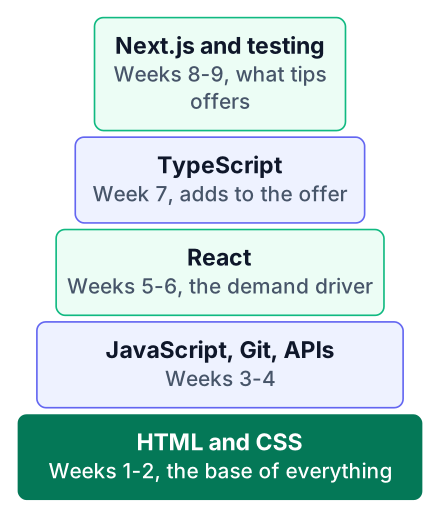
Spend 10 weeks on the roadmap.sh skill list in order: web basics, JavaScript, React, then TypeScript and Next.js. Indian fresher frontend offers sit at ₹3-6 LPA, according to Palify and Uncodemy, and employers now expect more than React basics. Each week below has one clear target and one project you can show on GitHub. The plan assumes about 3-4 hours a day; if classes take most of your time, stretch it to 14 weeks and move Next.js until after your first applications.
Weeks 1-2: Web basics and responsive design
Start with HTML and CSS plus responsive layout, because every other frontend skill sits on top of them. The roadmap.sh frontend roadmap puts these first too, and I follow its skill list for the whole plan.
Week 1 is semantic HTML. Use <header>, <nav>, <main> and <button> instead of a page full of <div> tags. Build a form with labels on every input. That habit is the first step of accessibility, which means making the page usable for people with screen readers or a keyboard only.
Layout comes in the second week. Learn Flexbox for rows and columns, then Grid for full page layouts. Design mobile-first: style the phone screen, then add media queries for wider screens. Most of your users in India will open your site on a phone, so this order matches real use.
Add a little UX thinking here. Is the button easy to tap? Can someone find the contact form in a few seconds? Your project for these two weeks is a responsive landing page for a made-up product, such as a local coaching centre.
Weeks 3-4: JavaScript with Git and DevTools
JavaScript is the skill where most freshers get stuck, so it gets two weeks plus daily use of Git and browser DevTools. If you need a free course to follow alongside, I compared options in this list of free JavaScript courses.
Week 3 covers variables, functions, arrays and objects. Then learn DOM events: make a button change the page when clicked. Rebuild one section of your landing page so it reacts to the user, like a menu that opens on mobile.
Async code arrives in week 4. You will call a REST API, which is a URL that sends back data, usually as JSON. Here is the pattern you will write again and again:
async function loadUser(username) {
  try {
    const res = await fetch(`https://api.github.com/users/${username}`);
    if (!res.ok) throw new Error(`Request failed: ${res.status}`);
    const user = await res.json();
    document.querySelector("#name").textContent = user.name;
  } catch (err) {
    console.error(err);
  }
}
loadUser("octocat");
Read the MDN guide to using fetch, found by searching for Using Fetch on MDN once this code runs. Open the Network tab in DevTools and watch the request go out. When something breaks, put a breakpoint in the Sources tab instead of adding ten console.log lines.
For Git, make a new branch for each feature and merge it when it works. Your project is a small app that loads data from a public API, like a GitHub profile viewer or a weather card.
Weeks 5-6: React, the skill employers ask for most
React is the demand driver in India, with thousands of roles posted each month according to Uncodemy, so it takes two weeks and one real project. The same source names the hiring hubs: Bangalore, Hyderabad, Pune, Delhi NCR, Chennai and Mumbai, plus remote roles.
Week 5 is the core model. A component is a function that returns some UI. Props pass data into it, and state holds data that changes. Learn useState for that state and useEffect for work outside rendering, like fetching data. Rebuild your week 4 app in React and notice how much DOM code disappears.
Real apps need more, so week 6 adds the rest. Render lists with keys (a unique id on each item so React can track it), handle forms with controlled inputs (inputs whose value lives in state), and add routing so the app has more than one page. Fetch API data inside a component and show a loading message while it waits.
Your project is a multi-page React app. A job board that reads from a public API works well, because recruiters understand it at a glance.
Week 7: TypeScript for a higher offer
TypeScript is the cheapest upgrade in the plan, because it appears in many fresher job posts, and Uncodemy puts the pay uplift at roughly ₹2-4 LPA. Treat that range as a rough estimate from one source, not a promise.
Put simply, TypeScript is JavaScript with types, which means you tell the code what shape your data has. Learn basic types first, then interfaces. Type your component props so a wrong prop shows a red line before you run anything.
Next, type your API responses. Write an interface for the job object your week 6 app fetches. Then convert that whole project to TypeScript, one file at a time. The errors you fix during the conversion teach you more than any tutorial chapter.
Weeks 8-9: Next.js, testing and web performance
Next.js, testing and performance are what separate you from other freshers who stop at React basics. Uncodemy reports that employers in 2026 expect these skills alongside React.
Week 8 is Next.js. Learn its file-based routing, where each file in a folder becomes a page. Then learn server rendering, which builds the page on the server so it loads faster and search engines can read it. Add page titles and meta descriptions; that is most of the SEO basics a fresher needs.
Quality is the focus of week 9. Write a handful of tests with React Testing Library, using its official intro as your guide: does the form show an error on empty input? Run Lighthouse in DevTools and fix what it flags. Large images are the usual problem, so compress them and use the Next.js image component.
Your project is a deployed Next.js app with a public link. Vercel lets you deploy from a GitHub repository for free.
The 10-week roadmap and what each skill unlocks
One table maps each week to its roadmap.sh skill, its project, and what it does for your fresher offer. It follows the roadmap.sh skill order, and the pay figures here come from two small blogs run by training and recruiting sites, so treat them as rough. The ₹3-6 LPA fresher band is reported by Palify and Uncodemy.
| Week | Skill from roadmap.sh | Project | What it unlocks |
|---|---|---|---|
| 1-2 | HTML, CSS, responsive design, accessibility | Responsive landing page | Entry ticket: every frontend role assumes it |
| 3-4 | JavaScript, Git, DevTools, REST APIs | Public API app | Passes the JavaScript round in interviews |
| 5-6 | React | Multi-page React app | The most requested skill, with thousands of roles a month (Uncodemy) |
| 7 | TypeScript | React app converted to TypeScript | Roughly +₹2-4 LPA, one source only, so check real job posts (Uncodemy) |
| 8-9 | Next.js, testing, web performance | Deployed Next.js app | Meets 2026 employer expectations (Uncodemy) |
| 10 | Portfolio | Three pinned GitHub repos | Startups judge GitHub over resumes (Palify) |
Pay also changes by city. My breakdown of front end fresher salaries in Bangalore goes deeper on one hub.
Week 10: Build a GitHub portfolio and apply
Startups hire on skills over degrees, so week 10 goes to a portfolio of three projects and your first applications. Palify also notes that a GitHub portfolio matters more to these employers than a resume.
Pick three projects
Choose your best work from weeks 2 to 9. The React app, its TypeScript version and the Next.js app usually make the strongest set.
Write a clear README
For each repo, explain what the app does, what you built it with and how to run it. Add one screenshot.
Deploy and pin
Put a live link at the top of every README. Pin the three repos on your GitHub profile.
Apply every day
Send a few applications daily to startups and remote roles. Search LinkedIn and Wellfound, and check company career pages directly. Keep going with campus drives like TCS and Infosys at the same time.
Mention the live links in your cover note. A recruiter who can click and use your app is far more likely to call you.
Common mistakes that slow freshers down
Most freshers lose weeks by jumping to React before JavaScript is solid, or by watching tutorials without building anything. Here is what to do and what to skip.
Do this
- Finish weeks 3-4 before you touch React
- Learn TypeScript after React, on a project you already know
- Change every tutorial project: new data, new design, one extra feature
- Add labels, keyboard support and a few tests to each project
- Push to GitHub every day you code
Avoid this
- Starting React when
mapandasyncstill confuse you - Learning TypeScript with nothing real to type
- Copying a tutorial project line by line and calling it yours
- Treating accessibility and testing as optional extras
- Keeping finished projects only on your laptop
A common worry: do you need a CS degree? For startups and remote roles, your GitHub work matters more. Campus drives at service companies often do check degree eligibility, so read each posting. If you are starting even earlier, see my full stack roadmap after 12th.
Today, open roadmap.sh/frontend and tick the skills you already have. Then start week 1: build one responsive HTML and CSS page and push it to a new GitHub repository tonight.