How to Use GitHub Copilot Web Free for Your Coding Projects
GitHub Copilot Web works entirely in your browser with no credit card and no IDE. The Free plan gives you 2,000 code completions and 50 chat requests monthly, enough for explaining files, fixing bugs and delegating tasks.
Say you have a college project due Friday and no credit card. Your laptop keeps failing to install an IDE, and the error messages make no sense. Most "free AI coding" guides start with "first, set up VS Code", which is the one step you cannot finish. GitHub Copilot on github.com needs only a browser tab.
Copilot Web means using Copilot Chat on github.com, and it works on the Free plan with no credit card. The Free plan gives you 2,000 code completions and 50 chat requests a month, according to GitHub's plans page. That is enough to explain code and fix bugs. The delegating steps near the end are optional, because chat alone covers the explain-and-fix work, and the agent section tells you what to check before you try them.
Copilot Web is Copilot Chat on github.com
On the website, Copilot on GitHub.com is the chat and agent experience that runs inside your repository pages, so you need no editor, extension or install.
GitHub's docs describe four kinds of help on the website:
- Asking questions about your code and repository.
- A cloud agent that works through multi-step tasks.
- Code review on pull requests.
- Automations that run on your repository.
This is the same Copilot that lives inside VS Code. You reach it through a web page instead of an editor. That helps on a shared lab computer or a library machine where you cannot install anything.
If you already use AI tools built into your browser, this is one more, made for code. I covered the general ones in browser AI features for students.
Copilot Web Free vs ChatGPT free for a student on no budget
Copilot Free is tied to your repositories and has monthly caps, while free ChatGPT has no repository link and explains code line by line more clearly, based on G2's side-by-side test.
| Copilot Web (Free) | ChatGPT (free) | |
|---|---|---|
| Price | $0, no card (GitHub) | $0 (G2) |
| What it does free | Chat about your repository, code completions, code review | General chat, line-by-line explanations, whole-project drafts |
| Agent access | G2 says paid plans only; GitHub lists agent features within Free's credit allowance | No link to your repositories |
| Ads | None listed by G2 | Free tier has ads (G2) |
| Best for | Questions about code already on GitHub | Learning a concept slowly, from the start |
In G2's test of seven coding tasks, Copilot won the to-do-list and search-algorithm tasks. ChatGPT won the portfolio task and the JavaScript bug explanation.
My verdict: use Copilot Web when the question is about your repository. Use ChatGPT when you need an idea taught from zero. Using both is fine.
Check what the Free plan includes before you start
The Free plan allowance is a fixed monthly count, so it helps to know what counts as a request before you start.
On the plans page, Copilot Edits count as chat requests, so both take from the same chat cap. Completions are a separate count. In the browser you will mostly spend chat requests, not completions.
Chat requests are what you will spend in the browser, and you can see your usage in your GitHub Copilot settings.
Are you a verified student? Then look at the Copilot Student plan, which gives free access to Copilot features. Eligibility depends on GitHub's student verification, so check that page before you count on it.
Create a repository and sign in to Copilot
A small practice repository gives Copilot something real to read, and you can set it up in about five minutes.
Sign in to GitHub
Go to github.com and sign in, or create a free account. The Copilot Free plan does not ask for a credit card.
Create a repository
Click "New repository", name it
copilot-practiceand tick "Add a README file". Then click "Create repository".Add one small file
Choose "Add file", then "Create new file". Name it
average.py, paste the code below (it has a deliberate bug, which you will find in a moment) and commit it.Open Copilot Chat
Click the Copilot icon at the top of the page. If GitHub asks you to turn on Copilot Free, accept it.
def average(marks):
    total = sum(marks)
    return total / len(marks)
print(average([]))
This function averages a list of exam marks or grades, which works for a college course in Kolkata or Ohio. It runs fine on a normal list. On an empty list it crashes with a ZeroDivisionError, which gives Copilot a real bug to find.
Ask Copilot to explain a file
Open the file, ask Copilot a specific question about it, and each question counts as one chat request, so one clear question beats five vague ones.
In your repository, go to average.py and then open the chat. Copilot can see the file you are viewing, so you do not need to paste the code. Try prompts like these:
- "Explain what
average()does, line by line." - "Why does this crash on an empty list?"
- "Suggest a fix that returns zero for an empty list, and show the new code."
Copilot shows a fixed version. Click the pencil (Edit) icon on average.py, type the change yourself instead of pasting, then commit. Typing it makes you read each line. That habit of reading code you did not write also helps when you pass a take-home coding assignment.
Delegate an issue to the cloud agent
The cloud agent takes a written issue, works on its own branch and opens one pull request for you to review.
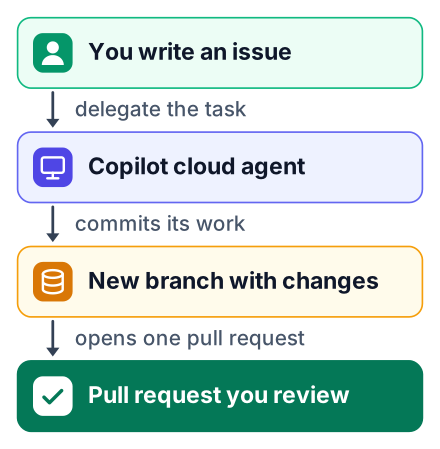
- Open the Issues tab and click "New issue". Title it "Return zero from average() when the list is empty".
- In the body, name the file, describe the bug and say what "done" looks like. Clear issues get better pull requests.
- Under Assignees, choose Copilot.
- Wait for the pull request. Read the changes, leave comments if something is wrong, then merge or close it.
GitHub's docs set firm limits on the agent. It works only in the repository you specify and only on repositories hosted on GitHub. It uses one branch at a time and opens one pull request per task. A single session runs for at most 59 minutes (GitHub Docs).
As of October 2026, the sources disagree on whether the agent is free. G2 says the coding agent is reserved for paid plans, while GitHub's own Copilot page lists agent features within the Free plan's AI credit allowance. The quickest test is to open an issue while signed in: if Assignees shows Copilot, your account has the agent. If it does not, skip this section, because the chat steps above already fix the bug, and the plans page shows what a paid or student plan adds.
Pros
- Small, well-described fixes get done while you study something else.
- You practise reviewing pull requests, a skill every team expects.
Cons
- You learn less than if you wrote the fix yourself.
- A vague issue can waste a task on the wrong change.
Stay inside the free limits
Spend chat requests on questions about your own repository, such as "Why does average() crash on an empty list?", and use free ChatGPT for general explanations, such as "Explain how division by zero errors work in Python, from the start."
Plan your chat cap by the week, not by the day. Fifty requests a month is about 12 a week: 3 for explaining new code, 5 for bugs, and 4 spare for follow-ups on your college or internship code.
Save the agent for issues you can describe in a few sentences.
Later, you may get VS Code working. GitHub's blog explains how to continue a Copilot session in VS Code, so the work you start in the browser does not have to start over.
Common mistakes
- Vague prompts. "Fix my code" wastes a request. Name the function and the problem.
- Pasting secrets into chat. Never share API keys, passwords or a
.envfile. - Merging without reading. A pull request from the agent is a draft until you have read every line.
Today, create one practice repository, add a small file, and ask Copilot Chat on github.com to explain it. Then write one clear issue and delegate it, and read the pull request line by line before you merge anything.


