Build Projects with Gemini 4 Argon: 3 Starter Ideas for 2026
Gemini 4 Argon is Google's strongest model for long coding tasks, now generally available since October 13. Try these three starter projects before the API price doubles on December 1.

Google's builders page for Gemini 4 Argon shows five projects people made by prompting the model, including a seaplane flight simulator, a wildfire globe and a multiplayer capture-the-flag game. Then comes the catch. According to Tech AI Wire's availability report, Argon is not on the free API tier. Is it worth paying for as a student, and what should you build first?
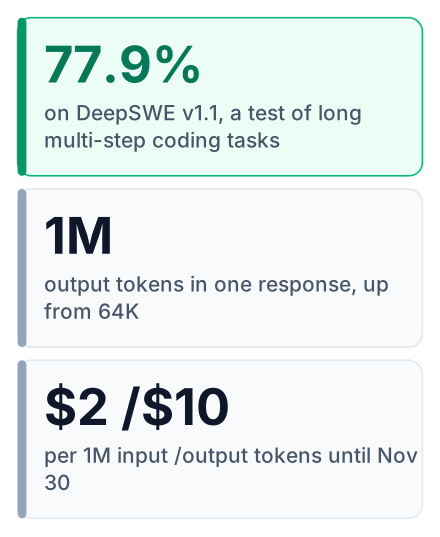
Gemini 4 Argon is Google's strongest model for long coding tasks and 3D builds, and it became generally available on October 13. It is not free. The API costs $2 per 1M input tokens and $10 per 1M output tokens until November 30, then $4 and $20. Subscribers can also use it in Antigravity and the Gemini app.
Gemini 4 Argon is now open to everyone, with one catch
You can reach Argon through the API and AI Studio with a paid key, but Antigravity and the Gemini app need a Google AI Ultra or paid Pro plan, as Google's October 23 builders post confirms.
Google first announced the model in its September 30 launch post. The general release followed on October 13, per Tech AI Wire.
The same builders post lists AI Mode in Search for Ultra and Pro subscribers. That matters less for building, but it tells you Google plans to put this model in front of a lot of people. If you want the shorter student-focused summary first, read what Gemini 4 Argon changes for students.
What Argon is good at: long coding tasks and 3D builds
Argon scores 77.9% on DeepSWE v1.1, a test of long multi-step coding work, and Google says it can write up to 1M output tokens in one response.
DeepSWE is a benchmark that gives a model real software tasks needing many steps, such as reading a codebase, changing several files and making the tests pass. A higher score means the model finished more of those tasks without help.
| Headline number | Value | Source |
|---|---|---|
| Gemini 4 Argon on DeepSWE v1.1 | 77.9% | 9to5Google |
| Claude Opus 5.5 on DeepSWE | 74.2% | 9to5Google |
| GPT-6 Astra on DeepSWE | 74.1% | 9to5Google |
| Maximum output per response | 1M tokens (up from 64K) |
The output limit is the part I find most useful for students. Older models stopped mid-file on big jobs, and you had to ask them to "continue". With a much larger limit, Argon can write a whole small project in one answer.
Google's demos go beyond the three in the opening. Its builders also made a jet-engine simulation, a tectonic-shockwave view on the globe, and a carriage built from a single image. These are visual projects with physics and many moving parts, which is exactly where long output helps.
Where Argon falls behind Claude Opus 5.5
Argon leads on long coding, but the pages I have do not show it leading everywhere, so check the Artificial Analysis leaderboard against Claude Opus 5.5 before you pick it for agent work.
That leaderboard lists Gemini 4 Argon (high) at an Intelligence Index of 53, at roughly $1.99 per benchmark task. The index mixes many tests, not only coding. Open the page and sort by it to see which models sit above and below Argon today, because these rankings change after every release.
Agent-style work is a different job from writing a big file. Here the model runs commands in a terminal, reads the result and decides the next step. None of my sources give Argon a win on that kind of test. Treat it as unproven there until you see a score.
Pros
- Strong at long, multi-file coding tasks
- Good at visual builds like 3D scenes and simulations
- Very large output, so fewer cut-off answers
Cons
- No proven lead on agent-style terminal tasks
- Paid only on the API
- Price rises after the introductory period
Argon costs $2 and $10 per million tokens, then doubles
The free API tier stops before Argon, so every request costs money, and the introductory price doubles on December 1, according to Tech AI Wire's pricing report.
A token is a small piece of text, roughly part of a word, and you pay for tokens you send (input) and tokens the model writes (output).
| Period | Input, per 1M tokens | Output, per 1M tokens |
|---|---|---|
| Until November 30 | $2 | $10 |
| From December 1 | $4 | $20 |
Prices from Google's launch post and Tech AI Wire. No source gives a rupee price, so I have kept it in dollars.
Two settings behave differently from other models. Argon ignores temperature and top-p, and its default output cap is 65,536 tokens, so you must raise that cap yourself to get the full long output. Its context window, the amount of text it can read at once, is 1,048,576 tokens.
Output is the expensive side. Say you ask for one small 3D scene: a short prompt in, a few thousand tokens of code out. That costs a few cents, whether you pay with an Indian or a US card. An agent loop that re-reads a large codebase on every step is different, because it sends the whole project again and again. That is where a bill grows.
| Option | Cost | Access | Best use |
|---|---|---|---|
| Argon via API or AI Studio | Pay per token, no free tier | Paid API key | One focused build |
| Argon in Antigravity or the Gemini app | Included in subscription | Ultra or paid Pro plan | Regular building if you already subscribe |
| A free-tier or open-weight model | Free to start | Free API tier or your own machine | Daily questions and practice |
For a free open-weight option aimed at coding, see Kimi K3.1 Pro. If you work inside Google's coding tool, OpenAI models in Antigravity covers what else runs there.
Starter project 1: a 3D scene in your browser
A single prompt in AI Studio can produce a small 3D world you can open and rotate in a browser, which makes it the quickest first build.
This is a cut-down version of Google's seaplane demo. Before you send anything, set a budget alert or spending limit on your Google Cloud billing account. Then keep the scope to one scene and one control, so the output stays short.
Build a single HTML file that uses three.js to show a small island
with a seaplane floating on calm water. Let me rotate the camera
by dragging with the mouse. No other controls. Add short comments
that explain each part of the code.
Save the reply as an .html file and open it. Check three things: the scene loads, dragging rotates the camera, and the browser console shows no errors. If three.js fails to load, ask Argon which script tag it used and why.
Starter project 2: a two-player browser game
A simple capture-the-flag game shows how well Argon handles code that spans several files and rules.
Google's builders made a multiplayer version. You should not start there. Ask for a single-player game first, and add the second player in a later prompt, once the first version works.
Describe the rules
Write the game in plain words: the map, the flag, how you score, how the round ends.
Run it
Open the files in your browser and play one full round.
Report one bug at a time
Paste the exact error or describe the exact wrong behaviour. One fix per prompt keeps the changes small enough to read.
Ask for a change
When it works, ask for the second player on the same keyboard.
If you have an Ultra or paid Pro plan, do this in Antigravity instead. You can see every file it changes, and your subscription covers the use.
Starter project 3: a small coding tool for yourself
Asking Argon to build a tool you will really use, such as a study timer or a file renamer, tests its long-task strength on code you can judge.
A downloads-folder sorter works for anyone, in Pune or in Ohio. You know what the folder should look like afterwards, so you can tell at once if the code is wrong.
Write a Python script that sorts my Downloads folder into
subfolders by file type: PDFs, images, zip files, and everything
else. Print what it will move and ask me to confirm before moving
anything. Explain each function in a comment.
Read every line before you run it, and test it on a copy of the folder first. A script that moves files can lose them.
The common mistake is asking for the whole app in one prompt, then not understanding a single function in it. Ask for the smallest version, read it, then add one feature at a time.
Which model should you use for your next project?
Use Argon for one big build you will pay a few dollars for, and keep a free model for everyday questions and practice.
If you already pay for Ultra or Pro, build in Antigravity and stop thinking about tokens. On a tight budget, keep agent loops away from Argon, where its lead is unproven and costs add up. For learning a concept, a free model explains it just as well, and you can turn your notes into study material with Gemini's notebook tools.
Which project would you build first: the 3D scene, the game, or a tool for your own folder? Tell me in the comments.
Open AI Studio today, set a spending limit, and try the 3D scene project with one short prompt before Argon's price doubles on December 1.