Best Free Java Course for Beginners in 2026: Honest Picks
As of October 2026, the top-ranked Java MOOC is officially legacy. Here's the truly free course to start with, plus which "free" offers hide a certificate fee, and a five-step path to your first Java project.

As of October 2026, the University of Helsinki's Java Programming MOOC shows a notice on its own course page: it is a legacy course. For years it was the first name on almost every "best free Java course" list. So check whether any list that recommends it mentions that notice before you trust it.
That leaves a beginner in India with no budget a fair question. Which free course should you start with, and which "free" offers hide a fee?
Start with Bro Code's free YouTube Java course, then audit Duke's specialization on Coursera for structure and graded work. The video is a pick by cost, not a verified best, because I did not check its upload date or Java version. Treat any "free certificate" offer as a paid product. Then build one small project as soon as you can.
Bro Code's full-length Java YouTube course
Start with a single long video course, because it is the only option here that is free from the first minute to the last, with no sign-up and no certificate fee. Bro Code's "Java Full Course for free" is in clear English. I could not check its upload date or Java version here, so confirm both on the video page before you start. If the video turns out to be old, use the audit option of Duke's course below instead.
One long video suits a total beginner for a simple reason. You control the speed. You can pause on a line you do not understand, play it again, and type the same code into your own editor before you move on.
This course fits you if you have never written code and want to watch a person write Java in front of you. It also fits a student who studies in short blocks between college classes. You can stop at any minute and continue the next day from the same point.
The honest limit is feedback. Nobody checks your code, and there are no graded exercises. If your program breaks, you read the error yourself and compare your code with the screen, line by line.
Pros
- Free from start to end, with no hidden fee
- Self-paced: pause, rewind, repeat
- No account or sign-up needed
Cons
- No feedback on your code and no graded exercises
- Easy to watch for hours without typing a single line
University of Helsinki Java MOOC is now legacy
The Helsinki course is still online and still free to read, but its own page says it is no longer maintained or updated and no longer gives ECTS credits. ECTS credits are European university credits, which once let this course count toward a degree.
"Legacy" means the course is no longer updated by its authors. Its exercises still teach core Java well: variables, loops, objects and lists. But Java tools and versions keep changing, and nobody fixes the course when a step stops matching. If an install guide no longer looks like your screen, you have to solve it alone.
A certificate is still possible. You get it through the mooc.fi completions page, not from the course material itself.
Use it if you want exercises in a fixed order and you prefer reading to watching. Skip it if setup problems stop you easily, because a frozen course cannot answer your questions.
Duke's Java course on Coursera
Duke's specialization is the most structured option. But only the learning is free. On its Coursera page, the certificate needs a paid Course Certificate for each course.
The specialization has 5 courses and takes about 6 months at 10 hours a week, with no prior experience needed. You write code in BlueJ, a simple Java editor made for teaching, and use CodePen for some web parts. The final capstone project builds a recommender, the kind of system that suggests films on Netflix or products on Amazon.
Duke's Coursera listing does not state a last-updated date, so check each course page before you enrol. I have not quoted a certificate price in rupees because I could not verify one, so read the amount on the enrol page before you pay.
You can audit each course for free. Auditing means you study the material without paying, and you get no certificate at the end.
If you want the certificate but cannot pay, apply for financial aid. On each course page, look for the "Financial aid available" link next to the enrol button. You fill in a form about your income, your study goals and why you need help, and Coursera reviews it. You apply course by course, so plan to send a form for each of the five.
Great Learning's 3-hour free Java course
This is the shortest option, a 3-hour taster that walks you through installing the JDK and Eclipse, and Great Learning's course page says it charges a fee if you want the completion certificate.
That same page says the certificate fee is non-refundable, so read the payment screen and the exact amount before you click.
The setup part is the most useful piece here. The JDK (Java Development Kit) is the set of tools that turns your code into a running program. Eclipse is an editor built for Java. Getting both working is often the first wall a beginner hits.
A course this short will not make you job-ready. It shows you what Java looks like and stops there. Say you list a three-hour certificate on your resume: it shows you finished a taster, not that you can build anything. A small project you built and can explain gives an interviewer much more to ask you about. If you are aiming at campus placements, look at the notices or past papers from your own college to see which Java topics they test, and practise those.
Four free Java paths compared
Set side by side, only the YouTube course has no certificate at all, and the other three each carry a catch you should know before you start. Independent lists such as hackr.io's roundup of Java courses also name Duke's specialization, along with other free picks like freeCodeCamp's 3.75-hour course.
| Course | Length | Structure | What is free | Certificate cost | Maintained? | Best for |
|---|---|---|---|---|---|---|
| Bro Code (YouTube) | One long video (length not verified) | Follow along, no exercises | Everything | No certificate | Not stated; check the video's upload date and Java version | A zero-cost start |
| Helsinki MOOC | Self-paced parts | Exercises in a fixed order | All material | Through mooc.fi completions | No, legacy course | Learners who like reading and drills |
| Duke on Coursera | 5 courses, about 6 months | Courses, graded work, capstone | Audit only | Paid, per course (financial aid available) | Last update not stated on the page | Structure and a big final project |
| Great Learning | 3.0 hours | Short video lessons | Course content | Non-refundable fee | Last update not stated on the page | A quick taster and setup help |
From zero to your first Java project
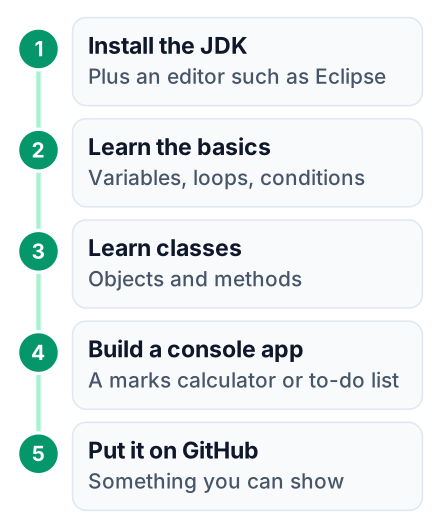
Move from watching to building by week three: install the JDK, write small programs, then build one console app that you can show to someone. When you get stuck on any step, look it up in Oracle's official Java documentation before you search random forums.
Install the JDK and an editor
Follow the install guide in Oracle's Java docs. Add an editor such as Eclipse or VS Code. Run one program to prove it works.
Learn variables and loops
Store values, print them, and repeat actions with
forandwhile. Write a few tiny programs for each idea.Learn classes and objects
Java puts all code inside classes. Make a
Studentclass with a name and marks, then create objects from it.Build one console project
Pick something small, like a student marks calculator or a to-do list that runs in the terminal. Finish it, even if it looks plain.
Put it on GitHub
Upload the code and write a short README that says what it does and how to run it.
Your very first file can be this small. Save it as Main.java:
public class Main {
    public static void main(String[] args) {
        String name = "Riya";
        System.out.println("Hello, " + name + ". Java is running.");
    }
}
Run javac Main.java to compile it, then java Main to run it. If you see the greeting, your setup works. For the README in the last step, this guide on writing a GitHub project README as a beginner shows what to include.
Where the Java path differs from the JavaScript path
Java makes you set up tools and learn types and classes before you see a result, while JavaScript shows a result in the browser on day one. If you read our free JavaScript course guide, expect a slower first week here.
Its rules are also stricter. Every variable has a type, such as int for whole numbers or String for text. If the types do not match, the compiler refuses to run your program and shows an error. That feels harsh at first. Later it saves you from bugs that JavaScript would let through silently.
The two lead to different work. Java leads toward backend systems and Android apps, so check which languages your target employers list in their job posts. JavaScript leads toward web pages and front-end jobs. If that is your goal, this list of front-end skills a fresher in India needs is the better next read.
Java is not fading, either. The PYPL index shows its share of global tutorial searches has stayed steady since 2004.
My view: pick Java if you are heading into campus placements or want backend or Android work. Pick JavaScript if you want to build websites and see results fast.
Common mistakes when learning Java free
The most common mistake is collecting courses instead of finishing one, followed by paying for a certificate before you have a project. Here is the short list:
- Starting several courses at once. Each one repeats the basics, so you relearn variables four times and never reach classes.
- Watching without typing. Your fingers need to make the mistakes. Pause the video and write every line yourself.
- Paying for a certificate first. Build the project, then decide if a certificate still matters to you.
- Skipping error messages. Java's compiler tells you the file and line number of the problem. Read it slowly before you change anything.
Pick one course today. If you are unsure, choose the Bro Code video. Install the JDK this evening and type along for the first hour. By the end of the week, write one small Java program of your own, one that no tutorial showed you.