Lovable Portfolio: Build a Fresher Resume Website in an Afternoon
A live portfolio link gets you past resume filters that drop freshers with no clickable projects. Pick one of six Lovable templates matched to your target role, paste its ready-made prompt, and publish in an afternoon, without writing code.

Say you have sent sixty applications and heard nothing back. Your resume has a "Projects" section with three project names on it. A recruiter who does read your resume has nothing to click, so they must take those project names on trust. In my view, a live link lets them open your work and judge it in seconds. This post shows how to get one this afternoon, without writing code.
Pick one of six Lovable portfolio templates that matches your target role, paste its ready-made prompt, and publish. Lovable vibe coding means you describe the site in plain English and the AI writes the code. The free plan may be enough for a first version, though I have not measured the credits a full build uses, and the student Pro plan costs $12.50 a month.
Lovable vibe coding means describing, not coding
Vibe coding means telling an AI what you want in plain language. The AI writes the code. The term was coined by Andrej Karpathy. You judge the result by what you see on screen, then ask for changes in words.
Lovable is a vibe coding app that builds a website from a chat. You type a request, it writes the code, and a live preview appears next to the chat. Its guide to vibe coding apps names three ways to work in it:
- Agent Mode: you describe a goal and Lovable makes the changes across the project.
- Chat Mode: you talk through an idea or a problem before any code changes.
- Visual Edits: you click a part of the preview and change it directly.
If you would rather work with a coding agent, read how Indian students build apps with Codex Cloud. For a portfolio site, Lovable's ready templates give you the quickest start.
Why a live link beats a resume line for freshers
A deployed URL gives a recruiter something to open, which a list of project names does not. A line like "Weather app (React)" asks the recruiter to trust you. A link lets them check your work in a few seconds.
Lovable's own UX portfolio guide reports that 90% of hiring managers consider portfolios important when they evaluate UX candidates, though that is a vendor figure and covers UX roles only. For developer and analyst roles, these sources give no figure. I have no recruiter survey from India to cite, so this is my opinion, but the reasoning still carries over: work a person can open is easier to judge than work they have to imagine.
Pick the template that matches your target role
Each of six real Lovable templates is my suggestion for one fresher role, so you choose by the job you want, not by looks, and you can swap any of them. The portfolio gallery lists 54 templates, so treat these six as a shortlist to start from.
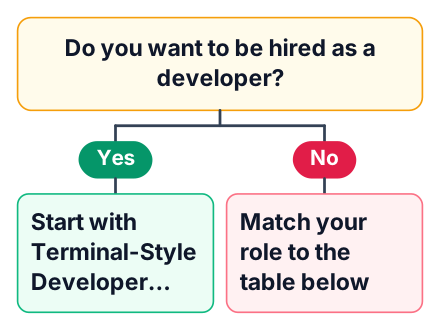
| Target role | Template to try first | Prompt to paste |
|---|---|---|
| Front-end developer | Terminal-Style Developer Portfolio | "Make a portfolio for [name], a front-end developer fresher from [college], [city]. Show three projects with live demo and GitHub links. Add a skills list and a contact section." |
| UI/UX designer | Verdure | "Build a UX portfolio for [name] with two case studies. Each one shows the problem, my research, the wireframes and the final screen." |
| Product or visual designer | Folio | "Create a designer portfolio with a large grid of my work, a short about section and a contact form." |
| Content or technical writer | Ivory | "Make a clean writer portfolio for [name]. List my articles with titles, one-line summaries and links." |
| Data or analytics | Sonder | "Make a portfolio for a data analyst fresher. Each project shows the question, the dataset, one chart and the finding." |
| Creative roles | Creative Resume | "Turn my resume into a one-page creative site with education and skills, plus my projects. Add a button to download the PDF." |
The Terminal-Style Developer Portfolio and Creative Resume come from the template gallery. The UX portfolio guide names Verdure and Ivory, and it also names Folio and Sonder. The role match is my suggestion, and I have not built a full portfolio from each of these templates, so open each preview and swap if another layout shows your work better.
Lovable also publishes its own ready-made portfolio prompts. Read them next to mine and borrow any detail that fits. In every prompt, name your college and your city. A recruiter in Pune or Bengaluru scanning for local freshers sees it at once.
Paste the prompt and add your real details
The template prompt gives the layout, and your own projects and links make it yours. Start from a template on the portfolio templates page and follow these steps:
Open the template
Click the template you picked and start a new project from it.
Paste the prompt
Copy the prompt from the table, fill in the brackets, and send it.
Replace the placeholder text
Swap every sample name for your own, and replace each sample project and link too. Use only projects you built and can demo.
Read the preview
Click every button and link. Read each line as a recruiter would.
Fix one area per message
Ask for changes in plain English, one part of the page at a time.
A good follow-up message is specific. For example: "Move the Projects section above About. Give each project card a Live demo button and a GitHub button." A weak one says "make it better", which tells the AI nothing.
Free plan vs student Pro: 30 credits a month or $12.50
In my judgement a first portfolio can fit inside the free plan if you plan your edits, but I have not counted the credits a full build uses, and the student plan is only needed if you build more. Here is the comparison, from the Lovable pricing page and the student discount page:
| Free plan | Student Pro | |
|---|---|---|
| Price | $0 (pricing) | 50% off the $25 Pro plan, so $12.50 a month for up to 12 months (students) |
| Build credits | 5 a day, up to 30 a month (guide) | Higher than free; the exact number is on the pricing page and I have not confirmed it here |
| Cloud credits | 20 a month (guide) | See pricing |
| Projects | Public only | Not confirmed here; check the pricing page before relying on it |
| How to get it | Sign up | Verify with your college email |
Lovable lists its prices in US dollars, and these pages give no rupee figure. Each message you send uses credits, whatever its size.
Publish and put the URL where recruiters look
A portfolio only helps when the link sits on your resume, LinkedIn and every application form. Click Publish, then open the URL on your phone. Check it on your phone, since someone may open it there, and make sure the menu and project cards work on a small screen.
Next, put the link in the header of your resume, beside your email and phone number. Add it to your LinkedIn profile and your GitHub bio. Free-plan projects are public, which suits a portfolio, since you want strangers to see it. Lovable gives the published project a default address on its own domain, so check the publish settings to see whether you can change it.
Lovable has a GitHub integration that keeps a copy of the code in your own repository. Turn it on, then write a clear README using this guide to a beginner GitHub README. The same link works for campus placement forms and off-campus applications to TCS or Infosys. Send it to startup founders too, since a link is quick for them to open.
Common mistakes with a Lovable portfolio
Most weak portfolios fail on content, not on tools: vague projects, no links, and too many edits. The tool is fast, but speed does not fix empty content.
Cons
- Templates can look generic if you keep the default text and colours.
- You still have to understand and explain every project you show.
Watch for these four mistakes:
- Choosing a template by looks. A designer layout hides code projects. Match the role first.
- Burning credits on tiny edits. One message per comma fix empties your daily limit.
- Listing projects with no working demo. Each project needs a live link or a short screen recording.
- Not being able to explain the site. An interviewer may ask how it works. Know which tool built it and what you changed.
The fourth mistake matters most for developer roles. The portfolio gets you the interview, but your own skills carry it. This 10-week front-end skills plan for freshers in India covers what to learn next.
Today, open Lovable's portfolio template gallery, pick the one template that matches your target role, paste its prompt, and publish the first version before tonight. Then put the link on your resume.