Python Project Ideas for Beginners That Solve Real Problems
Stuck with the same to-do app and calculator as every other fresher? Build projects that solve problems an Indian interviewer actually has: a railway PNR tracker, an offline UPI-style expense logger, and eight more.

Say you are a fresher with "To-do app" and "Calculator" on your resume. The interviewer has seen both hundreds of times this month. Now say your resume lists a tool that checks a train PNR, and a logger where you type in your own UPI spends and see them offline. That second resume starts a conversation. The first one ends it.
Pick projects that solve a problem the interviewer also has. The ten Indian-context ideas below take two hours to an afternoon each: a railway PNR tracker and an offline UPI-style expense logger come with full code, and eight shorter ideas follow, each with a clear input and output. Each uses only the Python standard library or one free API, so you can finish every one and explain it.
A project an interviewer understands in five seconds gives you five minutes of good questions. A to-do app gives them nothing to ask. Each project below names the skill it teaches, and the main ones end with a sentence you can say about it in an interview.
Railway PNR tracker checks booking status from code
This tracker teaches you how to call a real API, read JSON and handle errors, using something every Indian student has used. RailRadar offers a free sandbox plan with 100 requests per month, and it covers a PNR Status API for real 10-digit PNRs. That limit is enough to build and test this project several times over.
Before you write anything, open the RailRadar API docs. Copy the exact PNR endpoint and the name of the header that carries your key. API details change, and the docs are the only place to trust for them. The script below reads both the key and the endpoint from environment variables, so nothing secret sits in your code.
import os
import sys
import requests
API_KEY = os.environ["RAILRADAR_API_KEY"]
PNR_URL = os.environ["RAILRADAR_PNR_URL"]  # copy from the RailRadar docs, with {pnr} in it
pnr = sys.argv[1] if len(sys.argv) > 1 else ""
if not (pnr.isdigit() and len(pnr) == 10):
    sys.exit("A PNR is 10 digits. Check the number on your ticket.")
resp = requests.get(PNR_URL.format(pnr=pnr), headers={"X-API-Key": API_KEY}, timeout=10)
if resp.status_code == 429:
    sys.exit("Monthly request limit reached. Try again next month.")
if resp.status_code == 404:
    sys.exit("No booking found for that PNR.")
resp.raise_for_status()
data = resp.json()
print(data.get("trainName"), "-", data.get("journeyDate"))
for i, p in enumerate(data.get("passengers", []), start=1):
    print(f"Passenger {i}: booked {p.get('bookingStatus')}, now {p.get('currentStatus')}")
Install the one outside library with pip install requests, then run python pnr.py 1234567890. The response will look roughly like this. This sample is made up to show the shape of the data, not real RailRadar output, so check every field name against the docs. If the sandbox gives you no live PNR data, save it as mock.json and run the script against that file instead:
{
  "pnr": "1234567890",
  "trainName": "Example Express",
  "journeyDate": "2026-11-14",
  "passengers": [
    {"bookingStatus": "WL 18", "currentStatus": "RAC 3"},
    {"bookingStatus": "WL 19", "currentStatus": "CNF B2 41"}
  ]
}
The error checks matter more than the happy output. A wrong PNR, a typo with nine digits, or a used-up monthly limit should each print a clear message. A crash with a long traceback tells an interviewer you only tested the simple case. To test the printing code without spending a request, save the sample JSON above as mock.json and read it with json.load(open("mock.json")) in place of the requests call. In an interview, say: "It validates the PNR first and turns every API failure into a clear message."
UPI-style expense logger works offline with sqlite3
An expense logger with sqlite3 teaches you databases and SQL placeholders, without a server or internet. The Python docs describe SQLite as "a lightweight disk-based database that doesn't require a separate server process", and the module ships with Python. You install nothing.
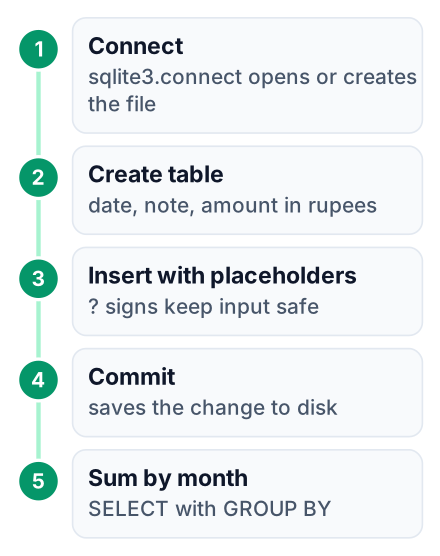
The idea comes from how India pays. UPI handled 21.63 billion transactions in December 2025 alone, which means almost every interviewer sends UPI payments daily. Your logger records spends you type in by hand, the way a UPI history would show them, and totals them by month.
import sqlite3
def inr(amount):
    s = str(amount)
    if len(s) <= 3:
        return "₹" + s
    last3, rest = s[-3:], s[:-3]
    groups = []
    while len(rest) > 2:
        groups.insert(0, rest[-2:])
        rest = rest[:-2]
    if rest:
        groups.insert(0, rest)
    return "₹" + ",".join(groups) + "," + last3
con = sqlite3.connect("expenses.db")
cur = con.cursor()
cur.execute("""
    CREATE TABLE IF NOT EXISTS expenses (
        id INTEGER PRIMARY KEY,
        spent_on TEXT,
        payee TEXT,
        amount INTEGER
    )
""")
entries = [
    ("2026-08-02", "Laptop", 92000),
    ("2026-08-05", "PG rent", 18000),
    ("2026-08-07", "Mess fees", 4500),
    ("2026-08-20", "Books", 10000),
    ("2026-09-05", "PG rent", 18000),
    ("2026-09-07", "Mess fees", 4500),
    ("2026-09-11", "Metro card", 650),
    ("2026-09-18", "Food delivery", 1240),
]
cur.executemany(
    "INSERT INTO expenses (spent_on, payee, amount) VALUES (?, ?, ?)",
    entries,
)
con.commit()
rows = cur.execute("""
    SELECT substr(spent_on, 1, 7) AS month, SUM(amount)
    FROM expenses
    GROUP BY month
    ORDER BY month
""").fetchall()
for month, total in rows:
    print(f"{month}  {inr(total)}")
con.close()
Run it once on a fresh folder and the terminal prints:
$ python expenses.py
2026-08  ₹1,24,500
2026-09  ₹24,390
Look at the ? marks in the INSERT line. They tell sqlite3 to pass each value as data, never as part of the SQL command. If you glued the payee name into the query string yourself, a name like x'); DROP TABLE expenses;-- could run as code. That attack is called SQL injection, and placeholders stop it.
The inr() function is your Indian twist. It keeps the last three digits aside, then peels the rest off in pairs from the right and joins every group with commas. Python's own formatting groups digits in threes, which gives 124,500. Writing lakh-style grouping by hand shows you thought about who reads the output. Running the script a second time adds the same rows again, so your stretch goal is an add command that takes one spend from the keyboard. In an interview, say: "It stores spends in SQLite with placeholders and groups them by month, with lakh-style output."
Fare and seat checker compares trains on one route
Extending the railway idea to fares and seat availability teaches you how to combine two API calls into one clean table. RailRadar's free sandbox also covers a Seat Availability API and a Fare API, under the same monthly request limit you met in the PNR tracker.
- Inputs: a source station code, a destination code, a date and a class such as 3A or SL.
- Concept you learn: query parameters. You pass them as a dictionary with
requests.get(url, params={...})instead of building the URL by hand. - Output: one row per train with its fare and the seats left, sorted by fare.
- Stretch goal: save each response to a JSON file, and read from that file on repeat runs.
That stretch goal is also your guard against the limit. Each train on a route costs two requests, one for fare and one for seats. A busy route can burn through your month's quota in a single careless loop, so cache while you test.
In an interview, say: "It merges two API responses on train number and caches results to stay inside a free quota." That one line shows data joining and cost awareness together.
Four small tools use only the standard library
A GST bill calculator, an EMI and compound-interest calculator, a campus placement tracker and a CSV-based hostel mess budget each need no install, and each teaches you functions and file handling. The compound-interest idea also appears in the GeeksforGeeks beginner projects list, which you can use to compare your version with theirs.
| Project | Python skill practised | Time needed | Interview talking point |
|---|---|---|---|
| GST bill calculator | Functions, dictionaries for tax slabs, rounding money with decimal | Two to three hours | "I used Decimal because floats give wrong paise values." |
| EMI and compound-interest calculator | Maths formulas, loops, input checks for negative values | An afternoon | "It prints a month-by-month schedule, like a bank statement." |
| Campus placement tracker | Reading and writing CSV with the csv module, filtering | An afternoon | "It shows which companies I applied to and which rounds I cleared." |
| Hostel mess budget | csv, datetime, simple reports per week | Two to three hours | "It warns when weekly spending crosses the amount I set." |
The placement tracker is the one to show first if you are in final year. Fill it with the companies you are applying to, such as TCS, Infosys or a local startup, and it becomes useful the day you finish it. The GST calculator is the best one for learning why money and floating-point numbers do not mix. Here is the bug in two lines:
>>> print(0.1 + 0.2)
0.30000000000000004
>>> from decimal import Decimal; print(Decimal('0.1') + Decimal('0.2'))
0.3
The first line shows the float error, and the second shows Decimal giving the exact answer when you build it from strings
Three quick builds come from open project collections
A USD to INR converter, a password generator and a command-line to-do list are common ideas, and you make them stand out by adding an Indian twist. The Python-World mini-projects repository holds simple versions of ideas like these under an MIT license. Read their code after you write your own, not before.
Rupee converter with an offline fallback. Fetch a live USD to INR rate from a free rate API. If the internet is down, read the last saved rate from a small JSON file and print the date it was saved. The fallback is the part interviewers ask about.
Password generator with safety rules. Use the secrets module, not random, because secrets is built for security. Add a checker that rejects weak choices for things like a UPI PIN: repeated digits, simple sequences, or your birth year. Here is a starting checker:
def weak_pin(pin):
    if len(set(pin)) == 1:
        return True
    return pin in "01234567890" or pin in "09876543210"
It returns True for 1111 and 1234, and False for 7391. Extend it to reject the birth year
Command-line task list for exam revision. Each task gets a subject and an exam date. The list sorts by the nearest exam and shows how many days are left. It is still a to-do app, but now it solves a problem every student in the room has had.
Once you finish these, an AI project is a sensible next step. This guide on how to build an AI agent in Python step by step uses the same API skills you practised on the railway projects.
Which project should you build first?
Start with the expense logger if you are new to Python, and with the PNR tracker if you already know functions and loops.
Build the expense logger
No API, no install. You learn SQL and file storage with nothing to go wrong outside your own code.
Build the PNR tracker
Your first real API. Practise environment variables and error handling here.
Add one standard-library tool
Pick the placement tracker or GST calculator from the table and finish it in one sitting.
Write a README for each
Explain what it does and how to run it, and paste a screenshot or code block of the real terminal output. This guide to writing a GitHub project README walks through each section.
Write one resume line per project
Name the problem first: "Offline UPI-style expense logger in Python and SQLite with monthly totals in lakh format."
Three finished projects with READMEs beat ten half-built ones. If you want to know what these projects can lead to in pay, read this breakdown of Python developer fresher salaries in India for 2026.
Common mistakes make good projects look weak
The most common mistakes are a hard-coded API key and a missing README. Code that crashes on bad input comes close behind. Each one is quick to fix:
- Key in the code. Anyone who opens your repository can copy it and use up your free requests. Fix: read it with
os.environ, and add a.envfile to.gitignoreif you use one. - No error handling. A wrong PNR or an empty input should not print a traceback. Fix: check input first, then check the response status code before reading JSON.
- No sample output. A reviewer will not clone and run your code. Fix: paste real terminal output into the README, like the expense logger output above.
- Copying a tutorial line by line. You cannot explain code you did not write. Fix: build it yourself first, then compare. For SQL, check placeholder usage against the official sqlite3 documentation instead of a random snippet.
Pick one project today, create a GitHub repository for it, and push a first commit with a README that shows the terminal output before you go to sleep.