Mistral Large 4 Open Weights: What a Student Can Actually Run
Mistral put the weights of a 1-trillion-parameter model online for free. But a normal laptop can't run it. Here's how a student actually uses it: through the cheap API, not self-hosting.

On October 29, 2026, Mistral put the weights of a roughly 1-trillion-parameter model on Hugging Face. Anyone can download them for free, yet the file is far too big for any student laptop. So what does "open" mean for a student with a normal budget?
Mistral Large 4, nicknamed Le Chonk, is an open-weight model you can download, change and host privately. It has about 1 trillion parameters, but only 49 billion are active for each token, per Mistral's announcement. Most students will use the cheap API, because the full model needs a 512GB Apple Silicon Ultra or about eight GPUs (Hugging Face).
Mistral Large 4 open weights: what launched
The full weights of Large 4 were released by Mistral on October 29, 2026, as a multimodal model that reads text and images and takes a 1M-token context, according to Mistral's own page. The Hugging Face launch blog went up the same day. TechCrunch reports that Mistral first showed the model earlier in October, and this release adds the downloadable weights.
The model page lists 1.05 trillion total parameters, split into 128 experts with 5 working on each token (Mistral). A mixture of experts is a model built from many smaller sub-networks, where a router picks a few of them for each piece of text. That design is why the active count stays small.
What the open-weight license lets you do
Mistral's Ecosystem Open-Weight License, an MIT derivative, lets you download and change the model, then run it privately, but selling it to others as a hosted service needs a separate commercial license (Hugging Face). "Open weight" means you get the trained model file. Open source in the strict sense also covers the code and data used to train a model. An open-weight release only promises the file and the rules for using it.
Pros
- Download the weights and keep them forever
- Fine-tune it on your own data
- Run it on your own machines for a personal, class or team project
- Keep private code on hardware you control
Cons
- You pay for all the hardware yourself
Say you build a code helper for your final-year project and run it for your own group. That fits the free license. Say instead you want to charge strangers per request to use your hosted copy. That is the case the commercial license is for.
This is a summary, not legal advice. Read the license file on the model page before you ship anything. Read next, a similar release with different license terms: Kimi K3.1 Pro.
Running it yourself takes serious hardware
A 2-bit quant fits on one Apple Silicon Ultra with 512GB of unified memory, while the better FP8 and NVFP4 quants need around eight GPUs, and NVFP4 needs NVIDIA Blackwell cards (Hugging Face). A quant is a smaller copy of the model that stores each number with fewer bits. It uses less memory, and you lose some quality.
| Option | What it needs | Trade-off |
|---|---|---|
| 2-bit GGUF | One Apple Silicon Ultra with 512GB unified memory | Fits one machine, lowest quality of the three |
| NVFP4 | NVIDIA Blackwell GPUs | Tested at about 10 tokens per second on 4x RTX 6000 Pro, 32K context |
| FP8 | Around eight GPUs | Closer to full quality, most expensive to run |
| Source: Hugging Face launch blog | ||
Ten tokens per second means a short paragraph takes several seconds to appear. That is usable for one person, and slow for a team.
Software support is ready. Hugging Face says the model runs from day one in transformers and in vLLM, a tool that serves models quickly. It also runs in llama.cpp. GGUF is a file format for quants, and Unsloth and llama.cpp provide them (source).
API pricing: what a student actually pays
CellCog reports that the API lists at $1.36 per million input tokens and $4.18 per million output tokens, and that a two-week launch sale halves both to $0.68 and $2.09. Mistral's own pricing page does not list the sale in the sources I found, so treat it as unconfirmed (CellCog). Cached input, meaning text the API has seen before and stored, costs $0.07 during the sale and $0.14 after.
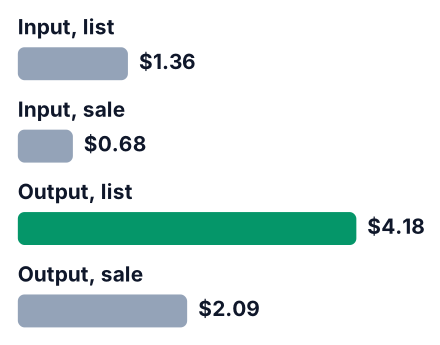
| Price per 1M tokens | Launch sale | List price |
|---|---|---|
| Input | $0.68 | $1.36 |
| Output | $2.09 | $4.18 |
| Cached input | $0.07 | $0.14 |
| Source: CellCog | ||
You may also see $2.06 next to the model on the Artificial Analysis leaderboard. That is the cost per benchmark task at the high setting. It is what the tester spent, not your bill.
Say you run a week of code reviews that sends two million input tokens and gets back half a million output tokens. As a rough estimate, two million input tokens is about 500 source files of 300 lines each, so a small team can reach it in a week. Here is the cost in US dollars, using the CellCog prices (CellCog):
| Week of reviews | Launch sale | List price |
|---|---|---|
| Input, 2M tokens | $1.36 | $2.72 |
| Output, 0.5M tokens | about $1.05 | $2.09 |
| Total | about $2.40 | about $4.81 |
All costs here are in US dollars, and no source gives a rupee price yet. For a price comparison with an OpenAI model, see our post on GPT-6.1 Terra pricing.
Coding and cyber benchmarks: where it leads
On Mistral's own numbers, it leads open-weight models on Terminal-Bench 4.0 and Cognition FrontierCode 2.0, and it ties GLM-5.3 on the Coding Agent Index while using 47% fewer tokens per task. These are the company's claims about its own model.
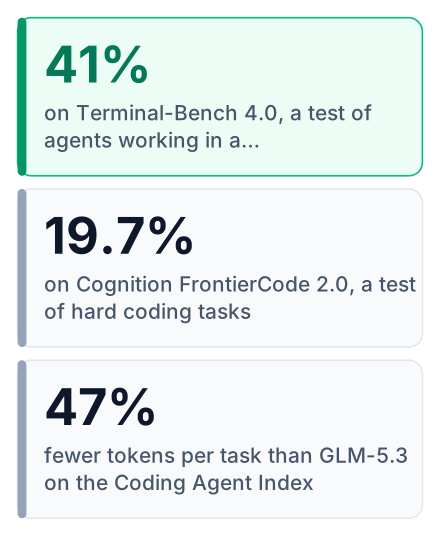
| Test (Mistral's figures) | Score |
|---|---|
| Terminal-Bench 4.0 | 41% |
| Cognition FrontierCode 2.0 | 19.7% |
| Artificial Analysis Coding Agent Index | 48% |
| Vulnerability reproduce-and-patch | 82% |
| Artificial Analysis Cyber Index | 51% |
| Refusal of malicious cyber prompts | 96.6% |
| Source: Mistral | |
The refusal figure matters for a security-focused model. It means the model says no to most requests that try to use it for attacks.
Different figures appear on the Hugging Face blog: 49.8% on the Coding Agent Index and 61.7% on DeepSWE v1.1. The two sources use different test setups, so the numbers do not match exactly.
Here is the honest limit. On the Artificial Analysis Intelligence Index, Large 4 scores 26 at the high setting, while DeepSeek V4.1 Flash leads open-weight models at 32. It is strong at coding agents, not the top open model overall.
Does Le Chonk replace ChatGPT or Claude?
For a student, use the API to test it and keep your current tool for daily work. Self-hosting only makes sense if you have the hardware.
| What you need | Better fit |
|---|---|
| Casual chat and homework help | Keep your current chat app |
| A coding agent on your own repo | Try Large 4 through the API |
| Private or sensitive code | Large 4, self-hosted by your team or college lab |
| A very low budget | Large 4 API during the sale, or free tiers of other tools |
The bigger reason is control. TechCrunch reports that Mistral pitches open weights as access for defenders that cannot be cut off. A hosted chatbot can change its terms tomorrow, but that control argument only applies if you download and host the weights yourself. If you only use the API, you depend on Mistral in the same way. If multimodal projects interest you more, our post on Gemini 4 Argon covers that side.
How to try it today
Your fastest start is the API with a small project, and downloading the weights only makes sense once you have the hardware or a team to share it.
Get an API key
Sign up on Mistral's console and create a key. Keep it out of your Git history.
Point a coding tool at the model
Most editors and agent tools accept a custom endpoint and model name.
Try it on a small repo you own
Ask it to explain a module, fix a failing test or review one pull request.
Compare with your current tool
Give both the same task. Check the answers and the token count.
Decide on self-hosting
Only consider it if your team or college lab has the GPUs.
Here is a generic chat request. The model name and key are placeholders: check the exact model ID in Mistral's own documentation before you run the command, because IDs can change after a launch.
curl https://api.mistral.ai/v1/chat/completions \
  -H "Authorization: Bearer YOUR_API_KEY" \
  -H "Content-Type: application/json" \
  -d '{
    "model": "MODEL_NAME_FROM_DOCS",
    "messages": [
      {"role": "user", "content": "Review this function for bugs: ..."}
    ]
  }'
Only CellCog reports the half-price sale, which it says lasts two weeks from launch, so check Mistral's own pricing before you rely on it (CellCog). Sign up for the Mistral API during the launch sale, run Large 4 on one small repo of your own, and compare the result with the tool you use now before you spend on any hardware.


