Best Gemini Models 2026: Argon vs Flash vs Flash-Lite
Gemini's lineup changed. Pro and Ultra are now plan names, not model names. This guide breaks down which current model fits your task and which plan unlocks it, with 2026 prices.

As of 28 October 2026, Google's subscription page lists "Pro" and "Ultra" as paid plans that unlock models. Say you open the Gemini app and search "Gemini Nano vs Pro vs Ultra". Many older articles and videos describe a lineup that has since changed, so check the date on anything you read. Which model should you use, and what will it cost you?
The best Gemini model depends on the job, and the plan decides which one you can open. Use Gemini 4 Argon for the hardest work, 3.8 Flash for daily tasks, Flash-Lite to save money, and Nano Banana for images. As reported on Google's subscription page and by GeoToolbox, the free tier gives you Flash-Lite, and Google AI Pro unlocks Argon. Eligible US college students can get Pro free for a year, with a redemption deadline of 31 December 2026. I found no rupee prices for India, so students there should start on the free tier.
Pro and Ultra are plan names now, and Nano means an image tool
Pro and Ultra now name Google's paid subscriptions on the official plans page, and "Nano" survives mainly as the image tool Nano Banana. Old comparisons of three model sizes no longer match what you can click. If a blog post compares "Gemini Nano" on your phone with "Gemini Ultra" in the cloud, close the tab. It is describing an older product.
This matters because the old advice was about size. Bigger meant smarter and slower. Today the choice has two parts: which model fits the task, and which plan you are paying for.
If you came here searching "gemini pro vs ultra", you are comparing two subscriptions. The plans section further down gives the prices and what each one adds. For a subject-specific comparison against ChatGPT, see ChatGPT vs Gemini for medical students.
Gemini models list: what each current model does
The Gemini API models page lists a flagship reasoning model (Gemini 4 Argon), two Flash generations (3.8 and 3.6), two budget Flash-Lite models (3.5 and 3.1), a still-Preview 3.1 Pro, and the Nano Banana image models. That page is the one to bookmark. Blog posts go out of date; Google updates its own docs first.
Here is each model in one line:
- Gemini 4 Argon: the flagship for reasoning. It reads up to 1M tokens of context and can write up to 1M tokens of output, per the official models page. A token is a small piece of a word, and 1M tokens is roughly several novels of text. The context window is how much text the model can read at once.
- Gemini 3.8 Flash: the smartest Flash model. Fast, and good enough for most daily work.
- Gemini 3.6 Flash: the previous Flash. Still listed, but 3.8 replaces it for new work.
- Gemini 3.5 Flash-Lite and 3.1 Flash-Lite: the budget models. Built for speed and low cost.
- Gemini 3.1 Pro: still marked Preview. A 3.5 Pro has not shipped.
- Nano Banana (versions 2.1 and 2, plus Lite and Pro variants): the image-generation models. Nano Banana is the image model; it is not the same thing as the old on-phone Gemini Nano.
- Gemini Omni Flash: the video model.
Project Genie sits outside this list. It is a separate world model that builds interactive scenes, and I covered it in my write-up on Google's Genie world model. For coursework you can ignore it.
Which model for which job, and which plan unlocks it
Match the job to the cheapest model that can do it, then check which plan opens that model. That rule comes from The Rundown's model comparison, which puts Argon on the hardest reasoning and coding, 3.8 Flash on substantial daily work, and Flash-Lite on fast, high-volume extraction.
The table below joins two official pages: the API models list and the subscription page. API prices are in dollars per 1M tokens, input then output, from GeoToolbox's pricing summary.
| Model | Best student job | Plan that unlocks it | API price per 1M tokens |
|---|---|---|---|
| Gemini 4 Argon | Hardest reasoning and coding | Google AI Pro and up | $2 / $10 intro through 30 Nov 2026, then $4 / $20 (GeoToolbox) |
| Gemini 3.8 Flash | Daily work: notes, code help, drafts | Google AI Plus and up | $0.75 / $3.75 intro through 31 Dec 2026, then $1.50 / $7.50 (GeoToolbox) |
| Gemini 3.5 Flash-Lite | Fast, cheap extraction and sorting | Free tier | $0.30 / $2.50 (GeoToolbox) |
| Nano Banana | Diagrams, posters, slide images | Free tier, about 3 images a day (IntuitionLabs) | Priced per image, see IntuitionLabs |
Note the intro prices. Argon's discount ends a month before Flash's does. If you are building a project on the API, budget for the later price, not the launch price.
One model is missing from the table on purpose. The Rundown suggests 3.1 Pro Preview only if you already have a workflow built on Pro. Its API price is $2 / $12, rising to $4 / $18 above 200K tokens, according to GeoToolbox. A new student project has no reason to start there.
Gemini 4 Argon is for work that defeats other models
Argon earns its higher price only on the hardest reasoning and coding problems, where Google's own test shows 77.9% on DeepSWE v1.1, a software-engineering coding benchmark, against 74.1% for GPT-6 Astra, as listed in The Rundown's comparison. Google's own page on Argon at work shows the kind of tasks involved. These are Google's own numbers, a 3.8-point gap on the vendor's test, not an independent one.
Say you are chasing a bug that crosses a dozen files in a group project. Flash keeps suggesting fixes that break something else. That is the moment to switch to Argon. It can hold the whole codebase in that long context window from the models list, and reason across the files together.
Other good uses are a multi-step proof for a discrete maths course, or a long project spec you need checked for gaps. Google's own examples of Argon handling complex tasks show the kind of work it is designed for. If you want project ideas sized for it, read what to build with Gemini 4 Argon.
Pros
- Best Gemini model for hard reasoning and large codebases
- Reads and writes very long documents in one go
- Leads GPT-6 Astra on Google's own coding test, not an independent one
Cons
- Needs a paid plan in the app
- Costs the most on the API, and the intro price ends soon
- Slower than Flash for simple questions
Gemini Flash and Flash-Lite cover most student work
Most of your day is small jobs, and a small model finishes them in seconds.
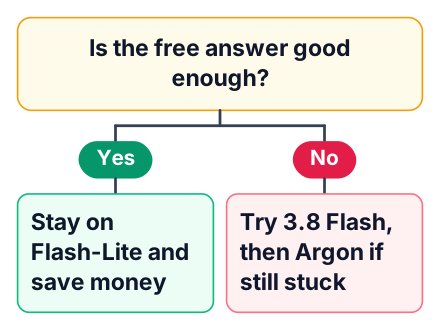
Paste in an error message and ask what it means. Upload lecture slides and ask for a one-page summary. Ask for a first draft of a README for your GitHub project. 3.8 Flash handles all of these well, and you will not notice a quality gap.
Flash-Lite is for volume. Picture a script that sends a few hundred rows of survey data to the API, one row at a time, and asks the model to tag each one. Speed and price matter more than depth here. On the API, Flash-Lite costs about one fifth of 3.8 Flash's post-intro input price and one third of its output price, based on GeoToolbox's figures.
Use this order and only move up when the answer is weak:
Try Flash-Lite
Give it the task as clearly as you can. Check the answer against your notes.
Move to 3.8 Flash
If the answer is vague or wrong, ask the same question here.
Move to Argon
Switch only if Flash is still stuck after a clear prompt.
Gemini Pro vs Ultra: what the plans cost and unlock
Google's subscription page did not show prices when I checked, so these US prices come from GeoToolbox and may be out of date. On those figures, Google AI Pro at $19.99 a month looks like the sensible paid step for a student. Ultra, at $99.99 to $199.99 a month, only makes sense for heavy daily use. Below Pro, the free tier costs $0, and Google AI Plus costs $4.99 a month after a cut from $7.99 in June 2026, per the same page.
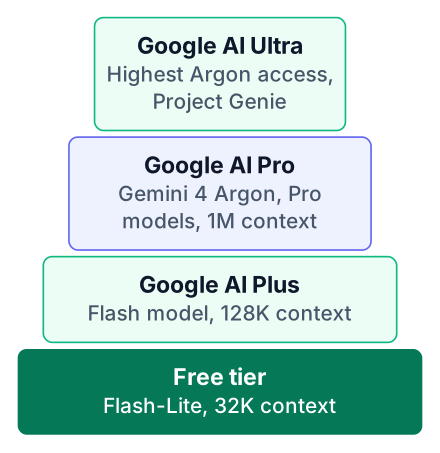
Here is what changes between plans. Limits and storage are from GeoToolbox; what each plan includes is from Google's subscription page.
| Plan | App context window | Storage | Usage limits and extras |
|---|---|---|---|
| Free | 32K tokens | 15GB | Base limits (GeoToolbox) |
| Google AI Plus | 128K tokens | 400GB | Higher than free (GeoToolbox) |
| Google AI Pro | 1M tokens | 5TB | About 4x free limits, and access to Argon as listed on Google's page (Google) |
| Google AI Ultra | 1M tokens | 20TB to 30TB | 5x or 20x Pro limits, top Argon access, Project Genie (GeoToolbox) |
The context window is the part students feel first. It decides how much of a textbook chapter or codebase you can paste into one chat. Pro and Ultra share the same window, so Ultra mostly buys you more usage, not a bigger brain.
Images follow the same steps. IntuitionLabs reports about 100 Nano Banana images a day on Pro and about 1000 on Ultra. Few students need either number.
If you are weighing Gemini Pro against a Claude subscription, my post on stretching Claude Pro's usage limits shows how far that plan goes for coursework.
US students: Google AI Pro is free for a year
Eligible US college students aged 18 or older can claim Google AI Pro free for one year, and the offer must be redeemed by 31 December 2026, according to GeoToolbox. IntuitionLabs reports the same offer, so two separate pages agree on it.
That year gives you everything in the Pro row above: Argon, the long context window, the higher limits and Pro's image quota. For a student writing a thesis or building a capstone project, that is the whole toolkit at no cost.
Two things to do before you redeem it. First, read the offer terms on Google's own page, because eligibility checks can change. Second, set a calendar reminder a week before your free year ends. Check in the offer terms whether the free year renews into a paid plan, and decide on purpose, not by discovering the monthly Pro charge on your card.
India: start on the free tier and upgrade only when a task fails
Students in India should start on the free tier, because it reportedly includes Flash-Lite and Nano Banana (confirm this in your own account), and paid plans bill in local currency that you should check on the subscription page. I am not giving rupee prices here because none of the pages I checked list them. Look at the page from your own account to see what you would pay.
The free year of Pro described above is for US college students. I have found no source that offers it in India, so do not plan around it.
Here is a practical way to decide. Use the free tier for one month. Each time an answer fails you, write down the task and why it failed. At the end of the month, pay only if a specific job on that list needs Argon or higher limits. For a sense of how other AI plans are priced in India, see Claude Pro's price in India.
There is one more option if you code. The API has its own per-token pricing, separate from the app plans, listed in the model table earlier. For a small project that makes a handful of calls a day, paying per token can cost less than any subscription. The Gemini API docs explain how to get a key.
The free tier does have limits you will hit:
- The app context window is the smallest of any plan, so a full semester of notes will not fit in one chat.
- The image quota runs out after a few pictures a day.
- Argon is not available, so the hardest coding problems stay out of reach.
Open the Gemini app on the free tier today and give Flash-Lite one real task from your coursework. Write down where the answer falls short. If you are a US college student, check Google's offer page for the free year of AI Pro before the offer closes.


