Cursor Mobile App: Launch Agents and Merge PRs From Your Phone
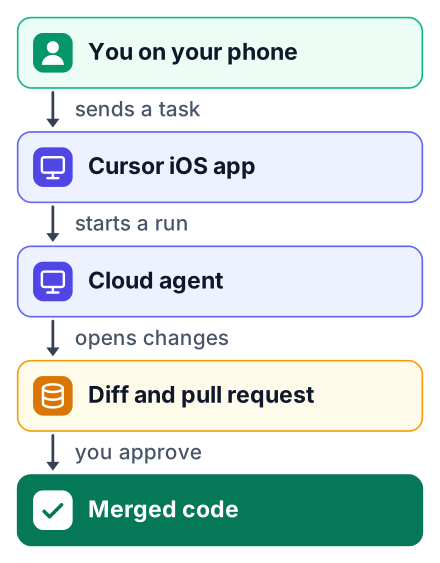
Cursor now has an official iOS app that lets you launch, supervise and merge coding agents from your phone. It needs a paid plan starting at Premium, and there is no Android version yet.

Say you are on a bus home. An agent you started at your desk has just finished a bug fix, and the fix is waiting for you to read it and merge it. Your laptop is at home and your stop is ten minutes away.
Since June 29, 2026, you can do exactly that. The Cursor for iOS public beta that began on that day changed the answer, with one catch about money.
Cursor's iPhone and iPad app launches coding agents and lets you watch and merge their work. It needs a paid plan. A beginner on Free or Plus cannot use it at all and needs Premium at $30/month. It is not an IDE. It adds to your laptop and does not replace it. Not sure you should pay? The verdict is in the last section.
Cursor mobile app: what exists and what does not
On iPhone the app needs iOS 26, works in English only, and lists X Corp as its developer. There is no Android app yet, though the Cursor docs say Android is planned. If you searched "does cursor have a mobile app", that is your answer for today.
The device rules are strict. The official docs require iOS 26.0 or later on iPhone and iPadOS 26.0 or later on iPad. The app is in English only.
One detail confuses people on the App Store. The App Store listing names the developer as X Corp, because Cursor is now part of the X and SpaceX group. It is still the real Cursor app, not a copy made by someone else.
Check your plan before you install
The app is blocked on the Free and Plus tiers, so the plan you pay for decides what you can do. Here is how the Cursor pricing page and the mobile docs line up.
| Plan | Website price | Mobile app | Cloud agents and automations |
|---|---|---|---|
| Free | $0 | No | No |
| Plus | $8/month | No | No |
| Premium | $30/month | Yes | Yes, this is the entry point |
| Super | $100/month | Yes | Yes, with more usage and priority access |
| Ultra | $200/month | Yes | Yes, with more usage and priority access |
| Teams | from $30 per user per month | Yes | Check the pricing page for team limits |
Older subscriptions count too. The docs list the legacy Start, Pro, Pro+ and Ultra plans as able to use the app, alongside Enterprise.
The pricing page lists dollar prices only, and I could not confirm a student plan there. No rupee price is published, so check the final amount at checkout, where your bank or Apple may add tax or conversion charges.
Install the app and sign in
Installing takes the App Store and the same Cursor account you use on the web, with no separate sign-up. The listing shows a download of about 325.6 MB, so use Wi-Fi if your mobile data is limited.
Check your system version
Open Settings, then General, then About. Confirm you meet the version rule from the first section before you download anything.
Install Cursor
Search "Cursor" in the App Store and check that the developer is X Corp.
Sign in
Use the login you already use on cursor.com. Your plan and connected repos come with it.
Allow notifications
Say yes when the app asks. Without them, you only learn an agent finished when you open the app.
Pick a repo and launch an agent
You choose a connected repository, describe the task by typing or by voice, and the agent runs in the cloud. Per the Cursor docs, repo connections, secrets and environment variables are set up on the web, so do that first at your desk.
Small, specific prompts work best on a phone. I have not timed a real run myself, so treat this as an illustration and not a result. Say your portfolio site has a contact form that accepts an empty email field. A good prompt names the file area, the bug and how to check the fix:
In the contact form component, the form submits when the email field is empty.
Add validation so it shows "Please enter a valid email" and blocks submit.
Add one test for the empty case. Do not change styling.
Pick the repo
Choose your portfolio repo from the list of repos you connected on the web.
Write or speak the task
Type the prompt or use voice input. Speaking works well on a bus, as long as you say the file and the expected result.
Choose MCP servers for this run
You can turn on only the MCP servers this task needs. Fewer tools means fewer surprises.
Send it
The agent starts working in the cloud. You can lock your phone.
There is a second option called Remote Control. It lets you steer an agent running on your own computer instead of the cloud, which is the better choice when the code only exists on your laptop. The docs say it needs Cursor 3.9.8 or later on that computer, and the computer must stay awake.
Annotate a screenshot in Design Mode
Design Mode lets you draw on a screenshot of the running app so the agent sees exactly which part to change, as the Cursor launch post shows. Words like "the button looks wrong" are vague. A circle around the button is not.
Open Design Mode on the agent's run
Find the run you want to adjust and switch to Design Mode. The exact button may move during the beta.
Mark the wrong element
Circle the error message that overlaps the input, or the button that is off-center.
Add a short note
Write one line, such as "Move this below the field, red text."
Send it back
The agent gets the marked screenshot plus your note and keeps working.
You do not need to keep the app open while you wait. Live Activities track up to 8 agents on your lock screen, and a push notification arrives when one finishes. Live Activities are iPhone updates that stay on your lock screen.
Review the diff and merge the PR
Merging from your phone is safe only if you read the diff first and your repo has tests that run on the pull request. The mobile docs list diff review and PR merging as core features, but the judgment is still yours.
Open the diff
Tap the finished agent. You see each changed file with added and removed lines.
Read every changed file
For the contact form task, expect a change to the form and one new test. Anything else needs a reason.
Ask for changes or approve
If something is off, reply in the thread. The agent updates the same pull request.
Merge the PR
Wait until your tests pass before merging. If they fail, ask the agent to fix them first.
What a phone still cannot do
The app has no editor, terminal or file browser, so anything that needs hands-on coding still waits for a laptop. If you searched "cursor ide mobile", there is no mobile Cursor IDE. The app directs agents; it does not let you write code yourself.
Pros
- You can start and check agents away from your desk.
- Voice input makes quick tasks fast to send.
- Lock screen updates mean less checking.
- Design Mode turns a vague visual bug into a clear request.
Cons
- Per the docs, secrets, env config, MCP management, admin and billing stay on the web.
- No editor, terminal or file browser on the phone.
- App Store reviews note missing features versus the web, such as sub-agent visibility and project skills.
- It is a beta, it is iOS only, and it is paid only.
People who use it seem happy overall. The listing shows a 4.7 rating from about 1K ratings. Read the low-star reviews too, because they describe the gaps you will hit first.
Who should pay for it and who should wait
I think you should pay only if you already use cloud agents often and have an iPhone on iOS 26. If not, the Free plan on a laptop is enough to learn the basics, though it has no cloud agents. The Premium price on the pricing page is a real monthly cost for a student in Bengaluru or in Ohio.
- You are on Free: stay there for now. Writing and fixing code yourself builds the skill that lets you judge an agent's diff later. My post on building a fresher portfolio with Lovable explains why you still need to understand the code a tool writes.
- You have an iPhone and a Premium budget: try cloud agents on the web first for a few days. Install the app only once you start agents often enough that waiting at your desk annoys you.
- You use Android: wait. Nothing you do today will carry over until an Android app ships.
Check your current Cursor plan on cursor.com/pricing today. If it is Premium or higher and you have iOS 26, install the app and launch one small agent task on a throwaway repo, then read the diff before you merge it.