Mistral Large 4 vs ChatGPT: Best AI for Students in 2026
Mistral Large 4 is now open-weight, and ChatGPT's free tier has improved a lot. This comparison looks at price, privacy, coding ability, and API costs to help students decide which AI assistant to use for learning and projects.

Say you are a second-year student in Pune with a laptop budget of about twenty thousand rupees. Or say you study in Ohio and can spend roughly twenty dollars a month on tools. On 29 October 2026, Mistral released the weights of its one-trillion-parameter model. That model can run with no internet and no monthly fee, but only on a server-class machine or a 512GB Apple computer, so for most students the real choice is the cheap Mistral student plan or ChatGPT's free tier. Which should you pay for?
Mistral Pro is the cheaper plan; ChatGPT is the easier pick if you just want a chat app that works. Privacy only comes from running the downloaded model yourself, and Mistral's own chat app and API are hosted services that receive your text. Mistral Pro costs $5.99/mo for verified students, ChatGPT Plus costs $20/mo, and only Mistral lets you run the model on your own hardware. Coding quality is not compared head to head here, because no source scores Mistral Large 4 against ChatGPT. Running the model yourself needs very expensive hardware.
Mistral Large 4 vs ChatGPT at a glance
The two differ most in who controls the model: Mistral Large 4 ships its weights for anyone to download, while ChatGPT stays on OpenAI's servers.
"Open-weight" means the trained model file is public, so you can download it and run it on your own computer. ChatGPT gives you access to a model, never the model itself.
| Feature | Mistral Large 4 | ChatGPT |
|---|---|---|
| Model access | Download the weights, use Mistral's chat app, or call the API | ChatGPT app or OpenAI's API only |
| Open weights | Yes, under the Mistral Ecosystem Open-Weight License | No |
| Chat plan price for students | Mistral Pro at $5.99/mo (verified students) | Plus at $20/mo |
| Free tier | Free plan listed on Mistral's pricing page | Unlimited text on GPT-5.6 Luna since 6 August 2026 |
| API price (per 1M tokens) | $0.70 input / $2.10 output | No sourced rate in this post; the per-token rates are in our GPT-6.1 Terra price breakdown |
| Context window | 1M tokens | Varies by model and plan; check OpenAI's current docs |
| Self-hosting | Possible, with very large hardware | Not possible |
Mistral Large 4 is a mixture-of-experts (MoE) model. It has 1 trillion parameters in total, but only about 49B are active for each answer. MoE means the model is split into many smaller expert parts, and each answer only uses a few of them. This makes each answer cheaper to produce than its full size suggests.
The license has one limit worth knowing. You may use and change the model, but the Mistral Ecosystem Open-Weight License restricts reselling it as a hosted service. For a student project or a college lab, that limit will not affect you. For more on the release itself, read our Le Chonk open-weights explainer.
Coding reliability: what the benchmarks show
Among open-weight models, Mistral Large 4 leads on agent-style coding tests, but a benchmark score is not the same as how it behaves on your homework project. An "agent-style" test asks the model to finish a whole task by itself, step by step. That is closer to real work than answering a single question.
| Test | What it checks, in plain words | Mistral Large 4 score |
|---|---|---|
| FrontierCode 2.0 | How many hard programming problems the model solves | 19.7%, the top open-weight score |
| Terminal-Bench 4.0 | Whether it can finish tasks by typing commands in a terminal, like a developer would | 41%, up 13 points from the preview |
| Artificial Analysis Coding Agent Index | A combined score across several agent coding tasks | 48%, tied with GLM-5.3 while using 47% fewer tokens |
| Coding Agent Index (Hugging Face figure) | The same index, as reported at launch | 49.8% |
The token figure matters more than it looks. Fewer tokens for the same result means a smaller API bill and a faster reply. Two sources giving slightly different index numbers is normal, since scores often get updated after launch.
Here is the honest gap for anyone searching "mistral large 4 vs chatgpt coding". None of the sources this post relies on gives a head-to-head score against GPT-6.1 Terra, ChatGPT's current mid-tier coding model. I will not guess one. The fair way to compare them is to give both the same tasks yourself, which the last section explains.
Mistral Large 4 also has three reasoning modes: Low, Medium and High, with High as the default. "Reasoning" here means how long the model thinks before it answers.
- Low: quick syntax questions, like "how do I reverse a list in Python?"
- Medium: explaining an error message or writing one small function.
- High: debugging across several files, or planning a project structure.
Higher modes are slower and use more tokens. OpenAI has a similar idea in its paid tiers; our post on GPT-6.1 Terra Pro's reasoning mode covers what that costs.
Student cost math: subscription plans
A verified student pays $5.99 a month for Mistral Pro, against $20 for ChatGPT Plus, which saves about $168 a year. The table below is built only from those two pricing pages.
| Plan | Monthly price | Yearly total |
|---|---|---|
| ChatGPT free tier | $0, unlimited text on GPT-5.6 Luna | $0 |
| Mistral Pro (verified student) | $5.99 | $71.88 |
| ChatGPT Go | $8 | $96 |
| Mistral Pro (regular) | $14.99 | $179.88 |
| ChatGPT Plus | $20 | $240 |
Neither pricing page gives a rupee figure. For readers in India, the final amount depends on the exchange rate on the day you pay, plus any fee your card or bank adds for foreign payments. Check your bank statement after the first month to see the real number.
The student discount only applies after Mistral verifies you, usually through a college email or ID. If your college email does not qualify, the regular price is still cheaper than Plus, but the gap gets smaller.
One honest point against paying at all: ChatGPT's free tier now gives unlimited text chat. Say you mostly ask for explanations of error messages and a few code snippets a week. The free tier may already cover you, and the cheapest plan is the one you do not buy.
API cost: pay per token instead of per month
If you build your own app or tool, paying per token is cheaper than any subscription until you send millions of tokens a month. A token is a small piece of text, roughly a short word or part of a longer word. "Per 1M tokens" is the price for one million of those pieces.
Mistral Large 4 costs $0.70 per 1M input tokens and $2.10 per 1M output tokens, with cached input at $0.07. Input is what you send to the model. Output is what it writes back. Cached input is text you send again and again, like the same instructions at the top of every request, and it is charged at a tenth of the normal input rate.
Say you build a small study bot for your class. Over a month, your classmates send it about one million tokens of questions, and it writes back about half a million tokens of answers. Here is the math, using those Mistral rates:
| Part | Amount used | Cost |
|---|---|---|
| Input | One million tokens | Seventy cents |
| Output | Half a million tokens | About one dollar |
| Total for the month | Less than two dollars |
That is far below any chat plan. The math changes only if your app gets busy, with many users or long answers.
For OpenAI's side, this post has no sourced per-token rate, so it does not claim which is cheaper. Our GPT-6.1 Terra pricing post for students lists rates, so you can put its input and output prices into the same study-bot math and compare both.
Before you budget, open the live price page. Some aggregator sites, OpenRouter among them, still show Mistral's older and higher preview price. If you build on an aggregator, the price you pay is the one on its page, not on Mistral's.
Privacy: self-hosting keeps your code on your laptop
With a downloaded model, your prompts never leave your machine, whereas every ChatGPT message is sent to OpenAI's servers. TechCrunch's coverage framed the release around cybersecurity use, where keeping data in-house is often a rule, not a choice.
Pros
- Your code and prompts stay on your own hardware.
- It works with no internet connection.
- No company can change the model or the price under you.
- You can follow strict college or employer rules about sharing code.
Cons
- The hardware costs far more than years of any subscription.
- Setup takes time and some comfort with the terminal.
- Smaller, compressed versions answer more slowly and can be less accurate.
- You handle updates and fixes yourself.
For most homework, privacy is not a big concern. It starts to matter in four cases:
- You are working on code for a paying client.
- Your internship company forbids pasting its code into outside tools.
- You are building a project or startup idea you have not released yet.
- Your college has rules about which AI tools you can use on graded work.
One common mistake: Mistral's own chat app and API are still hosted services. When you type into them, your text goes to Mistral's servers, the same way ChatGPT messages go to OpenAI's. The privacy win only applies when you run the weights yourself. For either hosted service, check the current privacy settings in your account before you paste in anything sensitive.
Running Mistral Large 4 offline: what hardware you need
Full-precision hosting needs about 1,128GB of GPU memory, and the 2-bit version still needs a 512GB Apple Silicon Ultra machine, so most students cannot do it today. The full version, stored in a format called FP8, needs eight H200 server GPUs, according to the same Hugging Face post.
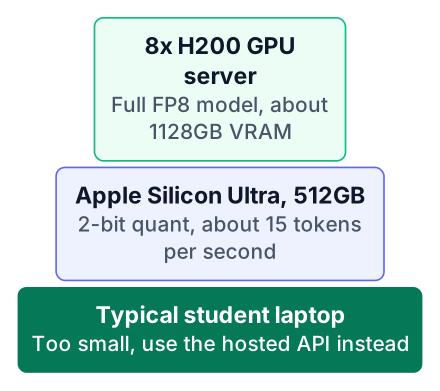
Quantization means storing each number in the model with fewer bits, so the file gets much smaller in exchange for some accuracy. The 2-bit GGUF version is the most compressed one. On a single Apple Silicon Ultra with 512GB of RAM, it writes about 15 tokens per second. That is slower than a hosted chat app, but usable for reading answers as they appear.
If you do not own that machine, you still have options:
- A college lab or shared server. Ask your department whether it has GPU servers. A lab that already has the hardware can host it once for many students.
- The API. You get the same model with almost no setup, but your prompts go to Mistral's servers.
Be clear about why you would self-host. For one student, it is a privacy choice, not a money-saving one. The machine costs more than many years of the API bill from the previous section.
If you do have access to the hardware, the path looks like this:
Check your memory
Confirm your machine has enough RAM or GPU memory for the version you want, using the figures on Hugging Face.
Download the quantized weights
Get the GGUF version that fits your memory from the official Hugging Face release.
Run it with a local runner
Load the file in a local model runner that supports GGUF, following that runner's own instructions.
Test with a small prompt
Ask for one short function first, and watch the speed and memory use before you trust it with real work.
Who should pick what
Pick Mistral Pro for cheap daily coding help, ChatGPT free for casual use, the API for projects, and self-hosting only if you have the hardware and a real privacy need. Here is how that maps to different readers:
- First-year beginner: start with ChatGPT's free tier. You are still learning what to ask, and a free tool is enough for that.
- Student building a portfolio project: use the Mistral API. Your bill stays small, and you learn how real apps call a model, which is a skill to show in interviews.
- Student handling private or client code: self-host through a college server, or ask whoever owns the code which tools they allow.
- Student on a tight budget in India or the US: if you code with AI help every day, the verified student Mistral Pro plan gives the most for the least.
My opinion, based on price alone since coding quality is not compared here: for a student who codes daily, Mistral Pro at the student price is the better deal than ChatGPT Plus. The counterpoint is real, though. ChatGPT is the tool most of your classmates and teachers already use, and its setup takes about a minute. If shared familiarity matters to your study group, that is a fair reason to stay.
Your next step: open mistral.ai/pricing and check whether your college email qualifies for the student plan. Then spend one week giving the same three coding tasks to Mistral and to ChatGPT's free tier. Write down which answers you had to fix, and pay for the one you trust more.


