How to Use Claude Code for Debugging: A Backend Walkthrough
Claude Code can trace a backend bug across your files in seconds, but its plan needs your judgement. This walkthrough follows one Express API error from stack trace to tested fix, marking every step where you must stay in control.
Say your own API returns an HTTP 500 error at eleven at night. The stack trace points at a file you did not write. The deadline is tomorrow morning. Do you hand the whole bug to an AI tool, or read every file yourself?
This post follows one backend bug from that error to a tested fix, in the terminal. Along the way, I mark the steps where you must not trust the AI. If you wonder whether AI saves time on backend work at all, our CRUD benchmark on coding with AI measured it.
To debug with Claude Code, install it, run claude inside your project folder, paste the full stack trace in plan mode, check the cause it finds, read the diff, and run a failing test before you accept the fix. It traces the cause across files and proposes a fix. You run the tests yourself. It needs a paid plan, because the Free plan does not include Claude Code.
Check the plan and cost before you install
Claude Code is not on the Free plan, so you need Pro or higher before the first command works. Pro is the cheapest way in. AIZOLO reports rupee prices for India, listed below next to the US prices, but check the final price at checkout.
| Plan | US price | India price |
|---|---|---|
| Pro | $20/month, or $17/month billed annually ($200/year) (Claude pricing) | ₹2,399/month, or ₹2,000/month billed annually (₹24,000/year), GST included (AIZOLO) |
| Max 5x | $100/month (Claude pricing) | ₹11,999/month (AIZOLO) |
| Max 20x | No US figure. The US page instead lists a separate tier called Ultra at $200/month, described as a 10x plan (Claude pricing) | ₹23,999/month (AIZOLO) |
| Free | No Claude Code (Claude pricing) | No Claude Code (Claude pricing) |
A price table hides the limits. Every plan has a rolling 5-hour session limit plus a weekly limit. Chat on web, desktop and mobile draws from the same pool as Claude Code (Claude pricing FAQ). A long chat about your resume in the afternoon leaves less room for debugging at night.
India has rupee billing since July 13, 2026, but UPI is not supported yet (AIZOLO's country price comparison). AIZOLO reports these rupee prices, not Anthropic, so check the final price at checkout before you pay. The gain is that your bank no longer adds foreign-exchange fees.
Two billing traps catch new users (NxCode's Claude Code pricing guide). API credits pay for the Claude Platform and cannot be spent inside interactive Claude Code. And if an ANTHROPIC_API_KEY variable is set on your machine, Claude Code bills that key at API rates instead of your subscription.
Install Claude Code and start it in your project
One install command per operating system, then you run claude from inside the project folder so it can read your files. Both commands come from the official Claude Code docs.
# macOS or Linux
curl -fsSL https://claude.ai/install.sh | bash
# Windows (PowerShell)
irm https://claude.ai/install.ps1 | iex
# then, inside your project
cd my-api
claude
On the first run, it asks you to log in. Use the account that holds your paid plan. The next section adds the one file that makes it useful.
Start it in the project root, not your home folder. From the root it can see the routes and the tests together. That is what lets it follow a bug from one file to the next.
Wondering if this saves time at all? Our CRUD benchmark on coding with AI tested that on routine backend work.
Add a CLAUDE.md file with your project rules
A CLAUDE.md file in the project root is read at the start of every session, so you write your rules once instead of repeating them. For a small Express API, it can be this short:
# Project rules
## Run things
- Install: npm install
- Tests: npm test
- One test file: npx jest tests/users.test.js
## Code style
- Use async/await, no .then() chains
- Return 404 for missing records, never 200 with empty data
- Errors go through middleware/errorHandler.js
## Ask first
- Never edit files in migrations/ without asking
- Never change .env or package versions without asking
Backend mistakes travel further than frontend ones. A wrong migration changes the database for every user, not one screen. The "Ask first" lines stop the tool from touching those files on its own.
On a team, commit CLAUDE.md to git. Every developer then gets the same test command and the same review rules. The rules then live in the repo, not in one person's head.
Paste the error and let it trace the root cause
Give it the full stack trace, not your guess, and it follows the failure across files to the line that causes it, as the Claude Code docs describe for bugs.
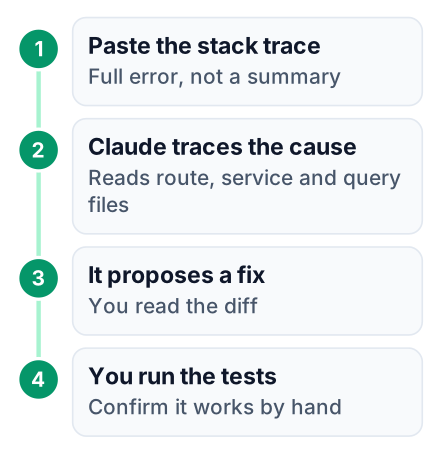
Say your Express API has a GET /api/users/:id route. It works for real users. For an ID with no row in the database, it crashes. Before you paste anything, press Shift+Tab to turn on plan mode. In plan mode it explains a plan before it edits a file (NxCode).
Then paste the whole error with one line of context. The project here is a small example I built for this post, and the exchange below is shortened, so the tool's exact wording will differ:
> GET /api/users/9999 returns 500. Full trace below.
> Find the root cause. Don't edit yet.
TypeError: Cannot read properties of null (reading 'email')
    at getUserProfile (src/services/userService.js:14:22)
    at async src/routes/users.js:9:21
Reading src/routes/users.js
Reading src/services/userService.js
Reading src/db/userQueries.js
Root cause: findUserById() in userQueries.js returns null when no
row matches. getUserProfile() reads user.email without a null check.
The route has no "not found" branch, so the TypeError reaches the
error handler and becomes a 500.
Plan:
1. Return null from getUserProfile() when the user is missing.
2. In the route, send 404 when the profile is null.
3. Add a test for a missing ID.
Look at what it read. You gave it one error. It opened the route, then the service, then the query file, and found the cause in the database layer. You hand over the reading and keep the judgement.
Ask it why before you say yes. If the explanation does not match the code you can see, stop there.
Review the diff before you accept it
Read each changed line yourself, because a fix that stops the error can still hide the real problem. Here is the diff it proposes:
--- a/src/services/userService.js
+++ b/src/services/userService.js
 async function getUserProfile(id) {
   const user = await findUserById(id);
+  if (!user) return null;
   return { email: user.email.toLowerCase(), name: user.name };
 }
--- a/src/routes/users.js
+++ b/src/routes/users.js
   const profile = await getUserProfile(req.params.id);
+  if (!profile) {
+    return res.status(404).json({ error: 'User not found' });
+  }
   res.json(profile);
A worse fix is easy to accept late at night. Changing user.email to user?.email also stops the crash. The endpoint would then return a 200 with an empty email. Your frontend would show a blank profile instead of "User not found".
Check these by hand:
- Cause or symptom. Does the change handle the null where it starts, or only hide the crash?
- Files touched. Did it edit anything outside the route and the service? A change to the error handler or a migration needs a reason.
- Status code. A missing row should return 404, not 200 with empty data.
Pros
- Reads many files fast and follows imports you would have to search for
- Explains a stack trace in plain words
- Proposes a fix and a test together
Cons
- Does not know what the endpoint should do for your users
- Can miss edge cases, like a deleted user or a malformed ID
- Will not flag security gaps on its own, like a missing auth check or a leaky error message
Test the fix yourself
Run the test suite and the failing request on your own machine, and ask Claude Code for a new test that fails before the fix and passes after it.
Commit before you start. Its GitHub page says it handles git workflows, so it can write the commit message for you. You still read that message before it goes in. If a fix goes wrong, git restore . takes you back to the clean state.
Write the failing test
Ask for a supertest case that requests a missing ID and expects 404. Read it until you can explain each line.
Run it before the fix
Use
npx jest tests/users.test.jsfor this. It must fail. A test that passes now proves nothing.Apply the fix
Accept only the diff you reviewed in the last section.
Run the whole suite
Call
npm testnext. A change in the service can break another route that calls it.Hit the endpoint
Run
curl -i localhost:3000/api/users/9999and look for 404 in the first line.
A test you understand is proof you can show a reviewer. The AI saying "done" only means the tool stopped.
Keep usage low with four commands
Four commands stop long sessions from using up your 5-hour limit (Claude pricing) on one bug, and NxCode's guide lists all four.
/usageshows your plan limits and what is using them. Check it before a big task./modelswitches to a cheaper model for simple jobs, like renaming a variable or writing a test./clearresets the context. Run it between bugs.- Shift+Tab is the plan mode from the tracing step. You can reject a plan before any file changes, so nothing is edited yet.
Context is why /clear matters. The conversation so far goes along with each new message, so a long session grows heavier every turn. A large context still eats into the shared limit faster.
Common mistakes when using Claude Code
Most problems come from vague prompts, accepting edits without reading them, and paying for the wrong thing.
- Pasting only the last line of the error. "TypeError" alone gives it nothing to follow. The file paths in the trace are what it traces.
- Running without tests. With no test command in CLAUDE.md, it cannot check its own work, and neither can you.
- Trusting the first explanation. Check that the cause it names matches the code you can see before you say yes to the plan.
- Asking it to fix several bugs at once. One bug per session keeps the diff small enough to read. For billing traps, see the cost section.
- Never clearing context. One session for many bugs drags old files into every message.
Pick one small bug in a project you already have, then do three things:
- Add a CLAUDE.md with your test command.
- Paste the full stack trace into Claude Code in plan mode.
- Write the failing test yourself before accepting any fix.


