Is Coding With AI Faster? Two Studies Say Contradictory Things
GitHub found AI made developers 55% faster on new code. METR found it made them 19% slower on real codebases. Both results are real, and the difference comes down to the task you are doing.
Say you ask an AI tool to build a simple CRUD app (create, read, update, delete: the four basic things an app does with stored data). It writes the routes in minutes. Then you spend the afternoon fixing what it wrote. Two controlled studies measured two different jobs, a new program and a large existing one, and they point in opposite directions.
It depends on the task, not on the tool. AI was faster on a new task started from a blank file and slower on real, existing codebases. Both results come from controlled studies, and the two tasks were very different. Knowing which kind of task you have tells you when to use AI and when to write by hand.
Two studies, two opposite results
GitHub measured a speedup and METR measured a slowdown, and both are real experiments with a comparison group. A comparison group means some developers worked with AI and some worked without it, so the difference is measured, not guessed. Here is how GitHub's Copilot experiment and METR's randomized trial line up.
Read the task column before the result column. The group writing new code from nothing got the speedup. The group fixing issues in big projects, where every change is reviewed, got the slowdown.
This matters if you have been reading that AI will replace junior developers. The data shows something less simple than "AI makes everyone faster". I looked at the jobs side of this in is software engineering dead for Indian freshers.
Greenfield tasks: where AI is faster
On a blank-file task, AI removes the slowest part, which is typing out code you already know how to describe. That kind of work is called greenfield: a new project with no old code to fit around. In GitHub's experiment, both groups got the same job, and the Copilot group finished in 71 minutes on average against 161 minutes without it.
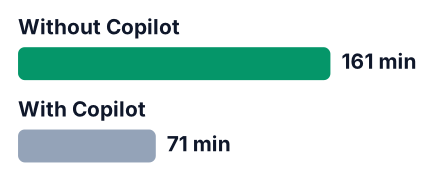
More people in the AI group also finished the task at all. GitHub reports a completion rate of 78% with Copilot and 70% without. Speed is only useful if the work gets done, and here it did.
The size of the gain is less certain than the headline. GitHub gives a confidence interval of 21% to 89% for the speed gain. A confidence interval is the range the true value most likely falls in. That range is wide, but even its lowest end is a clear gain.
Blank-file work also suited the tool. An HTTP server is very common code, the kind found in many public projects and tutorials. There was no older code for the AI's suggestions to clash with, either.
Existing codebases: where AI slowed developers down
On large repos the developers already knew well, the time went into reviewing and testing AI output, then fixing it, so tasks took longer. METR's trial ran from February to June 2025. METR's range was 2% to 39% slower. Even the best case was slower. "Randomized" means each issue was randomly marked as "AI allowed" or "AI not allowed", so the two groups of tasks were fair to compare. Only 16 people took part, which is a small sample. A 2026 follow-up from METR found different numbers, covered further down.
These were not practice projects. Every change had to meet the project's own standards for code review and documentation, with tests. AI output that looks fine in a blank file often does not meet rules like these on the first try.
The most useful part of the study is what the developers believed. Before starting, they expected AI to make them 24% faster. After the slowdown, they still believed AI had sped them up by about 20%.
Your feeling of speed is not a measurement. Watching code appear on screen feels like progress. The hour you spend checking that code afterwards does not feel like part of the same task, but it is.
What a CRUD app looks like in two phases
A simple CRUD app is only an example here. Neither study used one, and the code below has no timings, so it is an illustration, not evidence. It shows a fast writing phase and a slower checking phase, the same split the two studies point to in different tasks.
Here is the kind of code AI writes in seconds: a minimal Express route for creating and reading notes.
const express = require("express");
const { randomUUID } = require("crypto");
const app = express();
app.use(express.json());
const notes = [];
// Create a note
app.post("/notes", (req, res) => {
  const note = { id: randomUUID(), text: req.body.text };
  notes.push(note);
  res.json(note);
});
// Read all notes
app.get("/notes", (req, res) => {
  res.json(notes);
});
It runs. It also saves a note with no text at all, because nothing checks req.body.text. That gap is where the second phase begins.
Phase two here is a small fix, and an easy one. Add a check at the top of the POST handler that returns a 400 error when the text is empty. The slow part METR measured is harder: AI code that clashes with an existing database layer or login middleware, which you must rework by hand. This is the small fix:
if (!req.body.text) {
  return res.status(400).json({ error: "text is required" });
}
Describe the feature
Write a short paragraph: what data you store, which routes you need, and what counts as bad input.
Generate the routes
Ask the AI for the first draft in a blank file. This is the greenfield case, where GitHub's speedup applies.
Read every line
Explain each line out loud. If you cannot explain a line, pause and learn it before moving on. Look for missing checks like the empty note above.
Fit it into your existing code
Connect it to your database layer, your login code and your other routes. Here you review and fix more than you write, the pattern METR measured.
Test and record both phases
Write down the minutes for writing and the minutes for fixing separately. The total is your real speed.
Check your own work. If your college assignments and first projects start from a blank file, as many do in India, the GitHub result may be the closer match for you. If an internship task means editing a large existing project, the METR result may fit better.
For US students working on bootcamp or portfolio projects, the picture is the same. The advantage shrinks once you join a large existing codebase, which is what most first full-time jobs look like.
Is coding with AI faster and cheaper? What newer data says
Newer evidence is mixed, and writing more code has not been shown to mean delivering more value. In a February 2026 update, METR estimated about an 18% speedup for developers who returned from the original study and about 4% for newly recruited ones.
METR itself does not trust either number much. Some developers refused to take part if it meant working without AI, so the people who stayed were not a fair sample. METR treats the estimates as lower bounds (the real effect could be larger) and changed its study design because of this.
The dev.to thread this post answers cites wider research. I could not open the original papers, so treat the numbers below as second-hand. One observational study by MIT and Wharton researchers followed more than 500,000 GitHub developers and was revised in September 2026. It reportedly found commits up about 240%, but no overall rise in how much people used the apps.
Commits measure code written. App usage measures whether anyone got value from it. The gap between those two is the part worth remembering.
The same thread lists two smaller gains from other studies. I could not check them, so I leave out their figures.
"Cheaper" is the half of the question none of these sources answers. They measure time and output, not cost, so I will not guess a figure. The cost you can track is your own: the subscription you pay and the hours spent fixing output. If you use a free tier, how many ChatGPT prompts you get per day is part of that cost too.
Pros
- A working first draft of common code in seconds
- No old code for the suggestions to clash with
- More people finished the task in GitHub's test
- Easy to try two or three versions of an idea quickly
Cons
- Easy to accept code you cannot explain
- Missing checks, like input validation, are common
- Fast writing hides slow fixing if you only time the first phase
- You practise less of the code you are trying to learn
When to reach for AI and when to write by hand
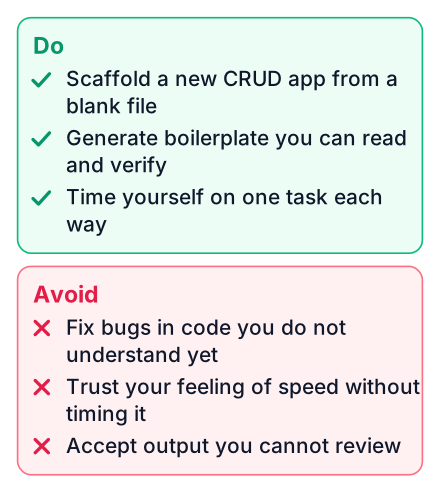
Use AI for new, small, well-described code you can check quickly, and write by hand where you need to understand the code deeply. A quick test helps: could you spot a bug in this output within a few minutes? If not, AI will cost you time, not save it.
Good uses of AI:
- Scaffolds: the empty folders, config files and starter routes of a new project
- Boilerplate you have written by hand before and understand
- Throwaway scripts, like renaming a folder of files once
- First drafts of new files that you then read line by line
Do not use AI for:
- Bug fixes in code you do not understand yet
- Any work where you cannot judge whether the output is right
- Topics you are learning for an exam or an interview, where typing it yourself is the practice
Pick one small CRUD feature this week, like adding and listing notes. Build it once with AI and once by hand, and write down the minutes for writing and for fixing each time. Then read the METR study to see how it measured the same thing.


