Stored Procedure in SQL: A Beginner's Guide With MySQL and SQL Server Examples
A stored procedure in SQL is a precompiled block of SQL saved on the database server and run by name. This guide walks through the syntax in both MySQL and SQL Server, with a worked example that returns verified counts.
You send a raw SQL query from your app, and the database parses it every single time. Now imagine the same query, written once, saved on the server, and run by name. That is a stored procedure — and it is one of the first things backend teams expect you to know.
A stored procedure in SQL is a named block of SQL that you save on the database server and run with CALL (MySQL) or EXEC (SQL Server). It reduces network traffic, hides complex logic, and lets you reuse the same query without rewriting it. Once you learn the pattern, you will see it in almost every production database you touch.
What a stored procedure is and why it matters
A stored procedure is a precompiled SQL block stored on the server, reused by name, and run with CALL or EXEC, as explained on W3Schools. Think of it as a saved recipe: you write the steps once, and the kitchen (the database) remembers them.
Here is the raw-query problem. Imagine every time your app sends a query like SELECT * FROM orders WHERE city = 'Mumbai', the server has to parse it, check the syntax, and build an execution plan. If that happened ten thousand times, you would pay the parsing cost ten thousand times. With a procedure, the server saves that plan, so repeated calls skip the heavy lifting. This is a standard explanation in the MySQL tutorial.
W3Schools lists four main benefits: reusability (one place for logic), security (run-only permission keeps table access out of the app), and easier maintenance (a fix updates every caller). Performance comes from precompilation—the server saves the plan, so repeated calls skip parsing. These points are verified on W3Schools.
Check it yourself: See W3Schools for the definition and benefits, and MySQL Tutorial for the syntax and execution plan details.
CREATE PROCEDURE: the basic syntax
You define a procedure with CREATE PROCEDURE name (parameters) BEGIN ... END, and it stays on the server until you drop it, per the MySQL tutorial. The three parts are the name, the optional parameter list in parentheses, and the BEGIN...END block that holds the statements.
The body can contain multiple statements, not just one. Here is the simplest possible example for a table called orders:
CREATE PROCEDURE GetOrders()
BEGIN
    SELECT * FROM orders;
END;
Create
Run CREATE PROCEDURE to save the block on the server.
Call
Run CALL GetOrders() to execute it.
Drop
Run DROP PROCEDURE GetOrders to remove it.
DELIMITER: the step every beginner misses
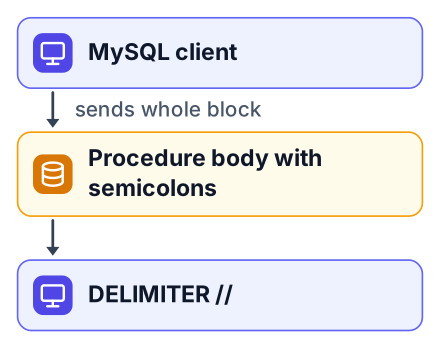
You must switch the client delimiter so MySQL treats the whole procedure body as one statement, not many, as the MySQL tutorial shows. The confusion is simple: your client sees a semicolon and assumes the statement is over. But the procedure body is full of semicolons. Without a delimiter change, the client sends only the first line and the server throws a syntax error.
DELIMITER //
CREATE PROCEDURE GetOrders()
BEGIN
    SELECT * FROM orders;
END //
DELIMITER ;A worked example: citycount in MySQL
Here is a full, working stored procedure that takes a country code and returns how many cities it has — with verified output from the MySQL manual. This example is the fastest way to see the whole cycle in action.
DELIMITER //
CREATE PROCEDURE citycount (IN country CHAR(3), OUT cities INT)
BEGIN
    SELECT COUNT(*) INTO cities FROM city
    WHERE CountryCode = country;
END //
DELIMITER ;
CALL citycount('JPN', @cities);
SELECT @cities;
Run it with 'JPN' and the variable holds 248. Run it with 'FRA' and it holds 40. These numbers are the actual output from the MySQL reference manual. You can check this in the manual's example section.
| Call | Result |
|---|---|
| CALL citycount('JPN', @cities) | 248 |
| CALL citycount('FRA', @cities) | 40 |
IN, OUT and INOUT parameters
IN parameters pass values in, OUT parameters return them, and INOUT parameters do both, as explained in the MySQL tutorial. In the citycount example, country is IN because you send it in, and cities is OUT because the procedure fills it for you.
Say you have an e-commerce orders table. An IN parameter filters the rows you care about:
CREATE PROCEDURE OrdersByCity(IN city_name VARCHAR(50))
BEGIN
    SELECT COUNT(*) FROM orders WHERE city = city_name;
END;
An INOUT parameter starts with a value, lets the procedure change it, and returns the result. This pattern is useful for accumulating totals across multiple steps:
CREATE PROCEDURE Accumulate(INOUT total INT, IN add_value INT)
BEGIN
    SET total = total + add_value;
END;
SQL Server uses the same three modes but writes the parameters with an @ prefix, as you will see next.
Stored procedures in SQL Server: EXEC and @parameters
SQL Server uses @-prefixed parameters, AS BEGIN...END, EXEC to run, and DROP PROCEDURE to remove, per W3Schools. The Northwind example from that page shows a procedure that selects customers from a given city:
CREATE PROCEDURE SelectAllCustomers @City nvarchar(30)
AS
BEGIN
    SELECT * FROM Customers WHERE City = @City
END;
You run it with EXEC SelectAllCustomers @City = 'London'. The structure mirrors MySQL: a name, a parameter list, and a body. The differences are the @ sign, the AS keyword instead of BEGIN after the name, and EXEC instead of CALL.
Pros of SQL Server syntax
- @ parameters make it obvious which values are inputs.
- EXEC is short and familiar to .NET developers.
Cons compared to MySQL
- No DELIMITER step, but the AS BEGIN block can confuse beginners.
- The syntax does not transfer to other databases.
To remove it, run DROP PROCEDURE SelectAllCustomers. That is the same idea as MySQL's DROP, just with the SQL Server name.
Raw query vs stored procedure vs view: which to use
Use a raw query for one-off ad-hoc work, a stored procedure for logic that repeats and needs security, and a view for a fixed result set you query against. Each has a different job, and mixing them up causes real problems in production.
| Feature | Raw query | Stored procedure | View |
|---|---|---|---|
| Storage | Not stored | Stored on server | Stored on server |
| Parsing | Re-parsed every time | Precompiled | Precompiled |
| Parameters | None | IN, OUT, INOUT | None |
| Permissions | Full table access | Run-only possible | Read-only |
| Result sets | One | Multiple possible | One |
A raw query is fine for a one-time report or debugging. A view, as covered in our guide to normalization in DBMS, is a saved SELECT that you treat like a table, and it is perfect for a fixed result set. A stored procedure wins when you need parameters, security, or multiple result sets from one call. Backend teams favor procedures precisely because of the run-only permission W3Schools describes, since it keeps raw table access out of the app layer. That page shows the security benefit explicitly.
What interviewers ask freshers about stored procedures
Interviewers ask you to define a stored procedure, name its benefits, explain DELIMITER, and tell when you would use it over a raw query. These are the standard DBMS interview questions that come up in fresher rounds. You can prepare using the MySQL tutorial which covers these topics.
- What is a stored procedure? Answer: "A precompiled SQL block stored on the server and executed by name."
- Why use one? Answer: "Reusability, performance because of precompilation, and security through run-only permission."
- How do you return a value? Answer: "With OUT or INOUT parameters."
- What is DELIMITER for? Answer: "It tells the client that the semicolons inside the body are part of one statement."
- Can you put an IF statement inside? Answer: "Yes, the body can contain conditional logic, loops, and multiple statements."
The security benefit is worth repeating in your answer: you can grant a user permission to execute a procedure without giving them access to the tables it reads. That single feature is why backend teams trust procedures with sensitive data. If you know both MySQL and SQL Server syntax, SQL Server interview questions become much easier, and it signals you can work in more than one environment. The same applies if your interviewer asks about DML commands as a follow-up, since procedures are built on those commands.
Open your MySQL client and create the citycount procedure from this post. Run it with 'JPN' and 'FRA' and check that you get 248 and 40. Then write your own procedure for an orders table that takes a city and returns the order count. That is the fastest way to make the concept stick.