SQL Server Interview Questions for 5 Years Experience (2026)
SQL Server interviews at 5 years test your ability to fix slow queries, not recite definitions. This list covers indexes, SARGability, tempdb, isolation levels, deadlocks and more, each with T-SQL examples and reasoning.
Say you have five years of SQL Server on your CV, and the interviewer gives you one problem. A report query takes forty seconds. You have to fix it on the whiteboard. Nobody asks you to recite what a clustered index is. They watch how you reason about it.
At 5 years of experience, SQL Server interviews test whether you can explain why a query is slow and fix it. Expect questions on indexes, SARGability, tempdb, dynamic SQL, MERGE, isolation levels, deadlocks and SQL Agent. Each answer needs a short T-SQL example and the reasoning behind it, not a definition. This guide does not cover parameter sniffing, CTEs versus temp tables, or statistics, so prepare those separately.
This list covers the SQL Server engine side of the job. At this level you are often interviewing for a mid-level role, and the difference between SDE-1 and SDE-2 expectations is mostly this: can you find the cause on your own?
Clustered vs nonclustered indexes, and the covering index
A clustered index stores the table rows themselves in key order, so a table has only one, while a nonclustered index is a separate structure that points back to the rows (Microsoft's index design guide).
Write the pair on the whiteboard first, then add the covering index. The third index is the one that removes the key lookup described below.
-- The table rows are stored in OrderID order
CREATE CLUSTERED INDEX CIX_Orders_OrderID
    ON dbo.Orders (OrderID);
-- A separate structure that points back to the rows
CREATE NONCLUSTERED INDEX IX_Orders_CustomerID
    ON dbo.Orders (CustomerID);
-- A covering index for: WHERE CustomerID = @c AND OrderDate >= @d
CREATE NONCLUSTERED INDEX IX_Orders_Customer_Date
    ON dbo.Orders (CustomerID, OrderDate)
    INCLUDE (TotalAmount, Status);
Explain the key-column order out loud. Columns compared with equality go first, then the column used in a range such as BETWEEN or >=. Among equality columns, putting the more distinct one first is a common rule of thumb, not a law (see Microsoft's index design guide). Columns you only select, or filter on in a non-SARGable way, go in INCLUDE instead of the key.
| Clustered | Nonclustered | |
|---|---|---|
| How many per table | One | Many |
| What the leaf level holds | The data rows themselves | Key values plus a pointer to the row |
| Best use | A narrow, unique, ever-increasing key, often the primary key | Columns you filter, join or sort on often |
The usual follow-up is "What is a key lookup?" Answer it like this. The nonclustered index finds the row, but a selected column is missing from it. SQL Server then jumps to the clustered index once per row to fetch that column. On a large result, those jumps cost more than the seek. Adding the missing columns to INCLUDE puts them in the index leaf, so the lookup disappears from the plan.
If the interviewer moves on to table design, revise normalization in DBMS too. Index choices follow from how the tables are split.
SARGable queries get an index seek, the rest scan
SARGable means Search ARGumentable: the predicate is written so the optimizer can seek straight to matching index rows instead of reading the whole index (Microsoft's index design guide).
The classic example wraps a function around the column. SQL Server must run YEAR() on every row before it can compare, so it reads the whole index.
-- Non-SARGable: the plan shows an Index Scan
SELECT OrderID, TotalAmount
FROM dbo.Orders
WHERE YEAR(OrderDate) = 2026;
-- SARGable: the plan shows an Index Seek
SELECT OrderID, TotalAmount
FROM dbo.Orders
WHERE OrderDate >= '2026-01-01'
  AND OrderDate <  '2027-01-01';
Both queries return the same rows. The rewrite leaves the column bare and moves the work to the constant side. Use a half-open range (greater than or equal to the start, less than the next start). It handles time values correctly, while BETWEEN with a last-day date can miss rows after midnight.
Patterns that usually break a seek:
- A function on the column:
YEAR(col),UPPER(col),ISNULL(col, 0) - Arithmetic on the column:
WHERE Price * 1.1 > 100instead ofWHERE Price > 100 / 1.1 - A leading wildcard:
LIKE '%son' - An implicit conversion, such as comparing a VARCHAR column to an NVARCHAR parameter
Interviews at this level also ask about ranking and running totals. Those are covered in our window functions interview questions for 5 years experience, which pairs well with this list.
tempdb holds temporary work and row versions
tempdb is a shared system database, recreated every time the engine starts, that stores temp tables and the version store, plus spill data from large sorts and hash joins (Microsoft's tempdb documentation).
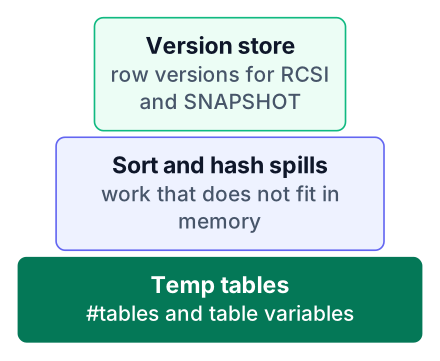
Because it is rebuilt on restart, tempdb is minimally logged and you cannot back it up or restore it. Every database on the instance shares it. One badly written report that spills a huge sort can slow down every other application on the server.
The bottleneck usually shows up when many sessions create temp objects at once and wait in line to claim space in one file. More data files mean shorter lines. The same Microsoft page gives the rule: with 8 or fewer logical processors, use the same number of data files as processors. Above 8, start with 8 files. Give every file the same size and the same growth setting, so SQL Server fills them evenly.
The version store is the part people forget. RCSI and SNAPSHOT isolation keep older copies of changed rows there, so turning them on raises tempdb usage. Size tempdb before you switch, not after the disk fills.
sp_executesql beats EXEC(@sql) for dynamic SQL
sp_executesql keeps the statement text constant and passes values as parameters, so the optimizer can reuse the plan and the input cannot rewrite your query (Microsoft's sp_executesql reference).
Here is the version interviewers want you to spot as the problem:
-- String concatenation: a new statement text for every value
DECLARE @CustomerID NVARCHAR(20) = N'42';
DECLARE @sql NVARCHAR(MAX) =
    N'SELECT OrderID, TotalAmount FROM dbo.Orders WHERE CustomerID = '
    + @CustomerID;
EXEC (@sql);
And the fix:
-- Parameterized: the text stays the same, only the value changes
DECLARE @sql NVARCHAR(MAX) =
    N'SELECT OrderID, TotalAmount FROM dbo.Orders WHERE CustomerID = @cid';
EXEC sp_executesql
    @sql,
    N'@cid INT',
    @cid = 42;
With EXEC, each unique string is a different statement, so each one compiles separately. Run the report for many customers and the plan cache fills with near-copies. With sp_executesql, the text never changes, so SQL Server compiles once and reuses that plan.
The security point matters as much. In the first version, whatever sits in @CustomerID becomes part of the SQL text. A value like 0; DROP TABLE dbo.Orders would run as code. In the second, @cid is only ever a value, never part of the statement.
MERGE upserts in one statement, with traps
MERGE compares a source to a target and runs INSERT, UPDATE or DELETE from one join, but it must end with a semicolon and is not always the best choice (Microsoft's MERGE reference).
MERGE dbo.Customers AS tgt
USING staging.Customers AS src
    ON tgt.CustomerID = src.CustomerID
WHEN MATCHED THEN
    UPDATE SET tgt.Email = src.Email,
               tgt.City  = src.City
WHEN NOT MATCHED BY TARGET THEN
    INSERT (CustomerID, Email, City)
    VALUES (src.CustomerID, src.Email, src.City);   -- this semicolon is required
SELECT @@ROWCOUNT AS RowsAffected;  -- inserts + updates together
Two details show you have used it for real. Leave out the final semicolon and the statement fails. And @@ROWCOUNT after MERGE gives the total rows affected across all branches, not a split by action. If you need the split, use the OUTPUT clause with $action.
The trap interviewers like: the Microsoft page cautions that for a simple change to one table, plain INSERT, UPDATE or DELETE statements scale better. MERGE earns its place when you sync a whole table from a source in one pass.
Pros
- One join drives inserts and updates, so the source is read once.
- Sync logic sits in one readable statement.
- OUTPUT with
$actionlogs what each row did.
Cons
- A missing semicolon breaks it.
- For simple one-table changes, separate statements scale better.
- Harder to tune and debug when one branch is slow.
Isolation levels decide what readers and writers can see
Isolation levels trade consistency for concurrency: READ COMMITTED is the SQL Server default, and each level above or below it changes which locks a query takes (Microsoft's SET TRANSACTION ISOLATION LEVEL reference).
| Level | What a reader sees | The catch |
|---|---|---|
| READ UNCOMMITTED | Changes other sessions have not committed yet | Dirty reads; same as NOLOCK on every table |
| READ COMMITTED | Only committed data | Readers and writers can block each other |
| SNAPSHOT | Data as it was when the transaction started | Needs ALLOW_SNAPSHOT_ISOLATION ON for the database |
| SERIALIZABLE | A fixed range no one else can change | Range locks; the most restrictive level |
The two lines to know by heart:
SET TRANSACTION ISOLATION LEVEL SNAPSHOT;
ALTER DATABASE SalesDb SET READ_COMMITTED_SNAPSHOT ON;
The second one turns on RCSI (read committed snapshot isolation). Readers get the last committed version of a row instead of waiting for a writer's lock. On Azure SQL Database it is already the default.
Interview tip: if asked "Why not just use NOLOCK?", compare the two. NOLOCK stops blocking by reading uncommitted data, so a report can show a sale that later rolls back. RCSI stops most reader-writer blocking and still shows only committed data. The cost is version store space, which you already sized in tempdb.
Deadlocks: how to find the graph and fix the cause
A deadlock happens when two transactions each hold a lock the other needs, and SQL Server ends it by rolling back the cheaper transaction as the victim, which the application sees as error 1205 (Server Side Technology Solutions' deadlock guide).
You do not need to set up tracing to find past deadlocks. The built-in system_health Extended Events session already records every deadlock graph. This query reads them:
SELECT
    x.ev.value('@timestamp', 'datetime2') AS deadlock_time,
    x.ev.query('(data/value/deadlock)[1]') AS deadlock_graph
FROM (
    SELECT CAST(t.target_data AS XML) AS target_data
    FROM sys.dm_xe_sessions AS s
    JOIN sys.dm_xe_session_targets AS t
        ON s.address = t.event_session_address
    WHERE s.name = 'system_health'
      AND t.target_name = 'ring_buffer'
) AS d
CROSS APPLY d.target_data.nodes(
    'RingBufferTarget/event[@name="xml_deadlock_report"]'
) AS x(ev)
ORDER BY deadlock_time DESC;
Save the graph as an .xdl file and open it in Management Studio to see which sessions and objects were involved, and which locks they held. The same guide lists five common patterns:
- Two transactions updating the same tables in opposite order
- Key lookups, where a reader and a writer meet on the clustered index
- Cascading foreign keys that lock child tables you did not touch directly
- Page splits during heavy inserts
- Parallelism inside a single query
Fixes follow the cause. Make every code path touch tables in the same order. Add the missing index so the lookup goes away. Keep transactions short. Turn on RCSI where readers are involved. And make the application retry on error 1205, because some deadlocks will still happen.
The guide's example is a good one to retell: a nightly batch hit 200+ deadlocks per hour, and one index fixed it, cutting the run from 6 hours to 38 minutes (source). This was one company's case, not a typical result. Still, the lesson often holds: look for the cause, such as a missing index, before reaching for a lock hint.
SQL Agent runs scheduled jobs
SQL Server Agent runs scheduled jobs that automate processes at a set interval, and interviewers use it to check whether you have run production maintenance (Simplilearn's SQL Server question list).
Know the three parts. A job is the named unit of work. Each job has one or more steps, such as a T-SQL script or an SSIS package. A schedule says when the job runs.
Typical jobs are full and log backups, index rebuild or reorganize, statistics updates and nightly ETL loads. When a job fails, check the job history first, then the output of the failed step. Many failures come from the account the job runs as: it lacks a permission, or cannot reach a file share.
Tie this to the earlier sections if you get the chance. A nightly batch that deadlocks may well be an Agent job, so check its schedule. Saying "I would check when the job runs and what else overlaps it" shows you connect scheduling to locking.
How to practise these answers before the interview
Rehearse each answer as problem, cause, fix and proof: say what is slow, why, the T-SQL you would write, and how you would confirm it with the execution plan.
Build a real table
Create an Orders table and fill it with a few hundred thousand rows using a loop or a numbers CTE. Small tables hide every problem.
Run the slow version
Write the non-SARGable query, the key-lookup query or the EXEC string. Turn on
SET STATISTICS IO ONto see logical reads.Read the actual plan
Find the scan, the key lookup or the spill warning. Say out loud what caused it.
Apply the fix and compare
Add the index or rewrite the predicate. Compare logical reads and the plan shape before and after.
Simplilearn's list is useful for checking definitions, but most answers there are one line long. Use it to find gaps, then practise those gaps with the four steps above. If your interview also has a coding round, our DSA interview questions post covers that side.
If you do not have a slow query of your own, install SQL Server Developer Edition (free) and restore a sample database such as AdventureWorks. Today, write one query with a function on a filtered column, check its plan for a scan, and rewrite it as a SARGable range. Compare the logical reads before and after.


