Docker Interview Questions for Java Developers: The Fresher Checklist
Java fresher interviews ask more Docker questions than most candidate expect. Here is the real multi-stage Spring Boot Dockerfile, the five commands to practice, and the exact answers that sound confident.
You have memorized what a container is, but the interviewer says: "Write a Dockerfile for your Spring Boot app." Your hands go cold. That question decides more Java fresher interviews than any theory definition, and most question lists never show you the actual file. For a deeper look at the career path, check how to become an AI/ML engineer after 12th in India and the US.
The fastest way to pass a Docker round in a Java fresher interview is to practice the real Spring Boot workflow end to end. You need the multi-stage Dockerfile from Docker's official Java guide, the matching compose.yaml, and the command sequence docker compose up --build, docker ps, docker logs, docker exec.
Docker vs VM: the one-liner that sounds confident
A Docker container shares the host OS kernel, while a virtual machine runs its own full OS, which is why containers are lighter and start in seconds, as Hirist's Docker interview guide confirms. Interviewers ask this first to see whether you understand the core idea or just memorized a definition.
Say it in two sentences. First: "A container uses the host's kernel, so it does not need its own operating system." Second: "A VM includes a full OS, so it is heavier and slower to start." That is the whole answer.
| Feature | Docker container | Virtual machine |
|---|---|---|
| OS | Shares the host kernel | Runs its own full OS |
| Size | Megabytes | Gigabytes |
| Start time | Seconds | Minutes |
| Isolation | Process-level | Full hardware-level |
Image vs container: the difference that shows you get it
An image is a read-only template, and a container is a running instance of that image, like a class versus an object in Java, per the Hirist guide. When the interviewer asks this, they want to hear the Java analogy because it proves you connect Docker to what you already know. Practicing this analogy alongside Java interview questions for 3 years of experience helps solidify the connection.
Say: "Just as you write one class and create many objects, you build one image and run many containers." Then add the commands you use to see them: docker images lists images, and docker ps lists running containers. The follow-up is usually "how does an image become a container?" The answer is docker run.
The Dockerfile instructions you must know cold
FROM, WORKDIR, COPY, RUN, EXPOSE, CMD, and ENTRYPOINT are the instructions that appear in most Java Dockerfiles, and you should explain each in one line, as the Java interview questions repository lists them. Practice saying each one out loud until the one-liner comes without thinking. For a structured path, the best free Java beginners course syllabus for 2026 can reinforce these fundamentals.
| Instruction | One-line meaning | Java example |
|---|---|---|
| FROM | Base image to start from | eclipse-temurin:21-jdk |
| WORKDIR | Working directory inside the container | /app |
| COPY | Copy files from host into the image | COPY target/*.jar app.jar |
| RUN | Run a command during the build | RUN ./mvnw dependency:go-offline |
| EXPOSE | Document the port the app uses | EXPOSE 8080 |
| CMD | Default command when the container runs | CMD ["java", "-jar", "app.jar"] |
| ENTRYPOINT | Main command that is hard to override | ENTRYPOINT ["java", "-jar", "app.jar"] |
Use COPY, not ADD. ADD can fetch remote files and extract archives, but COPY is simpler and does what you need for a JAR. If asked about CMD versus ENTRYPOINT, the one-sentence answer is: CMD provides default arguments that you can override, while ENTRYPOINT sets the main command that stays fixed.
The real multi-stage Spring Boot Dockerfile (the original element)
Docker's official Java guide builds with eclipse-temurin:21-jdk, extracts Spring Boot layers, then runs on eclipse-temurin:21-jre as a non-root user, slimming the final image by hundreds of megabytes. This is the file to memorize and explain line by line.
# syntax=docker/dockerfile:1
FROM eclipse-temurin:21-jdk-jammy AS build
WORKDIR /workspace/app
COPY . .
RUN ./mvnw -B -DskipTests package
RUN java -Djarmode=layertools -jar target/*.jar extract --destination target/extracted
FROM eclipse-temurin:21-jre-jammy
RUN useradd --create-home appuser
USER appuser
WORKDIR /app
COPY --from=build /workspace/app/target/extracted/dependencies/ ./
COPY --from=build /workspace/app/target/extracted/spring-boot-loader/ ./
COPY --from=build /workspace/app/target/extracted/snapshot-dependencies/ ./
COPY --from=build /workspace/app/target/extracted/application/ ./
EXPOSE 8080
ENTRYPOINT ["java", "org.springframework.boot.loader.launch.JarLauncher"]
There are three stages. The first stage uses the JDK to compile and package your application. The second stage extracts Spring Boot layers using layertools, which splits the JAR into dependencies, loader, and application code. The third stage runs on a smaller JRE image and creates a non-root user for security.
Multi-stage builds slim the image because the final stage only copies what the app needs at runtime, as Tutorial Works' Java containerization guide explains. The JDK with all its build tools never enters the final image, only the JRE. One trap to avoid: Alpine Linux images use musl, not glibc, which can cause issues with some Java native libraries, so the official guide sticks with a standard Ubuntu-based image. Understanding this distinction is part of the Java developer skills freshers need in 2026.
The compose.yaml and .dockerignore that complete the setup
A compose.yaml lets you run your Spring Boot app and its database with one command, and a .dockerignore keeps build context small by excluding target and .git, per Docker's Java guide. Interviewers increasingly expect you to know both files, not just the Dockerfile. Pairing this with the DevOps fresher career path and salary in India for 2026 gives a fuller picture.
services:
  app:
    build: .
    ports:
      - "8080:8080"
    healthcheck:
      test: ["CMD", "curl", "-f", "http://localhost:8080"]
      interval: 10s
      timeout: 3s
      retries: 5
target/
.git/
.idea/
*.imlThe build context is the set of files Docker sees when building your image. Excluding target/ matters because that folder holds your compiled classes and JARs, which can be large and are rebuilt inside the container anyway. The healthcheck in compose.yaml tells Docker to check the app on port 8080 every ten seconds so it can report whether the container is healthy.
Commands you must run fluently in a live interview
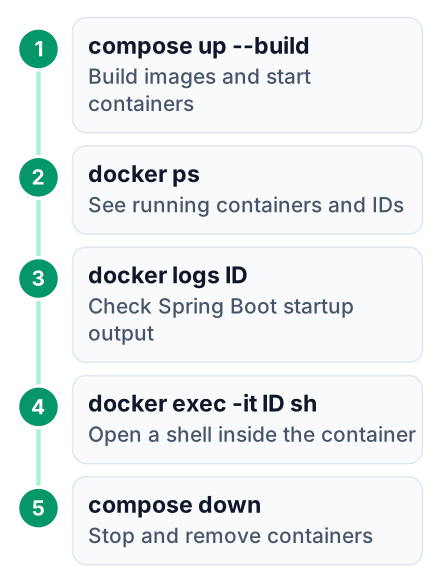
The five commands to practice until they are automatic are docker compose up --build, docker ps, docker logs <container-id>, docker exec -it <container-id> sh, and docker compose down, as shown in Docker's Java guide. Run them against the official spring-petclinic sample so the output feels familiar.
Build and start
docker compose up --build. This builds the image and starts the container.
Check it is running
docker ps. You should see your container with a container ID and the port 8080 mapped.
Read the logs
docker logs <container-id>. You will see Spring Boot starting and Tomcat on port 8080.
Go inside
docker exec -it <container-id> sh. This opens a shell inside the running container.
Stop everything
docker compose down. This stops and removes the containers.
Open your browser at http://localhost:8080 and you should see the pet clinic app. Add the -d flag to docker compose up to run in detached mode, meaning the terminal is free for other commands. If asked about docker stop versus docker compose down, the difference is that stop halts a container while down also removes the network and containers defined in the compose file.
Volumes vs bind mounts vs the JVM memory questions
Volumes are managed by Docker for persistent data, bind mounts point to a host folder, and for Java you should set -Xmx and -Xms to fit the container's memory limit, per Tutorial Works' best practices. This is the section where interviewers check whether you know production concerns, not just build steps.
| Feature | Volumes | Bind mounts |
|---|---|---|
| Where data lives | Docker-managed area | Any host folder |
| Who manages it | Docker | You |
| Backup | Easy with docker commands | Depends on the folder |
| When to use | Database data in production | Local development with live code |
Java's memory detection in containers has worked since 8u191, released in 2018, so modern builds generally just work. But you should still set explicit limits. Add -Xmx512m to your JVM arguments so the heap cannot exceed the container's memory limit, and set the container's limit with Docker flags --memory and --cpus. One concern per container means your Spring Boot app and your MySQL database belong in separate containers, connected through compose, not crammed into one. This is a common topic in SQL Server interview questions for 5 years of experience, so revisiting it helps.
docker system prune and the cleanup questions
docker system prune removes unused containers, networks, images, and build cache, and every fresher should know it without being asked a second time, according to Hirist's question set. This shows up as a simple "how do you clean up Docker?" question.
Run it when your disk is filling up, especially after many builds. Build cache is the main culprit because every docker build stores intermediate layers. To remove one specific image, use docker rmi <image-id>. To stop a running container, use docker stop <container-id>. The interview follow-up is usually about docker rm for removing stopped containers, so know that too.
Kubernetes and the questions that go beyond Docker
You do not need Kubernetes for a fresher Docker round, but knowing that it orchestrates containers and that a pod is the smallest unit shows you are ready for the next step, as the Java interview repository groups these questions together. Keep this answer short and honest. For a road map, the best free Java beginners course syllabus for 2026 covers similar ground.
Kubernetes manages many containers across multiple machines, which is overkill for a single Spring Boot app but essential when you scale to many services. A pod is the smallest deployable unit, wrapping one or more containers. The one follow-up to expect is "Have you used Kubernetes?" Answer honestly with what you practiced locally: "I have used Docker Compose, and I understand the basic Kubernetes concepts, but I have not deployed a cluster yet." That honesty beats a memorized claim.
Open your terminal, clone spring-petclinic, and run the five commands against the official Dockerfile before your next interview. If you can do it without looking at notes, you are ready for the Docker round.


