Google's Free AI Video Model: 3 Free Clips a Month for Students
Gemini Omni 1.2 Flash makes 15-second AI videos with sound, free in Google Vids. You get three clips a month with any Google account, enough for a resume intro, a demo or a class visual.

Say you need a 15-second video for your resume, a class project or a product demo, and you have no budget for an editing tool. On November 5, 2026, Google shipped Gemini Omni 1.2 Flash, and a plain Google account is now enough to make one. You have no budget, so the useful question is what you get at no cost.
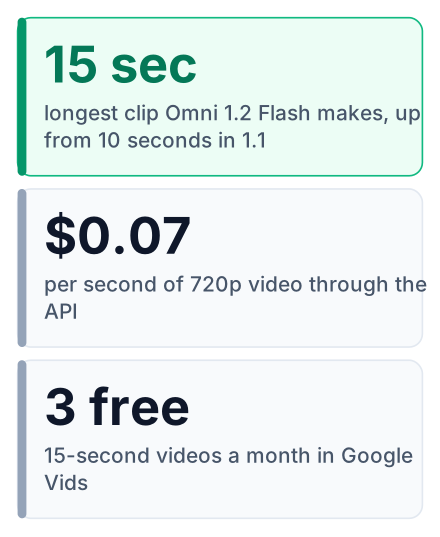
Gemini Omni 1.2 Flash is Google's new AI video model, and students can use it free in Google Vids. It makes clips up to 15 seconds long, with sound. The API price is also 30% lower than Omni 1.1. With a Google account you get three 15-second videos a month at no cost (Google Vids announcement).
What Google launched on November 5
Google DeepMind made Omni 1.2 Flash generally available on November 5, 2026, and it creates and edits video clips of 3 to 15 seconds, with native audio (DeepMind's launch post, Google's developer blog).
In plain words, it does two jobs. You type a description and it makes a video. Or you give it a video and ask for changes. You pick the clip length in one-second steps, so a 7-second clip is as easy as a 15-second one.
"Native audio" means the sound is made together with the picture. People in the clip speak, and their lips move with the words. You do not add a voice track later in a separate tool.
Every clip carries a SynthID watermark (MLQ News). This is a hidden mark that software can detect. You cannot see it, but it tells checking tools where the video came from.
Make your first AI video free in Google Vids
Head to vids.new, sign in with any Google account, and the Omni 1.2 Flash generation tool makes your first clip without a payment method (Google Vids announcement).
Open vids.new
Type it straight into your browser's address bar. It opens a new Google Vids project.
Sign in
Use a personal Gmail account. A college Workspace account may also work, but your school's admin can restrict it, so check with them first.
Pick the video generation tool
Google does not name the button in its announcement, so look for a video or Omni generation option when you start a new project, and check the Vids page linked above if your screen differs. This is the part backed by Omni 1.2 Flash.
Describe the clip
Write what should happen, or upload reference images so the model copies a look, a face or a product.
Generate and download
Watch the result closely, then download it or place it in your Vids project.
The free limit is up to three 15-second videos per month, per the Vids page. It resets monthly, not daily. So plan all your clips before you spend the first one. A test prompt like "a cat on a skateboard" uses up a real slot.
Limits change often with free tiers. Check the Vids page for the current number before you plan around it.
Three free videos a student can make
The three monthly clips (per Google) fit three jobs students in India and the US both have: a video resume intro, a product demo and a class explainer.
A video resume intro. Say you are applying for internships and your portfolio site looks like every other one. A short opener at the top of the page, or pinned on LinkedIn, gives a recruiter something to watch before they read. Keep the spoken line to one sentence: your name and what you build.
Your product demo. Say you built a to-do app or a small chatbot for a hackathon. A short clip at the top of your GitHub README shows what it does before anyone clones the code. It also works on a simple landing page.
The class explainer. Say you have a presentation on how blood moves through the heart, or how a packet travels across a network. A short visual opening grabs the room faster than a slide of bullet points. If you build study notes with AI, our post on Gemini Notebook pairs well with this.
Pros
- No cost and no card needed
- No setup: it runs in the browser
- Sound and speech come with the video
Cons
- Only a few clips each month
- Short clips only, so no full tutorials
- AI video can look wrong: extra fingers, garbled text, odd motion. Check every clip before you share it.
That last point matters most for the resume use. A recruiter who spots a broken hand in your intro will remember it. Watch the clip twice at full size before you post it.
Omni 1.2 Flash vs Omni 1.1 Flash
Version 1.2 gives longer clips, a lower price and better editing. It keeps the same input pricing as 1.1, so that cost does not change (Orca Router comparison, DeepMind).
| Feature | Omni 1.1 Flash | Omni 1.2 Flash |
|---|---|---|
| Max clip length | 10 seconds | 15 seconds |
| Video price (720p) | Not published; Google's announcement says 1.2 costs about 30% less than 1.1 in the API | $0.07 per second |
| Editing | Regenerate to change things | Multi-turn edits: change background, lighting or aspect ratio without regenerating |
| Reference adherence | Not rated in the sources linked below; 1.2 is documented to accept up to 6 images | Up to 6 reference images, short motion clips and audio cues |
| Speech and lip-sync | Not rated in the sources | More natural |
| Input price | $1.50 per million tokens | $1.50 per million tokens |
| Text output price | $9 per million tokens | $9 per million tokens |
Sources for every row: Orca Router, Google's developer blog and DeepMind.
The editing change is the one you will feel. Before, a wrong background meant making the whole clip again. Now you reply in the same chat ("make it daytime") and only that part changes. On a free plan with a small monthly limit, fewer full regenerations means fewer wasted attempts.
API pricing for project builders
In the Gemini API and AI Studio, video costs $0.07 per second at 720p, and there is no free API tier, so the free route is Vids only (MLQ News, Orca Router).
My advice is simple. Test your idea in Vids first, where mistakes cost nothing. Move to the API only when your app must make video on its own, such as a tool that turns a user's text into a clip.
December 3 auto-migration and regional limits
On December 3, 2026, requests to Omni 1.1 are routed to 1.2 automatically, and the default clip length stays at 10 seconds (Orca Router).
If you have code that calls 1.1, it will not break, but set the clip duration yourself if you want longer clips.
Editing and extension are region-gated, meaning blocked, in the EEA and the UK, and also in Switzerland (source). Readers in India and the US are not affected by that rule. Dates like these can move, so confirm them on Google's developer blog before you plan a release around them.
Try it today: your next step
Spend one of your three free clips this week on something you will use, then decide if an API project is worth the cost (Google Vids limits).
Write the prompt first, in a notes app, using the four parts from the tip above. Then generate one clip and check it frame by frame for errors. Save the other two slots for later in the month, when a deadline makes them worth more.


