GPT-6.2 Astra Pro Is Not a Model — It's a Setting That Raises Your Bill
GPT-6.2 Astra Pro is not a separate model. It is GPT-6.2 Astra with reasoning mode set to "pro," which runs extra passes and multiplies your token cost. For student projects, plain Astra or the cheaper Sol usually works fine.
Search OpenAI's own docs for a model called GPT-6.2 Astra Pro and you will not find one. Marketplaces list it with a price, but OpenAI's API guide does not list a model by that name. I searched both for that name on 19 November 2026, two days after launch, and found no such model. You can repeat the check by searching the guide for the name. A missing listing is strong evidence, not proof. The gap tells you what you are really paying for.
GPT-6.2 Astra Pro looks like a setting, not a separate model: it appears to be GPT-6.2 Astra with its reasoning mode set to "pro". Only one third-party source, OrcaRouter, says this directly. OpenAI's guide shows that mode and effort exist as settings. That mode runs extra passes of model work on each request, so one answer costs more than normal. Nobody publishes the exact multiplier, so measure it yourself: run one prompt with and without Pro mode and compare the usage field in the API response. For most student projects, plain GPT-6.2 Astra or the cheaper GPT-6.2 Sol is enough.
What OpenAI launched on November 17
OpenAI released GPT-6.2 Astra and GPT-6.2 Sol together, as the developer forum announcement says. Astra is the stronger of the two on agent tasks, and it costs less per task than GPT-6 Astra did.
Agents are programs where the model plans and runs several steps by itself, such as editing files and running tests. On Agents' Last Exam, a test of that kind of work, Astra scored 5.2 points above GPT-6 Astra at less than a third of the cost per task, according to OpenAI's launch page.
If price is your main question, my breakdown of Astra and Sol prices for students goes deeper on the two base models.
Pro is a reasoning mode, not a model
In the API, Pro is the setting reasoning.mode = "pro" on the gpt-6.2-astra model, as OrcaRouter's explainer shows. That is why you should not expect a separate model page for Astra Pro. Only OrcaRouter spells this out, so treat it as one third-party source.
Here is an example based on OrcaRouter's description, written with the JavaScript SDK. Check OpenAI's reasoning guide before you use it, because the exact field names come from that third-party source:
import OpenAI from "openai";
const client = new OpenAI();
const response = await client.responses.create({
  model: "gpt-6.2-astra",
  reasoning: { mode: "pro", effort: "high" },
  input: "Why does this function return undefined? ...",
});
console.log(response.output_text);
Delete the mode line and you get plain Astra. The model name stays the same either way.
Marketplaces like OpenRouter show Pro as its own entry for convenience. Picking a name from a menu is easier than editing request settings. The listing is a shortcut, not proof that a second model exists.
Mode and effort are two different settings
OpenAI's reasoning guide treats reasoning.effort and reasoning.mode as independent settings, so Pro is not just the highest effort level. You can change one without touching the other.
- Effort
- How long the model thinks during one pass at your question. Higher effort means more thinking before it answers.
- Mode
- Whether the model answers in one pass or runs several passes and combines them. Pro mode means several.
Astra also has no "none" effort level, per OrcaRouter. Every Astra request includes some thinking, even a one-line question. The OpenAI guide explains that this hidden thinking is billed as output tokens.
What Pro mode costs you
Astra's price is $8 per million input tokens and $40 per million output tokens, per OpenRouter. Pro mode multiplies the tokens used per request, and no source publishes by how much. Take a 2,000-token prompt with a 1,500-token reply. On Sol that costs about $0.019 ($0.004 for input plus $0.015 for output). On plain Astra it costs about $0.076 ($0.016 plus $0.06). On Pro mode it costs more than $0.076. The extra passes add tokens at the same rate, so the bill is higher than the per-token price suggests.
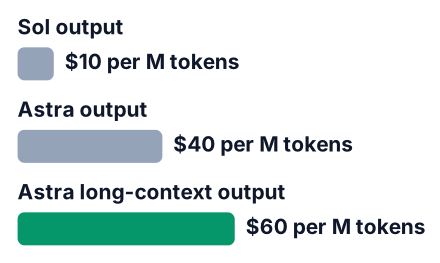
| Option | Input per 1M tokens | Output per 1M tokens | Work per request | Source |
|---|---|---|---|---|
| GPT-6.2 Sol | $2 | $10 | One pass | OpenAI forum |
| GPT-6.2 Astra | $8 | $40 | One pass | OpenRouter |
| Astra, Pro mode | $8 | $40 | Several passes, more tokens (multiplier not published) | OpenRouter |
| Astra, prompt above 272k tokens | $16 | $60 | Long-context rate | OrcaRouter |
Notice the Pro row. The rate per token does not change. What changes is how many tokens one question burns. To see the real number, send the same prompt twice and print the usage field each time:
const prompt = "Why does this function return undefined? ...";
const plain = await client.responses.create({
  model: "gpt-6.2-astra",
  input: prompt,
});
const pro = await client.responses.create({
  model: "gpt-6.2-astra",
  reasoning: { mode: "pro" },
  input: prompt,
});
console.log(plain.usage);
console.log(pro.usage);
// Placeholder output, your numbers will differ:
// { input_tokens: 2000, output_tokens: 1500 }
// { input_tokens: 2000, output_tokens: <larger number> }
Multiply each output_tokens value by the output price to compare the two bills.
Say you paste a function of a few hundred lines and ask why a test fails. On Sol, you pay the lowest rate for your prompt and the reply. On plain Astra, each token costs more, but the model runs once. On Pro mode, the rate matches plain Astra, yet the model runs several passes. You pay for the thinking in every one of them.
Then say you also paste your whole project folder. If that pushes the prompt past the long-context line, both input and output move to the higher rate in the table. A big paste plus Pro mode is the fastest way to a surprise bill.
Sol gives you most of the coding quality for less
For code, GPT-6.2 Sol nearly matches Astra at about one fifth of the cost per task, according to the OpenAI forum announcement. The announcement text I read names no benchmark and gives no scores for this claim, so treat it as OpenAI's own summary. Cost per task depends on how many tokens a task uses, not just the price per token. On a student budget, that makes Sol the better first choice.
Pros
- Much cheaper per token, so you can retry a prompt without worrying.
- Close to Astra on everyday coding work like fixing bugs and writing tests.
Cons
- Astra leads on long agent tasks with many steps.
- "Nearly matches" comes from OpenAI itself, so test it on your own code.
Sol also gets new features first. OpenAI's Ultrafast option for Pro 200 subscribers starts with Sol, per the same announcement. If you want a model from outside OpenAI, the Claude Fable 5.2 price and speed guide covers one.
A budget plan for students
Start with Sol, move to plain Astra only when Sol fails, and use Pro mode only for one hard problem that has already beaten both. Even OpenRouter's Astra Pro page advises plain gpt-6.2-astra for everyday coding.
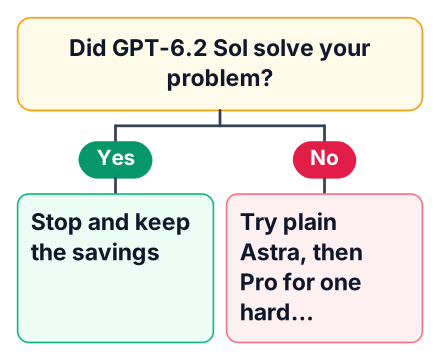
Try Sol first
Send every new coding question to Sol. Most will end here.
Retry on Astra
If Sol's answer is wrong after one clearer follow-up, send the same prompt to plain Astra.
Use Pro for one stuck problem
Switch on Pro mode only for a single bug that both models got wrong. Do not leave it on.
Keep prompts short
Paste only the files the problem touches, so you stay under that long-context price.
If you call the API from your own code, you can automate the first step. My post on cutting API cost with a routing classifier shows the idea with Gemini, and it works the same way here.
Where you can use it today
Astra and Sol are available in ChatGPT Work and Codex for Plus, Pro, Enterprise and Edu plans, not in regular ChatGPT chat, per the launch announcement. Developers can also call both through the API.
Check your own plan before you pay for anything new. Some colleges buy Edu plans for students, so ask your IT office whether yours does. If you are in India, also check that your card can pay in US dollars, since the prices here are in dollars. If you pay per request instead, marketplaces like OpenRouter let you use one key for several vendors.
Astra's knowledge cutoff is May 18, 2026, according to OrcaRouter, so it may suggest an outdated library version. Check the library's docs before you install anything it names. If you are on a chat plan with usage caps, this guide to daily ChatGPT prompt limits helps you plan.
Is Pro mode worth paying for?
Pro mode pays off only when one wrong answer costs you more than the extra bill, such as a bug you have spent hours on. OrcaRouter describes it as a tool for hard problems, not a default.
For learning exercises, Pro is a waste. You learn more by reading a cheaper model's wrong answer and finding the mistake yourself. Boilerplate like a login form or a config file gains nothing from extra passes. Quick questions about syntax are the same.
Watch for this common mistake:
- Not checking the output. More passes do not make an answer correct. Run the code and read it before you trust it.
Pick one coding problem you are stuck on today and run it on GPT-6.2 Sol first. Write down whether Astra or Pro mode would have changed the answer before you spend on either.


