How Many ChatGPT Prompts Per Day Can You Really Send in 2026?
Everyday text chat is unlimited on Free, Go, Plus and Pro, with automatic checks that only slow or block automated or very heavy use, but Free allows only 3 file uploads a day. Here are the limits OpenAI publishes, current plan prices and a student day.
You are deep into debugging a React component at 10 PM, and you wonder: will ChatGPT stop answering me tonight? OpenAI publishes no daily prompt count for any plan. Its pricing page lists everyday text chat as unlimited on every plan, subject to automatic checks that only slow or block automated or very heavy use.
Files are the part with a number: Free allows 3 uploads a day, per OpenAI's file uploads FAQ. The honest answer is that plain text questions have no daily number; files do.
Plain text has no daily cap on any plan. OpenAI calls the text-chat checks "abuse guardrails": automatic checks that only slow or block automated or extremely heavy use, not a normal student session. For Plus and Pro, the same page shows no daily message cap and calls everyday chat unlimited.
If you need to save uploads, paste code and error messages as text instead of attaching screenshots. Below you will find every number OpenAI publishes, what it is not publishing, and what it means for a student day in India or the US.
What changed in 2026, and which model names are current
In August 2026, OpenAI said Luna would become the default for Free and Go. It also added unlimited text chats and a Think button for harder questions. The source is the release notes, which state: "Everyday text chat is now unlimited for all plans."
The chats are subject to the automatic checks described above. The pages I read give no number for what counts as heavy, so I cannot say whether 200 messages in one evening is safe.
Model names changed after that. An October 7, 2026 entry in the same release notes says Plus, Pro, Business and Enterprise use GPT-6 Sol, while Free and Go use GPT-6 Luna. OpenAI describes Luna as its most efficient model for focused, high-volume tasks; I found no official wording ranking Sol against it for chat.
The API has a slightly different list. Its pricing page lists gpt-6-luna, gpt-6.1-terra, gpt-6.1-sol and gpt-6-astra. You only need these API names if you build your own tools.
The numbers OpenAI publishes
Here is everything I could find from OpenAI's own pages. The upload figure comes from the FAQ linked below; the chat status comes from the pricing page linked above. The rupee figures are converted from that page's dollar prices at an estimated ₹94 to the dollar on 11 November 2026. Limits can change, so check your own account as well.
The page also separates consumer plans from business and enterprise plans; this post covers only the consumer side.
| Plan | Default model | Text chat | File uploads |
|---|---|---|---|
| Free | GPT-6 Luna | Unlimited, with automatic checks | 3 per day |
| Go | GPT-6 Luna | Unlimited, with automatic checks | More than Free; no daily number published. A 2025 launch report said 10x Free |
| Plus | GPT-6 Sol | Unlimited, with automatic checks; no daily number | No daily number published |
| Pro | GPT-6 Sol | Unlimited, with automatic checks; no daily number | No daily number published |
That upload limit comes from OpenAI's file uploads FAQ, which also says OpenAI may lower limits at busy times. Treat any detail beyond the 3-per-day figure as unconfirmed. The FAQ may mention an hourly cap or whether failed uploads count; those details are not confirmed. Check the live FAQ for the current wording before you plan around it.
For Go, TechCrunch's launch report says Go offered 10 times more messages, image generations and file uploads than Free. That was August 2025, so treat it as a launch claim, not today's exact number.
OpenAI's pricing page also lists what the paid plans add: Go gets more messages with tools and more uploads, Plus gets expanded messages and uploads, and Pro offers three usage tiers. None of those entries gives a daily prompt number; the only published daily cap here is Free's 3 file uploads.
Two words you will see: token and context window
A token is a small piece of text, often a short word or part of a longer one. AI companies count and price text in tokens, not in words.
A context window is how much text the model can keep in view at one time: your question, your pasted files and its earlier answers together. When a chat gets longer than the window, the oldest parts fall out. You do not need to remember this number for the ChatGPT app; it matters only if you build with the API. The app's own window is not published.
What the API costs
The API has no daily message cap, but it is paid only (there is no free API tier) and has per-minute request and token limits that rise as you spend, as the Luna model page shows. You pay for the tokens you send (input) and receive (output), quoted per 1 million tokens. These are the Standard API rates, from OpenAI's API pricing:
| API model | Input per 1M tokens | Output per 1M tokens |
|---|---|---|
| gpt-6-luna | $0.10 | $0.50 |
| gpt-6.1-terra | $1.00 | $5.00 |
| gpt-6.1-sol | $2.00 | $10.00 |
| gpt-6-astra | $10.00 | $50.00 |
Most students never need the API, so use the live rate card if you build a project.
For example, a request with 2,000 input and 500 output tokens on Luna costs about half a cent — too small to worry about. On gpt-6.1-sol, which the pricing page lists at $2.00 input and $10.00 output per million tokens, the same request would cost $0.009 (0.9 cents), which is 20 times more than the half-cent on Luna.
What the plans cost: rupees and dollars
The same rate card puts Go at $8 a month, Plus at $20 a month, and Pro from $100 a month. Pro also lets you choose one of three usage tiers.
At an estimated ₹94 to the dollar on 11 November 2026, that is about ₹752 for Go, ₹1,880 for Plus, and ₹9,400 for Pro. The rate is an estimate, so check it before you pay. Prices are in US dollars, so the rupee figures above are conversions rather than local list prices.
For many Indian students, about ₹1,880 a month for Plus is a lot of money, and about ₹752 for Go is a much smaller step. Both figures come from the same pricing page and the estimated ₹94 rate.
A student day in prompts
I could not find what happens on the 4th upload in a day, so test it: attach a 4th file and note what the app says. That is honest and actionable. The only number OpenAI publishes for Free is 3 uploads per day, and if you paste code as text instead of a screenshot, that part never touches the upload cap. Keep a simple note of which days you attach a file, and ignore text messages when you count.
Here is a concrete text-heavy student day so you can see how "unlimited" feels: 80 short messages spread across 6 chats (one per topic), no file attachments, and you never hit any limit. Even 200 messages in one evening would not hit a cap, because the checks only target automated or extremely heavy use. So the number you actually need to track is the file upload count, not the message count.
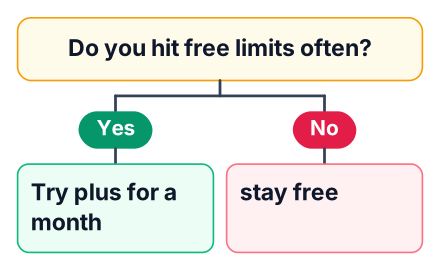
The decision rule is simple: for one week, note each day you hit the upload cap. If it happens on most days, try Go first; if you rarely hit it, keep Free.
Is a paid plan worth it?
The decision rule: for one week, note each day you hit the upload cap. If it happens on most days, try Go first, since the plan costs about ₹752 in India or $8 in the US (see the pricing page), and move to Plus only if Go still stops you.
A plan that removes an upload limit you rarely hit is not worth a monthly fee. If you finish most days without reaching the limit, the fee is better spent on a course or a good textbook.
Tips for students in India and the US
- Merge before uploading. Combine related notes into one document so one upload covers a whole topic.
- Keep one chat per topic. A fresh chat avoids carrying old text in the context window.
- India: See the local price on OpenAI's own page before you pay.
Claude users face the same trade-off, and our guide to Claude Pro usage limits shows how to stretch a paid plan. If you are weighing other free tools, Mistral Large 4 vs ChatGPT compares them for students. For more on writing prompts that get more from each message, read our prompt engineering guide for students.
Do that for one week, and the right plan will name itself.


