Genie 4 Is Here: Text Prompts Now Build Live 3D Worlds You Can Walk Into
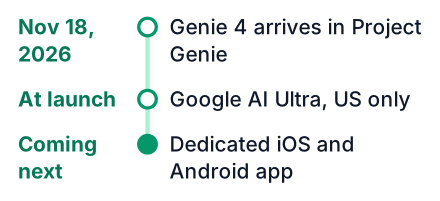
Google DeepMind launched Genie 4 on November 18, 2026, inside Project Genie for Google AI Ultra subscribers. It turns a text prompt into a live 3D world you can edit mid-session, with adaptive audio and a $250/month price tag, US-only at launch.
On November 18, 2026, Google DeepMind put Genie 4 inside Project Genie. Google's official announcement says access is for eligible Google AI Ultra subscribers. Say you are a US student who wants to try it this weekend.
Genie 4 turns a text prompt into a live 3D world you can change while you are inside it, with sound that adapts. It runs in Project Genie, which needs Google AI Ultra at $250 a month and is US-only at launch, according to this DEV Community breakdown. For most students it is something to watch, not a tool to use today.
What Genie 4 adds to Project Genie
According to Google's launch post, this is the first Genie version that pairs real-time interactive 3D worlds with native audio. Earlier Genie models were research previews. This one ships inside a product that paying users can open.
Google DeepMind built the model, and Google announced it on November 18, 2026. DeepMind also published its own announcement with more detail on how the worlds behave.
If you have already played with Google's other prompt-to-something tools, the pattern will feel familiar. Our post on turning a sketch into an app with Gemini Canvas shows the same idea for web apps. Genie applies it to whole explorable worlds.
Edit the world mid-session by typing again
You can type a new prompt while you are inside a world to change the weather, add a character or redirect the action, without starting over, as DeepMind's post describes. The world keeps running while the change happens.
This is an example of how it should behave, not something I tested myself. Picture a quiet forest at dusk and a path you are walking down. You would type "start a thunderstorm," and the sky should darken as rain begins around you. A few steps later you would type "a fox runs across the path," and one should appear, with no break in the scene.
Compare that with a game engine like Unity or Godot. To get the same result, you would change the lighting by hand and add a rain particle system. Then you would import a fox model, animate it, and write a script that triggers it. Each of those steps is separate work in an engine, and I have not timed them. In Genie, DeepMind describes the same change as one typed sentence.
The catch is control. You describe what you want, and the model decides how it looks. You cannot set the exact speed of the fox or the angle of the rain.
Native audio adapts as the world changes
Sound is generated with the visuals, from ambient soundscapes to character dialogue, and it shifts when you change the scene, according to DeepMind. Start the thunderstorm, and you hear it.
Behind this sits the new Project Genie agent. It coordinates Gemini multimodal models (models that handle text and images as well as sound) and adds custom background scores. You do not pick a music track. The agent writes one that fits the scene.
The launch video from Google DeepMind, near the top of this post, is the fastest way to judge the audio yourself. Text descriptions of sound only go so far.
The Project Genie agent and the community gallery
A conversational agent builds worlds from a chat, and a gallery lets you publish, explore and remix other people's worlds, per Google's announcement. Two gallery examples Google names are "Villa Giallo," a gothic manor mystery, and "The Life of Ants."
This is the part I find most important. For years, Google's world-simulation work lived in papers and short demo clips. Now it has a chat window, a sharing page and a remix button. That is what turning research into a product looks like.
Genie 3 is the earlier Genie model, and Project Genie is the product that runs both it and Genie 4. Genie 3 got updates too. Sessions can last longer, worlds can link together, and you can start a world from a 360-degree panorama photo. A dev.to report adds that a multiplayer mode is part of the release. Every video and audio output carries a SynthID watermark, Google's hidden marker for content its models make. Inputs and outputs also pass through safety screening.
| Feature | What Genie 4 does |
|---|---|
| Native audio | Sound is generated with the visuals and adapts to the scene |
| Edit mid-session by prompt | Change weather, add characters, redirect action |
| Project Genie agent | Builds worlds from a chat and adds custom background scores |
| Price | Google AI Ultra, $250 a month, US only at launch |
Google does not state a separate session length for Genie 4, so that number is unknown. The figures, features and price above come from DeepMind and the DEV Community report.
Access and cost: Google AI Ultra at $250 a month
You can only use Genie 4 inside Project Genie. It needs a $250 a month Google AI Ultra plan, and only in the US, according to the DEV Community report. It is not an API (a way for your own code to use the model), so there is no per-token pricing and no way to call it from your own code. None of the sources I opened mention a student discount, so treat that as unknown.
Right now it works on desktop and Android. The same report says a dedicated app is still coming, built for phones on iOS and Android. Students outside the US cannot sign up at all for now.
That price is a big ask on a student budget. If you want a sense of how other Google AI tools compare for students, our breakdown of Gemini 4 Hydrogen pricing for students covers the cheaper end.
Pros
- You can explore a playable world minutes after typing an idea.
- Google's announcement says the worlds come with sound that adapts as you change the scene.
Cons
- The monthly cost of $250 equals about 25 hours of work at $10 an hour.
- US only, with no API, so you cannot build it into your own projects.
What it replaces, and what it does not
It can stand in for early game-engine prototyping, but it does not give you code, assets or a shippable game you control. The DEV Community write-up describes worlds you explore and share inside Project Genie. Nothing in the sources mentions exporting them.
My view: Genie is a sketchbook for game ideas, and a very good one. A designer can test whether a mood works before anyone builds it. But a game studio still needs people who can write the logic, tune the controls and ship the build. I could be wrong if export arrives later. Until then, the engine skills stay valuable.
The same split shows up across Google's generative tools. Our post on building video apps with Gemini Omni Flash shows that the useful skill is wiring the model into something you own.
Here is what to practise now:
- Basic 3D movement: a character that walks and jumps, with walls that stop it.
- Scripting events: a trigger that starts rain when the player enters a zone.
- Writing clear prompts, since describing a scene well is now a building skill too.
What to do now if you cannot pay $250
Start with the launch video and gallery examples, then keep building game and 3D skills in free tools so you are ready when access widens. DeepMind's announcement page is the place to check for news on wider access.
Watch the launch video
It is short. Pay attention to how the audio changes when the scene changes.
Browse the gallery examples
Look at "Villa Giallo" and "The Life of Ants" on Google's page to see what the model handles well.
Start one small project in a free engine
Install Godot, the free game engine, and make a plane with a character that walks. Follow the first 3D game tutorial in Godot's own documentation if you get stuck.
Compare your scene to Genie's output
Note what took you hours and what Genie does in one prompt. Also note what you could control that Genie cannot.
Pick the free engine tonight and get that one scene running by the weekend. When Genie access widens, you will know exactly what it saves you, and what it still cannot do.