Best AI for Students to Study in 2026: Free Tools That Work in India
ChatGPT's free plan with Study mode and Gemini's free tier cover notes, flashcards, and practice questions for most Indian students. Google's free year of AI Pro is for US college students only, so this guide matches each free tool to one exam phase.
Say you have three weeks before a semester exam. A Gemini ad offers a free year of its paid plan, and you sign up in a hurry. Then the sign-up page asks for something you cannot give. As of November 2026, the Gemini for Students page lists that offer for eligible US college students aged 18+ only. So what should a student in India actually use?
Use ChatGPT free for notes and Gemini free for flashcards; pay only if a limit costs you study time before a fixed exam date. OpenAI lists Study mode on ChatGPT's free plan. Gemini's free tier is the one I would try for flashcards, but I could not find a Google page that confirms its limits or its availability in India, so check it in your own account. Google's free year of AI Pro is for US college students only, so it is not an option for you. Below, I match each tool to one exam phase.
Most "best AI for students" lists rank tools by features. I think that is the wrong order. You study in phases: first you understand your notes, then you memorise, then you test yourself. Each phase needs a different kind of help. If you only want a head-to-head between two tools, read my Perplexity vs ChatGPT comparison for students instead.
ChatGPT free plan with Study mode
ChatGPT's free plan includes Study mode and unlimited text chats, which is enough for turning lecture notes into clear explanations, according to OpenAI's pricing page. Study mode is listed in every tier, Free included. A paying user does not get a better version of it.
This is the notes phase. You have a chapter you half understand, and you want it explained in plain words. Paste a section and ask: "Explain this as if I am seeing it for the first time. Then ask me two questions to check I understood."
The free plan does have limits. Uploads are limited on Free, and so is voice use. Image generation is limited too. Text chats are not, and that tells you how to work. Paste your notes as text, one topic at a time, instead of uploading a big PDF.
Say your professor shared a long PDF on thermodynamics. Copy the section on entropy into the chat first. Finish it, then paste the next section. You never touch the upload limit, and each answer stays focused on one idea.
The same habit works for code. Paste one error message and the function around it, not your whole project. If you were looking for the best AI for students free of cost, this is where I would start.
Pros
- Study mode is included on the free plan
- Unlimited text chats, so pasting notes costs nothing
Cons
- File uploads are limited on Free
- Voice and image generation are limited too
Gemini free tier for summaries and quizzes
Gemini's free tier is where I would try the flashcards phase, but I cannot source a claim that it handles summaries and self-quizzing well, or that it is available in India. The Gemini for Students page describes only the paid student plan for US students, not the free tier, and it lists no free-tier limits. Open the Gemini app with your own Google account and run the prompt below on one page of notes before you rely on it.
I give Gemini the flashcards phase. By now you understand the chapter. What you need is a pile of short questions to repeat until the answers come without effort. Gemini is good at cutting long notes into small pieces.
Copy this prompt, fill in the topic and paste your notes at the end:
Here are my notes on [topic]. Make ten flashcards from them.
Format each card as:
Q: one short question
A: an answer of one or two sentences
Use only facts that appear in my notes.
If my notes are unclear on a point, tell me instead of guessing.
After the ten cards, ask me the questions one at a time.
Wait for my answer before you show the next one.
[paste your notes here]
Two lines in that prompt do most of the work. "Use only facts that appear in my notes" stops the tool from adding things your syllabus never covered. "Wait for my answer" turns a list you would just read into a quiz you have to answer.
If you want the best AI for students to study free, a free Gemini account with this prompt is hard to beat. Curious which of the two apps Indian students use more? I looked at Gemini vs ChatGPT market share in India.
Free quiz generators for practice tests
Dedicated quiz tools may suit the practice-test phase because they are described as turning your own PDFs into MCQs, according to Edubrain's roundup of AI quiz generators. I have not tested these tools myself. That roundup is published by EduBrain, which makes one of the tools in it, so treat its claims as the vendor's own.
Three tools from it fit an Indian college student:
- EduBrain: built for academics. You upload a PDF and it makes college-level MCQs from it.
- Kahoot!: gamified quizzes built from a PDF. Good for a study group the night before a test.
- QuestionWell: makes MCQs you can edit, then exports them to Google Forms or an LMS (the system your college uses for coursework).
The roundup is not where I would check plan limits. Before you upload a full semester of notes, open each tool's own pricing page.
You can also skip these tools entirely. ChatGPT's free plan makes MCQs from a prompt: "Write MCQs on this topic, four options each, at the level of a mid-semester exam. Hide the answers until I reply." That costs nothing and stays inside the text chats you already have.
Google AI Pro student plan is not open to Indian students
The free year of Google AI Pro is for eligible US college students aged 18+, so an Indian student cannot use it, according to the Gemini for Students page. Eligibility is verified every year, and the offer can be redeemed until Dec 31, 2026.
Here is what the plan includes, so you can see what you are missing:
- Higher limits: 4x usage limits
- Storage: 5 TB
- Access to Gemini Spark and Gemini Omni
- Study notebooks
- Personalized quizzes
- Learning plans
- A performance tracker
Look at that list again with your exam in mind. Quizzes and study notebooks are things the free prompt from the Gemini section already gives you. The larger usage limit is the real difference, and it only matters if you keep hitting the free limit.
Free vs paid study AI by exam phase
A table shows which exam phase a free tier already covers and where a paid tier might be worth it for an Indian student. The ChatGPT tier names come from OpenAI's pricing page. Check that page for current prices, because I am not quoting any here.
| Phase | Free option | Paid option | Open to an Indian student? | Verdict |
|---|---|---|---|---|
| Notes | ChatGPT Free with Study mode | ChatGPT Go, Plus or Pro (pricing page) | Free: yes. Paid: check the pricing page | Free is enough. Paste text instead of uploading |
| Flashcards | Gemini free tier | Google AI Pro student year (student page) | Free: yes. Student year: no, US college students only | Use the free tier |
| Practice tests | EduBrain, Kahoot!, QuestionWell, or ChatGPT with an MCQ prompt (roundup) | Each tool's own paid plan | Check each tool's pricing page | Start with the ChatGPT MCQ prompt |
One more thing to check before you pay anyone. OpenAI sells ChatGPT Edu to universities, listed on the same pricing page. Ask your college IT office or a department head whether your institution has it. If it does, you may already have access through your college email. OpenAI also offers ChatGPT for Teachers free to US K-12 educators, which does not help you directly.
When a paid plan is worth it
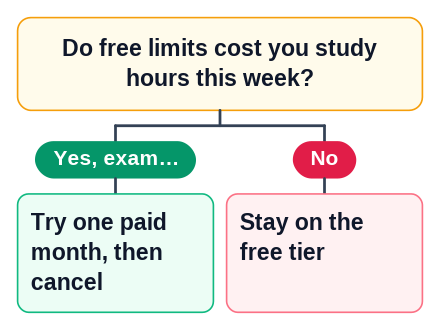
Pay for one month only when a deadline, like a semester exam or placement test, makes the free limits cost you real study hours. Before you do, check the current India price on OpenAI's pricing page, since prices and tiers change.
Here is the kind of case I mean. Say you have ten days before end-sem and keep hitting upload limits. Your professor's notes are scanned PDFs, so you cannot copy the text out. Every time you hit the limit, you lose part of an evening retyping pages. That lost time is worth more than one month's fee.
Run through these questions in order. Stop as soon as an answer tells you to stop, and only go on when it tells you to.
- Did you hit a free limit this week? No: stay free. A limit you have not met is not a reason to pay.
- Did the limit cost you study time? No: change how you work, such as pasting text instead of uploading.
- Is there a fixed date coming, like an end-sem or a campus placement test? No: wait until there is one.
- Does your college already give you ChatGPT Edu? Yes: use that and pay nothing.
- Still stuck? Pay for one month and set a reminder to cancel the day after the exam.
Common mistakes when using AI to study
The biggest mistake is letting the AI do the thinking, so use it to test you instead of to give you answers. Treat it like a quiz partner, not like an answer key.
- Copying answers without trying first. Write your own attempt, then ask the AI to check it. If you are learning to code, start with one of these free Python courses for beginners and solve each exercise before you ask for help.
- Trusting one tool's facts. AI tools get dates and formulas wrong, and sometimes definitions too. Check anything you will write in an exam against your textbook.
- Forgetting a trial. The trial, not the tool, is what ends up costing money.
- Paying before a real limit. Paying because a plan sounds better is how students end up with three subscriptions and no extra marks.
Use the tools in this order, because each phase feeds the next one:
Notes
Paste one topic into ChatGPT with Study mode and get it explained until you can say it back in your own words.
Flashcards
Give the same notes to Gemini with the flashcard prompt and drill the cards over two or three days.
Practice test
Turn the chapter PDF into MCQs with a quiz generator and take them under a time limit.
Which should you pick?
Pick by phase: ChatGPT free for notes, Gemini free for flashcards, a quiz generator for practice tests. The table above shows a free option for every phase. The ChatGPT details come from OpenAI's pricing page, and I have not confirmed India availability or limits for Gemini or the quiz tools, so check each one in your own account first.
Today, open ChatGPT free or Gemini free, paste one chapter of your notes, and ask for ten flashcards. Test yourself on them tomorrow.


