Perplexity vs ChatGPT for Coding: Which Solves Beginner Bugs Faster?
One AI tool fixes your bug with code, while the other explains why your code failed. Perplexity wins debugging and refactoring, while ChatGPT wins UI and feature builds. Here's how to pick the right one for the job you're stuck on today.
Say you paste a broken Fibonacci function into two AI tools. ChatGPT hands you one fixed version. Perplexity shows several fixes and explains why your code failed. Index.dev ran this exact test in 2026, as one of six coding tasks. This post rests mostly on that one test, so treat it as a guide, not a final ranking. Index.dev did not time either tool, so this post cannot say which is faster, only which one explained the bug better in that test.
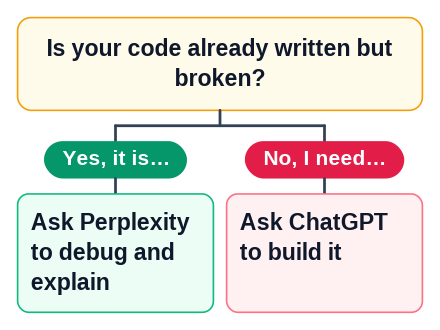
Use Perplexity when your code is broken, and ChatGPT when you need something built. In Index.dev's 6-task test, Perplexity won debugging and refactoring, while ChatGPT won the UI, feature and gallery tasks. Pick the tool by the job, not by the brand.
Perplexity vs ChatGPT for coding: the quick verdict
Each tool wins a different kind of beginner job, so the real question is what you are stuck on today. A bug and a new project need different help. One needs an explanation, and the other needs code that runs.
This verdict comes from two places. The first is Index.dev's hands-on coding comparison, which gave both tools the same tasks and picked a winner for each. The second is Zapier's 2026 review of the two tools, which looks at them as general assistants and covers pricing.
Say you have a to-do app where the "delete" button does nothing. You do not need a new app. You need someone to point at the line that is wrong and tell you what you misunderstood. That is a different request from "build me a to-do app", and the two tools split along exactly that line.
If you want the wider picture outside coding, such as essays and notes, read Perplexity vs ChatGPT for students first.
Which one to open for this problem: a comparison table
A beginner has three common coding jobs, and the table maps each one to a winner and a reason. I added a fourth row for the day you just want a working page. Each reason points to a task result from Index.dev or the summary from Zapier.
| Your job | Tool to open | Why |
|---|---|---|
Fixing an error like IndexError or "x is not defined" | Perplexity | It won the debug task in Index.dev's test, which was a runtime error in a Fibonacci function. |
| Debugging a logic bug (code runs, answer is wrong) | Untested | Index.dev did not run a pure logic-bug task. Perplexity did win the refactor task and the budget-calculator build, which involve logic, so treat this row as a best guess (Index.dev). |
| Learning what a piece of code does | Perplexity | Index.dev calls it stronger at "explaining code behaviour" (source). |
| Bonus: building a page fast | ChatGPT | It won the signup form and the responsive image gallery (Index.dev). Zapier rates it highly for coding too. |
Treat this table as a rule of thumb, not a law. One test with a handful of tasks cannot cover every bug you will meet.
Perplexity explains why broken code fails
In the Fibonacci IndexError task, Perplexity gave several optimized solutions and explained the cause, which is what a stuck beginner needs (Index.dev). A single patched line fixes today's bug. An explanation stops you writing the same bug next week.
Here is an example I wrote to show the kind of bug involved. It is not Index.dev's exact code, but it fails the same way:
# Example only: an off-by-one bug
def fibonacci(n):
    fib = [0, 1]
    for i in range(2, n):
        fib.append(fib[i - 1] + fib[i - 2])
    return fib[n]
print(fibonacci(5))  # IndexError: list index out of range
A good answer does more than hand back fixed code. It tells you that range(2, n) stops one number early. Take n = 5. The loop adds indexes 2 to 4, so the list becomes [0, 1, 1, 2, 3], which has indexes 0 to 4. Then fib[5] asks for a slot that does not exist. That is the lesson.
A good answer then offers more than one fix, with a reason for each. Like the buggy code above, these fixes are my own illustration, not copied from either tool:
# Fix 1: let the loop reach n
def fibonacci(n):
    fib = [0, 1]
    for i in range(2, n + 1):
        fib.append(fib[i - 1] + fib[i - 2])
    return fib[n]
# Fix 2: skip the list and keep only two numbers
def fibonacci(n):
    a, b = 0, 1
    for _ in range(n):
        a, b = b, a + b
    return a
Fix one is the smallest change. Fix two uses less memory, because it never stores the whole sequence. Seeing both side by side teaches you that "working" and "good" are separate questions.
Part of the reason for this style is how Perplexity is built. Zapier describes it as a tool built around real-time search with reliable citations. Its habit is to show where an answer comes from, and that habit carries over into explaining code.
ChatGPT built the cleaner page in the test
ChatGPT produced the cleaner frontend code for the signup form, the add-a-feature task and the responsive image gallery (Index.dev). Index.dev's bottom line: "ChatGPT is your go-to when you need polished, frontend-friendly code."
Zapier reaches a similar view from a different direction, calling ChatGPT "a superb partner" for coding among other creative work. Here is how that plays out for a beginner:
Pros
- Polished UI code that looks decent on the first try.
- Frontend-friendly output: HTML, CSS and JavaScript that fit together.
- Handles "add this feature to my existing code" requests well.
Cons
- It may give you a fix without teaching you why it works.
- A beginner can end up pasting code they do not understand.
- When that code breaks later, you have no idea where to start.
The cons are not really about ChatGPT. They are about how a beginner uses it. Ask it "explain each part of this form" after it builds one, and most of the problem goes away.
Whether AI saves time on a full build is a separate question. This CRUD app benchmark looks at that directly.
Perplexity vs ChatGPT for students: price and free tiers
Both tools have a free plan, so a student can test each on one real bug before paying anything. Here is the pricing Zapier lists for 2026:
- Free: both Perplexity and ChatGPT have one (Zapier).
- $20/month: the main paid plan on both (Zapier).
- ChatGPT Go at $8/month: the only budget tier either company offers (Zapier).
None of these sources give a rupee price, so I have left the figures in dollars. Check the price on each app before you pay, since it can differ by country.
That $8 tier matters if money is tight, whether you are in a hostel in Pune or a dorm in Ohio. It sits between free and the full plan. My advice is to stay on the free plans until you hit a limit that blocks real work.
Perplexity vs ChatGPT for research, and where it matters in coding
Citations help most when you check a library's docs.
Libraries change. A function you saw in a tutorial from a few years back may be renamed or removed. A tool answering from memory can hand you the old name with full confidence.
Try this routine. Ask Perplexity "which function does this library use for this task in its current version?" Click the cited link. Read the official docs yourself. If the link does not support the answer, you have caught the mistake before it reached your code.
Common mistakes when you ask AI to fix your code
Most bad answers come from a bad question, such as pasting only one line without the error message. The tool then guesses, and a guess sounds just as confident as a real answer.
- Do paste the full error message, including the line number.
- Do include the whole function around the broken line, not just the line.
- Do say what you expected to happen and what happened instead.
- Do ask for the reason before you accept the fix.
- Do run the fixed code yourself before moving on.
- Don't paste code into your project that you cannot explain line by line.
Turn those into a routine you repeat on every bug:
Copy the error
Select the full traceback or console message and use it as it is, not your summary of it.
Paste the code
Add the full function plus one line on what it should do.
Ask why
Type "why did this fail?" and read the answer before looking at any fix.
Run it
Apply one fix and run your code with the same input that broke it.
Re-ask
If it still fails, paste the new error and say which fix you tried.
For a longer worked example of this loop on a real backend, see how to use Claude Code to fix a backend bug.
Which should you pick?
Keep both open: ask Perplexity about a broken function, and ask ChatGPT to build a whole small project.
If you are stuck on an error message right now, start with Perplexity and use the routine above. The test covered a runtime error, not a logic bug, so compare both tools on those. If you need a landing page or a form working by tonight, start with ChatGPT, then ask it to explain what it wrote.
Remember where these verdicts come from: one hands-on test by Index.dev in 2026. Both tools update often, and your code is not their test code.
Take one bug you could not fix this week, paste the full error and function into both tools, and note which answer you understood better. Keep that tool for debugging.


