Perplexity AI vs ChatGPT for Students: Save More Study Time in 2026
ChatGPT saves most students more time, while Perplexity wins when you need sources you can check. Here is how the free plans compare and which one you should pay for.
Say you have a heavy study week ahead: two problem sets, one research essay and a lab report. You can pay for one AI tool at most, and you are choosing between ChatGPT and Perplexity. I compared both plans using review sources dated between February and October 2026, so you can decide which one deserves your money before you spend anything.
This post is about the app. The question is simple: which of the two is worth a student's money, judged on features, citations and price? For free-plan limits, see how many ChatGPT prompts you get per day.
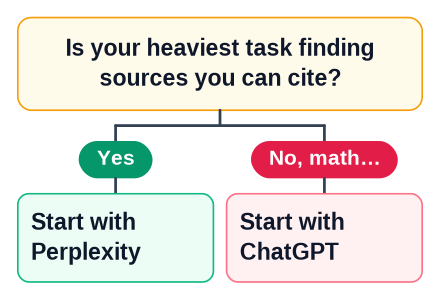
For most students, ChatGPT is the better one to pay for, because its free plan covers math and coding help, as well as writing support. Perplexity wins when you need answers with sources you can check. Pay for only one. Start free on both for a week, then pick the one that matches your heaviest study task.
Perplexity and ChatGPT are not the same kind of tool
Perplexity searches the web first and then writes an answer, while ChatGPT answers from its trained model first and searches only when needed. That one design choice explains most of the differences between the two apps.
Picture Perplexity as a librarian who reads before speaking. ChatGPT is closer to a tutor who answers from memory and opens a book only when unsure.
The models underneath differ too. Kanerika's comparison says Perplexity routes questions across several models. These come from OpenAI and Google, along with Anthropic and NVIDIA. ChatGPT Plus runs OpenAI's own models, though model names change often, so check OpenAI's plan page for the current list.
Perplexity ai vs ChatGPT for studying: research and citations
Perplexity puts inline citations on every answer, even on the free plan, so you can open the source before you put it in an assignment.
That difference matters more than it sounds. A clever answer you cannot trace is risky in an essay. A plain answer with a link you can open is safer to build on.
Here is where the citations pay off:
- Essays: ask for recent articles on your topic. Open each one and keep only the ones your teacher would accept.
- Literature reviews: ask who has studied a question. Then follow the cited papers into your college library database.
- Fact checks: paste a claim from your notes and see whether current sources agree with it.
Perplexity Pro goes further. Kanerika lists premium sources on Pro, including PitchBook, Statista and S&P Capital IQ. For a business or economics student, Statista's charts can save a long search.
ChatGPT can search the web as well. Kanerika's split still puts sourced research on Perplexity's side, because citations are not ChatGPT's main feature. When ChatGPT answers from its model alone, there may be no link to open at all.
Perplexity ai vs ChatGPT for math, coding and exam practice
For problem solving, ChatGPT is the stronger problem solver because it reasons from the model, so it suits math sets and code debugging. SwifDoo's comparison draws the same line: ChatGPT for coding and tutoring, Perplexity for research.
Say you have a first-year calculus set with a handful of integration problems. Ask ChatGPT to solve one step by step, then ask why each step works. Cover the answer and try the next problem yourself. Use it to check your working, not to do the set for you.
Check every final answer against your textbook or answer key. A model that reasons well can still make arithmetic mistakes.
Code works the same way. Say you have a Python assignment that fails with an error you do not understand. Paste the code and the full error message, and ChatGPT can point to the broken line in plain words. Kanerika also rates ChatGPT stronger for code and data work, including uploaded files. If you wonder whether AI help makes coding faster overall, see this CRUD app benchmark.
For exam practice, upload your lecture notes and ask for a short quiz on them. Ask for the answers in a separate message, so you test yourself first.
Perplexity helps here in a smaller way. Use it to look up a current fact, such as the newest version of a library, or to find an official documentation page.
Free tiers: what you get before paying
On its free plan, Perplexity gives 3 Pro Searches a day with no practical cap on basic searches, per noxi.ai's plan comparison. ChatGPT Free includes more features, with caps on file uploads and image generation, plus deep research. None of the sources I read gives a fixed daily number for these, so check OpenAI's own plan page for the current caps.
- Perplexity Free in daily use: basic searches handle quick fact checks. The Pro Search cap matters on days you need deeper, multi-step answers for an essay.
- ChatGPT Free in daily use: web search and add-on tools are included, per the same noxi.ai breakdown. Uploads are the cap you feel when you send lecture notes or PDFs.
- Both plans: the vendor sets the limits and can change them without warning.
To see how far a free ChatGPT day can stretch, read how many ChatGPT prompts you get per day.
The free plan also decided noxi.ai's overall score. Its 7-rule comparison, scored on 24 October 2026, gave ChatGPT 90 and Perplexity 65 (noxi.ai). Most of that gap came from the free plan and the cheaper entry price, not from how well either tool answers questions. This is one reviewer's opinion, so do not treat the score as the deciding fact.
One caution. In February 2026, a journalist at XDA Developers reported that Perplexity cut Deep Research limits from 600 a day to 20 a month. The same report said Perplexity had silently sent some paid queries to cheaper models. That is one person's report, and it is months old. Treat every limit here as changeable, and read the vendor's own plan page before you pay.
Student pricing in dollars, with a note for India, and the decision table
Perplexity Education Pro at $10 a month after SheerID verification is the only live student discount of the two, per Truescho's June 2026 pricing check. I could not open Perplexity's own student page, so this price comes from that June review. ChatGPT's free Plus months for US college students closed on 31 October 2026, as noxi.ai notes.
SheerID is a service that confirms you are enrolled. You qualify only as a verified university student, and eligibility can differ by country. Check yours on Perplexity's plan page before you count on the discount. Truescho adds that the plan includes Learn Mode, and that the older $5 price no longer applies.
None of these sources gives a rupee price or confirms that India is eligible for the student discount, so the table stays in dollars. Check the checkout page for the amount in rupees before you decide.
| What you need | Student in the US | Student in India |
|---|---|---|
| Free tier | Both free plans, with the limits listed in the section above | Both free plans, with the limits listed in the section above |
| Student price | Perplexity Education Pro, $10/month with SheerID (Truescho). ChatGPT: no live student offer. | Perplexity Education Pro, $10/month if SheerID verifies your university; confirm India is eligible (Truescho). ChatGPT: no student offer in these sources. |
| Entry paid price | ChatGPT Go $8, Plus $20; Perplexity Pro $17/month billed annually (noxi.ai) | Same dollar prices (noxi.ai); local price shown at checkout |
| Top plans | ChatGPT Pro from $100; Perplexity Max $167/month (noxi.ai) | Same dollar prices (noxi.ai) |
| Source discovery | Perplexity | Perplexity |
| Math and engineering sets | ChatGPT | ChatGPT |
| Coding | ChatGPT | ChatGPT |
| Exam practice | ChatGPT | ChatGPT |
Indian readers who see classmates using Gemini instead can compare the three in Gemini vs ChatGPT market share in India.
A budget rule you can act on this week
Stay on the free plans first, and pay for one tool only after a free limit blocks your actual weekly work. The paid plans overlap, so paying for both is rarely needed. Even the XDA reviewer who uses four assistants daily argues that only one is worth paying for.
List your heaviest tasks
Write down the study jobs that take most of your week, such as a weekly problem set or a research essay.
Use both free plans for seven days
Do each task on both tools. Do not upgrade, even when a pop-up offers a trial.
Note the limit that blocks you
Write down the day and the tool. A blocked Pro Search and a blocked file upload point to different tools.
Apply the decision rule
Heavy math or code means ChatGPT. Heavy sourced writing means Perplexity Education Pro if you qualify; otherwise, stay free.
Pay for one and review in a month
Before you commit to an annual plan, check whether a monthly option exists. That way you can stop if your courses change next term.
Can you use both for free?
Yes, and many students do: Perplexity to find and check sources, ChatGPT to explain and practise. Both free plans are listed in noxi.ai's plan breakdown, so the pairing adds no bill.
Say you have an essay on how screen time affects sleep. In Perplexity, ask for recent studies on the topic. Open two or three of the cited pages and copy one passage you find hard to read.
Paste that passage into ChatGPT and ask: "Explain this in simple words, then give me one question to test whether I understood it." Write the essay paragraph yourself, from your own notes.
The risk is the same on both tools. An AI summary can misstate what a paper says, and a citation can point to a page that does not support the sentence. Open the source before you quote it, every time.
Next step: today, list your three heaviest study tasks, then use both free plans for seven days before you pay for anything.


