Free Web Hosting Tiers Compared: Which One Survives a Recruiter's Visit?
Six platforms still offer real free hosting in 2026, and each one fails differently at its limit. Here is which to pick for a static portfolio versus a full-stack app, and which hosts to avoid.

Say you build a small full-stack app, deploy it on a free plan and put the link in your portfolio. Six weeks later, which is just past the 30 days plus 14 days of grace Render gives a free database, a recruiter clicks it. The page loads, but every list on it is empty, because the database behind it no longer exists. On Render's free tier, that is the rule, not a bug.
For a static portfolio, pick Cloudflare Pages or GitHub Pages. For a full-stack app, pick Vercel (non-commercial only), Render or Netlify, and read each limit first. Each free tier fails differently when you pass a limit. The table below shows what a recruiter sees on each one.
Free hosting tiers at a glance
Five platforms still have a usable free tier in 2026 (Railway is in the table only as a short trial), with limits checked on 3 November 2026, and they differ most in what happens when you pass the limit, according to AgentDeals' 2026 free tier comparison.
| Platform | Best for | Main free quota | What a recruiter sees |
|---|---|---|---|
| Cloudflare Pages | Static sites with busy days | No traffic cap | Page loads; only file caps apply |
| GitHub Pages | Docs and portfolios | Soft bandwidth cap | Page loads; GitHub may ask you to cut usage |
| Netlify | Static and frontend sites | Monthly credits | Site offline, visitors see an error page |
| Vercel Hobby | Next.js hobby apps | Separate limit per feature | Pages load, but screens that need API routes show errors |
| Render | Backend demos that can sleep | Monthly instance hours | Blank page for about a minute, then empty lists after the database expires |
| Railway | Short trials | Small monthly credit | Project paused, so the link shows nothing |
Cloudflare Pages has the most generous static limits
Cloudflare Pages gives unlimited requests and bandwidth, so traffic spikes will not stop a static site, per Klymentiev's 2026 hosting comparison.
The other free limits are about builds and files. You get 500 builds a month and 100 projects. You can also attach 100 custom domains, each with free SSL, according to the same comparison.
Watch the file caps: 20,000 files per site and 25 MiB per file (Klymentiev). A plain portfolio never gets close. A site that ships a long demo video can hit the size cap. A docs site with thousands of generated pages can hit the count cap. Put large media on a separate service and link to it.
Cloudflare Workers is a separate product for small pieces of server code. Its free plan allows 100,000 requests a day, with 10 ms of CPU time per request, per Render's 2026 free tier roundup. That covers a contact form endpoint. It does not cover image processing or anything else that needs heavy computing.
Pros
- A busy day of visitors does not take the site offline.
- One free account holds many projects and domains.
- Workers can add small backend pieces to a static site.
Cons
- The file caps catch sites with heavy media.
- The Workers CPU limit rules out heavy server work.
- The build cap matters if every commit triggers a deploy.
GitHub Pages is static only, with soft caps
GitHub Pages cannot run any server code, so a form handler or login needs a different host, as Klymentiev's comparison notes.
You get 1 GB of storage and 100 GB a month of soft bandwidth. Builds are capped at 10 an hour, and HTTPS is free (Klymentiev).
A soft limit is a usage level the platform expects you to stay under. It does not switch your site off the moment you cross it. If you go far past it, the host can ask you to reduce usage or move somewhere else.
It suits project documentation and personal portfolios best. Your code already lives on GitHub, so there is no extra account to manage. If you need something to put on it, most of these beginner JavaScript project ideas run as plain static pages.
Netlify's credit system can suspend your site
New Netlify accounts get 300 credits a month instead of fixed bandwidth, and going over suspends the site, according to AgentDeals.
This credit system started in September 2025 (AgentDeals). Older accounts on the legacy free plan get 100 GB of bandwidth and 300 build minutes a month instead, per Klymentiev. Before you plan around credits, read Netlify's pricing page to see what each action costs.
The overage does not turn into a bill. Your site goes offline instead. That protects your bank balance, but it hurts a portfolio link that a recruiter might click at any time. Check the usage page in your dashboard before you share a link widely.
Custom domain setup is covered in the Netlify domains docs.
Vercel Hobby is for non-commercial projects only
Vercel's free Hobby plan forbids commercial use, so a client site or a site with ads breaks the terms, per AgentDeals.
Inside that rule, the usage limits are wide enough for most student projects:
| Resource | Hobby limit (AgentDeals, 2026) |
|---|---|
| Edge requests | 1M a month |
| Function invocations | 1M a month |
| CPU time | 4 CPU-hours a month |
| Provisioned memory | 360 GB-hours a month |
| Image transformations | 5K a month |
| Projects | 200 |
| Deploys | 100 a day |
For a portfolio with a few hundred visitors, you will not reach any of these limits. An edge request is one page or file sent to a visitor from a server near them, and a function invocation is one run of your server code. When you pass one of these limits, Vercel pauses that feature for 30 days (AgentDeals). The pages may still load. Say your app's API routes run as functions, though: those routes stop answering, and your frontend shows errors on every screen that needs data.
If requests start failing and you don't know why, read the server error log first. It tells you whether the problem is your code or a platform limit.
The commercial rule matters most for freelancers. That is true for a student taking gigs in Pune and for one in Texas. Before you deploy paid work, ask these questions:
- Is a client paying you to build or run this site?
- Does the site show ads or affiliate links?
- Does it sell a product or a paid service?
- Is it the website of a business, even a small tuition centre or a local bakery?
A yes to any of them likely puts you outside the Hobby plan. Vercel's own terms have the exact wording, so read them when you are unsure.
Render's free database expires after 30 days
Render's free Postgres database is deleted after 30 days plus a 14-day grace period, so it is only for testing, according to Render's own free tier article. The database holds 1 GB until then.
The free web service gives 750 instance hours a month, 512 MB of RAM and 0.1 CPU (Render). It sleeps after 15 minutes without traffic and takes about a minute to wake up. You do not need a credit card to sign up.
That wake-up delay matters for a portfolio. The first visitor after a quiet spell waits on a blank page, and many people close the tab before it loads. To keep your data past the expiry, point the app at a database hosted somewhere else. Use Render only for the server code.
Two custom domains are included, and each extra one costs $0.25 a month, per Render's article. The Render custom domains docs give the setup steps:
Add the domain
Open your service in the Render dashboard and add the custom domain there.
Configure DNS
At your DNS provider, create the records the dashboard shows you.
Remove AAAA records
AAAA records point a domain at IPv6 addresses. Render's docs tell you to delete them for this domain.
Verify
Go back to the dashboard and verify the domain. A wildcard domain (any subdomain of your domain) needs CNAME records plus its own verification records.
Pros
- Runs real backend code, not only static files.
- No credit card needed to start.
- A sleeping service costs you nothing.
Cons
- Slow first load after the service has been idle.
- The free database disappears, taking your data with it.
- The small amount of RAM struggles with heavy frameworks.
Railway, Koyeb, Fly.io and Heroku are not free options now
Four platforms that students often recommend either run out of credit quickly or no longer offer a free plan. Each line below names its own source; the general comparison is AgentDeals' 2026 comparison.
- Railway: a $5 trial credit in the first month, then $1 of credit a month. Your project pauses when the credit runs out (Render).
- Koyeb: no free plan for new users since February 2026. The Pro plan starts at $29 a month (AgentDeals).
- Fly.io: no new free plans since October 2024. The trial gives 2 machine hours or 7 days (AgentDeals).
- Heroku: its free tier ended in November 2022 (AgentDeals).
Older tutorials and videos still tell you to deploy on these for free. Check the date on any guide before you follow it. An outdated guide can lead you to a sign-up page that asks for a card.
Which free host to pick for your project
Match the host to the project type: static site, personal full-stack app, or anything that earns money. Render's 2026 free tier guide sorts the platforms in a similar way. Answer these questions in order:
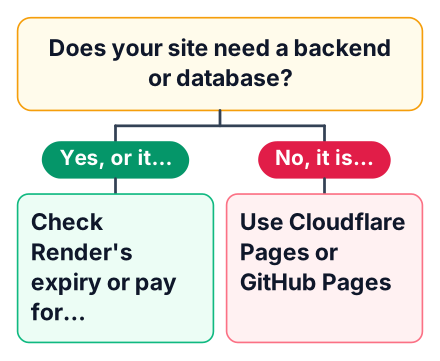
Does it earn money or serve a client?
If yes, use a paid plan or a host whose free tier allows commercial use. Stop here.
Does it need server code?
If no, it is a portfolio or docs site. Use Cloudflare Pages, or GitHub Pages if your code already lives there.
Is it a Next.js hobby app?
Use Vercel Hobby, and watch the function limits if your app calls an API.
Is it an API demo that can sleep?
Use Render, and keep the data in a database hosted outside Render.
Netlify fits any of the non-commercial cases above if you prefer it. Just check your credit usage weekly while traffic is still new to you.
To go live today, put a static portfolio on Cloudflare Pages and check it again in six weeks. Before you deploy a bigger project, open your chosen platform's pricing page and write down its three limits that would break your project. Then deploy a small test site and watch the usage dashboard for a week before you put your real project on it.