Is Claude Code Worth It for Students in 2026?
Claude Code costs $20 a month via the Pro plan, and free tools cover most student projects. Check if your college has Claude for Education, then try Copilot Student before paying.

Say you open Claude's pricing page this week, looking for a free way to try Claude Code. You read down the Free column twice, and the coding agent is not listed there. The plans that do include it charge you every month. Whether you study in Pune or in Ohio, $20 a month is $240 a year, about the price of a textbook or a used laptop part, so the real question is whether the agent earns that money.
Claude Code needs the Pro plan at $20 a month ($17 a month if you pay $200 for the year). For most students, it is not worth it yet: try Copilot Student and a free agent first, and pay $20 only when they stop you on real work. Free tools like GitHub Copilot Student and the open-source agents Cline and Aider cover most student projects. They cost nothing, but they have limits you should know about before you rely on them.
What the Free plan gives you
Free Claude is a chat assistant that can explain code and answer questions.
What Free does give you is a chat assistant with tight limits. Engadget's 2026 breakdown of the Free plan lists these features:
- Web search inside the chat.
- Artifacts, a side panel where you can view code and documents that Claude creates.
The message cap is the real limit. Engadget reports roughly 15 to 40 messages per 5-hour rolling window. Your count resets 5 hours after you start, not at midnight. The cap applies only to Sonnet 4.6 and Haiku 4.5. Opus 4.8 is not included. For a quick question about a loop, that is plenty. For debugging a project over an evening, you can run out before you finish.
If you are not yet sure that AI help speeds up coding at all, read this CRUD benchmark of coding with and without AI before you compare prices.
The video below shows one creator's method for using Claude Code without paying, which works by routing the tool through free model providers. It is not an official Anthropic method, I have not tested it, and its risks are covered in the free routing section further down.
Claude plans compared with free coding tools
Next to the free tools, the paid Claude tiers differ mainly in how much coding you get and whether you must use a terminal.
| Option | Cost per month (US) | Cost per month (India) | Claude Code included? | Usage ceiling | Needs a terminal? | Source |
|---|---|---|---|---|---|---|
| Claude Free | $0 | Free | No | Rolling message cap, Sonnet and Haiku only | No (chat in the browser) | claude.com/pricing, Engadget |
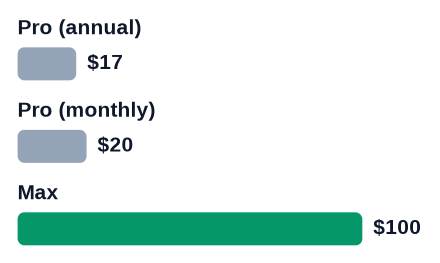
| Claude Pro | $20, or $17 billed yearly | No ₹ price on the page I opened | Yes | One pool shared with chat; exact size not stated on the page | Not stated on the page | claude.com/pricing |
| Claude Max | $100 | No ₹ price on the page I opened | Yes | One pool shared with chat; exact size not stated on the page | Not stated on the page | claude.com/pricing |
| GitHub Copilot Student | Free for verified students | Free for verified students | No | Unlimited completions; limited chat and agent use | Not stated on the page | education.github.com/pack |
| Cline | Tool is free; you pay for the model you connect | Tool is free; you pay for the model you connect | No | Set by your model provider | Not stated on the page | agentic.ai |
| Aider | Tool is free; you pay for the model you connect | Tool is free; you pay for the model you connect | No | Set by your model provider | Not stated on the page | agentic.ai |
The "not stated" cells are honest gaps. I only filled in what the linked pages say, and you can check each row yourself. Pro and Max are billed in dollars, so a reader in India needs a card that works for international payments, and I give no rupee price because I have no source for one.
Pro and Max share one usage pool
Claude Code does not get its own allowance, because chat and the coding agent both draw from one shared pool of usage that you cannot split, as the pricing FAQ states: "Your activity across Claude on web, desktop, mobile, and Claude Code all draws from the same pool."
Here is what that means in practice. A long evening of Claude Code reading your files and rewriting functions uses the same budget as your chats. You may then find little left when you want help with lecture notes the next day.
There is an extra path for heavy sessions. The same FAQ points to pay-as-you-go API credits through a separate Console account, which is a different login where you pay for each request instead of a monthly fee. You pay for each request, so a careless session with a large codebase costs real money.
Above Pro sit Max at $100 a month and Ultra at $200 a month, both listed on the pricing page. Most students will never need either. They suit people who code with Claude for many hours every working day.
Pros
- The coding agent is included with your chat plan.
- One subscription covers both chat and code.
Cons
- Coding and chat share one limit.
- The monthly fee adds up over a degree.
- You need a card that accepts international or online payments.
GitHub Copilot Student costs nothing
Verified students get Copilot free through the GitHub Student Developer Pack, with unlimited code completions and an allowance of AI credits.
The limit sits in the same line on the pack page: "limited chat and agent usage." Completions are the grey suggestions that appear as you type. Chat and agent mode are the parts that explain code or edit several files for you, and those are the parts that run out.
I only know what the pack page states. It does not give an exact credit amount, so I will not guess one. Check your own allowance inside GitHub once you are approved.
Applying works the same way in Kolkata or in Texas. Create a GitHub account, open the Student Developer Pack page, and apply as a student. The page tells you what proof of enrolment it accepts, so have your college ID or college email ready before you start.
Cline and Aider are open-source agents
Cline and Aider are free open-source coding agents, and you bring your own model, which is where the cost and quality limits come in. Both appear in Agentic.ai's list of 25 free AI coding agents, next to Codex CLI and Camber.
An agent is the program that reads your files, plans a change and edits your code. The model is the AI that does the thinking behind it. You connect a model by pasting in an API key from a provider, and that provider sets the price and the rate limits.
This split matters more than it sounds. A weak free model inside a good agent still writes weak code. A strong paid model inside the same agent gives better results, but then the tool is no longer free. I have not tested the quality gap between free models, so give each tool the same small task and compare the results yourself.
The Agentic.ai list does not tell me clearly enough which of these runs in a terminal and which runs inside an editor. Rather than promise you something I have not checked, I suggest installing both on a small practice repo and seeing which one suits how you work.
For free models, OpenRouter is one service people connect these agents to. It offers some models at no cost, with rate limits. Read its current terms before you plan a project around it, because free model lists change.
Free routing of Claude Code has real catches
A community toolkit on GitHub can run the Claude Code tool through free model providers, but it is not an official Anthropic path. Its own page claims routing through 61 free providers, and I have not checked that claim myself.
The catch is what runs underneath. You get the Claude Code program, but the answers come from free models, which are weaker than Claude's own models. Each free provider also has its own rate limits, so a session can slow down or stop partway through.
It may break the terms of the model providers or of Anthropic, and I have not tested it. Treat it as an experiment, not a study plan.
- Do read the repository's terms and its code before you install anything.
- Do try it on a throwaway practice project first.
- Do expect slower and less accurate answers than paid Claude.
- Don't point it at a project that holds passwords or API keys.
- Don't plan a submission deadline around a free provider staying online.
Check whether your college already pays for Claude
Some universities give students Claude for free, so ask your college before you pay anything. The clearest example is LSE, which announced free Claude for Education access for all its students on 2 April 2025.
Anthropic's pricing page also lists a separate Education plan, which institutions buy for their students. I have no source naming which colleges in India or the US have such a deal. Ask your IT help desk or student office one direct question: "Do we have Claude for Education?"
If the answer is yes, ask a second question. Find out whether Claude Code is part of your college's plan, because a college deal for chat may not cover the coding agent.
Is Claude Code worth it for personal projects?
For personal use and side projects, free tools are enough unless you already pay for Pro and want the agent in the same account.
Say you are building a portfolio app: a small expense tracker with a login page and a database. Most of that work is ordinary code, such as forms, routes and a few queries. Copilot's completions handle much of the typing, and an open-source agent can draft a whole route when you describe it in plain English. A paid agent saves you some time, but it does not unlock anything this project needs. This is a worked example, not a test: this post compares prices and limits, not the quality of the output.
Follow this order, and stop at the first step that covers your work:
Check college access
Ask your IT or student office whether your college has Claude for Education.
Claim Copilot Student
Apply for the GitHub Student Developer Pack and use Copilot in your editor.
Try Cline or Aider
Connect a free model and give the agent one small task, like adding a form to your app.
Pay for Pro only if you hit limits
If the free tools keep stopping you on real work, try Pro for a month. This walkthrough on using Claude Code to fix a backend bug shows what the agent does well.
Common mistakes. The first is paying before trying the free tools: many students subscribe in the first week and then use the agent twice a month. The second is expecting the Free chat plan to include Claude Code, then spending an evening searching for a setting that does not exist.
Which should you pick?
Pick by what you already have: a Pro subscription, a verified student account, or neither.
- You already pay for Pro: use Claude Code. It costs you nothing extra, and you only need to watch the shared limit.
- You are a verified student without Pro: use Copilot Student, and add Cline or Aider when you want an agent.
- You have neither yet: use Free Claude chat for questions, and an open-source agent with a free model for code. For research questions outside coding, see Perplexity vs ChatGPT for students.
Apply for the free GitHub Student Developer Pack this week and build one real project with Copilot Student before you spend $20 on Claude Pro.


