Gemini Omni 1.2 Flash video API is now GA: what it costs and what to build
Google's Gemini Omni 1.2 Flash video API reached general availability on 5 November 2026, with 15-second clips, turn-by-turn editing, and a 30% price cut to $0.07 per second at 720p. Here's what a student developer can build with it, and what one clip really costs.
I have not run a test of my own; I read the pages on 7 November 2026. I started with DeepMind's launch page that day and did the sums for a student budget, because a price per second is easy to nod at and hard to feel. One full clip now costs about a dollar, so the real question is how many clips a small budget buys, what to build with them, and which workflow keeps the bill low. Here is the answer.
Google made Gemini Omni 1.2 Flash generally available on 5 November 2026, with 15-second clips, conversational editing and a 30% price cut to $0.07 per second for 720p. It replaces Omni 1.1 Flash as the cheap default, and it both generates and edits video natively. Below is what a student or junior developer can build with it (DeepMind, The Decoder).
Where you can use Omni 1.2 Flash today
Developers reach the model through the Gemini API, Google AI Studio and the Google Cloud Console, and it also appears in Flow, Google Vids, the Gemini app for Google AI Ultra subscribers and Google Ads, according to The Decoder.
Only two of those entry points matter if you write code. Google AI Studio is for prototyping: you type a prompt, watch the clip, and adjust. The pages I opened do not say whether video generation there is free, so check your own console for limits and charges before you run many tests.
The Gemini API is for apps. Your code sends a prompt and gets a video back. The Cloud Console fits a team that already runs its servers on Google Cloud.
Everything else is a consumer app. If you only want free clips for a class project and no code, read my companion post on making free videos with Omni 1.2 Flash in Google Vids. This post stays on the builder side.
Clips now run 3 to 15 seconds, set in one-second steps
You choose any length from 3 to 15 seconds in one-second increments, where Omni 1.1 Flash stopped at 10 seconds, as DeepMind's launch post states.
| Feature | Omni 1.1 Flash | Omni 1.2 Flash |
|---|---|---|
| Longest native clip | 10 seconds | 15 seconds |
| Length control | Not stated in the sources | 3 to 15 seconds, one-second steps |
| Price per second (720p) | About $0.10 (worked out: $0.07 ÷ 0.7) | $0.07, after a 30% cut |
| Conversational editing | No | Yes, across the full clip |
Conversational editing fixes one detail without a full redo
Multi-turn editing lets you swap the background, lighting or aspect ratio one turn at a time, across the full 15 seconds, so you stop regenerating a whole clip to fix one thing, according to DeepMind.
Say you have a twelve-second demo clip of your to-do app. The phone looks right and the motion is smooth. But the background is a messy desk, and you wanted a plain studio.
The old way was to rewrite the prompt and generate the clip again. You pay for every second a second time. Worse, the new clip may change the parts you liked, which can mean a third try.
With editing, you send one follow-up: "change the background to a plain white studio." The phone and the motion stay as they were. Generation is charged by the second, so edits may be cheaper than regenerating, but that is a guess. Google's pages do not say how an edit is billed, so treat it as a possible full-clip charge until you test one edit and read the charge in the billing section of your own console.
Clear follow-ups get better results, and writing them is a prompt skill. My guide to prompt engineering for students covers how to phrase one change at a time.
Reference inputs keep faces and brand colors consistent across clips
The model accepts reference images of characters and products, plus style images, motion clips up to 3 seconds and audio cues, and it keeps faces and garments consistent, along with packaging and brand colors, as The Decoder reports.
Each reference type has a job:
- Character images keep the same face and clothes from clip to clip.
- Product images keep the label, the packaging type and the exact color.
- Style images set the look, such as flat illustration or warm film tones.
- Short motion clips show the movement you want, like a slow camera turn.
- Audio cues guide the sound and the timing of the video.
Picture a small online shop that sells one steel water bottle, or one cotton kurta. It wants three clips: unboxing, the product in use, and the product on a shelf. Without a reference, the bottle's color and logo can drift between clips. With one product photo as the reference, the shop asks the model to keep them fixed.
This works for a seller on Etsy in the US or on Meesho in India. Google lists better reference adherence as a 1.2 improvement. How well it holds up on your own product is something to test, not assume.
Pricing: $0.07 per second at 720p, so $1.05 for 15 seconds
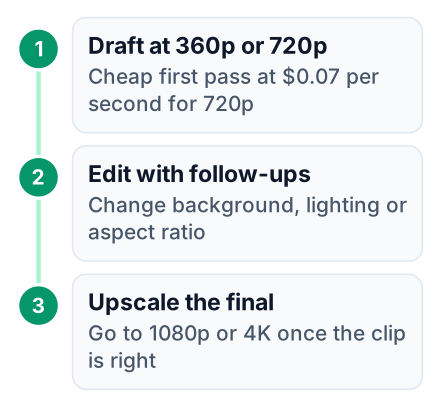
The $0.07 figure is the draft price. The sources give no price for 1080p or 4K, so the cost of a final clip is unknown, and they do not say how an edit is billed. Before you budget, make one edit and read the charge in the billing section of your Google Cloud Console. At $0.07 per second for 720p output, a full 15-second clip costs about $1.05, and Google advises drafting at 360p or 720p before upscaling to 1080p or 4K (DeepMind, The Decoder).
The math is one line: $0.07 × 15 seconds = $1.05. Ten full clips would be ten × $1.05 = $10.50 (price source).
I give costs in dollars because no source gives a rupee figure, and I have no verified exchange rate to quote, so convert $1.05 at today's rate in your bank or card app. For a budget check, $10 buys about 9 full clips at 720p ($10 ÷ $1.05 = 9.5, rounded down).
Google's advice gives this workflow, which saves money only if edits cost less than a new draft. You do the trial and error at the cheap resolution:
Draft cheap
Generate at 360p or 720p until the motion and framing are right (DeepMind).
Fix with edits
Use follow-up turns to change details instead of starting a new clip.
Upscale once
Move only the final approved version up to 1080p or 4K (DeepMind).
What can a student build with Omni 1.2 Flash?
Because it is an API, a student can put video generation inside their own app: 15-second product explainers, talking-head tutorials and reference-consistent brand videos, which Google's developer announcement frames as the model's main uses.
Your path is simple. Prototype in AI Studio until your prompts work, then call the Gemini API from your app, and check your console for what each test costs. The model is also listed on OpenRouter if you already route requests through it. Here are three project ideas, with costs worked out from the $0.07 per second rate:
- Product explainer generator. Say you build a tool where a small seller uploads one product photo and gets a short ad. One full-length clip costs about $1.05 at 720p (DeepMind).
- Tutorial intro maker. Say you build an app that turns a lesson title into a ten-second intro for a coding channel. Each intro costs about $0.70 (DeepMind).
- Brand video kit. Say you build a page that takes a logo and colors, then makes three matching full-length clips. The set costs about $3.15 (DeepMind).
Pair any of these with a front end you sketched in Gemini Canvas and you have a full project a recruiter can click through.
Limits and watermarks to check before you build
Google lists fast sports action, rapid script changes and complex physics as work in progress, and every output carries an imperceptible SynthID watermark, per DeepMind.
Pros
- Cheaper per second than the version before it.
- Longer clips, with exact length control.
- Turn-by-turn edits instead of full redos.
- Better consistency from reference images.
- Generally available, so safer to build on.
Cons
- Weak on fast sports, quick scene changes and complex physics.
- Per-second billing adds up when you regenerate often.
- A hidden watermark is on every output.
My plain advice: do not build a product around sports highlights or crash simulations yet. Pick ideas with calm motion, like a product turning on a table or a person talking to the camera. SynthID is a hidden mark that detection tools can read, not something you see. Be open with your users about how the video was made, and check each platform's own rules before you post or sell.
Here is your next step. Open Google AI Studio today and generate one full-length 720p product explainer for a project you already have. Make one follow-up edit instead of regenerating, and write down what it cost. Then read the free companion post on Omni 1.2 Flash in Google Vids. Which small app of yours would you add video to first?


