Claude Code's 'Don't Ask Again' Leaks Secrets: 5 Checks to Save Your Repo
Anthropic's Claude Code stores literal shell commands, passwords included, when you approve 'Yes, and don't ask again.' Here are the five checks to find and fix exposed secrets before they hit public GitHub.
Imagine clicking a button that promises to stop asking for permission, and it quietly saves the literal shell command — password included — into a file that ends up on public GitHub. Apiiro found 2,539 real secrets in 1,994 repositories, and Anthropic's head of Claude Code admitted the issue and is now prototyping fixes.
Yes, and don't ask again saves the exact command to .claude/settings.local.json, which can leak passwords and API keys if pushed to GitHub. Five checks this afternoon: search history, untrack, gitignore, grep for patterns, and rotate anything exposed.
What the button actually saves
Choosing 'Yes, and don't ask again' stores the literal shell command — password and all — into .claude/settings.local.json at the root of your project, per the official Claude Code permissions documentation. The command string is stored verbatim, not sanitized. If you approve a Bash command like PGPASSWORD=secret123 psql -U admin or sshpass -p mypassword ssh user@server, that exact text lands in the file. WebFetch domain approvals save the URL pattern the same way.
Why it ends up on public GitHub
Claude Code adds the file to your GLOBAL git ignore, not the project's .gitignore, so nothing stops it from being committed when you push, according to the permissions docs. The global ignore lives on your machine only. When you push a school project or demo repo to GitHub, the file goes with it unless the repo's own .gitignore lists it. The only ignore that travels with the project is the one inside the repo.
What leaked and how we know
Apiiro scanned 104,185 public copies of the file across 103,617 repos and found 1,122 files holding 1,379 live secrets — database passwords and Supabase keys dominated, as GBHackers reported. The breakdown: 379 database passwords, 122 Supabase service-role keys, 103 Supabase account tokens, 43 SSH logins, 42 GitHub/GitLab/npm tokens, 23 AWS keys, and 6 private keys. Sixty-three organizations were affected, and one confirmed its exposed key was live. Including git history, shared settings files, and agent transcripts, the total reaches 2,539 secrets in 1,994 repositories.
Why scanners miss one in five
Standard scanners look for key formats, not passwords typed after PGPASSWORD= or sshpass -p, so about one in five affected files slips past both Gitleaks and TruffleHog, as a DEV Community analysis explained. Gitleaks flagged 564 files and TruffleHog 643, but 215 files escaped both. The scanners detect strings shaped like API keys, not passwords embedded in command lines. That gap is why manual grep matters.
git log --all --full-history -- .claude/settings.local.jsonCheck 1: git log --all --full-history
Search every commit, including deleted ones, for the settings file so you know the true exposure, as the GBHackers report recommended. Run the command above. If it returns anything, the file was committed at some point. Deleting the file does not clear history — the commit remains in the log and in any clone or fork.
Check 2: git rm --cached and the repo's own .gitignore
Untrack the file without deleting it locally, and add it to the project's .gitignore so it stays ignored for everyone who clones, per the Claude Code docs. Run git rm --cached .claude/settings.local.json, then add .claude/settings.local.json to your repo's .gitignore. The global ignore is not enough — it only protects your machine. The repo's own .gitignore is the only one that travels with the project.
Check 3: grep for what scanners miss
Run grep for PGPASSWORD=, sshpass -p, mysql -p, 'Authorization: Bearer', and api[_-]?key= patterns to catch passwords format-based scanners ignore, as the DEV Community post showed. These patterns appear in commands that use databases or SSH. The 215 files that slipped past both Gitleaks and TruffleHog held exactly this kind of credential.
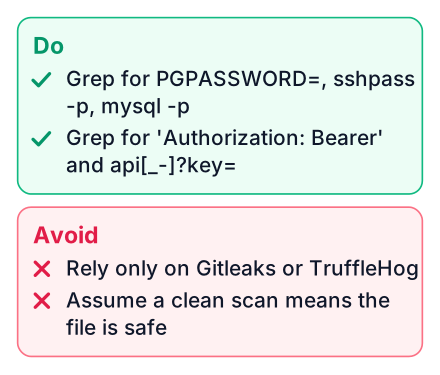
grep -rE "PGPASSWORD=|sshpass -p|mysql -p|Authorization: Bearer|api[_-]?key=" .claude/Check 4: rotate anything that was ever committed
If a secret touched git, treat it as public: rotate the password, key, or token even after removing the file, as iTnews reported. Deletion is not enough — clones, forks, and history keep the secret accessible. One vendor confirmed its exposed key was live. Rotate Supabase keys, GitHub tokens, AWS keys, and SSH passwords without delay.
The durable fix: approve patterns, pull from env vars
Instead of letting Claude save a literal command, approve pattern rules like Bash(npm run:*) and load secrets from environment variables so no password ever sits in plaintext, per the official permissions guide. Pattern rules match a command shape, not the exact string, so credentials never get written to disk. Environment variables keep secrets out of command lines entirely. Boris Cherny, head of Claude Code at Anthropic, acknowledged the issue on Hacker News and said the team is prototyping auto-mode detection and basic secret scanning, as iTnews noted.
Search history
Run
git log --all --full-history -- .claude/settings.local.jsonto see if the file was ever committed.Untrack the file
Run
git rm --cached .claude/settings.local.jsonto stop tracking it without deleting it locally.Add a repo .gitignore entry
Add
.claude/settings.local.jsonto the project's own .gitignore so it stays ignored for everyone.Grep for password patterns
Search for PGPASSWORD=, sshpass -p, and similar patterns that scanners miss.
Rotate exposed secrets
Change any password or key that ever touched git — history and forks keep it accessible.
Run the git log command right now, and if you find the file, rotate what it holds — then add a pattern rule and a .gitignore entry to keep it from returning. For more on how coding agents are reshaping development workflows, see how agents now drive 40% of pull requests, and for context on the models behind these tools, check Ripple 65B and OpenAI GPT-6.


