Gemini API File Slicing: Pay Only for the Pages You Read
Google's new Gemini API file slicing lets you send only the page, sheet range, or clip you need, and you pay tokens only for what the model reads. Here's how to use it to cut your bill on big files.
Say you upload a two-hundred-page lecture PDF to Gemini and ask one question about page forty-seven. Do you pay for all two hundred pages, or only the one you needed?
Google's Gemini API file slicing lets you send the model only one page, sheet range, or clip, and you pay tokens only for what it reads. It works across all Gemini 4 models and adds no new pricing. Existing token rates apply, so the savings come from reading less.
What Google launched
Google added server-side slicing controls to the Gemini API on November 23, 2026, available in Google AI Studio and Vertex AI, according to Google's own announcement. "Server-side" means Google's servers cut the file for you. You send the file once, then ask for the part you want.
The supported types cover most files a student works with. PDFs, Office documents, slide decks and spreadsheets all go in directly, along with OpenDocument files, audio and video. You can also request layers, not only pages. Unite.AI reports that the document and slide controls also work on Gemini 3, so older projects can use them too.
If you are picking a model for the first time, my breakdown of Gemini 4 Hydrogen's price for students is a good place to start.
Slicing bills only the parts Gemini inspects
You request specific pages, spreadsheet cells, or media segments, and billing covers only those parts instead of the whole upload, as MLQ.ai explains. Before this, as Google's announcement frames it, attaching a file meant the model processed all of it, whatever you asked. The table shows the difference on files you probably have open right now.
| File | Whole-file upload | Sliced request |
|---|---|---|
| Lecture PDF | The model reads every page | The model reads the one page you name |
| Workbook | Every sheet goes in | One worksheet or one cell range goes in |
| Recorded lecture video | The whole recording is processed | A thirty-second clip is processed |
| Who decides what gets read | Nobody: everything is read | You, in the request |
| Best for | Summaries of the full file | Questions about a known part |
Slicing does not help when your question needs the whole file. A summary of an entire project report is one example. The model has to read everything anyway, and the bill stays the same.
Skim cheap, then zoom in: a Python flow outline
Read every page as cheap text with gemini-4-hydrogen first, then send only the one page you need at high resolution to gemini-4-neon. Google recommends this pattern for large documents. The skim finds the right page. The zoom reads the charts, tables and handwriting that plain text misses.
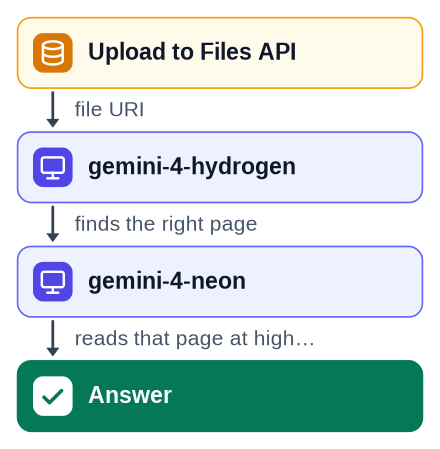
Upload once
Send the file to the Files API and keep the file URI it returns.
Skim as text
Ask the cheaper model to read every page as text and name the page that answers your question.
Zoom on one page
Send only that page, as a high-resolution image, to the stronger model.
This is a flow outline, not a paste-and-run script. The slice_of helper is a placeholder because I could not verify the exact request field names, so copy them from Google's file slicing announcement before you run it.
from google import genai
client = genai.Client()  # reads GEMINI_API_KEY from your environment
# Upload once. Every call below reuses notes.uri.
notes = client.files.upload(file="lecture_notes.pdf")
def slice_of(file, pages, mode, resolution="low"):
    # Placeholder: build the slice part here.
    # Copy the exact field names from Google's file slicing docs.
    raise NotImplementedError
question = "Which page explains the proof of the master theorem?"
# Pass 1: skim every page as plain text with the cheaper model.
skim = client.models.generate_content(
    model="gemini-4-hydrogen",
    contents=[
        slice_of(notes, pages="all", mode="text"),
        question + " Reply with the page number only.",
    ],
)
import re
match = re.search(r"\d+", skim.text)
if match is None:
    raise ValueError("No page number in reply: " + skim.text)
page = int(match.group())
# Pass 2: zoom in on that one page as a high-resolution image.
answer = client.models.generate_content(
    model="gemini-4-neon",
    contents=[
        slice_of(notes, pages=[page], mode="image", resolution="high"),
        question,
    ],
)
print(answer.text)
Everything outside the helper shows the flow you keep. Once you fill the helper in, print skim.text and answer.text on your own file, and check that the page number in the first reply is a bare number before you trust the second call.
Uploading is a one-time step. You pass the same file URI in later turns and in tool calls, so nothing gets sent twice. Agents get the same power: a tool's reply inside function_result can ask for a slice of a file, instead of pasting the whole file back into the conversation.
Why does this spend fewer tokens? With skim-then-zoom, you pay image rates for one page, and only one page reaches the stronger model. The sources I used give no text-token figure per page, so I cannot say exactly how much the skim costs. Run a count-tokens call on your own file, once as text and once as images, to see the gap. Skim-then-zoom is not worth it when the text-only answer is already enough, because the zoom step then adds cost and little else. Choosing which model handles which request is its own skill, and I covered it in cutting Gemini API cost with a routing classifier.
Page-image token costs by resolution
A page image costs about 280 tokens at low resolution, 560 at medium, and 1,120 at high, according to Unite.AI's breakdown. These estimates cover Gemini 3 and Gemini 4 models. The right column is my own suggestion, not Google's.
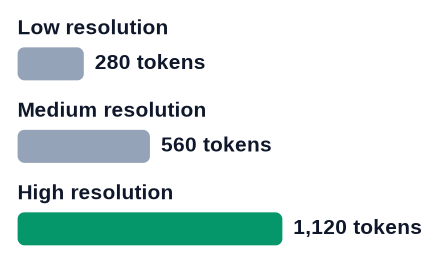
| Resolution | Tokens per page image (estimate) | When to pick it |
|---|---|---|
| Low | About 280 | Pages that are mostly plain text |
| Medium | About 560 | Slides with simple diagrams |
| High | About 1,120 | Dense charts, small print, handwriting |
Here are two cases, in tokens only, using Unite.AI's per-page figure. Case one: you know the page. Sending all 200 pages at high resolution is 200 x 1,120 = 224,000 tokens. Slicing the one page you need is 1,120 tokens, about 200 times fewer. Case two: you do not know the page. The skim runs as text, and the sources give no per-page text cost, so I cannot give you a total for it. The zoom adds 1,120 tokens for one high-resolution page, and you add your own measured skim cost on top. For comparison only, a skim done as low-resolution images would be 200 x 280 = 56,000 tokens, about 57,120 in all, but that is not the workflow in the code above. These are my own estimates from Unite.AI's numbers, and the partner-reported savings in the next section are the real-world check.
Vercel and LiteLLM report real savings
Vercel reported 14x fewer tokens when skimming a PDF page for text (the sources do not say what that was measured against), and LiteLLM cut prompt tokens by 67% on a PDF and 33% on a workbook, per Unite.AI and MLQ.ai.
Treat these as partner-reported results, not guarantees. Your saving depends on how much of the file your question needs. Asking about one chapter of your notes needs very little. Asking Gemini to compare every week's slides needs almost all of them.
The smaller workbook figure fits that idea. A spreadsheet question often touches several sheets or long columns, so there is less to cut.
Upload limits that still apply
Slicing does not lift file limits. These come from Unite.AI, so check Google's docs before relying on them: 50 MB per file, 1,000 pages per PDF, 2,000 pages or slides per Office file, and 50,000 cells per sheet, as Unite.AI lists them. Here is what to do when you hit one:
- Size cap: compress a long recorded lecture, or split it into parts before upload.
- Page cap: split a full textbook PDF into chapter files.
- Cell cap: move raw data into a second sheet and keep summaries on the first.
Files you upload through the Files API are stored for 48 hours, and the Files API itself is free, according to the same report. After that window, the URI stops working and you must upload again. Save the upload time next to the URI in your code, and re-upload when it gets old.
Pair slicing with Google's tool-retrieval cost-saver
Google released tool retrieval for agents in the same week, which trims the tool definitions an agent sends, while slicing trims the files. With tool retrieval, the agent does not carry every tool's description in every request. It loads the tools it needs for the current step.
The two fit together well. Picture a study-helper agent with a dozen tools that reads course PDFs. Tool retrieval keeps the tool list short, and slicing keeps the file input short. I walked through the first half in Gemini tool retrieval and deferred loading.
How to cut your bill on big files today
Start with your largest PDF or slide deck, skim it as cheap text, and slice only the pages your question needs. You can try it in Google AI Studio, following Google's announcement. These files show up in most courses, in Pune or in Ohio:
- Course notes PDF: ask which page covers a topic first, then ask your real question about that page only.
- Slide deck for a project review: send slides with diagrams at high resolution and the rest as text.
- Spreadsheet of marks or expenses: request the one sheet or cell range your question touches.
- Final project report: slice by section when you want feedback on one part.
If you are building on the free tier, my post on the Gemini Decisions API free tier shows how to stretch a quota further.
Pick the biggest PDF in your current project and run it through a count-tokens call twice, once as the whole file and once sliced to the single page you need, then write both totals down so you can see your own saving before you spend anything.


