Gemini API Tool Retrieval: stopping wasted tokens in agent prompts
Google's Tool Retrieval preview lets the Gemini API keep a tool's full schema out of the prompt until the model asks for it by name. Here's how it works, when it saves money, and a three-step refund example with code.
Say your agent is wired to a hundred tools. Before the model reads one word of the user's question, every request already carries the full parameter schema for every one of them. Google's new Tool Retrieval preview, announced on November 19, 2026, is built to stop that resend.
Tool Retrieval lets the Gemini API keep a tool's full parameter schema out of the prompt until the model asks for it. You add a tool_search tool and set defer_loading: true on the tools you hold back. It is a preview in the Interactions API, so expect changes.
Tool Retrieval keeps idle tool schemas out of context
The model still sees each deferred tool's name and description. Google's developer blog post describes the feature as a preview in the Gemini Interactions API. It targets agents wired to dozens or hundreds of tools.
A schema is the part of a tool that lists its parameters, their types and which ones are required. One schema is small. A hundred of them, sent on every request, add up fast. You pay for those input tokens each time, and the model has to read past them to find the one tool it needs.
Refund example: one request, three steps
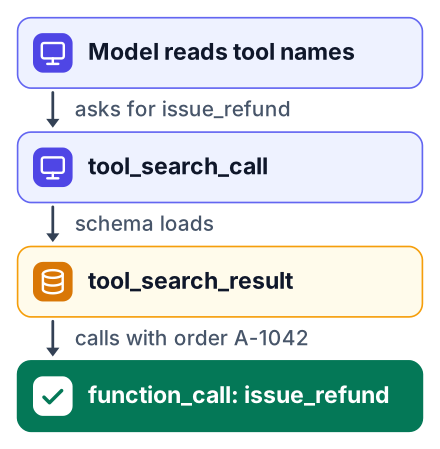
A customer-service agent refunding $40 on order A-1042 shows the whole flow, because the schema load and the function call both happen inside one request. That example comes from Google's own sample, which runs on gemini-4-hydrogen and gives the agent an issue_refund function.
The request below follows the shape of Google's sample. Field names can shift during a preview, so compare it with the blog post before you run it.
curl "https://generativelanguage.googleapis.com/v1beta/interactions" \
  -H "x-goog-api-key: $GEMINI_API_KEY" \
  -H "Content-Type: application/json" \
  -d '{
    "model": "gemini-4-hydrogen",
    "input": "Please refund $40 on order A-1042. It arrived broken.",
    "tools": [
      { "type": "tool_search" },
      {
        "type": "function",
        "name": "issue_refund",
        "description": "Issue a refund for a customer order.",
        "defer_loading": true,
        "parameters": {
          "type": "object",
          "properties": {
            "order_id": { "type": "string" },
            "amount": { "type": "number" },
            "reason": { "type": "string" }
          },
          "required": ["order_id", "amount"]
        }
      }
    ]
  }'
When the response comes back, look at interaction.steps. You will see the three steps in order:
tool_search_call
The model reads the short name and description, decides it needs
issue_refund, and asks for it by name.tool_search_result
The API returns the full parameter schema for that one tool and adds it to the context.
function_call
The model calls
issue_refundwith the order ID and amount filled in. Your code runs the real refund.
Two limits matter before you try it. The feature needs the v1beta API version, and the older generateContent endpoint is not supported, according to PPC Land's coverage.
What Tool Retrieval costs and when it saves money
There is no separate fee, so savings appear only when the schemas you never load are worth more than the ones you do load plus the extra search cost. PPC Land's breakdown lists four parts to the bill. The billing detail comes from this one outside report, and Google has not confirmed it:
- All tokens are billed at the standard input rate for the model you call.
- Turning on
tool_searchadds a small fixed block of input tokens. - Each loaded schema is billed as input for the rest of the conversation. You cannot unload it.
- Each server-side search runs a second billed model pass over the whole context. A second pass means the model reads your whole prompt again, so you pay for those input tokens twice.
The deferred tools are not free either. In early testing, PPC Land measured each deferred tool's listing line at about 26 tokens. About 100 deferred tools then add about 2,600 input tokens per request. At Gemini 4 Hydrogen's $1.50 per million input tokens (the rate I used in my Gemini 4 Hydrogen pricing post), that is about $0.004 per request, or about $3.90 per thousand requests.
Here is a rough before and after. This is my own estimate, because Google has published no savings number. Assume 100 tools and 300 tokens per full schema. Without deferral, every request carries 30,000 tool tokens, which is about $0.045 per request or $45 per thousand. With deferral, it carries 2,600 listing tokens plus one loaded schema of 300 tokens, about 2,900 tokens, or $4.35 per thousand. If a conversation loads three schemas, that is 2,600 plus 900, or 3,500 tokens, about $5.25 per thousand, before the extra search passes are added.
Google has not published official numbers. There is no savings figure, no accuracy or latency figure, no size for the fixed block and no date for general release, as PPC Land notes.
Other vendors shipped the same idea first, with the same defer_loading flag. Anthropic's Tool Search Tool (November 2025) claimed an 85% token cut in its own test. OpenAI's tool search with GPT-5.4 (March 2026) claimed 47% in internal tests. Both are vendor claims, reported by PPC Land, not independent measurements.
For a student, the size of your tool library decides it. A demo agent with a weather tool and a calculator gains nothing. A project that wraps a whole API, with many endpoints the user rarely touches, is where deferral starts to pay.
| Situation | Many tools, mostly unused | Few tools, used every time |
|---|---|---|
| What deferral removes | Most schemas stay out of every request | Almost nothing, since each tool gets loaded anyway |
| Extra search passes | Occasional, only for the tools the model needs | Frequent, one for each tool it loads |
| Likely result | Fewer input tokens per request | Same or higher cost |
Server-side, client-side and MCP modes
Server-side search needs no index, while client-side mode suits teams that already have their own tool registry, embedding index or per-user permissions. PPC Land describes a third option for remote MCP servers. MCP (Model Context Protocol) is a standard way to expose a set of tools from a separate server.
| Mode | How you turn it on | What you run | Who it suits |
|---|---|---|---|
| Server-side | tool_search plus defer_loading: true | Nothing. Google does the search. | Students and small teams |
| Client-side | execution: "client" | Your own search, with one extra round trip per search | Teams with a tool registry or permission rules per user |
| Remote MCP | defer_loading on an mcp_server tool | Your MCP server, as before | Anyone already serving tools over MCP |
The MCP option is the easiest win. One flag on the server entry defers every tool it exposes, so you do not mark tools one by one.
Skip it for small tool sets
With a handful of tools you use on nearly every request, deferral can cost more than it saves. Here is how the trade-off looks for a student demo project.
Pros
- Fewer input tokens when you have many tools you rarely use
- No search index to build or host in server-side mode
Cons
- Preview only, so behaviour and field names may change
- Each server-side search adds a billed second model pass
- Loaded schemas stay billed for the whole conversation
- A small fixed block of tokens whenever
tool_searchis on
My rule of thumb: measure before you switch. Log input tokens per request with deferral off, then on, using the same prompts. If the number does not drop, turn it off.
Pair it with the cheaper Gemini 4 models
Tool Retrieval works on Gemini 3.6 and later, including every Gemini 4 model, so you can test it on the cheaper ones before choosing a model. That support list comes from PPC Land. You try it today in the Interactions API on the v1beta version.
Start with gemini-4-hydrogen, the model Google's sample uses, at the input rate quoted in the cost section. I broke down what that model costs a student in my Gemini 4 Hydrogen pricing post.
Gemini 4 Neon is another option. Check its current price on OpenRouter's Gemini 4 Neon page, and see how Neon compares with Flash for coding. Prices on these pages change, so read the live page on the day you build.
Your next step: take an agent you already have and defer its rarely used tools on gemini-4-hydrogen in the Interactions API. Then run the same twenty prompts with and without tool_search, and compare the input tokens. If cost is the goal, a second lever is cutting Gemini API cost with a routing classifier, which sends easy requests to cheaper models.