Gemini Tasks Is Free: What Google's New Agent Toggle Actually Does
Google renamed its paid Spark agent to Tasks and made it free for everyone in six countries. Here is what it costs, what it can do, and the one rule that keeps your wallet safe.
On November 17, 2026, Google's Spark agent stopped being a paid extra. It became "Tasks", a toggle on the Gemini app home screen, as The Verge reports. Before that, only Google AI Pro and Ultra subscribers could use it. Picture a student in Mumbai with an exam-date email open on the evening of the launch: Tasks can put that date in the calendar for them, and in the US it can even phone a business and wait on hold.
Gemini Tasks is free in the US, Japan and Korea, plus Canada, Australia and also India, with no per-request fee. It is Google's old Spark agent, now running on Gemini 4 Hydrogen, according to Google's announcement. It can call businesses, book appointments, read your email and, in the US, pay through Google Pay. It stops to ask before it buys anything.
Gemini Tasks is Spark, now free for everyone
The change comes from Google itself and is confirmed by outside coverage, as the Google blog post and The Verge both report.
Josh Woodward announced the change for Google. Spark first launched in May 2026, but only for AI Pro and Ultra subscribers. Google says the free rollout reaches "hundreds of millions of people".
The agent runs on a new model. If you want to know what that model is and what it costs developers, read our post on Gemini 4 Hydrogen pricing for students.
Turn on Tasks with the Chat-to-Task toggle
To start, open the Gemini app, flip the home-screen toggle from Chat to Task, then type what you want done, as Google describes it. The steps are the same in India and the US.
Open the Gemini app
Update it first on Android or iPhone, so you have the newest version.
Flip the toggle to Task
The switch sits on the home screen. Move it from Chat to Task.
Describe the job in plain words
Write it the way you would ask a friend: "Add my exam date from this email to my calendar."
Confirm when Gemini asks
Read each question before you say yes. This is where you stay in control.
The feature is rolling out, not switched on for everyone at once. If the toggle is missing on day one, check again in a few days. Want to test Gemini models from the developer side while you wait? Our guide on claiming Google AI Studio cloud credits shows how to try them free.
What the free tier does in all six countries
Everyone gets calls to businesses and calendar booking. Email analysis, bill analysis and shopping search come too, according to Google's feature list.
Calls are the surprising part. In Google's own example, Gemini called two dealerships at once and booked a car-service appointment in under five minutes. It waits through hold music for you, then puts the appointment in Google Calendar.
Email analysis goes a step further than a summary. Google shows Gemini reading utility bills from email and finding a $389 electric-bill spike, caused by a heat pump turning on at 4 p.m. during peak pricing. A chatbot would explain bills to you. This agent went and looked at yours.
Shopping search uses Google's Shopping Graph, the product database behind Google Shopping. Tasks also connects to more than 60 apps, and developers can apply to Google's Connected Apps Platform to add theirs.
US-only extras: Google Pay, Password Manager and email or text
Users in the US get purchases through Google Pay, sign-in through Google Password Manager, and a way to assign tasks by emailing or texting Gemini, The Verge reports.
To use email, you forward a message to gemini@google.com. Texting works over RCS, the newer messaging standard that replaces SMS, and needs a US phone number on an eligible carrier. US users can also ask Gemini to call shops to compare prices and check stock. Receipts and order tracking land in Google Wallet, which Google says is coming to iOS too.
Here is how the split looks from India:
Pros
- The core agent is free in India, with no subscription.
- Calls, calendar entries and email help all work.
- Shopping search shows you products without any payment step.
Cons
- No checkout through Google Pay.
- No sign-in to your accounts through Password Manager.
- No sending tasks by email or text, since that needs a US number.
Google has not given a date for these extras outside the US. Treat them as US-only until Google announces otherwise.
How the Agent Payments Protocol keeps card details out of the transaction
This section applies to US users, since Google Pay checkout is US-only. AP2, short for Agent Payments Protocol, lets Gemini check out with a digital token instead of your real card number, Google explains. A token is a stand-in number that works for one payment setup, so the shop never sees your actual card.
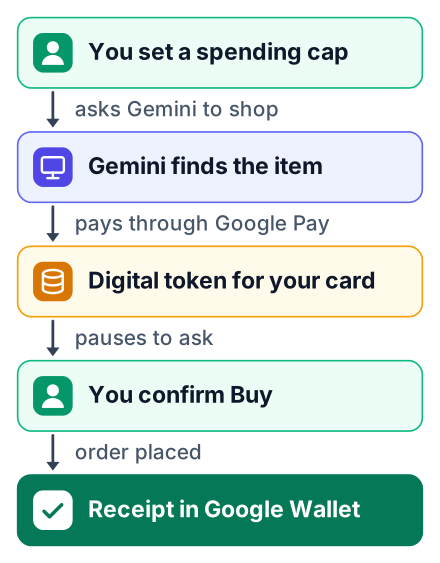
Mastercard and Visa support these tokens now, and Amex is coming soon. You set a hard spending cap yourself. Gemini will not share payment details unless you tell it to.
The flow below shows where you stay in charge:
You: "Find a desk lamp under my cap"
        |
        v
Gemini searches the Shopping Graph
        |
        v
Gemini picks an item and fills the cart
        |
        v
PAUSE: Gemini asks you "Buy?"  --- you say no ---> stops
        |
     you say yes
        |
        v
AP2 sends a digital token, not your card number
        |
        v
Receipt and tracking appear in Google Wallet
Google also describes the safety setup around this. Tasks runs in an isolated virtual machine kept for your account alone. The agent cannot reach outside it. Web pages can also hide instructions meant to trick the AI. That attack is called prompt injection, and Google says filters check the pages it visits.
On phone calls, Gemini says it is an AI. Businesses can opt out of getting these calls.
For a student, this is the real lesson. A chatbot replies. An agent acts: it makes calls, fills carts and spends money. Every rule above exists because acting is the default, so the limits have to be built in.
Why Tasks is free now: Gemini 4 Hydrogen
Google says the agent now runs on the new Gemini 4 Hydrogen model, and it announced the free launch together with that model, as The Verge covers. Google has not said what a task costs it to run.
What you can see is the shape of the free offer. There is no per-request charge. The limits come from your country, which decides the features you get, and from the confirmation pause before any purchase. Those are design limits, not usage caps.
Other labs build agents that act too, and The Verge lists Claude Duet, OpenAI's Dots and Meta's Muse as the other products in this group. For OpenAI's version of an agent that pays for you, read our post on ChatGPT Wallet and Dots.
What to try first as a student
Give Tasks one small, low-risk job and read what it asks you before it acts. These three jobs work in both India and the US:
- Add a deadline to your calendar. Point it at an email with an assignment or exam date and ask it to create the event.
- Summarise a bill or fee email. Ask what changed since last month, the way Google's electricity example did.
- Find a product and stop. Ask for a calculator or a laptop stand within a budget, and tell it not to buy.
While it works, note where it pauses and what it says it cannot do in your country.
We have not run these tasks ourselves; this post summarises Google's announcement and The Verge's report. What we could not confirm: when the US-only extras reach India, what a task costs Google to run, and whether the free tier has any usage limits.
Try it today with one small job, like adding a deadline to your calendar. Write down each point where it stops to ask you, because those pauses show how an AI agent is built to act.


