Google Antigravity's Cheminformatics Skills: What Students Should Learn
Google DeepMind's Cheminformatics Skills let an AI agent run a drug-discovery loop in about an hour. The pattern of tool use and evaluation transfers directly to what beginner programmers should learn.
On November 3, 2026, Google DeepMind said a drug-discovery loop that usually takes a computational chemist several days now runs in about one hour. A person typing code does not run that loop. An agent does. What should someone who is still learning to program take from that?
Google Antigravity's new Cheminformatics Skills let an AI agent run a real drug-discovery workflow, using chemistry tools instead of guessing. The agent plans the work and hands the maths to trusted software. Agents are now a general research pattern, not only a coding trick. Learn Python first, then three habits: tool use (letting a program call real tools), evaluation (testing results on data the model has not seen) and orchestration (deciding the order of steps and passing results between them).
Google Antigravity Cheminformatics Skills: what launched
The team at DeepMind added Cheminformatics Skills to Antigravity on November 3, 2026. The update turns Antigravity into a science workbench. The agent does the data work, and the scientist guides it.
Antigravity is Google's app where AI agents carry out multi-step work for you, not just answer one question. A "skill" is a packaged set of instructions and tool connections. The agent loads it to work in one field, the way you would install a plugin in your code editor.
This release is not Google's first science add-on. According to Crypto Briefing, it builds on the Science Skills suite from May 2026. The same report says Antigravity connects to 30+ scientific databases, a figure that Google's own post does not repeat, so treat it as unverified.
The crizotinib to lorlatinib demo, step by step
DeepMind's demo compares two lung-cancer drugs, crizotinib and lorlatinib. It shows the agent doing each stage a chemist would do by hand. Both drugs treat non-small-cell lung cancer. Crizotinib came first, and lorlatinib is a later, stronger version.
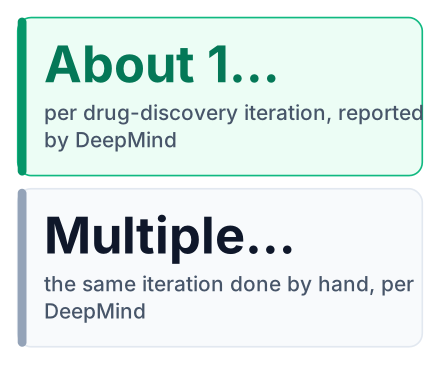
The agent then tried to find more ideas for improved drugs like lorlatinib. Here is what it did, in order:
Collect the data
It pulled thousands of known compounds from ChEMBL and PubChem, two large public chemistry databases.
Clean the data
It removed buffers and solvents, which are lab liquids that show up in records but are not drug candidates.
Compare close pairs
It ran matched molecular pair analysis, which compares two molecules that differ by one small change to see what that change does.
Build potency models
It trained models that predict potency (how little of a drug you need for it to work) and checked them.
Propose new molecules
It suggested new macrocycles, which are molecules built around a large ring. Each came with a synthesis route and electron-pushing diagrams, the arrow drawings chemists use to show how a reaction happens.
What students should learn from this
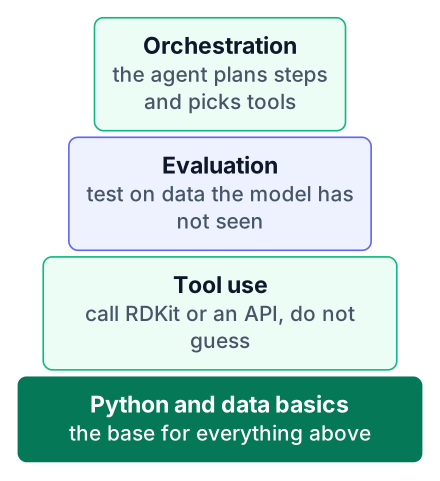
Here are the skills as layers, from the bottom up:
- Python and basic data handling
- Tool use, where your program lets a model call real functions
- Evaluation, so you know when the output is wrong
- Orchestration, chaining several tool calls into one task
The next sections explain each habit using the chemistry agent as the example.
Tool use is why the agent can be trusted with chemistry
The language model only plans and navigates, while RDKit, a deterministic chemistry library, does every calculation, so the numbers are computed instead of guessed. "Deterministic" means the same input always gives the same output. A language model cannot promise that.
This split is what people mean by tool use. The model writes a request, a real program answers it, and the model reads the answer back.
| The language model does | The tools do |
|---|---|
| Plans the order of the work | Calculate molecular properties with RDKit |
| Finds the right records in ChEMBL and PubChem | Return the stored data exactly as it is |
| Reasons about which results look promising | Run the same calculation the same way every time |
Code agents follow the same pattern. They call a compiler, a test runner or a linter instead of trusting their own guess. GitHub's yearly report found that agents already write a large share of pull requests. The chemistry release shows the method moving into science without changing shape.
If you have learned to write clear instructions for a model, you have the first half of this skill. Our prompt engineering guide covers that half. The second half is deciding which jobs the model must hand to a tool.
Evaluation decides whether an agent's model is any good
DeepMind says the agent builds and validates potency models. A model is only worth trusting if it is tested on data it has not seen, and that is general machine-learning practice you can learn on any dataset. That unseen data is called a held-out test set. You hide it during training and use it once at the end.
The split types below are standard machine-learning advice, not details DeepMind reported. How you choose that hidden data matters. A random split picks test rows by chance. A chronological split keeps the newest records for testing, which copies how a model meets the future. A scaffold split puts different molecule shapes in the test set, so the model cannot pass by remembering near-copies.
Say your model scores well on random splits but fails on new molecule families. It did not learn chemistry. It learned to recognise molecules close to ones it had already seen. A scaffold split would have caught that before anyone trusted it.
Tests you can run on any model or agent:
- Do: keep a test set the model never touches during training.
- Do: test on cases that look different from the training data.
- Do: compare against a simple baseline, such as always guessing the average.
- Don't: tune your model again and again on the same test set.
- Don't: trust a high score you cannot explain.
The same checks apply to a coding agent. A good-looking demo on easy tasks says little. A fixed set of hard tasks with known correct answers says a lot.
What this means for a beginner: agents are not only a coding trick
Agent orchestration, tool use and evaluation transfer from code to research, so you can learn them with ordinary programming projects today. Orchestration means deciding the order of steps and passing results between them.
The work this replaces is the slow part of a computational chemist's job. Collecting records, cleaning them and fitting first models used to take days by hand. The work it does not replace is judgement. Someone still has to ask whether a proposed molecule makes sense, and whether the model was tested fairly.
Say you build a small agent that answers "what was the dollar to rupee rate on a given date?" It calls an exchange-rate API instead of guessing. You then test it against a handful of dates where you already know the correct rate. A student in Pune or in Ohio can build that in a weekend, and it uses the same pattern as the chemistry agent.
Open models make this cheaper to practise. Our post on Mistral Large 4's open weights covers one option you can run yourself.
What it costs and who can use it now
The highest usage tier is free for 10,000 selected scientists for six months, so a student or hobbyist cannot count on running it yet. The sources give no price for a regular user. They give no rupee figure either, so I am not going to guess one.
How to try the Science plugin in Antigravity
Install the Antigravity App and add the Science plugin, or sign in with a Google Cloud business account if you are an Enterprise user. Both routes are listed in DeepMind's announcement.
- Download and install the Antigravity App.
- Add the Science plugin from inside the app.
- For Enterprise access, sign in with your Google Cloud business account instead.
Access may depend on onboarding, so the plugin might not work for you on day one. You can still practise the core idea for free. RDKit is open source and installs with pip.
# pip install rdkit
from rdkit import Chem
from rdkit.Chem import Descriptors
def molecular_weight(smiles):
    mol = Chem.MolFromSmiles(smiles)  # turn text into a molecule
    if mol is None:
        raise ValueError("Not a valid SMILES string")
    return Descriptors.MolWt(mol)
print(molecular_weight("CCO"))  # ethanol, prints about 46.07
SMILES is a way to write a molecule as a line of text. "CCO" means two carbons and one oxygen, which is ethanol. Compare the printed value with the molecular weight PubChem lists for ethanol.
This week, try this three-step exercise. It covers tool use and evaluation together.
- Install RDKit, run the ethanol code above and check that it prints about 46.07.
- Add a second molecule, aspirin, with the SMILES string "CC(=O)OC1=CC=CC=C1C(=O)O". Check your result against the molecular weight PubChem lists for aspirin.
- Put the function in a dictionary of tools, such as tools = {"molecular_weight": molecular_weight}. Then write a short function that takes a tool name and a SMILES string, looks up the tool by name and returns its result. Call it with "molecular_weight" and check the answer.


