Gemini 4 Carbon /swarm: Google's $2 agent team for student projects
Google released Gemini 4 Carbon to developers at an intro price of $2 per million input tokens, with the /swarm feature that turns one prompt into a team of agents. Here is what the launch means for student projects and how to try it today.
Google just opened its strongest AI model to developers, and the price tag for a student is almost boringly affordable.
Google's Gemini 4 Carbon is now available to developers at $2 per million input tokens and $10 per million output tokens. That intro price doubles to $4/$20 on Nov 30, 2026. For a student, this is the first time you can point one prompt at a project and watch a team of agents split the work, with Carbon doing the hard reasoning and cheaper models handling the routine parts.
What Google shipped today
Google released Gemini 4 Carbon, its strongest model, to developers, enterprises, scientists, and consumers today, according to Google's announcement. This follows its earlier release to cybersecurity defenders through the Fairwind Program two weeks prior.
The rollout reaches developers through the Gemini API in AI Studio and Gemini for business, as The Verge confirms. Everyone who pays for the API can access it today. Google AI Ultra subscribers get it free inside Antigravity, the Gemini app, and AI Mode in Search.
What the $2/$10 price means for your wallet
At $2 per million input tokens and $10 per million output tokens, a typical student project costs less than a cup of coffee. A few thousand tokens of input and a few hundred tokens of output for each request adds up to cents, not dollars.
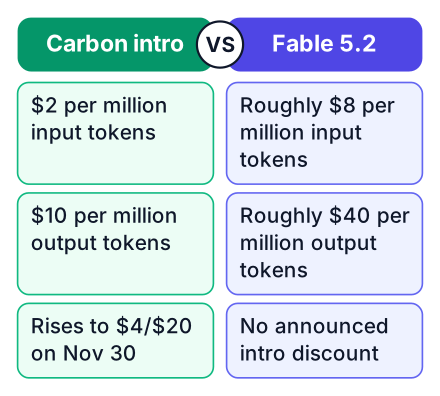
| Model | Input price / million tokens | Output price / million tokens |
|---|---|---|
| Gemini 4 Carbon (intro, until Nov 30) | $2 | $10 |
| Gemini 4 Carbon (after Nov 30) | $4 | $20 |
| Claude Fable 5.2 (estimate) | ~$8 | ~$40 |
| GPT-6 Astra (estimate) | ~$10 | ~$50 |
The price increase after Nov 30 is confirmed in a footnote on Google's announcement page. The Verge reports the intro price is about a fifth of OpenAI's GPT-6 Astra and a quarter of Anthropic's Claude Fable 5.2, which launched on Nov 9. The table's estimates for those two models come from The Verge's coverage.
Pros of paying per token
- Pay only for what you use. A small project costs cents.
- No subscription commitment. You can stop anytime.
- Full API access for building your own tools.
Cons vs Google AI Ultra
- Costs add up if you run many long requests.
- AI Ultra subscribers get Carbon included in Antigravity and the Gemini app.
- You manage billing and usage limits yourself.
How /swarm works
/swarm turns a single prompt into a coordinated team of agents that you can track in real time, with Carbon taking the deepest-reasoning roles while lighter models run parallel workspaces, per Google's developer blog. You describe the project once. The system decides which agents to create and what each one does.
Carbon can take architecture, coordination, and auditing roles. Faster, cheaper models handle the routine work like writing boilerplate or searching documentation. You watch the whole thing unfold instead of waiting for one long response.
What does this replace in a beginner workflow? The need to hand-stitch an orchestration script. Before, you would write code to call one model, parse its output, feed it to another model, and manage the flow yourself. /swarm does that coordination for you.
/swarm Build a to-do app with:
- a login page
- a database schema
- a way to add and delete tasks
- dark mode styling
Carbon handles the architecture. Split the rest among agents.
That one prompt in Antigravity starts the whole process. You see each agent appear, take a task, and report back.
Where Carbon ranks on the leaderboard
Carbon scores 60 on the Intelligence Index, placing it fourth behind three Fable 5.2 configurations and ahead of Argon at 50, according to the Artificial Analysis leaderboard. The ranking is close at the top, but the gap to Fable 5.2 is real.
Intelligence Index scores from the Artificial Analysis leaderboard.
Cost per benchmark task for Carbon is $7.76 at high reasoning, $6.59 at medium, and $7.19 at low, per the same leaderboard. That makes it cheaper per task than most models near its intelligence level, which matters if you plan to run many requests.
Where Google claims Carbon wins
Google says Carbon ranks first on CursorBench 4.0, Perplexity WANDR, and Zapier AutomationBench, with more than 2X lower cost per task than the next best external model, and second on the new Multimodal Knowledge Agent benchmark, as stated on DeepMind's announcement. Those are agent-focused benchmarks. They test how well a model completes multi-step tasks, not just answers questions.
For a student, the ranking matters less than the workflow. Carbon is strong enough for serious projects, and the /swarm feature makes it approachable. Here is how to try it today:
Open Antigravity
Sign in with your Google account. The /swarm feature is available to Google AI Ultra subscribers.
Write one /swarm prompt
Describe a small project you have been putting off. A to-do app, a flashcard tool, a portfolio site. Keep it to a few sentences.
Watch the agents work
You will see Carbon take the lead roles while lighter models handle the routine tasks. Track progress in real time.
Check the leaderboard yourself
Open the Artificial Analysis leaderboard and compare Carbon against Fable 5.2 and Argon by your own standards.
Review and refine
Ask the team to fix a bug or add a feature. The agents re-split the work automatically.
You can also call the API directly from AI Studio if you prefer writing code over watching agents. Both paths work for a student budget.
If you want to understand how to get better results from these models in general, our guide on prompt engineering for students covers the fundamentals. And if you are weighing which model to build your next project on, our comparison of Claude Fable 5.2's price and speed against the alternatives will help you decide. You can also read about what Antigravity's latest experiment means for developers to see where this tool is heading.
Open Antigravity and write one /swarm prompt that builds a small to-do app. Watch the agents split the work, and check the leaderboard link to see where Carbon stands.


