Gemini Indian English and Hindi voices: how to pick the right one
Google added 66 regional voices to the Gemini app. India English and Hindi are in the first group, but the menu has no labels. Here is how to find the voice that sounds right and apply it across the app.

Google just added 66 new voices to the Gemini app. Yet 9to5Google's testing found that the voice menu does not label them by city or region. If you want Gemini to sound like the people around you, you have to find that voice by ear.
To make Gemini sound Indian, open the three-dot menu inside Gemini Live or go to Settings and tap Gemini's voice, then pick an Indian English or Hindi voice. Google announced the regional voices on 16 November 2026 for Android and iOS. Your choice then applies across the app.
Google adds 66 regional voices to the Gemini app
Google announced the voices on its Keyword blog, and they are rolling out in the Gemini app on Android and iOS. The post comes from Neel Joshi, who leads product management for Gemini Live. Google first shared the plan at Google I/O.
The locales Google names are U.S. English and U.K. English, India English and Hindi, and Brazilian Portuguese, with Indonesian and Korean alongside. Each one gets its own set of voice options.
Google says it tuned the voices for natural rhythm and pitch, plus inflection. The aim is everyday clarity. They are not meant to be exaggerated accents.
This update changes how Gemini sounds, not which model answers you. For the latest model in the same app, read my post on what Gemini 4 Hydrogen costs students.
Switch the voice from Gemini Live or Settings
There are two routes: the three-dot menu inside Gemini Live lets you preview voices, and Settings has a Gemini's voice option. Use whichever you find first.
Preview inside Gemini Live
Open the Gemini app and start Gemini Live. Tap the three-dot menu, play a few voices and select the one you like.
Or change it in Settings
Open the app settings and tap Gemini's voice. Pick a voice from the list there.
After you pick a voice, test it before you trust it:
- Say one short sentence in Gemini Live and listen to the reply.
- Ask a question that needs a longer answer, so you hear the voice across several sentences.
- Open an old chat and tap Listen on a reply.
- If any part was hard to follow, go back and try another voice.
Google says the voices are rolling out, so the option may not show up on every phone yet. If you cannot see it today, update the app and check again in a few days.
One voice carries across Live, language practice and Listen
The voice you choose is used everywhere Gemini speaks, so you set it once. Google names three places where it applies.
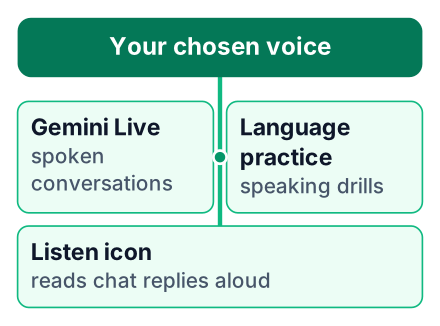
| Where your voice is used | A situation where it helps |
|---|---|
| Gemini Live conversations | Say you are walking to class and want to talk through why your recursive function never stops. |
| Language practice | Say you are learning basic German phrases before applying for a master's abroad. |
| The Listen icon on chat replies | Say Gemini gave you a long reply about database indexes, and you want it read aloud on the metro. |
Gemini can do more than talk now. My post on the free Gemini Omni 1.2 Flash video tier covers that side. If you would rather see less of Gemini at work, here is how to turn Gemini off in Google Docs entirely.
Gemini's menu does not label voices by region
The voice list does not say which city or region each voice comes from, and Gemini will not name its own accent if you ask. That is what 9to5Google found when it tested the update.
That report also says the UK gets more than 10 distinct English voices. Among them are Geordie and Scouse, as well as Scottish and Welsh. None of those names appear in the menu.
This means previewing is your only tool. You cannot search for "Kolkata" or "Delhi" and jump to a match. Neither source says how many Indian English or Hindi voices there are, so expect to try several.
Which voice should an Indian student pick?
Pick the voice you understand fastest on the first listen, and try Indian English and Hindi before deciding. Use this short checklist:
- Preview an Indian English voice and a Hindi voice with the same sentence.
- Ask Gemini to read one paragraph from your own notes aloud.
- Keep the voice you can follow at normal speed, without replaying.
Say you are revising operating systems the night before a campus placement test. You paste your notes on process scheduling into Gemini and tap Listen. With one voice you keep rewinding at "round robin". With another you follow it straight through. Keep the second one.
Indian English and Hindi make Gemini sound like home
A voice with familiar rhythm and pitch is easier to follow for long explanations than a generic American accent. This is my own reasoning, not a study result. When your ear is not working to decode an accent, more of your attention stays on the idea.
Here is where I think it helps most:
- HR round practice. Say you have a TCS or Infosys HR round next week. You answer "Tell me about yourself" out loud in Gemini Live, and the follow-up questions come back in an accent close to your interviewer's.
- Hindi explanations. Pointers in C confuse you in English. You ask Gemini to explain them in Hindi and listen while you trace the code on paper.
- Speaking another language. Language practice uses the same voice, so the instructions around the new language sound familiar.
What the launch says about Google's India push
Putting India English and Hindi in the first list of locales shows Google treats Indian users as a core audience for voice features. To be clear, this section is my opinion. Google's post does not describe its strategy.
India sits in that first group with five other locales from four other countries. That is a short list, and two of its entries are Indian. Since the plan dates back to the I/O preview, this launch is Google keeping a promise it made earlier.
Good and bad points for students
This feature is easy to use and personal, but the unlabelled menu and phone-only rollout limit it.
Pros
- An accent close to the one you hear every day
- One setting covers the whole app
- Useful for speaking practice and for listening to notes
Cons
- No city or region names in the voice menu
- Gemini will not tell you which accent it is using
- Announced for the Android and iOS apps only
Open Gemini on your phone today, preview the Indian English and Hindi voices with the same sentence, and keep the one you follow best. Then spend five minutes practising a spoken interview answer with it.


