ChatGPT Video Chat for Interview Practice: A Working Guide
ChatGPT's video chat can run mock interviews from your phone, but the clock is ticking. As of November 28, 2026, OpenAI says live video still runs on Advanced voice even as that mode retires on December 11. Here is how to set it up before the rules change.
Say you have an HR round on Monday and nobody to practise with. Your phone camera can be the interviewer's seat. Video stays on Advanced voice after December 11, 2026, but OpenAI has not said for how long. OpenAI's help center says live video keeps running on Advanced voice, the older voice mode, even after the newer GPT-Live voice replaces it for plain voice chats. The hard part is making the practice feel like a real round.
To use ChatGPT video chat for a mock interview, open ChatGPT on your phone, tap Voice, turn on the camera, and tell it which role to interview you for. You need a paid plan (Plus, Pro, Business, Enterprise or Edu). Ask for one question at a time, answer aloud, then ask for feedback.
Check your plan and phone first
Camera sharing in voice chat works on the ChatGPT mobile app and only on paid plans (Plus, Pro, Business, Enterprise, Edu), so the free plan cannot do video, according to OpenAI's voice with video page.
If you mostly use ChatGPT in a laptop browser, install the app on your phone before your practice day. Log in with the same account so your plan carries over.
I am not quoting a rupee price. Third-party price sites disagree on the figure. Open the upgrade screen inside your app and check the price shown for your country before you pay.
Is video worth paying for over typed practice? Here is the honest trade:
Pros
- You hear each question and must answer out loud, like a real round.
- You can hold up notes, a whiteboard sketch or your resume for it to see.
- You practise looking at a camera, which helps for online interviews.
Cons
- It costs money; text practice works on the free plan.
- You cannot edit an answer before sending it, which feels harder at first.
- It may use up your daily voice allowance.
If you are still deciding which AI tools deserve your money, my roundup of free and paid AI study tools covers what else a subscription gets you.
Set up with the phone and headphones you already own
A phone propped on a stack of books and wired earphones with a mic give a clear enough video interview setup for zero extra spend. You do not need a ring light or a tripod.
Raise the phone to eye level
Stack books on a table until the camera sits level with your eyes. Lean the phone against a wall or a heavy mug so it does not slide.
Plug in earphones with a mic
Use the pair that came with an old phone if you have one. This keeps ChatGPT's voice out of your mic, so it does not hear itself.
Face the light
Sit facing a window or a lamp. A window behind you turns your face into a dark shape.
Pick the quietest room
Close the door and switch off the fan if it is loud. Tell family you need a short quiet slot.
Test your connection
Open a short video call on Wi-Fi or mobile data first. If it stutters, move closer to the router.
Start the video session and set the interviewer role
To begin, open Voice, tap the camera icon, then give ChatGPT a role, a company style and a rule to ask one question at a time; this order follows the Fresno State career center walkthrough, adapted for video.
- Open the ChatGPT app and start a new chat.
- Tap the Voice icon at the bottom of the screen.
- Tap the camera icon so ChatGPT can see you.
- Tell ChatGPT the role by saying the key lines of a prompt from the next section aloud: the role, the round, and one question at a time.
- Answer each question aloud in full sentences, as you would in the room.
- After a handful of questions, say "Pause. Give me feedback on my answers."
Fresno State also suggests asking follow-ups. A useful one: "Which of my answers would worry a hiring manager, and why?" It pushes the feedback past polite praise.
Here is an illustrative round, written as a sample of what to aim for rather than a transcript. The question: "Tell me about a time a project did not go as planned." A sample spoken answer: "In my final-year project, our database slowed down when more users joined. I rebuilt the tables and we finished a week late." Useful feedback sounds like this: "You named the problem and your action, but you skipped the result. Add one number, such as how much faster the queries ran, and say what you would do differently." If your feedback is only "great answer", ask again for a score and the weakest point.
What video adds over voice-only is practice speaking to a camera and the chance to hold up a page or sketch. The sources I found do not show that ChatGPT reliably judges eye contact or body language, so treat any comment on your expression as a bonus. If that matters for your interview, ask a friend to watch one round.
Role-specific prompts for fresher interviews
Name the role, the interview round and the company style in your prompt. The Fresno State example names a specific job instead of asking for a generic interview. The three below go further and set the round.
For a data analyst role, this one mixes SQL with a business case:
Act as a hiring manager interviewing me for an entry-level data analyst role.
This is the technical round. Ask one question at a time and wait for my answer.
Cover SQL joins and GROUP BY, Excel pivot tables, and one short business case.
If my answer is vague, ask a follow-up like a real interviewer would.
Do not give feedback until I say "feedback".
Pair it with my list of ML interview questions for data analysts if the role mentions machine learning. For salary and hiring context before the round, see fresher data analyst hiring numbers.
The next prompt suits a large Indian IT services company and covers both rounds. It is a guess at the usual format, not the real process at TCS or Infosys, and a fresher developer can swap in their own stack:
Act as an interviewer at a large Indian IT services company like TCS or Infosys.
Run the technical round first, then the HR round. Ask one question at a time.
Technical: basic OOP, one simple coding logic question, and my final-year project.
HR: why this company, relocation, night shifts, and my strengths and weaknesses.
Keep a formal but friendly tone. Wait for "feedback" before you score me.
A US software internship leans on behavioural questions, so this prompt sets that round:
Act as an engineering manager interviewing me for a software engineering internship in the US.
This is the behavioural round. Ask one question at a time.
Ask about teamwork, a project that failed, and a time I learned something fast.
Expect answers in the STAR format (Situation, Task, Action, Result).
If I skip a part of STAR, point it out after I say "feedback".
Use video for study help, not only interviews
Pointing the camera at a notebook page, a diagram or a bug on paper lets ChatGPT explain it while you watch, which typed questions cannot do; OpenAI's video page shows this kind of live camera use.
Say you wrote a SQL query by hand and it looks wrong. Hold the page up and ask, "Walk me through what this query returns." You hear the logic line by line.
A circuit or a recursion tree drawn for an exam works too. Show it and ask where the mistake is. Then ask it to explain the fix more slowly.
Picture your viva being next week. Ask, "Quiz me on this page like an external examiner. One question at a time." That is close to the real thing.
One warning: messy handwriting can confuse it. Write clearly, and ask it to read the page back before it explains. For research questions that need cited sources, a different tool may suit better; see Perplexity vs ChatGPT for students.
Video still works after December 11, 2026
OpenAI retires Advanced and Standard voice on December 11, 2026, but says live video and screen-sharing keep running on Advanced voice until GPT-Live can do them, per its retirement help page.
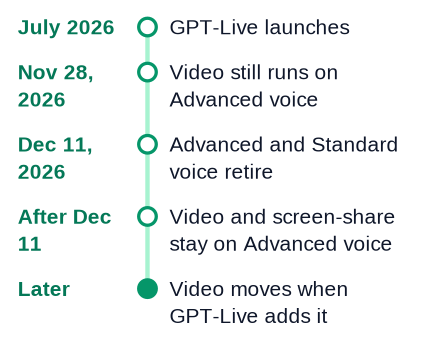
| When | What happens |
|---|---|
| July 2026 | GPT-Live launches as the new voice mode (AI Intel Desk) |
| December 11, 2026 | Advanced and Standard voice retire; plain voice chats move to GPT-Live automatically (OpenAI) |
| After that date | Live video and screen-sharing stay on Advanced voice until GPT-Live supports them (OpenAI) |
In practice, a voice-only chat after that date uses GPT-Live. Your camera sessions keep the older voice behind them. You do not need to change any setting.
The catch is that this is temporary. The ChatGPT Voice help page says Live does not support video or screen sharing yet. OpenAI gives no date for when it will. Check that page before a big interview week, because the steps above may shift.
Usage limits that decide how long you can practise
Plus gives 3 hours of Live voice per rolling 24 hours and Pro at $100 gives 15 hours, so plan short, focused sessions, according to the ChatGPT Voice help page. Those limits are for Live voice, and the sources I found do not say whether video sessions count against them. Run one 20-minute video round and check whether the app shows a limit message. For the price of Plus in your country, open the upgrade screen in the app.
"Rolling" means the window moves with you. Time you use at 9 pm today frees up again at 9 pm tomorrow.
Keep each round to twenty or thirty minutes. That is long enough for a full set of questions plus feedback. It also leaves room for a retry later the same day. On a Business, Enterprise or Edu account, ask your admin or college about your limits.
Common mistakes in AI mock interviews
The biggest mistake is accepting praise without asking for a score, a weak spot and a retry. ChatGPT tends to be encouraging, so ask directly: "Rate each answer out of ten and name my weakest one."
- Answering silently. Thinking an answer in your head skips the hard part. Speak every answer, even when you stumble.
- Letting it ask many questions at once. A list of questions turns into a written test. Repeat the rule: "One question, then wait."
- Never repeating the weak answer. Feedback only helps when you use it. Ask the same question again and answer with the fix.
- Trusting its company facts. It can be wrong about a company's rounds or values. Check the official careers page before you repeat any of it in the real interview.
Tonight, prop your phone up, use the prompt that matches your role, and run one twenty-minute round. Then ask for your weakest answer and repeat that question until it scores at least 8 out of 10.


